当前位置:网站首页>[Architect (Part 40)] connecting mongodb database developed by server
[Architect (Part 40)] connecting mongodb database developed by server
2022-06-23 10:51:00 【A tailed Warbler】
Keep creating , Accelerate growth ! This is my participation 「 Nuggets day new plan · 6 Yuegengwen challenge 」 Of the 23 God , Click to see the event details
Mongodb and Mongoose
Mongodb
Mongodb The database has been previously installed .
Create a imooc_lego_course database , One work collection.

Click on create Finish creating .

Mongoose
install
npm i mongoose -S
add to mongodb Configuration file for
module.exports = {
  // mongodb  Connection configuration
  mongodbConf: {
    host: 'localhost',
    port: '27017',
    dbName: 'imooc_lego_course',
  },
}
encapsulation mongoose , Connect mongodb
// src\db\mongoose.js

const mongoose = require('mongoose')
const { mongodbConf } = require('../config/index')

const { host, port, dbName, user, password } = mongodbConf

//  Splice connection string
let url = `mongodb://${host}:${port}` // dev  Environmental Science
if (user && password) {
  url = `mongodb://${user}:${password}@${host}:${port}` // prd  Environmental Science
}


//  Start connecting (  When using user name and password , need  `?authSource=admin` )
mongoose.connect(`${url}/${dbName}?authSource=admin`, {
  useNewUrlParser: true,
  useUnifiedTopology: true,
})

//  Connection object
const db = mongoose.connection

db.on('error', err => {
  console.error('mongoose connect error', err)
})

//  perform  node src/db/mongoose.js  Test connection
db.once('open', () => {
   //  To test whether the database connection is successful
   console.log('mongoose connect success')
})

module.exports = mongoose
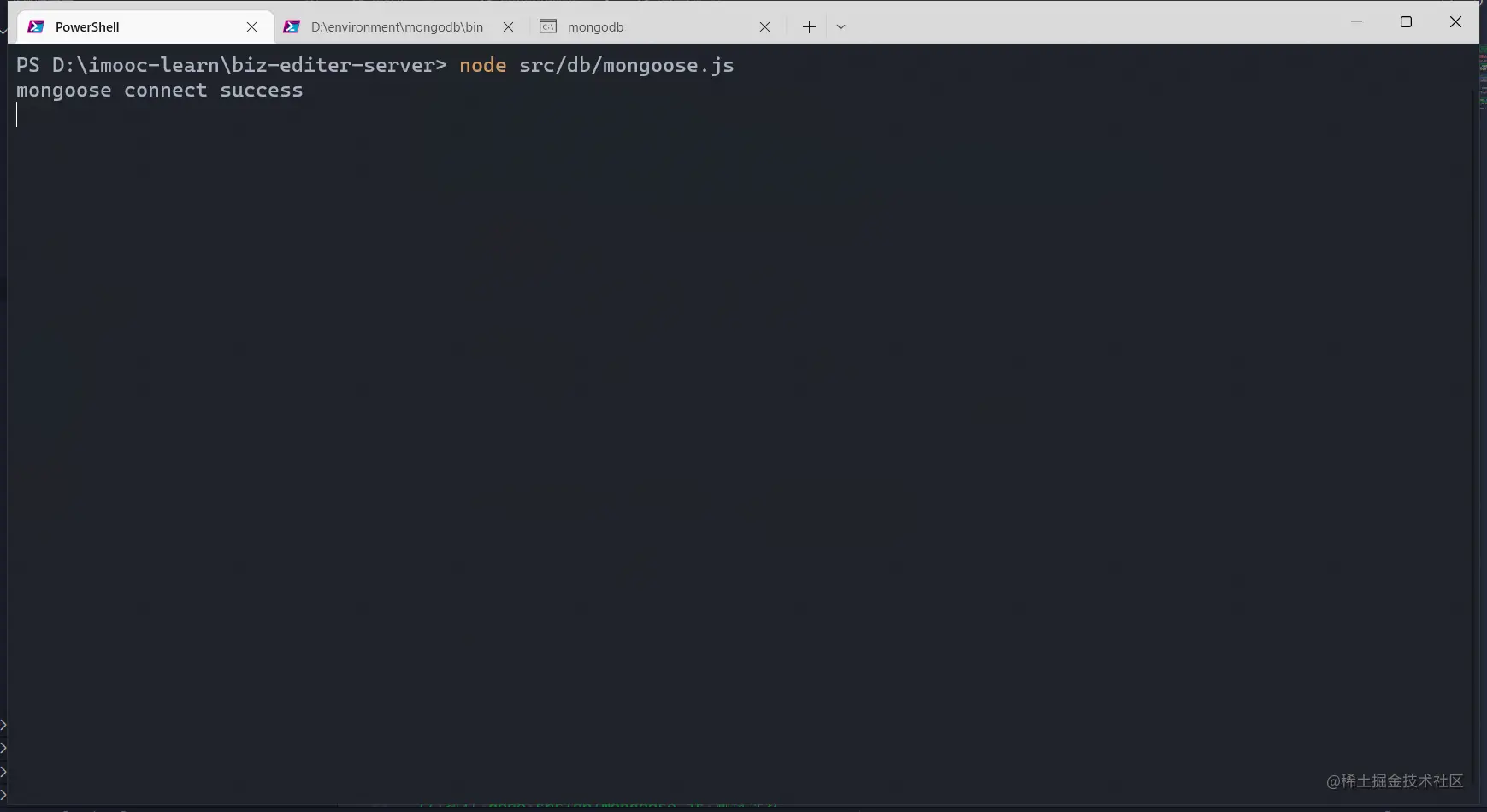
Console execution node src/db/mongoose.js , The database is correctly connected .
newly build model
// src\models\WorksModel.js

const mongoose = require('../db/mongoose')

const WorkScheme = mongoose.Schema(
  {
    // mongodb  It will generate automatically  _id, Don't define it yourself
    // title
    title: String,
    //  Component list for page
    components: [Object],
    //  Page properties
    props: Object,
    setting: Object,
  },
  {
    timestamps: true
  }
)

const WorkModel = mongoose.model('work', WorkScheme)

module.exports = {
  WorkModel
}
Further test the database connection
// src\routes\index.js

const router = require('koa-router')()
const packageInfo = require('../../package.json')
const testMysqlConn = require('../db/mysql2')
const ENV = require('../utils/env')
const { WorkModel } = require('../models/WorksModel')

//  Test database connection
router.get('/api/db-check', async (ctx) => {
  //  test  mysql  Database connection
  const mysqlRes = await testMysqlConn()

  //  test  mongodb  Database connection
  let mongodbConn
  try {
    mongodbConn = true
    await WorkModel.findOne()
  } catch (error) {
    mongodbConn = false
  }

  ctx.body = {
    errno: 0,
    data: {
      name: 'biz editor server',
      version: packageInfo.version,
      ENV,
      mysqlConn: mysqlRes.length > 0,
      mongodbConn
    }
  }
})

module.exports = router
visit http://localhost:3000/api/db-check, You can see mongodbConn The value of the field is true, This indicates that the database connection was successful .

Date And time zone
mysql and Mongodb When querying data , The time is wrong , There is an eight hour difference between them , It has something to do with the time zone .
stay nodejs in ,new Date() Will display the world standard sleep , It is eight time zones away from Beijing time , That's eight hours , Empathy , new Date('2022-06-18 14:00:00') The result is 2022-06-18T06:00:00.000Z, There is also a difference of eight hours .
If you want to get the time in the current time zone , Just use toString() that will do .
You can use some third-party libraries to format , such as date-fns
console.log('new Date()')
console.log()
console.log(new Date())
console.log()
console.log("new Date('2022-06-18 14:00:00')")
console.log()
console.log(new Date('2022-06-18 14:00:00'))
console.log()
console.log("new Date().toString()")
console.log()
console.log(new Date().toString())
The results of console printing are as follows

边栏推荐
- MySQL-02.工作中对索引的理解
- 六张图详解LinkedList 源码解析
- JVM简单入门-01
- Interview Manual of social recruitment Tencent high P (Senior Product Manager)
- 韦东山设备信息查询例程学习
- Noi OJ 1.2 06: round floating point numbers to zero
- Noi OJ 1.2 conversion between integer and Boolean C language
- Noi OJ 1.3 09: circle related computing C language
- NOI OJ 1.3 11:计算浮点数相除的余数 C语言
- NOI OJ 1.4 05:整数大小比较 C语言
猜你喜欢

长安LUMIN是否有能力成为微电市场的破局产品

ESP32-CAM高性价比温湿度监控系统配网与上网方案设计与实现

最简单DIY基于蓝牙、51单片机和舵机的钢铁爱国者机关枪控制器
ESP32-CAM高性价比温湿度监控系统
Solve the problem of invalid audio autoplay

Stockage d'images - référence

Numerical calculation method

Installation and use of binabsinspector, an open source binary file static vulnerability analysis tool
JVM简单入门-02

ESP32-CAM、ESP8266、WIFI、蓝牙、单片机、热点创建嵌入式DNS服务器
随机推荐
File has not been synchronized when NFS is mounted
Picture storage -- Reference
Stm32f1 and stm32subeide programming example - infrared tracking sensor driver
实现常用C语言字符串处理函数
Golang quick start (2)
只出现一次的数字<难度系数>&& 杨辉三角<难度系数>
Mysql-03.工作中对SQL优化的心得体会
【黄金分割点】与【斐波那契数列】
深潜Kotlin协程(十四):共享状态的问题
Unity technical manual - shape sub module - Sprite, spriterenderer and velocity over lifetime
Musk's 18-year-old son petitioned to change his name to sever the father son relationship
TTY drive frame
Is the online security of securities account opening high
Numerical calculation method
Noi OJ 1.3 16: calculating segment length C language
MySQL-01.工作中数据库优化和explain字段知识的总结
最简单DIY基于51单片机的舵机控制器
NOI OJ 1.4 01:判断数正负 C语言
NOI OJ 1.4 04:奇偶ASCII值判断 C语言
What does NFTs, Web3 and metauniverse mean for digital marketing?