当前位置:网站首页>暑假学习记录
暑假学习记录
2022-06-30 10:48:00 【童萌依然】
1.地图制作

通过在windows=>2D=>Tilemap中把想要的贴图放入这个框中,可以点击画笔等给世界地图中添加贴图。并且需要先创建游戏物体Tilemap。
再在地图中加入需要的游戏物体。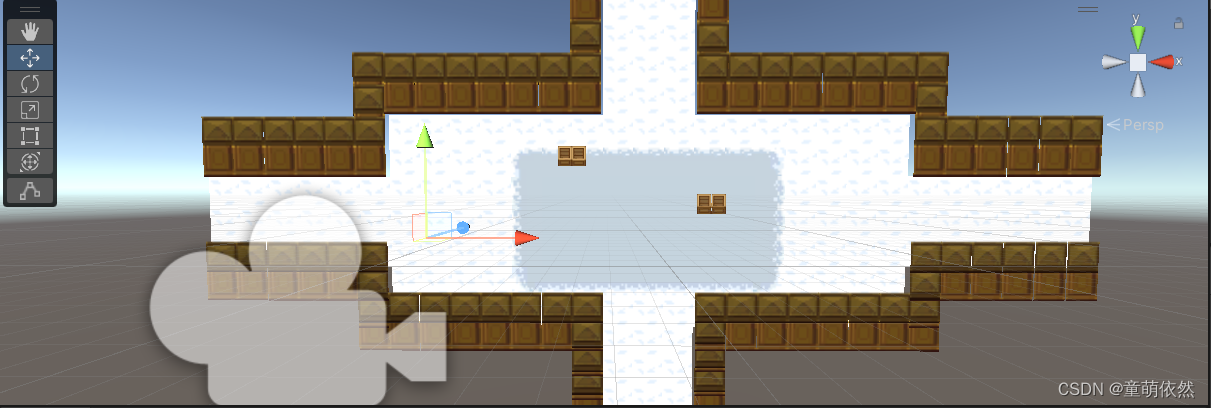
2. 敌人制作
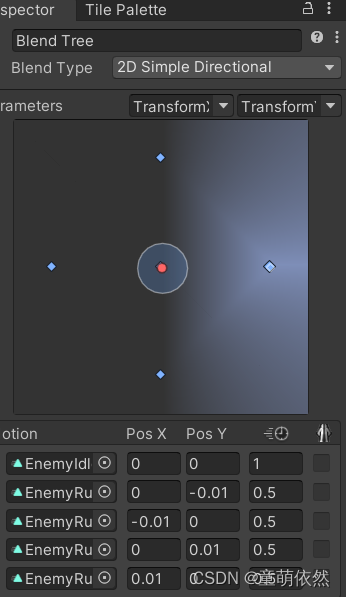
制作敌人的动画,并制作相应的动画状态机操控。
using System;
using System.Collections;
using System.Collections.Generic;
using UnityEngine;

public class Enemy : MonoBehaviour
{

    public float speed = 1f; //移动速度
    Animator animator;
    Rigidbody2D rigBody;
    public Vector2 movePlay; //移动向量
    public float moveTimer; //移动计时器
    public float moveTime = 1; // 移动时间
    bool IsMove = false;
    Vector3 originPos;
    Vector3 endPos;
    float timers = 0;
    int direction = 1;
    public int Bloodvalue;
    //一定要在FixedUpdate里
    IEnumerator TestIfTurn()
    {

        originPos = transform.position;
        yield return new WaitForSeconds(0.05f);
        endPos = transform.position;
        if (Vector3.Distance(originPos, endPos) <= 0.001f)
        {

            direction = direction * (-1);
        }
    }
    void Start()
    {

        rigBody = GetComponent<Rigidbody2D>();
        animator = GetComponent<Animator>();
        //使用切换方向向量的函数
        moveAuto();
    }

    // Update is called once per frame
    void Update()
    {

        moveTimer -= Time.deltaTime;
        //判断计时器完毕没有
        if (moveTimer >= 2)
        {

            Vector3 thisScale = this.transform.localScale;
            Vector2 position = rigBody.position;
            position += movePlay * speed * Time.deltaTime;
            rigBody.MovePosition(position); //调用刚体的位置赋值的方法

        }
        else if (moveTimer <= 2 && moveTimer >= 0)
        {

            animator.SetFloat("TransformX", 0);
            animator.SetFloat("TransformY", 0);
        }
        else if (moveTimer <= 0)
        {

            //完毕了就重新调用,重新获取方向
            moveAuto();
            //计时器重新赋值
            moveTimer = moveTime;
        }

    }


    void moveAuto()
    {

        //随机生成-1,0,1的数字,因为随机数的Next不取最大值,此处用(-1,2)
        //此处随机生成移动向量
        System.Random rd = new System.Random();
        float x = rd.Next(-1, 2);
        float y = rd.Next(-1, 2);
        movePlay = new Vector2(x, y);
        //切换方向
        Vector3 thisScale = this.transform.localScale;
        if (x != 0)
        {

            thisScale.x = Math.Abs(thisScale.x) * x;
            transform.localScale = thisScale;
        }
        animator.SetFloat("TransformX", x);
        animator.SetFloat("TransformY", y);
    }
    private void OnTriggerEnter(Collider other)
    {

        if (other.CompareTag("Bullet"))
        {

            Destroy(other.gameObject);
        }
    }
    void Blood(int value)
    {

        Bloodvalue -= value;
    }
}
3. 主角制作
与敌人制作类似,先制作好动画,在将动画加入到动画状态机中
代码如下
using System.Collections;
using System.Collections.Generic;
using UnityEngine;

public class Player : MonoBehaviour
{

    public Animator anim;
    public float runSpeed;
    public bool run;
    private float stopX,stopY;
    private Rigidbody2D rigidbody;
    void Start()
    {

        rigidbody = GetComponent<Rigidbody2D>();
        anim = GetComponent<Animator>();
    }

    // Update is called once per frame
    void Update()
    {

        Run();
    }
    void Run()
    {


        float moveDir = Input.GetAxis("Horizontal");
        float moveDer = Input.GetAxis("Vertical");
        Vector2 platerVel = new Vector2(moveDir * runSpeed, moveDer * runSpeed);
        rigidbody.velocity = platerVel;
        if (platerVel != Vector2.zero)
        {

            anim.SetBool("Run", true);
            stopX = moveDir;
            stopY = moveDer;
        }
        else
        {

            anim.SetBool("Run", false);
        }
        anim.SetFloat("InputX", stopX);
        anim.SetFloat("InputY", stopY);
    }
}
枪的代码
using System.Collections;
using System.Collections.Generic;
using UnityEngine;

public class Gun : MonoBehaviour
{

    public GameObject Prefab;
    public Transform Shoottransform;
    public GameObject Player;
    private float m_nextFire;

    /// <summary>
    /// 开火速率
    /// </summary>
    public float FireRate = 2.0f;

    /// <summary>
    /// 子弹对象
    /// </summary>
    public GameObject Bullet;

    /// <summary>
    /// 子弹速度
    /// </summary>
    public float BulletSpeed;
    void FixedUpdate()
    {

        Shoot();
        // 获取鼠标坐标并转换成世界坐标
        Vector3 m_mousePosition = Input.mousePosition;
        m_mousePosition = Camera.main.ScreenToWorldPoint(m_mousePosition);
        // 因为是2D,用不到z轴。使将z轴的值为0,这样鼠标的坐标就在(x,y)平面上了
        m_mousePosition.z = 0;

        // 武器朝向角度
        float m_weaponAngle = Vector2.Angle(m_mousePosition - this.transform.position, Vector2.right);
        if (transform.position.x < m_mousePosition.x)
        {

            m_weaponAngle = -m_weaponAngle;
        }

        //判断武器正反
        if ( transform.localScale.x > 0)
        {

            transform.localScale = new Vector3(-transform.localScale.x, transform.localScale.y, transform.localScale.z);
        }
        else if ( transform.localScale.x < 0)
        {

            transform.localScale = new Vector3(-transform.localScale.x, transform.localScale.y, transform.localScale.z);
        }

        // 变换最终角度
        transform.eulerAngles = new Vector3(0, 0, m_weaponAngle);
    }
    void Shoot()
    {

        m_nextFire = m_nextFire + Time.fixedDeltaTime;

        if(Input.GetMouseButton(0) && m_nextFire>FireRate)
        {

            // 获取鼠标坐标并转换成世界坐标
            Vector3 m_mousePosition = Input.mousePosition;
            m_mousePosition = Camera.main.ScreenToWorldPoint(m_mousePosition);
            // 因为是2D,用不到z轴。使将z轴的值为0,这样鼠标的坐标就在(x,y)平面上了
            m_mousePosition.z = 0;

            // 子弹角度
            float m_fireAngle = Vector2.Angle(m_mousePosition - this.transform.position, Vector2.up);

            if(m_mousePosition.x>this.transform.position.x)
            {

                m_fireAngle = -m_fireAngle;
            }

            // 计时器归零
            m_nextFire = 0;

            // 生成子弹
            GameObject m_bullet = Instantiate(Bullet, transform.position, Quaternion.identity) as GameObject;

            // 速度
            m_bullet.GetComponent<Rigidbody2D>().velocity = ((m_mousePosition-transform.position).normalized * BulletSpeed);

            // 角度
            m_bullet.transform.eulerAngles = new Vector3(0, 0, m_fireAngle);

        }
    }
}
摄像机跟随代码
using System.Collections;
using System.Collections.Generic;
using UnityEngine;

public class MainCamera : MonoBehaviour
{

    public Transform target;
    public float smoothing;
    internal static readonly object main;

    //定义两个位置进行限制相机移动
    // Start is called before the first frame update
    void Start()
    {


    }
    void Update()
    {


    }
    void LateUpdate()
    {

        if (target != null)
        {

            Vector3 targetPos = target.position;
            transform.position = Vector3.Lerp(transform.position, targetPos, smoothing);
        }
    }
}
边栏推荐
- Cp2112 teaching example of using USB to IIC communication
- MySQL export SQL script file
- LVGL 8.2 Simple Drop down list
- ESP32-C3入门教程 IoT篇⑤——阿里云 物联网平台 EspAliYun RGB LED 实战之批量生产的解决方案
- SQL必需掌握的100个重要知识点:创建和操纵表
- 【IC5000教程】-01-使用daqIDEA图形化debug调试C代码
- Go语言学习之Switch语句的使用
- Retest the cloud native database performance: polardb is still the strongest, while tdsql-c and gaussdb have little change
- 14岁懂社会-《关于“工作的幸福”这件事儿》读书笔记
- [proteus simulation] Arduino uno led simulated traffic light
猜你喜欢

Jetpack Compose DropdownMenu跟随手指点击位置显示

深潜Kotlin协程(十六):Channel

Go language defer

List介绍

电化学氧气传感器寿命、工作原理及应用介绍

IDEA 又出新神器,一套代码适应多端!

Methods and usage of promise async and await

The reasoning delay on iphone12 is only 1.6 MS! Snap et al. Analyzed the transformer structure latency in detail, and used NAS to find out the efficient network structure of mobile devices

Time complexity and space complexity

Dickinson's soul chooses its companion
随机推荐
LVGL 8.2 Simple Drop down list
[leetcode 16] sum of three numbers
Pycharm项目使用pyinstalle打包过程中问题及解决方案
我们公司使用 7 年的这套通用解决方案,打通了几十个系统,稳的一批!
Oceanbase installation Yum source configuration error and Solutions
Go语言学习之Switch语句的使用
IDEA 又出新神器,一套代码适应多端!
The intelligent DNA molecular nano robot model is coming
LVGL 8.2 Image styling and offset
林克庆到番禺区调研“发展要安全”工作 以“时时放心不下”责任感抓好安全发展各项工作
高通发布物联网案例集 “魔镜”、数字农业已经成为现实
Jetpack Compose DropdownMenu跟随手指点击位置显示
LVGL 8.2 Image styling and offset
The jetpack compose dropdownmenu is displayed following the finger click position
小程序中读取腾讯文档的表格数据
100 important knowledge points that SQL must master: insert data
ArrayList与顺序表
ESP32-C3入门教程 IoT篇⑤——阿里云 物联网平台 EspAliYun RGB LED 实战之批量生产的解决方案
导致系统性能失败的10个原因
深潜Kotlin协程(十八):冷热数据流