当前位置:网站首页>Jetpack Compose DropdownMenu跟随手指点击位置显示
Jetpack Compose DropdownMenu跟随手指点击位置显示
2022-06-30 10:34:00 【JIULANG9】
DropdownMenu显示时默认会避开点击的view
通常默认显示在左下方
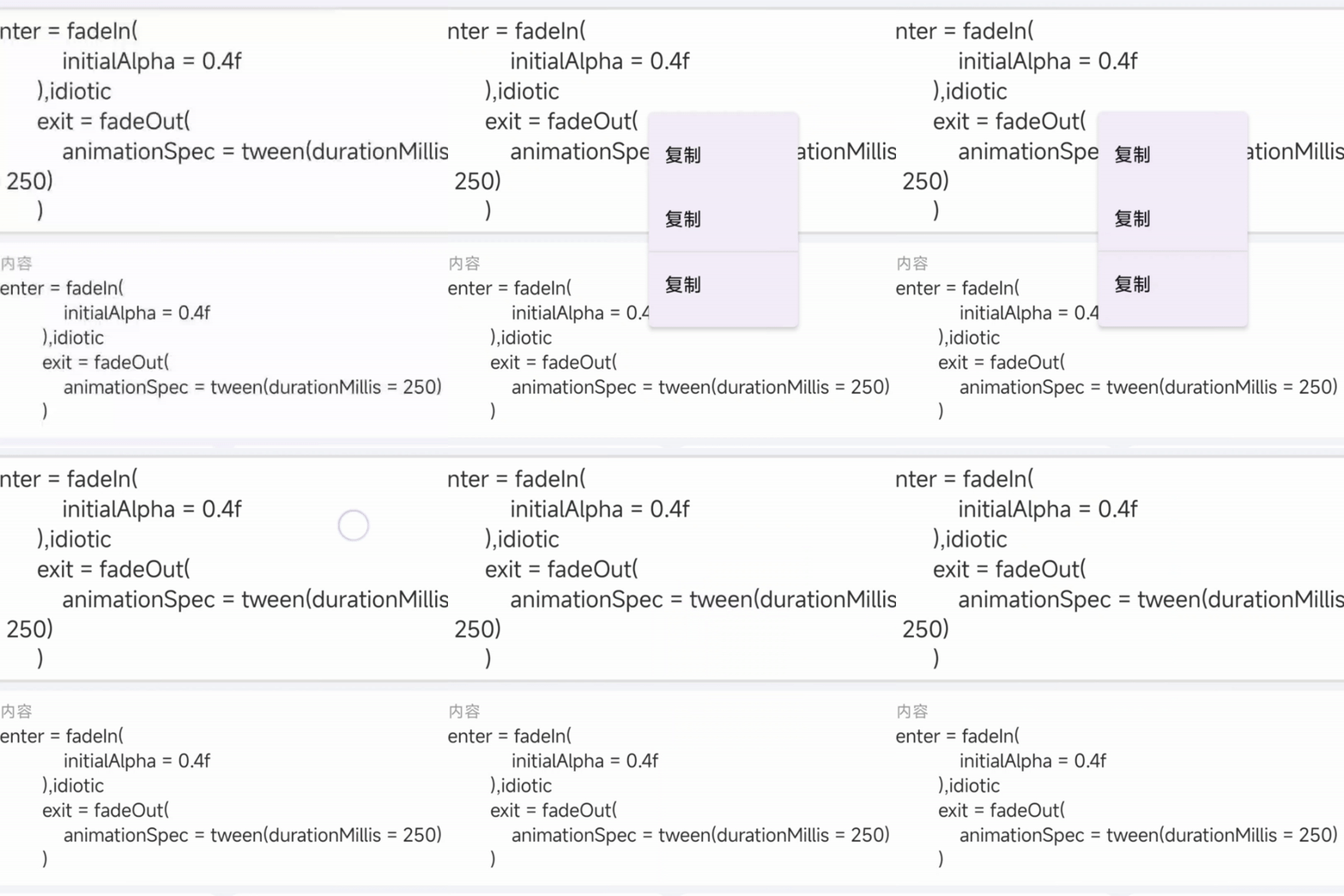
本篇文章教你实现跟随手指按下位置显示
效果图
实现方法
首先要获取到点击的位置之后计算偏移量
先分析两种offset参数
1使用DropdownMenu的offset参数
获取到点击的位置之后计算偏移量,
DropdownMenu的offset参数
@Composable
fun DropdownMenu(
    ...
    offset: DpOffset = DpOffset(0.dp, 0.dp)
    ...
)
这种方法比较麻烦,要反向计算偏移量,因为初始位置(x,y)轴的原点在左下角,而不是左上角
2Modifier.offset
将DropdownMenu嵌套在Box里面,调用BoxD的Modifier.offset()改变DropdownMenu的显示位置
这种方案的的初始位置(x,y)轴的原点在左上角
点击的位置就是DropdownMenu的偏移量,
获取到点击的位置
层级结构
Box{

  card()
  Box{

     DropdownMenu()
  }
}
在最外层的Box创建一个用于监听点击事件的修饰符,来捕获点击位置
val animatedOffset = remember {
     Animatable(Offset(0f, 0f), Offset.VectorConverter) }
Box(
    modifier = Modifier
        .fillMaxWidth()
        .pointerInput(Unit) {

            coroutineScope {

                while (true) {

                    //获取点击位置
                    val boxOffset = awaitPointerEventScope {

                        awaitFirstDown().position
                    }
                    //显示DropdownMenu
                    expanded = true
                    launch {

                        animatedOffset.animateTo(
                            boxOffset,
                            animationSpec = spring(stiffness = Spring.StiffnessLow)
                        )
                    }

                }
            }
        }

)
最后在DropdownMenu外层的Box()设置偏移量
Box(modifier = Modifier.offset {

    IntOffset(
        animatedOffset.value.x.roundToInt(),
        animatedOffset.value.y.roundToInt()
    )
} ) {

    DropdownMenu()
    }
完整代码
@OptIn(ExperimentalMaterial3Api::class)
@Composable
private fun FullContent(
    modifier: Modifier,
    context: String
) {

    var expanded by remember {
     mutableStateOf(false) }
    val animatedOffset = remember {
     Animatable(Offset(0f, 0f), Offset.VectorConverter) }
    Box(
        modifier = Modifier
            .fillMaxWidth()
            .pointerInput(Unit) {

                coroutineScope {

                    while (true) {

                        //获取点击位置
                        val boxOffset = awaitPointerEventScope {

                            awaitFirstDown().position
                        }
                        expanded = true
                        launch {

                            animatedOffset.animateTo(
                                boxOffset,
                                animationSpec = spring(stiffness = Spring.StiffnessLow)
                            )
                        }

                    }
                }
            }

    ) {

        Card(modifier = modifier
            .fillMaxWidth(),
            border = BorderStroke(2.dp, CustomTheme.colors.divider)
        ) {

            Text(
                text = context,
                modifier = Modifier.padding(6.dp),
                fontSize = 17.sp,
                fontWeight = FontWeight.Normal,

            )
        }
        Box(modifier = Modifier.offset {

            IntOffset(
                animatedOffset.value.x.roundToInt(),
                animatedOffset.value.y.roundToInt()
            )
        } ) {

            DropdownMenu(
                expanded = expanded,
                onDismissRequest = {
     expanded = false }
            ) {

                DropdownMenuItem(
                    text = {

                        Text(stringResource(id = R.string.app_copy))
                    },
                    onClick = {


                    })
                DropdownMenuItem(
                    text = {

                        Text(stringResource(id = R.string.app_copy))
                    },
                    onClick = {


                    })
                Divider()
                DropdownMenuItem(
                    text = {

                        Text(stringResource(id = R.string.app_copy))
                    },
                    onClick = {

                    })
            }
        }
    }
}
使用方法
FullContent(
    modifier = Modifier.fillMaxWidth(),
    context = "悄悄的我走了,
正如我悄悄的来;
我挥一挥衣袖,
不带走一片云彩。"
)
边栏推荐
- [proteus simulation] Arduino uno led simulated traffic light
- Cp2112 teaching example of using USB to IIC communication
- My in-depth remote office experience | community essay solicitation
- Pytorch notes: validation, model eval V.S torch. no_ grad
- Key library function based on Hal Library
- Unity Shader - 踩坑 - BRP 管线中的 depth texture 的精度问题(暂无解决方案,推荐换 URP)
- 同事的接口文档我每次看着就头大,毛病多多。。。
- Retest the cloud native database performance: polardb is still the strongest, while tdsql-c and gaussdb have little change
- scratch绘制正方形 电子学会图形化编程scratch等级考试二级真题和答案解析2022年6月
- LVGL 8.2 Simple Image button
猜你喜欢

Anhui "requirements for design depth of Hefei fabricated building construction drawing review" was printed and distributed; Hebei Hengshui city adjusts the pre-sale license standard for prefabricated

文件共享服务器
中国将强制统一充电接口,苹果如不低头,iPhone将被踢出中国市场

Rejuvenated Dell and apple hit each other, and the two old PC enterprises declined rapidly

无心剑中译狄金森《灵魂择其伴侣》

LVGL 8.2 Image

Retest the cloud native database performance: polardb is still the strongest, while tdsql-c and gaussdb have little change
再测云原生数据库性能:PolarDB依旧最强,TDSQL-C、GaussDB变化不大

Deep dive kotlin synergy (16): Channel

The reasoning delay on iphone12 is only 1.6 MS! Snap et al. Analyzed the transformer structure latency in detail, and used NAS to find out the efficient network structure of mobile devices
随机推荐
Deep dive kotlin synergy (16): Channel
The number of users of the home-made self-developed system exceeded 400million, breaking the monopoly of American enterprises, and Google repented
Double-DQN笔记
05_ Node JS file management module FS
Auto SEG loss: automatic loss function design
如何解决跨域
[deep learning] common methods for deep learning to detect small targets
The precision problem of depth texture in unity shader - stepping pit - BRP pipeline (there is no solution, it is recommended to replace URP)
LeetCode Algorithm 86. 分隔链表
深潜Kotlin协程(十七):演员
Pandora IOT development board learning (HAL Library) - Experiment 1 running lantern (RGB) experiment (learning notes)
LVGL 8.2 Simple Colorwheel
From introduction to mastery of MySQL 50 lectures (32) -scylladb production environment cluster building
在 sCrypt 中实现高效的椭圆曲线点加法和乘法
Android 开发面试真题进阶版(附答案解析)
pytorch 筆記 torch.nn.BatchNorm1d
OceanBase 安装 yum 源配置错误及解决办法
腾讯云数据库工程师能力认证重磅推出,各界共话人才培养难题
Rejuvenated Dell and apple hit each other, and the two old PC enterprises declined rapidly
数学知识复习:第二型曲线积分