当前位置:网站首页>ORB_ Slam3 recurrence - Part I
ORB_ Slam3 recurrence - Part I
2022-07-25 18:11:00 【[email protected]】
ORB_SLAM3
Preface
Recently due to work needs , I was forced to transfer in SLAM field , It is helpless , To beg for food , Forced to give up the original dream , Cry, cry, cry , The recent discovery SLAM It's also fun , Ah , It's delicious ! Don't talk much , Or that sentence , In order to urge myself to study hard , Record the first of the following recurrences SLAM Related projects .
1. ORB_SLAM3
ORB_SLAM It's based on ORB features 3D positioning and map building algorithm ,OBR_SLAM The family has been updated to the third generation , Today we will reproduce the following ORB_SLAM3, Although it has been more than two years , For the newcomer , Reproducing the latest version is the best choice .
Source connection :https://github.com/UZ-SLAMLab/ORB_SLAM3
Recommend learning :https://mp.weixin.qq.com/s/h1OIxdYQ5Eu-2OAHhsVcIQ
Now let's repeat it step by step , Students with poor conditions , Virtual machines are recommended Ubuntu18.04, The version is not recommended to be too high or too low , Go wrong .
2. Prepare the environment
2.1 C++11 Compiler
After installing the virtual machine , It is recommended to change to domestic sources , Open the terminal , Start installation gcc,g++,gcc yes C Language compiler ,g++ yes C++ compiler , Therefore, it is recommended to install the following . And then there's the installation Cmake Cross platform compilation tools .
- gcc,g++
sudo apt-get install gcc
sudo apt-get install g++
- cmake
sudo apt-get install build-essential
sudo apt-get install cmake
2.2 Pangolin
The installation process can be based on the process provided by the author , There may be many errors in the operation process , Everyone makes different mistakes , I suggest changing to domestic sources may cause less problems . official Install connections .
2.3 Opencv
It is worth noting that the official said opencv3.2 and 4.4 It's been tested , Can run through , But many students reacted , Only 4.4 It works , I suggest installing opencv4.4.
- Download the installation package on the official website
Official website Connect , The official website provides many ways to download , Pay attention to download Sources Ha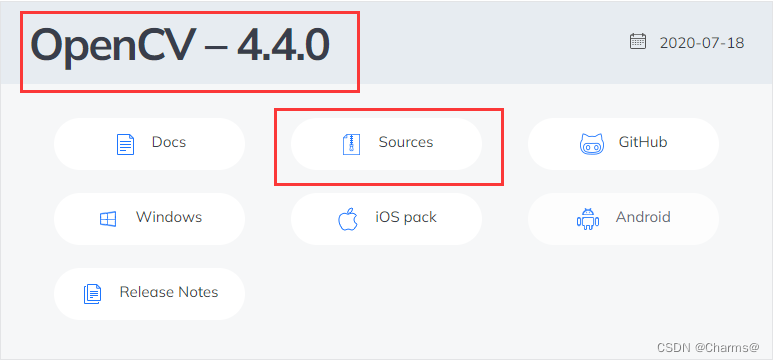
- Unzip and switch to the path
unzip opencv-4.4.0.zip
cd opencv-4.4.0
- Now start installing dependencies
sudo apt-get install git libgtk2.0-dev pkg-config libavcodec-dev libavformat-dev libswscale-dev
sudo apt-get install python-dev python-numpy libtbb2 libtbb-dev libjpeg-dev libpng-dev libtiff-dev libjasper-dev libdc1394-22-dev
- Cmake once
mkdir build
cd build
cmake -D CMAKE_BUILD_TYPE=RELEASE -D CMAKE_INSTALL_PREFIX=/usr/local -D WITH_GTK=ON -D OPENCV_GENERATE_PKGCONFIG=YES ..
remarks :
| command | explain |
|---|---|
CMAKE_BUILD_TYPE=RELEASE | The release |
CMAKE_INSTALL_PREFIX | Installation path of dynamic library , You can customize |
WITH_GTK=ON | libgtk2.0-dev Is the installation successful |
OPENCV_GENERATE_PKGCONFIG=YES | Automatic generation OpenCV Of pkgconfig file |
- compile make
Compile with multi system kernel , Can passnprocInquire about .
make -j2
- make install
sudo make install
notes : If something goes wrong in the middle , Need to compile again , You need to empty build file .
- Add library path
sudo vim /etc/ld.so.conf
Add the following code to the file include /usr/loacal/lib, Remember to save and exit (ESC + : + wq!). It can also be generated manually opencv.conf, open sudo vim /etc/ld.so.conf.d/opencv.conf, write in /usr/local/lib. Be careful opencv.conf, yes vim Manually generated empty file .
- Make the path work
sudo ldconfig
- Configure system environment
sudo vim /etc/bash.bashrc
Add at the end of the file :
PKG_CONFIG_PATH=$PKG_CONFIG_PATH:/usr/local/lib/pkgconfig
export PKG_CONFIG_PATH
Also use (ESC + : + wq!) Save and exit .
- Make system variables effective
source /etc/bash.bashrc
- Test whether the environment configuration is successful
pkg-config --modversion opencv4
pkg-config --cflags opencv4
pkg-config --libs opencv4

The above results appear , Congratulations on your success , If you still want to test , Whether the library can be called normally , Then you can test the code .
Create a new test file test.cpp. Input... At the terminal ( New file touch test.cpp ) ( Open file gedit test.cpp) Enter the following code to save .
#include <iostream>
#include <opencv2/opencv.hpp>

using namespace std;
using namespace cv;

int main()
{

    Mat srcImage = imread("image.jpg");
    imshow("Display Image window",srcImage);
    waitKey(0);
    return 0;
}
Pay attention to put a picture in the same level directory , And rename the picture image.jpg. Compile with the following commands .
g++ `pkg-config opencv4 --cflags` test.cpp  -o demo `pkg-config opencv4 --libs`
./demo


Come here and congratulate you , Hi Ti opencv4.4.
2.4 Eigen
install Eigen Relatively simple , There's nothing to say , Go straight to the code .
git clone https://gitlab.com/libeigen/eigen.git
cd eigen
mkedir build
cd build
cmake ..
make
sudo make install
3. Reappear ORB_SLAM3
3.1 Download code
git clone https://github.com/UZ-SLAMLab/ORB_SLAM3.git ORB_SLAM3
3.2 perform build.sh
cd ORB_SLAM3
chmod +x build.sh
./build.sh
3.3 test EuRoC Data sets
download EuRoC MAV Dataset Data sets , Take this data set as an example . Click on the link to download , stay ORB_SLAM3 Create a new file under the path Datasets(mkidr Datasets), Rename the downloaded dataset to MH01 Put in Datasets In file . Pay attention to the path , Or you'll make a mistake .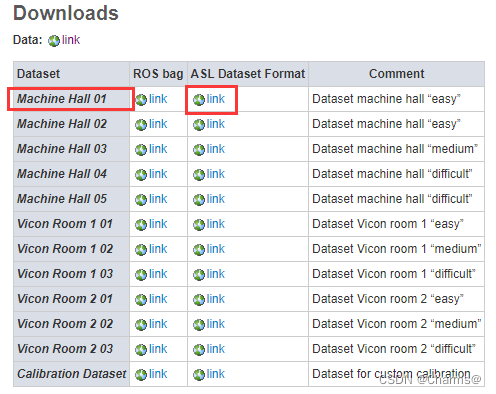
Be sure to pay attention to the path correspondence
./Examples/Monocular/mono_euroc ./Vocabulary/ORBvoc.txt ./Examples/Monocular/EuRoC.yaml ./Datasets/MH01/ ./Examples/Monocular/EuRoC_TimeStamps/MH01.txt dataset-MH01_mono
There are the following problems , Is running the command again ../Examples/Monocular/mono_euroc ./Vocabulary/ORBvoc.txt ./Examples/Monocular/EuRoC.yaml ./Datasets/MH01/ ./Examples/Monocular/EuRoC_TimeStamps/MH01.txt dataset-MH01_mono
In addition, this problem may occur during operation , No error , There is no result , as follows , It took a long time to solve this problem .
The output in terminal is as follows.
Initialization of Atlas from scratch
Creation of new map with id: 0
Creation of new map with last KF id: 0
Seq. Name:
There are 1 cameras in the atlas
Camera 0 is pinhole
[ INFO:0] global /home/ber/Documents/software/opencv-4.5.4/modules/core/src/parallel/registry_parallel.impl.hpp (96) ParallelBackendRegistry core(parallel): Enabled backends(3, sorted by priority): ONETBB(1000); TBB(990); OPENMP(980)
First KF:0; Map init KF:0
New Map created with 271 points
terms of settlement , You can see Connect , Namely Examples/Monocular/mono_euroc.cc In this document false to true, Probably in this position .
Here are the results of normal operation .

notes : What appears in the video image Small green box It is extracted ORB features , In the map video Green line path Represents the motion path of the camera , Small blue box Represents the motion process of the camera , That is, keyframes , Black spot Represents the road sign of the past , Red dot Represents the current road sign .
summary
Today's blog is written here , because , Too much blog content , Pages are always stuck , So the rest , I'll go on writing , I will test all the data later , And evaluate the results .
版权声明
本文为[[email protected]]所创,转载请带上原文链接,感谢
https://yzsam.com/2022/206/202207251754513415.html
边栏推荐
- 简述聚簇索引、二级索引、索引下推
- Brief introduction to clustered index, secondary index, index push down
- PHP memory management mechanism and garbage collection mechanism
- Drawing PDF form (II) drawing excel form style in PDF through iText, setting Chinese font, watermark, logo, header and page number
- nodejs 简单例子程序之express
- Installation and operation instructions of SVN client (TortoiseSVN)
- 实时云渲染有哪些优势
- C语言 cJSON库的使用
- The use of invocationcount, threadpoolsize, timeout of concurrent tests in TestNG
- CVE-2022-33891 Apache spark shell 命令注入漏洞复现
猜你喜欢

Installation and operation instructions of SVN client (TortoiseSVN)

Oracle导入出错:IMP-00038: 无法转换为环境字符集句柄

Sorting also needs to know the information and linked list

Cloud VR: the next step of virtual reality specialization

如何选择数字孪生可视化平台
nodejs 简单例子程序之express

绘制pdf表格 (二) 通过itext实现在pdf中绘制excel表格样式设置中文字体、水印、logo、页眉、页码

关于云XR介绍,以及5G时代云化XR的发展机遇

二叉树的相关操作

408 Chapter 2 linear table
随机推荐
List转换问题
Brief introduction of bubble sort and quick sort
大话DevOps监控,团队如何选择监控工具?
UFT(QTP)-总结点与自动化测试框架
Sequential storage structure, chain storage structure and implementation of stack
Construction of Huffman tree
Cloud XR面临的问题以及Cloud XR主要应用场景
Which real-time gold trading platform is reliable and safe?
Related operations of binary tree
What scenarios have rust, which is becoming more and more mature, applied?
Recommend a qinheng Bluetooth reference blog
MySQL page lock
Li Kai: the interesting and cutting-edge audio and video industry has always attracted me
简述聚簇索引、二级索引、索引下推
Postman get started quickly
Redis source code and design analysis -- 18. Analysis of redis network connection Library
二叉树的相关操作
SLA 、SLO & SLI
Number two 2010 real test site
UnitTest框架应用