当前位置:网站首页>Flume learning notes
Flume learning notes
2022-06-26 08:02:00 【qq_ forty-five million seven hundred and thirty-two thousand fi】
brief introduction
summary

Basic concepts

Flow model
Single stage flow

Multistage flow

Fan in flow

Fan out flow

introduction

3. Write format file
stay data Create a file in the directory , file name , The file suffix is optional
# to agent,source Naming
a1.sources=s1
# to channel Naming
a1.channels=c1
# to sink Naming
a1.sinks=k1
# To configure Source
a1.sources.s1.type=netcat // Means monitor tcp request , hold tcp The requested content is used as log data
a1.sources.s1.bind=0.0.0.0 // Configure the listening node ip
a1.sources.s1.port=8090 // Configure listening port
# To configure Channel
a1.channels.c1.type=memory // Means to temporarily store data in memory
a1.channels.c1.capacity=10000 // It means that tenthousand pieces of data can be temporarily stored in memory
a1.channels.c1.transactionCapacity=100 // Indicates the transaction capacity
# To configure sink
a1.sinks.k1.type=logger // Print data to the console
# take Source and Channel Binding
a1.sources.s1.channels=c1
# take Sink and Channel Binding
a1.sinks.k1.channel=c1
Execute startup command :
…/bin/flume-ng agent -n a1 -c …/conf -f basic.conf -Dflume.root.logger=INFO,console
New window , Carry out orders
nc hadoop01 8090 //nc To express to hadoop01 Of 8090 Port send a tcp request
Components
One .Source
1.AVRO Source

# Edit format file , Go to this directory first
/home/software/apache-flume-1.7.0-bin/data
vim avrosource.conf
a1.sources=s1
a1.channels=c1
a1.sinks=k1
a1.sources.s1.type=avro
a1.sources.s1.bind=0.0.0.0
a1.sources.s1.port=8090
a1.channels.c1.type=memory
a1.sinks.k1.type=logger
a1.sources.s1.channels=c1
a1.sinks.k1.channel=c1
# Specify start command
…/bin/flume-ng agent -n a1 -c …/conf -f avrosource.conf -Dflume.root.logger=INFO,console
# send out AVRO Serialized data
# Open a new window
cd /home/software/apache-flume-1.7.0-bin/data
vim avrotest # Add content to this file
# Serialize the file and send
…/bin/flume-ng avro-client -H hadoop01 -p 8090 -c …/conf -F avrotest
Exec Source
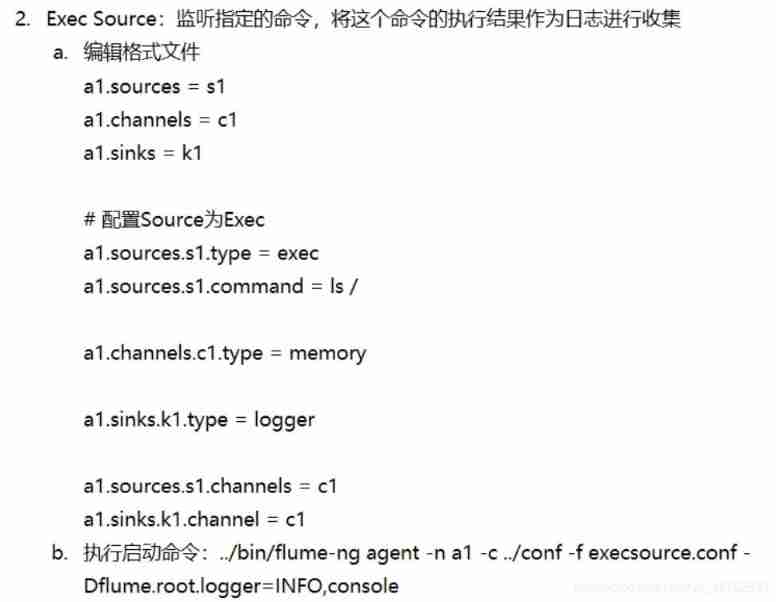
Spooling Directory Source


HTTP Source

Customize source

- demand : simulation :Sequence Generator Source
package cn.tedu.flume.source;

import org.apache.flume.Context;
import org.apache.flume.Event;
import org.apache.flume.EventDrivenSource;
import org.apache.flume.channel.ChannelProcessor;
import org.apache.flume.conf.Configurable;
import org.apache.flume.event.EventBuilder;
import org.apache.flume.source.AbstractSource;

import java.util.HashMap;
import java.util.Map;
import java.util.concurrent.ExecutorService;
import java.util.concurrent.Executors;

//  simulation :Sequence Generator Source
public class AuthSource extends AbstractSource
        implements EventDrivenSource, Configurable {


    private ExecutorService es;
    private int step;

    //  Get the value of the specified property
    @Override
    public void configure(Context context) {

        //  If you specify step Value , Then it will be incremented according to the specified step
        //  If not specified step, Then the default auto increment step is 1
        // This is actually the configuration file a1.sources.s1.step The attribute value ,
        // Subsequently, the string contents of the first parameter specified are different , You can get different attribute values , The back 1
        // Express , If you do not specify a default value
        step = context.getInteger("step", 1);
    }

    @Override
    public synchronized void start() {

        es = Executors.newFixedThreadPool(5);
        //  obtain Channel
        ChannelProcessor cp = this.getChannelProcessor();
        es.submit(new Add(step, cp));
    }

    @Override
    public synchronized void stop() {

        if (es != null) {

            es.shutdown();
        }
    }

}

class Add implements Runnable {


    private final int step;
    private final ChannelProcessor cp;

    public Add(int step, ChannelProcessor cp) {

        this.step = step;
        this.cp = cp;
    }

    @Override
    public void run() {

        int i = 0;
        while (true) {

            //  encapsulation headers
            Map<String, String> headers = new HashMap<>();
            headers.put("date", System.currentTimeMillis() + "");
            //  encapsulation body
            byte[] body = (i + "").getBytes();
            //  stay Flume in , Each log collected will be encapsulated into a Event object
            Event e = EventBuilder.withBody(body, headers);
            //  take Event Objects in the Channel in
            cp.processEvent(e);
            i += step;
        }
    }

}
Package the project , take jar Put the bag in /home/software/apache-flume-1.7.0-bin/lib Under the table of contents
Then format the configuration file auth.conf
a1.sources=s1
a1.channels=c1
a1.sinks=k1
a1.sources.s1.type=cn.tedu.flume.source.AuthSource # Note that it should be written as the full path name of the class
a1.sources.s1.port=8090
a1.channels.c1.type=memory
a1.sinks.k1.type=logger
a1.sources.s1.channels=c1
a1.sinks.k1.channel=c1
Then use this configuration file to start the customization source that will do
Channel
- Memory Channel

- File Channel

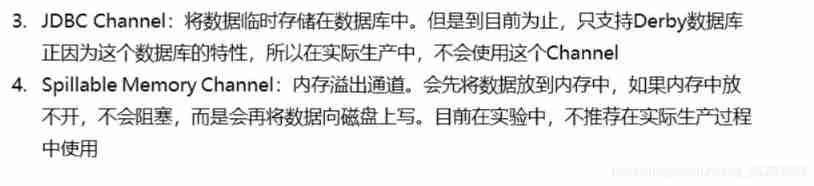
Sink
- HDFS Sink

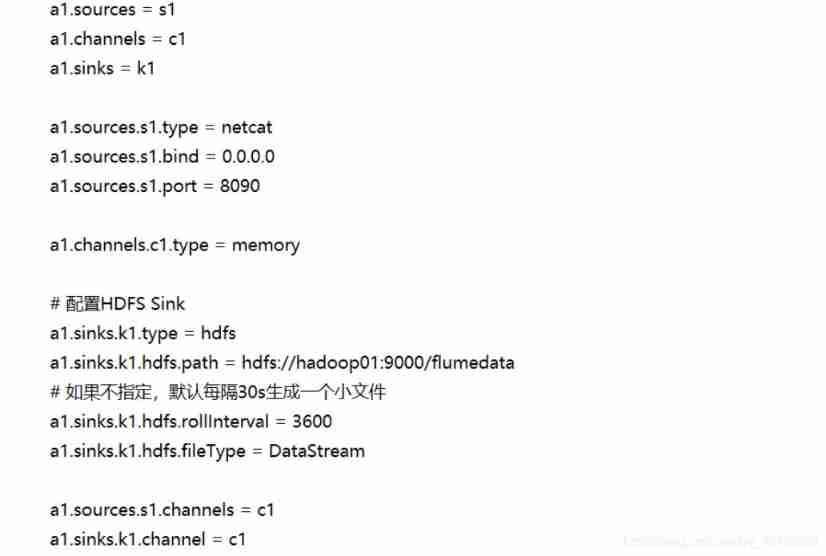
- Logger Sink

- File Roll Sink

- AVRO Sink( Realize multi-level flow 、 Fan in flow and fan out flow )

Multistage flow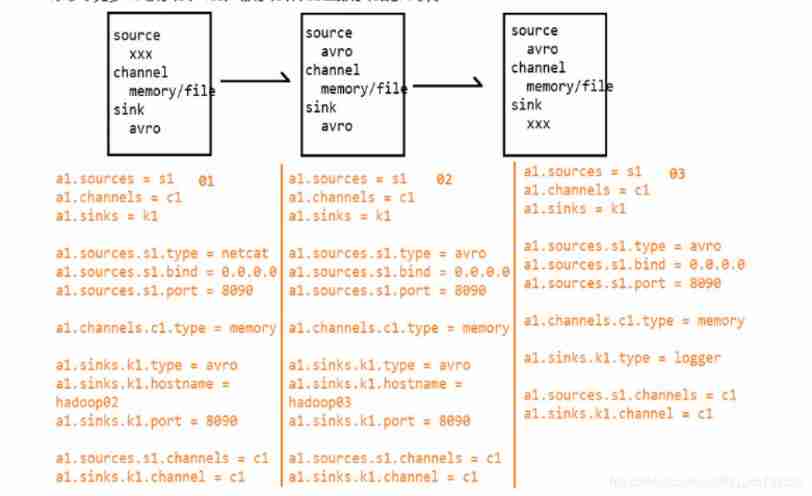
Fan in flow
Delete flow
Customize sink
Custom Sink: You need to customize a class implementation Sink Interface , In the process of implementation , Matters needing attention .
Case study : Write out the data to the specified path
package cn.tedu.flume.sink;

import org.apache.flume.*;
import org.apache.flume.conf.Configurable;
import org.apache.flume.sink.AbstractSink;

import java.io.PrintStream;
import java.util.Map;

//  Write out the data to the specified path
public class AuthSink extends AbstractSink implements Sink, Configurable {


    private String path;
    private PrintStream ps;

    @Override
    public void configure(Context context) {

        //  Gets the specified path
        String path = context.getString("path");
        if (path == null)
            throw new IllegalArgumentException(" Must define path attribute !!!");
        this.path = path;
    }

    @Override
    public synchronized void start() {

        try {

            ps = new PrintStream(path + "/" + System.currentTimeMillis());
        } catch (Exception e) {

            e.printStackTrace();
        }
    }

    @Override
    public Status process() {

        //  obtain Channel
        Channel c = this.getChannel();
        //  Get transaction
        Transaction t = c.getTransaction();
        //  Open transaction
        t.begin();
        //  from Channel Get data in
        Event e;
        try {

            while ((e = c.take()) != null) {

                //  obtain headers
                Map<String, String> headers = e.getHeaders();
                //  Write headers
                ps.println("headers:");
                for (Map.Entry<String, String> entry : headers.entrySet()) {

                    ps.println("\t" + entry.getKey() + "=" + entry.getValue());
                }
                //  obtain body
                byte[] body = e.getBody();
                //  Write body
                ps.println("body:");
                ps.println(new String(body));
            }
            //  Transaction submission
            t.commit();
            return Status.READY;
        } catch (Exception ex) {

            //  Transaction rollback
            t.rollback();
            return Status.BACKOFF;
        } finally {

            //  Closing transaction
            t.close();
        }
    }

    @Override
    public synchronized void stop() {

        if (ps != null) {

            ps.close();
        }
    }

}
Package the project into cd /home/software/apache-flume-1.7.0-bin/lib Under the table of contents .
And then in cd /home/software/apache-flume-1.7.0-bin/data Create under directory conf file , The contents are as follows , Note the full path of the class and the path of the file to be written .
Selector



Processor

data Medium conf file ( Because this is played on the basis of fan out ), Therefore, the first system node adds the following configuration information on the basis of fan out , Others are configured with fan out structure :
Graphic description 
It can also be used in sink Output to hdfs Scene , To store files by day , The configuration is as follows :
Interceptor

Multiple interceptor chain configurations 
search and Replace Interceptor configuration 
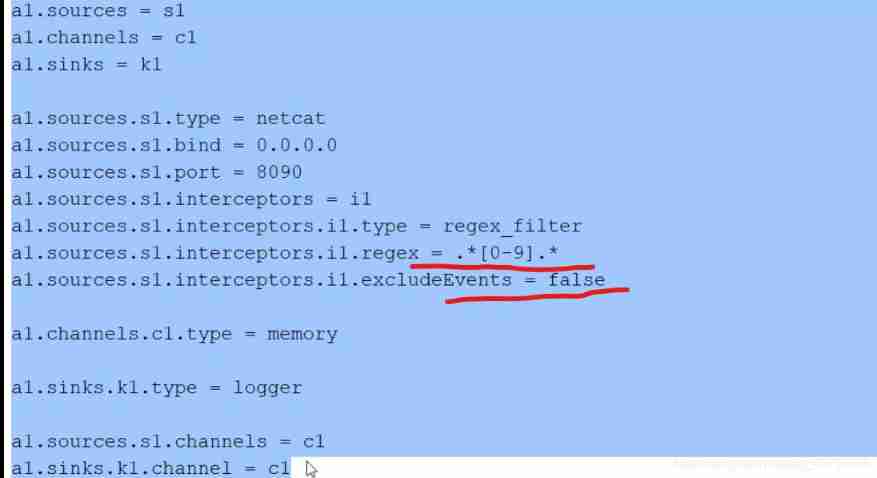
Regex Filtering Interceptor configuration 
边栏推荐
- Gavin teacher's insight on transformer live class - multi state transition of financial BOT and rasa interactive behavior analysis of Rasa project (52)
- Click the button to call the system browser to open Baidu home page
- Google Earth Engine(GEE) 01-中输入提示快捷键Ctrl+space无法使用的问题
- JS Date object
- Record the dependent installation problems encountered in building the web assets when developing pgadmin
- 解决 psycopg2.NotSupportedError: PQconninfo not available in libpq < 9.3
- Double linked list -- tail interpolation construction (C language)
- How to debug plug-ins using vs Code
- Take you three minutes to get started typescript
- Uniapp uses uviewui
猜你喜欢

Redis (4) -- Talking about integer set
Okhttp3 source code explanation (IV) cache strategy, disadvantages of Android mixed development

Opencv mouse event + interface interaction drawing rectangle polygon selection ROI

Record the dependent installation problems encountered in building the web assets when developing pgadmin

Tsinghua Yaoban chendanqi won Sloan award! He is a classmate with last year's winner Ma Tengyu. His doctoral thesis is one of the hottest in the past decade

Chapter II (summary)

Junit

Web technology sharing | webrtc recording video stream

Data governance: from top project to data culture!

Database learning notes I
随机推荐
Hand drawn style chart library chart Implementation principle of xkcd
Use intent to shuttle between activities -- use explicit intent
OSPF design principles, commands take H3C as an example
Junit
Bluebridge cup 1 introduction training Fibonacci series
Listview control
You can command Siri without making a sound! The Chinese team of Cornell University developed the silent language recognition necklace. Chinese and English are OK
Basic use of swiperefreshlayout, local refresh of flutterprovider
Double linked list -- tail interpolation construction (C language)
Real machine debugging of uniapp custom base
What if the service in Nacos cannot be deleted?
Database learning notes I
The long path of Xiao Sha (graph theory, Euler diagram)
Two models of OSPF planning: double tower Raider and dog tooth crisscross
Uniapp wechat withdrawal (packaged as app)
What is the difference between bone conduction earphones and ordinary earphones? Advantages of bone conduction earphones
Detailed explanation and code implementation of soft voting and hard voting mechanism in integrated learning
Take you three minutes to get started typescript
Apache InLong毕业成为顶级项目,具备百万亿级数据流处理能力!
信息学奥赛一本通 1355:字符串匹配问题(strs)