当前位置:网站首页>CAD assistant - 3D model format conversion tool
CAD assistant - 3D model format conversion tool
2022-06-29 20:22:00 【Brain in new VAT】
Open Cascade CAD Assistant Is a powerful offline 3D CAD Viewers and converters , It has a simple and intuitive interface , Free for personal and commercial use . The solution was originally developed as a mobile platform Open CASCADE Technology testing platform and display platform , It serves as a quick and convenient 3D Viewers are admired by thousands of mobile devices and desktop end users around the world .CAD Assistant Bring the power of open technology to processing 3D In the hands of data engineers .
1、 download CAD-Assistant
CAD Assistants are based on open source libraries (Open CASCADE Technology、Qt、FreeType、FreeImage etc. ) And USES the CAD And the open format of grid data (STEP、IFC、IGES、BREP、glTF、JT、PLY、STL、OBJ、 3DM). It also supports a set of other file formats , Such as DXF、SAT (ACIS)、XT (Parasolid).
Use the following link to download and install the latest version of CAD Assistant — v.1.6.0 (2021-10-05)( The installer can be found on the legacy web site ):
- Windows: Download the installer or Compressed files (x86_64).
- macOS: from DMG Package installation ( Intel x86_64,ARM 64 position ).
- Android: from Google Play Install or download APK (ARM 32 position ,ARM 64 position ,x86_64).
- iOS: from App Store Install or download IPA Archive.
- Linux: download AppImage(x86_64).
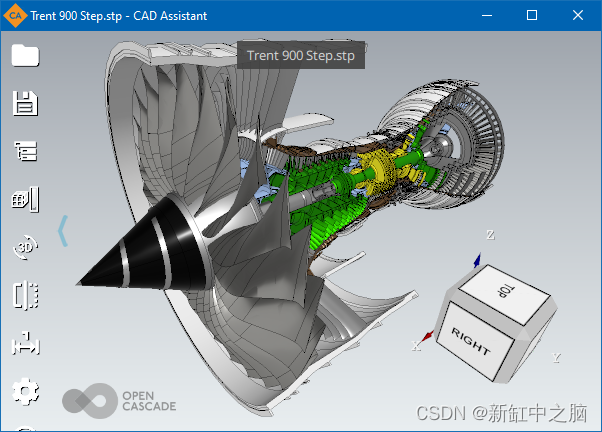
2、3D Model viewing and transformation
Basic 3D The model operation function consists of OCCT Of XDE Component supply , The program supports the following file formats :
- STEP(AP203、AP214 and AP242)—ISO 10303 standard , be used for CAD Product data representation and exchange between systems (ASCII Format ). Supported data : Shape geometry 、 Assembly structure 、 Color 、 name 、 Verify properties 、 file information 、 Dimensions and tolerances ( Semantics and tessellation PMI).
- IGES(5.1 and 5.3)—— Vendor neutral format , be used for CAD Data exchange between systems (ASCII Format ). Supported data : Shape geometry 、 Color 、 Top level object name 、 file information .
- glTF— API Neutral runtime asset delivery format (ASCII Or binary ), Usually supported by modeling systems and game engines . Supported data : Shape geometry ( Triangulation )、 Assembly structure 、 With texture mapping PBR Metal roughness material 、 name .
- XBF — BinXCAF, It is OCCT The general used XCAF Binary persistent format of document structure . The format accumulates the persistence of various data , These data can be obtained from STEP、IGES、ACIS、glTF And other file formats .
- BREP — OCCT Represented by the shape boundary ASCII Persistence open specification . Supported data : Shape geometry and assembly structure ( Defined by nested compounds , There is no name ).
- OBJWavefront — Modeling systems and game engines usually support 3D Asset exchange format (ASCII Format ). Supported data : Triangulation and quadrilateral 、 Common list of named groups 、 Common materials with texture maps .
- VRML or WRL — ISO 14772 Virtual reality modeling language (ASCII Format ). Supported data : Triangulation 、 Assembly structure 、 Color 、 name .
Other grid file formats can be imported with the following help Open Asset Import(COLLADA、3DS、FBX、BLEND) and openNURBS(3DM) library .
CAD Assistant for Android Medium CAX-IF test model
\ The assembly structure of the model can be navigated through the tree browser , Displays the name of the part in the assembly and its instance ( If available ). You can hide or show assembly components as needed to check the model . You can query the attributes of the selected subassembly or part , Include the name 、 Product information and geometric attributes ( area 、 Volume and center of mass ).
CAD-Assistant Attributes of the selected part in
this CAD The file reader can save the model as neutral (STEP、IGES、glTF、OBJ、PLY、STL) or OCCT Inside (BRep、XBF) Format .
3、 View grid data with attributes
Viewing a grid model with associated data is CAD An additional feature included in the assistant . The grid can be from PLY Read from file in format . This format was chosen because of its simplicity and the ability to store data related to grid nodes and elements . If your application has a model represented by a grid , You can easily save it as PLY Format and view it on your tablet . Additional data can be (RGB Color or scalar ) Add to each polygon or node .CAD The assistant allows you to wireframe 、 View any mesh in shaded and shrunk mode . If the mesh contains related color or scalar data , You can view it using the elements colored according to the selected number . For scalars , A color code will be displayed , Provide controls to narrow the range of display colors if necessary , To examine the data in more detail .
Strength analysis results of bulk carrier ( from RINA SpA Provide )
CAD The assistant supports various display modes , Used to analyze the grid structure 、 Material properties and mapping various quantities , Include :
- Hollow Mesh( Grid wireframe )
- Mesh Edges( The grid wireframe at the top of the shadow )
- Mesh Shrinked( Shadow mesh with gaps between triangles )
- Wireframe( Topological edge )
- Flat Shaded( Color with the plane normal of the triangle )
- Smooth Shaded( Default )
- Shaded with Edges( Coloring with topological edges )
The texture maps available in the document can be enabled one by one for material diagnosis .

CAD-Assistant Zoom out grid demo in
4、 Expand CAD Model import
Open Cascade business XDE Components provide more 3D File format :
- IFC Import– ISO 16739 IFC2x3 and IFC4 file (ASCII Format ).
- JT Import– ISO 14306 JT Binary visualization format .
- ACIS Import– SAT(ACIS Text ) and SAB(ACIS Binary system ) file .
- DXF Import– DXF file .
- Parasolid Import– X_T( Text ) and X_B( Binary system ) file .
business Version of Open Cascade The data import provided by the component can be done in CAD-Assistant Use in , But there's a limit - Model export... Is not allowed / transformation . The model can be accessed through the complete structure , No model size or other restrictions .
5、 Common operations
CAD -Assistant Optimized for devices with multi touch screens , And pass Finger gestures provide intuitive view operations :
- Select the assembly part by clicking
- Make the model by double clicking / Select the appropriate window
- Single finger rotation
- Pan or zoom with two fingers
View Cube And the context menu provides the operation of adapting the model to the window and the selection of standard views . The settings submenu provides options for viewers and Applications 、 Access to file information and message logs . The clipping plane feature allows access to internal model details .

CAD-Assistant Clipping box in
The material editor allows you to easily modify the properties of existing materials ( Import the bill of materials from the document ), And define new materials and assign them to selected objects .CAD Assistant support displays common (Blinn-Phong) Material and PBR Metal roughness material ( from glTF 2.0 Format definition ), Including color 、 Metal roughness 、 Spontaneous light 、 Normal and occlusion texture maps .

CAD-Assistant Material editor in
CAD The helper also includes interactive global illumination GPU Accelerate the path tracing rendering engine , For making realistic screenshots on the desktop platform .

CAD-Assistant The approximation in PBR Metal roughness

CAD-Assistant Path tracking in
CAD Assistant Integration with the operating system , Therefore, the application that supports file association will launch it to open files of related types . for example , You can open the email sent to you by clicking on the attachment in the email client STEP file . The save file dialog box allows you to save the current image of the model as PNG Format . If you choose Mail As the target directory , The mail client will start automatically , And save the file as an attachment .
6、 Supported platforms
at present CAD Assistant Support :
- Windows platform 10 / 8.1 / 7 SP1,64 position ( Support HiDPI Show )
- macOS platform , Support OS X 10.10( Calf ) And above
- Android platform , Support 5 And above
- iOS platform (iPad、iPhone), Support 8 And above
It has been tested , It can run on a range of modern intermediate tablets and smartphones . however , Smart phone users need to be reminded , The application is optimized for landscape screen orientation , And it may be inconvenient on the mobile phone in the vertical direction .
7、 Known problem
According to different equipment , Opening a large file may take some time . When a large model is displayed in the viewer , Devices with low range graphics processors can be slow . For a scene composed of millions of triangles , because GPU problem , The system may terminate the application without warning . Usually , It can be considered less than 50 MB Your files can be safely opened on most devices . If you encounter an out of memory error while loading a large file , We recommend that you restart the application .
Link to the original text :CAD Assistant — BimAnt
边栏推荐
- Software engineering - principles, methods and Applications
- What is a database? Database detailed notes! Take you into the database ~ you want to know everything here!
- 从众伤害的是自己
- Defense cornerstone in attack and defense drill -- all-round monitoring
- mysql中explain语句查询sql是否走索引,extra中的几种类型整理汇总
- 深入Go底层原理,重写Redis中间件实战无密
- Flume configuration 3 - interceptor filtering
- Win7 easy connect 提示:选路连接失败,可能当前连接网络异常,请稍后重试
- Three. JS development: drawing of thick lines
- 「运维有小邓」审核并分析文件和文件夹访问权限
猜你喜欢
![[compilation principle] type check](/img/fc/458871e2df4e0384f65e09faa909d7.png)
[compilation principle] type check

Cmake development - Multi Directory Project

Flume configuration 4 - Custom source+sink

Liunx instruction

「运维有小邓」AD域委派

Tag based augmented reality using OpenCV

A great open source image watermarking solution

How to set a pod to run on a specified node

Win7 Easy Connect prompt: route selection connection failed. The current connection network may be abnormal. Please try again later

lock4j--分布式锁中间件--自定义获取锁失败的逻辑
随机推荐
Jmeter之BeanShell详解和夸线程调用
2021 CCPC Harbin E. power and modulo (thinking questions)
CorelDRAW最新24.1.0.360版本更新介绍讲解
Koa 源码剖析
Notepad++ -- macro (record operation process)
Linux Installation mysql8
thinkphp5中的配置如何使用
Golang基础学习
深入Go底层原理,重写Redis中间件实战无密
「运维有小邓」审核并分析文件和文件夹访问权限
jfinal中如何使用过滤器监控Druid监听SQL执行?
[compilation principle] semantic analysis
Snowflake ID, distributed unique ID
Flume configuration 2 - ganglia for monitoring
Freemaker template framework generates images
Koa source code analysis
文件包含漏洞
Finally, Amazon~
Nutch2.1在Windows平台上使用Eclipse debug 存储在MySQL的搭建过程
Uncover the secret! Pay attention to those machines under the membership system!