当前位置:网站首页>Deployment practice and problem solving of dash application development environment based on jupyter Lab
Deployment practice and problem solving of dash application development environment based on jupyter Lab
2022-07-02 02:13:00 【Xiao Yongwei】
Dash It is used to build responsive Web Applied Python Open source library ,Dash The goal is to establish data analytical applications Python frame , It doesn't need to be used directly JavaScript, And can be flexibly embedded HTML Customize the page by label , The framework is based on Plotly.js、React and Flask structure , Can be directly combined with data analysis code , Build cool UI Web application .
Jupyter Dash Open source library , Can be in Jupyter Environment , It is easier to develop charts interactively Dash Applications .
Jupyter Notebook Tools are based on Web service , Take the form of browser web page as the working interface , Write and run code directly in the web page environment , The running results of the code will also be directly displayed in the web page under the code block . Such as in the process of programming need to write documentation , You can also write directly in the same page , It is convenient for developers to explain in time .
Jupyter lab yes Jupyter Notebook Super upgrade version of , More powerful ,Jupyter lab It's good for learning Python.
Next, share in Windows 10 In the environment , Deployment process and experience summary .
1. install Jupyter lab
pip install -i https://pypi.tuna.tsinghua.edu.cn/simple jupyterlab
Successfully installed
anyio-3.5.0
babel-2.9.1
contextvars-2.4
immutables-0.16
json5-0.9.6
jupyter-server-1.13.1
jupyterlab-3.2.9
jupyterlab-server-2.10.3
nbclassic-0.3.5
.sniffio-1.2.0
websocket-client-1.2.3
In this case Python Installation directory is D:\Python\Python36\, be Jupter The installation to D:\Python\Python36\Scripts Next :
Start the service execution jupyter-lab.exe file .
2. install Dash
pip install -i https://pypi.tuna.tsinghua.edu.cn/simple dash==2.0.0
Successfully installed
Flask-2.0.2
Jinja2-3.0.3
MarkupSafe-2.0.1
Werkzeug-2.0.3
brotli-1.0.9
dash-2.0.0
dash-core-components-2.0.0
dash-html-components-2.0.0
dash-table-5.0.0
dataclasses-0.8
flask-compress-1.10.1
importlib-metadata-4.8.3
itsdangerous-2.0.1
notes : At the beginning of the , Install the latest version , The problems are as follows :
pip install -i https://pypi.tuna.tsinghua.edu.cn/simple dash
AttributeError: (‘Read-only: can only be set in the Dash constructor or during init_app()’, ‘requests_pathname_prefix’)
I had the same problem today. Please downgrade your dash to 2.0.0, and it will work
pip install dash==2.0.0
3. install jupyter-dash
pip install -i https://pypi.tuna.tsinghua.edu.cn/simple jupyter-dash
Successfully installed
ansi2html-1.7.0
jupyter-dash-0.4.0
retrying-1.3.3
jupyter-dash As JupyterLab Extensions for , Need to rebuild , And rely on Node.js Environmental Science .
JupyterLab support
When used in JupyterLab, JupyterDash depends on the jupyterlab-dash JupyterLab extension, which requires JupyterLab version 2.0 or above.
This extension is included with the Python package, but in order to activate it JupyterLab must be rebuilt. JupyterLab should automatically produce a popup dialog asking for permission to rebuild, but the rebuild can also be performed manually from the command line using:
The reconstruction jupyter lab Environmental Science :
jupyter lab build
jupyter-dash The plug-in will run the application , Realize visual charts with new Tab Page display .
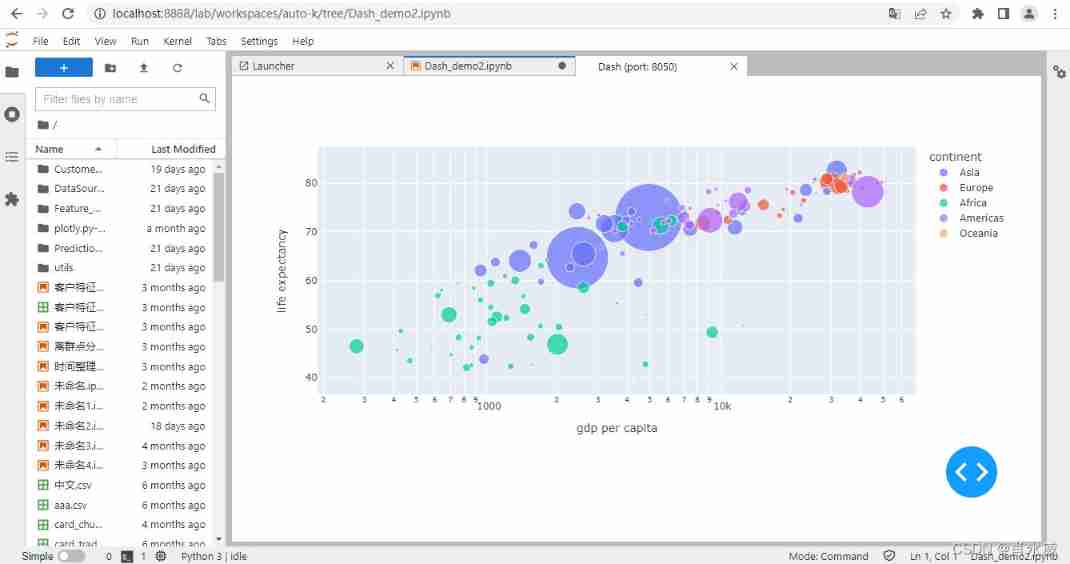
4. Demo Example
# Run this app with `python app.py` and
# visit http://127.0.0.1:8050/ in your web browser.

from dash import Dash, dcc, html
import plotly.express as px
import pandas as pd
from jupyter_dash import JupyterDash

#app = Dash(__name__)
app = JupyterDash(__name__)

df = pd.read_csv('gdp-life-exp-2007.csv')

fig = px.scatter(df, x="gdp per capita", y="life expectancy",
                 size="population", color="continent", hover_name="country",
                 log_x=True, size_max=60)

app.layout = html.Div([
    dcc.Graph(
        id='life-exp-vs-gdp',
        figure=fig
    )
])


if __name__ == '__main__':
    app.run_server(mode='jupyterlab')
    #app.run_server(mode='inline')
    #app.run_server(mode='external')
Code instructions :
- app.run_server(mode=‘jupyterlab’), Is in jupyter lab In the web environment , newly build Tab Page displays the running results ;
- app.run_server(mode=‘inline’), Is in jupyter lab In the web environment , Directly on the current page Cell The running results are displayed under ;
- app.run_server(mode=‘external’), In the new web page , Access the application interface , for example http://127.0.0.1:8050/.
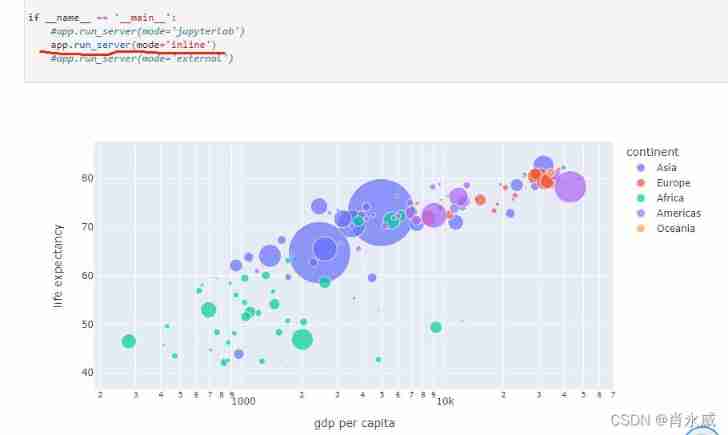
5. It involves NodeJs Deploy
because Node.js For reconstruction only jupyter lab Environmental Science , Therefore, deploy by unpacking , Easy to remove .
download Windows Binary (.zip), After downloading, extract the file to the location to be installed , For example, put the unzipped directory and content into D disc , The effect is as follows :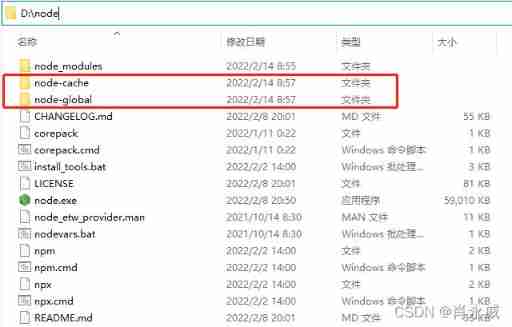
among , Create the following two folders :
- node-global :npm Global installation location
- node-cache:npm Cache path
Configure environment variables :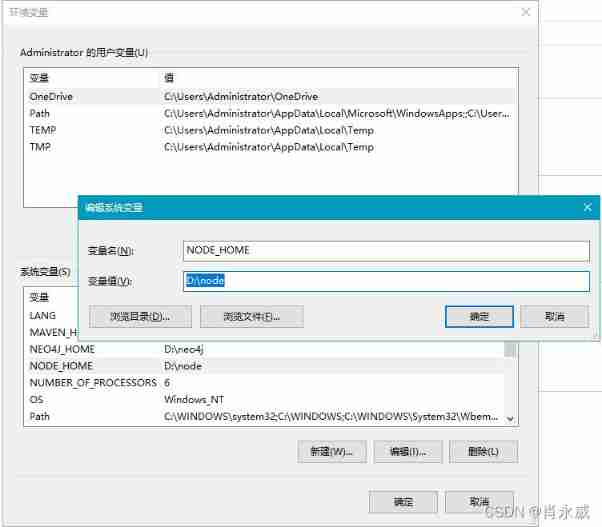
perhaps , Add the environment directly to Path in .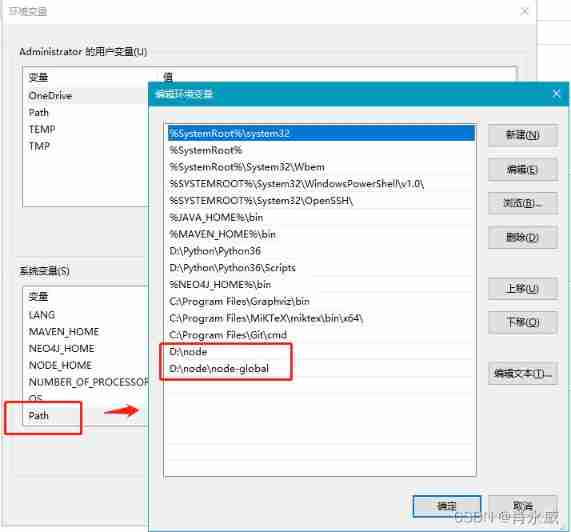
stay Jupyter Environment , Not only can you use Jupyter Lab, You can also use Jupyter Notebook Development Dash application , among ,app.run_server(mode=‘inline’) The way it works , If you don't want to install NodeJs restructure Jupyter Lab Extension plug-in , No effect inline and external Way to use .
Reference resources :
Xiao Yongwei . Pandas One of the quickstarts to advanced data analysis ——Python Development environment . CSDN Blog . 2021.09
边栏推荐
- Word search applet design report based on cloud development +ppt+ project source code + demonstration video
- 【深度学习】infomap 人脸聚类 facecluster
- How to turn off debug information in rtl8189fs
- Architecture evolution from MVC to DDD
- The middle element and the rightmost element of the shutter
- SQLite 3 of embedded database
- The difference between new and malloc
- oracle创建只读权限的用户简单四步走
- leetcode2309. The best English letters with both upper and lower case (simple, weekly)
- leetcode373. Find and minimum k-pair numbers (medium)
猜你喜欢

Cross domain? Homology? Understand what is cross domain at once

MySQL约束与多表查询实例分析
Decipher the AI black technology behind sports: figure skating action recognition, multi-mode video classification and wonderful clip editing
![[graduation season] graduate seniors share how to make undergraduate more meaningful](/img/03/9adc44476e87b2499aa0ebb11cb247.png)
[graduation season] graduate seniors share how to make undergraduate more meaningful

如何用一款产品推动「品牌的惊险一跃」?
Webgpu (I): basic concepts

1069. Division of convex polygons (thinking, interval DP)
leetcode2310. 个位数字为 K 的整数之和(中等,周赛)

Opencascade7.6 compilation

Additional: information desensitization;
随机推荐
C language 3-7 daffodils (enhanced version)
Post infiltration flow encryption
Comparative analysis of MVC, MVP and MVVM, source code analysis
[C #] use regular verification content
"C language programming", 4th Edition, edited by he Qinming and Yan Hui, after class exercise answers Chapter 3 branch structure
leetcode2309. 兼具大小写的最好英文字母(简单,周赛)
正则表达式学习笔记
Webgpu (I): basic concepts
How to execute an SQL in MySQL
As a software testing engineer, will you choose the bank post? Laolao bank test post
【深度学习】infomap 人脸聚类 facecluster
[deep learning] Infomap face clustering facecluster
734. Energy stone (greed, backpack)
Architecture evolution from MVC to DDD
leetcode2305. Fair distribution of biscuits (medium, weekly, shaped pressure DP)
MySQL constraints and multi table query example analysis
leetcode2312. 卖木头块(困难,周赛)
Logging only errors to the console Set system property ‘log4j2. debug‘ to sh
how to come in an investnent bank team
Volume compression, decompression