当前位置:网站首页>您的连接不是私密连接
您的连接不是私密连接
2022-06-26 22:49:00 【一 乐】
写在前面:
可能原因:网站被封了、网站进行了迁移、网站是外网(需要“搭工具”)
试试打开普通常见的那些网站,若是正常,说明浏览器没有问题,是当前你访问的该网站的问题
再试试 “搭工具”看看能不能访问
● 推荐的解决方式:搜索找到迁移后的新网站或者更换一个网站(有相同的资源):
推荐一些镜像网站:
    阿里巴巴:https://mirrors.aliyun.com/
    腾讯:https://mirrors.cloud.tencent.com/
    清华:https://mirrors.tuna.tsinghua.edu.cn/
    中科大:http://mirrors.ustc.edu.cn/
    北理:http://mirror.bit.edu.cn/
写在后面:我的无效折腾
- 方式1:敲命令:thisisunsafe
- 方式2:给浏览器加后缀参数: --test-type --ignore-certificate-errors
- 方式3:添加用户证书后,禁止
—本文是以访问https://mirrors.hustunique.com/ 这个网站为例子(访问这个网站,目的是为了下载epel-release)。
—下载epel-release网站推荐:https://archives.fedoraproject.org/pub/
一、问题:
1、问题的详细信息:
您的连接不是私密连接
攻击者可能会试图从 mirrors.hustunique.com 窃取您的信息(例如:密码、通讯内容或信用卡信息)。了解详情
NET::ERR_CERT_AUTHORITY_INVALID
- 图示:

2、错误原因:
计算机系统安装的某个软件(比如安装fiddler)导致使用Chrome访问https网站时,可能会出现以下错误,本文说明如何解决此类问题:“您的连接不是私密连接”、“NET::ERR_CERT_AUTHORITY_INVALID”、“ERR_CERT_COMMON_NAME_INVALID"或"NET::ERR_CERT_WEAK_SIGNATURE_ALGORITHM”。
二、解决:
1、方式1:手动敲 thisisunsafe(敲了一次,无效,直接放弃。因为有可能要敲多次,不推荐)
因为Chrome不信任这些自签名ssl证书,为了安全起见,直接禁止访问了,thisisunsafe 这个命令,说明你已经了解并确认这是个不安全的网站,你仍要访问就给你访问了。

2、方式2:忽略证书错误(亲测,无效,403,而且刷新缓存之后又发生"您的连接不是私密连接",不推荐)
- 忽略证书错误: --test-type --ignore-certificate-errors
■ 在谷歌浏览器的安装程序加上后缀: --test-type --ignore-certificate-errors

- 被拒绝访问

HTTP 403: 意味着Internet Explorer可以连接到该网站,但是没有查看网页的权限.
- 可能原因:网站进行了迁移
3、方式3:添加当前用户的证书(失败)
失败原因:因为找不到:颁发给(CertificatetionAuthority of WoSign) 和 颁发者(StartComCertification Authority)
具体步骤:
(1) 首先按组合键win+r打开运行窗口,输入mmc并按回车:

(2) 调出控制台窗口后,点击文件,选择添加/删除管理单元:

(3) 找到"“证书”“选项,点击"添加”,选择"我的用户账号":
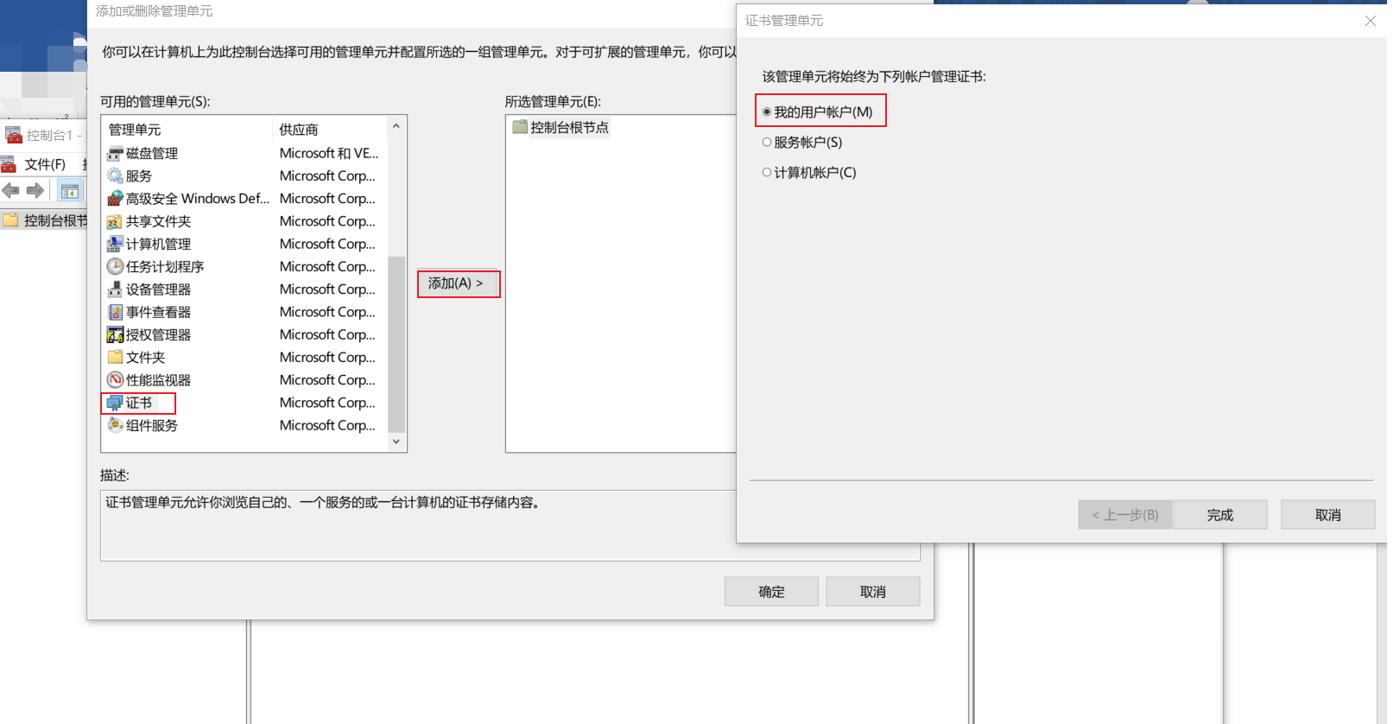
(4) 依次打开当前用户→中间证书颁发机构→证书,在右边找到CertificatetionAuthority of WoSign证书,右键打开其属性,将其禁用掉。
- 在这一步,找不到:颁发给(CertificatetionAuthority of WoSign) 和 颁发者(StartComCertification Authority)
(5) 关闭浏览器,重新访问网站
如果本文对你有帮助的话记得给一乐点个赞哦,感谢!
边栏推荐
- 不花一分钱做个在线的gif合成服务
- Introduction to operator
- Three solutions for improving embedded software development environment
- Different subsequence problems I
- Unity布料系統_Cloth組件(包含動態調用相關)
- 【710. 黑名单中的随机数】
- How to write test cases and a brief introduction to go unit test tool testify
- 树莓派初步使用
- Unity3D插件 AnyPortrait 2D骨骼动画制作
- 开放世界机甲游戏-Phantom Galaxies
猜你喜欢

CVPR 2022 - Interpretation of selected papers of meituan technical team

用C#通过sql语句操作Sqlserver数据库教程
數據清洗工具flashtext,效率直接提昇了幾十倍數

Some ways out for older programmers

360 mobile assistant is the first to access the app signature service system to help distribute privacy and security

Three solutions for improving embedded software development environment

FPGA -VGA显示

WP collection plug-in tutorial no thanks for WordPress collection of rules

WordPress collection plug-ins are recommended to be free collection plug-ins

vulnhub之DC9
随机推荐
DAST black box vulnerability scanner part 5: vulnerability scanning engine and service capability
DLA model (classification model + improved segmentation model) + deformable convolution
vulnhub之DC9
[Old Wei makes machines] issue 090: keyboard? host? Full function keyboard host!
如何写好测试用例以及go单元测试工具testify简单介绍
Vulnhub's DC8
Bs-gx-016 implementation of textbook management system based on SSM
【图像处理基础】基于matlab GUI图像曲线调整系统【含Matlab源码 1923期】
Unity animation knowledge of Art
Unity布料系統_Cloth組件(包含動態調用相關)
Which platform is the safest for buying stocks and opening accounts? Ask for sharing
Unity 设置Material、Shader的方法
【混合编程jni 】第七篇之JNI 的命令行们
[machine learning] - Introduction to vernacular and explanation of terms
Parsing complex JSON in fluent
Wechat applet is authorized to log in wx getUserProfile
请问CMS里UniAPP版本中的“自定义表单列表如何去掉?
Briefly describe the model animation function of unity
What is the “ How to remove a custom form list?
【710. 黑名单中的随机数】