当前位置:网站首页>Flink advanced features and new features (VIII)
Flink advanced features and new features (VIII)
2022-07-24 13:45:00 【Hua Weiyun】
Flink Advanced features and new features ( 8、 ... and )
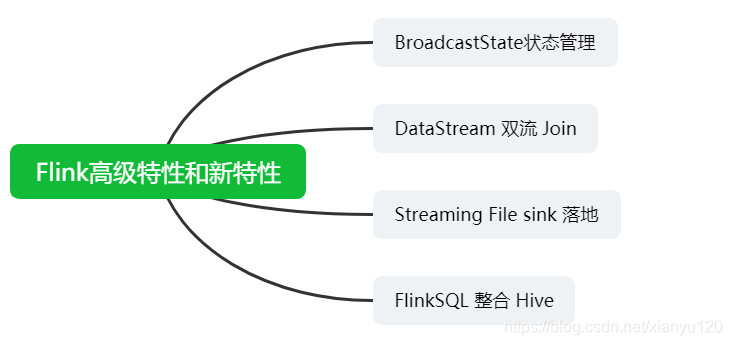
BroadcastState State management
- broadcast state Broadcast variable status

Application scenarios
Association update rules , Get the specified data ( to ip Get longitude and latitude )=> Map API Get Street location in provincial and urban areas
demand
real time Flink DataStream Filtering out configuration ( database ) Users of , And complete the basic information of these users in the event flow .
Demand process
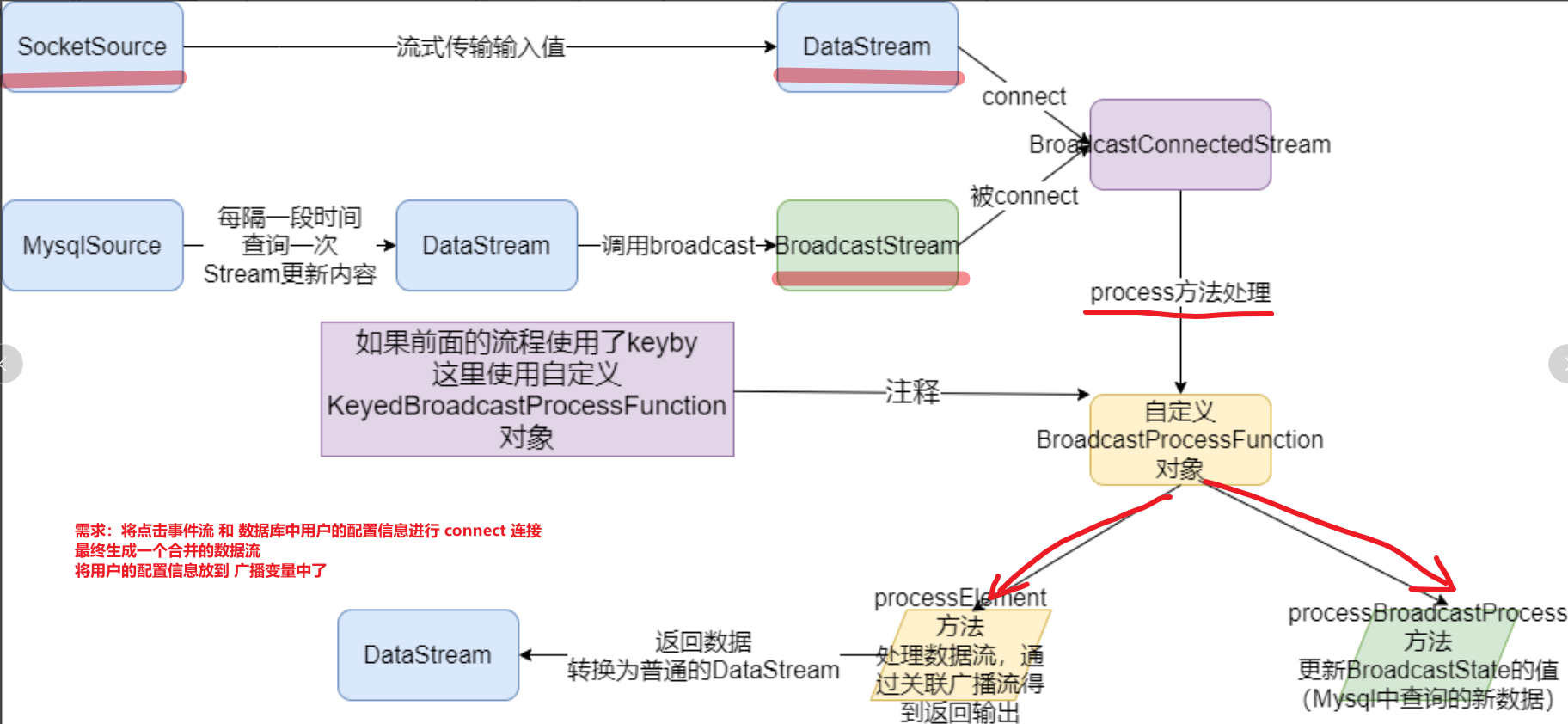
- Development steps
package cn.itcast.flink.broadcast;import org.apache.flink.api.common.state.BroadcastState;import org.apache.flink.api.common.state.MapStateDescriptor;import org.apache.flink.api.common.state.ReadOnlyBroadcastState;import org.apache.flink.api.common.typeinfo.Types;import org.apache.flink.api.java.tuple.Tuple;import org.apache.flink.api.java.tuple.Tuple2;import org.apache.flink.api.java.tuple.Tuple4;import org.apache.flink.api.java.tuple.Tuple6;import org.apache.flink.configuration.Configuration;import org.apache.flink.streaming.api.datastream.BroadcastStream;import org.apache.flink.streaming.api.datastream.DataStreamSource;import org.apache.flink.streaming.api.datastream.SingleOutputStreamOperator;import org.apache.flink.streaming.api.environment.StreamExecutionEnvironment;import org.apache.flink.streaming.api.functions.co.BroadcastProcessFunction;import org.apache.flink.streaming.api.functions.source.RichSourceFunction;import org.apache.flink.streaming.api.functions.source.SourceFunction;import org.apache.flink.util.Collector;import java.sql.Connection;import java.sql.DriverManager;import java.sql.PreparedStatement;import java.sql.ResultSet;import java.text.SimpleDateFormat;import java.util.Date;import java.util.HashMap;import java.util.Map;import java.util.Random;/** * Author itcast * Date 2021/6/24 8:29 * Two data streams 1. Flow of events 2. User configuration flow 3.connect Associated operations 4. Printout 5. Perform tasks * <String,String,String,Integer></> * {"userID": "user_3", "eventTime": "2019-08-17 12:19:47", "eventType": "browse", "productID": 1} * {"userID": "user_2", "eventTime": "2019-08-17 12:19:48", "eventType": "click", "productID": 1} * <String, String, Integer ></> * 'user_2', ' Li Si ', 20 * The final data flow 6 individual Tuple6<String,String,String,Integer,String,Integer></> * (user_3,2019-08-17 12:19:47,browse,1, Wang Wu ,33) * (user_2,2019-08-17 12:19:48,click,1, Li Si ,20) */public class BroadcastStateDemo { public static void main(String[] args) throws Exception { //1.env StreamExecutionEnvironment env = StreamExecutionEnvironment.getExecutionEnvironment(); // Set parallelism env.setParallelism(1); //2.source //-1. Build real-time data event flow - Custom random //<userID, eventTime, eventType, productID> DataStreamSource<Tuple4<String, String, String, Integer>> clickSource = env.addSource(new MySource()); //-2. Build configuration flow - from MySQL //< user id,< full name , Age >> DataStreamSource<Map<String, Tuple2<String, Integer>>> configSource = env.addSource(new MySQLSource()); //3.transformation //-1. Define the state descriptor //MapStateDescriptor<Void, Map<String, Tuple2<String, Integer>>> descriptor = //new MapStateDescriptor<>("config",Types.VOID, Types.MAP(Types.STRING, Types.TUPLE(Types.STRING, Types.INT))); MapStateDescriptor<Void, Map<String, Tuple2<String,Integer>>> broadcastDesc = new MapStateDescriptor<>("config", Types.VOID, Types.MAP(Types.STRING, Types.TUPLE(Types.STRING, Types.INT))); //-2. Broadcast configuration flow //BroadcastStream<Map<String, Tuple2<String, Integer>>> broadcastDS = configDS.broadcast(descriptor); BroadcastStream<Map<String, Tuple2<String, Integer>>> broadcastDS = configSource.broadcast(broadcastDesc); //-3. Connect the event stream to the broadcast stream //BroadcastConnectedStream<Tuple4<String, String, String, Integer>, Map<String, Tuple2<String, Integer>>> connectDS =eventDS.connect(broadcastDS); SingleOutputStreamOperator<Tuple6<String, String, String, Integer, String, Integer>> result = clickSource.connect(broadcastDS) //-4. Process the connected stream - Complete the user information in the event flow according to the configuration flow .process(new BroadcastProcessFunction<Tuple4<String, String, String, Integer>, Map<String, Tuple2<String, Integer>>, Tuple6<String, String, String, Integer, String, Integer>>() { @Override public void processElement(Tuple4<String, String, String, Integer> value, ReadOnlyContext ctx, Collector<Tuple6<String, String, String, Integer, String, Integer>> out) throws Exception { // Read out f0 by userId // Read users in the event stream userId String userId = value.f0; // from ctx Environment variables through desc Read out the broadcast status ReadOnlyBroadcastState<Void, Map<String, Tuple2<String, Integer>>> broadcastState = ctx.getBroadcastState(broadcastDesc); // If the broadcast status is not empty ,get(null) Get out The configuration data Tuple2 if (broadcastState != null) { Map<String, Tuple2<String, Integer>> map = broadcastState.get(null); // Judge map If it is not empty if (map != null) { Tuple2<String, Integer> stringIntegerTuple2 = map.get(userId); // Take out the name and age //collect collect Tuple6 //3-4. Handle (process) Flow after connection - Complete the user information in the event flow according to the configuration flow ,Tuple4 and Tuple2 Merge // Handle every element ,processElement out.collect(Tuple6.of( userId, value.f1, value.f2, value.f3, stringIntegerTuple2.f0, stringIntegerTuple2.f1 )); } } } //value Namely MySQLSource The latest information obtained at regular intervals in map data // First, obtain the historical broadcast status according to the status descriptor ctx.getBroadcastState(desc) @Override public void processBroadcastElement(Map<String, Tuple2<String, Integer>> value, Context ctx, Collector<Tuple6<String, String, String, Integer, String, Integer>> out) throws Exception { // Then clear the historical status broadcastState data BroadcastState<Void, Map<String, Tuple2<String, Integer>>> broadcastState = ctx.getBroadcastState(broadcastDesc); // Finally, put the latest broadcast stream data into state in ( Update status data ) broadcastState.put(null,value) broadcastState.clear(); broadcastState.put(null, value); } }); // Deal with elements in the broadcast //4.sinks result.print(); //5.execute env.execute(); } /** * <userID, eventTime, eventType, productID> */ public static class MySource implements SourceFunction<Tuple4<String, String, String, Integer>> { private boolean isRunning = true; @Override public void run(SourceContext<Tuple4<String, String, String, Integer>> ctx) throws Exception { Random random = new Random(); SimpleDateFormat df = new SimpleDateFormat("yyyy-MM-dd HH:mm:ss"); while (isRunning){ int id = random.nextInt(4) + 1; String user_id = "user_" + id; String eventTime = df.format(new Date()); String eventType = "type_" + random.nextInt(3); int productId = random.nextInt(4); ctx.collect(Tuple4.of(user_id,eventTime,eventType,productId)); Thread.sleep(500); } } @Override public void cancel() { isRunning = false; } } /** * < user id,< full name , Age >> */ public static class MySQLSource extends RichSourceFunction<Map<String, Tuple2<String, Integer>>> { private boolean flag = true; private Connection conn = null; private PreparedStatement ps = null; private ResultSet rs = null; @Override public void open(Configuration parameters) throws Exception { conn = DriverManager.getConnection("jdbc:mysql://node3:3306/bigdata?useSSL=false", "root", "123456"); String sql = "select `userID`, `userName`, `userAge` from `user_info`"; ps = conn.prepareStatement(sql); } @Override public void run(SourceContext<Map<String, Tuple2<String, Integer>>> ctx) throws Exception { while (flag){ Map<String, Tuple2<String, Integer>> map = new HashMap<>(); ResultSet rs = ps.executeQuery(); while (rs.next()){ String userID = rs.getString("userID"); String userName = rs.getString("userName"); int userAge = rs.getInt("userAge"); //Map<String, Tuple2<String, Integer>> map.put(userID, Tuple2.of(userName,userAge)); } ctx.collect(map); Thread.sleep(5000);// every other 5s Update the user's configuration information ! } } @Override public void cancel() { flag = false; } @Override public void close() throws Exception { if (conn != null) conn.close(); if (ps != null) ps.close(); if (rs != null) rs.close(); } }}- Real time data flow and Configuration flow in a dynamically changing database Conduct connect operation , Printout
边栏推荐
- R language uses the statstack function of epidisplay package to view the statistics (mean, median, etc.) of continuous variables and the corresponding hypothesis test in a hierarchical manner based on
- R语言使用epiDisplay包的summ函数计算dataframe中指定变量在不同分组变量下的描述性统计汇总信息并可视化有序点图、自定义cex.main参数配置标题文本字体的大小
- OWASP ZAP安全测试工具使用教程(高级)
- 脑注意力机制启发的群体智能协同避障方法
- Network security - Web information collection
- R语言使用epiDisplay包的tableStack函数制作统计汇总表格(基于目标变量分组的描述性统计、假设检验等)、设置by参数为目标变量、设置percent参数配置是否显示百分比信息
- The scroll bar in unity ugui is not displayed from the top when launching the interface in the game
- Simple use and difference of symmetric res, AES and asymmetric RSA (JWT)
- Icml2022 | branch reinforcement learning
- 网络安全——WAR后门部署
猜你喜欢

How to generate expected data? Emory University and others' latest "deep learning controllable data generation" review, 52 page PDF, covering 346 documents, comprehensively expounds the controllable g

Why are there "two abstract methods" in the functional interface comparator?

网络安全——文件上传内容检查绕过

position: -webkit-sticky; /* for Safari */ position: sticky;

JS execution mechanism
爱可可AI前沿推介(7.24)

Explain the edge cloud in simple terms | 2. architecture

The scroll bar in unity ugui is not displayed from the top when launching the interface in the game

WSDM 22 | graph recommendation based on hyperbolic geometry

Network security - use exchange SSRF vulnerabilities in combination with NTLM trunking for penetration testing
随机推荐
R语言epiDisplay包的kap函数计算Kappa统计量的值(总一致性、期望一致性)、对多个评分对象的结果进行一致性分析、评分的类别为多个类别、如果评分中包含缺失值则标准误及其相关统计量则无法计算
Go redis pipeline application
网络安全——WAR后门部署
How to generate expected data? Emory University and others' latest "deep learning controllable data generation" review, 52 page PDF, covering 346 documents, comprehensively expounds the controllable g
Group intelligence decision-making in an open environment: concepts, challenges and leading technologies
Repair the problem of adding device groups and editing exceptions on easycvr platform
WSDM 22 | 基于双曲几何的图推荐
代码签名证书与SSL证书区别
Some simple commands
网络安全——Web渗透测试
Statistical table of competition time and host school information of 2022 national vocational college skills competition (the second batch)
Network security -- man in the middle attack penetration test
An error is reported when using activiti to create a database table,
网络安全——使用Evil Maid物理访问安全漏洞进行渗透
Aike AI frontier promotion (7.24)
基于社会媒体数据增强的交通态势感知研究及进展
Ansible服务常用命令模块详细解析
网络安全——使用Exchange SSRF 漏洞结合NTLM中继进行渗透测试
The R language uses the sort function to sort vector data and return the actually sorted data (ascending by default)
Kunyu installation details