当前位置:网站首页>学习DiscoDiffusion的最基础操作
学习DiscoDiffusion的最基础操作
2022-06-27 01:22:00 【YakSue】
目标
Disco Diffusion 是一个AI绘图工具,通过一句话就可以让AI画出符合描述的图片,网上可以看到很多令人惊叹的结果。
我也想尝试一下这个神奇的技术,本篇目标是学习使用它的基础操作。
主要参考的教程是:Quick & Easy Tutorial for Disco Diffusion Google Colab (Make your own pictures!). - YouTube
由于是在 Google Colab 上,所以如果对它一无所知,最好简单了解下相关的基础概念(见前一篇)
0. 基础信息
本篇将使用的 Disco Diffusion 的 GoogleColab地址是:
Disco Diffusion v5.4 [Now with Warp] - Colaboratory
(原教程的版本是 4.1,但是我尝试后有报错,所以最后换成了这个5.4版本)
随后,可以将其复制到自己的GoogleDrive网盘中。
之后就可以在自己的网盘中打开了。本篇后续操作也是在自己网盘中做的。
正如前一篇所说,它是Jupyter Notebook,所以要做的就是配置这个文档中的基础设置,然后运行这个文档。
文档的目录结构如下:
接下来就是需要在其中做些最基本的设置了。
1. 设置:名字、步数、尺寸
这些设置在 Settings 中
这里有三个基础的参数注意:
bathch_name:这次运行的名字,也是之后会保存在云盘里的名字
steps:要运行的步数。步数越多则细节程度越高,教程中给出的示例:
当然,步数越高则耗时越长,所以对于一幅图片需要找到最合适的步数。
width_height:图片长宽。必须是64的倍数。
2. 设置:保存间隔
这个设置在 Settings 中的 ExtraSettings 中: intermediate_saves 将控制中间保存几次。比如我这里填9,那么在我的云盘上除了会看到最后一张结果外,还可以看到中间运算过程中保存的9张。
3. 设置:核心的Prompts
它在 Settings 中的 Prompts 中。
当然,他就是最核心的了。对于这个参数,文档中的描述是:
text_prompts: A description of what you’d like the machine to generate. Think of it like writing the caption below your image on a website. 你希望机器生成的内容的描述。可以想象是,如果这个图片出现在网站上,那么它的标题是什么。
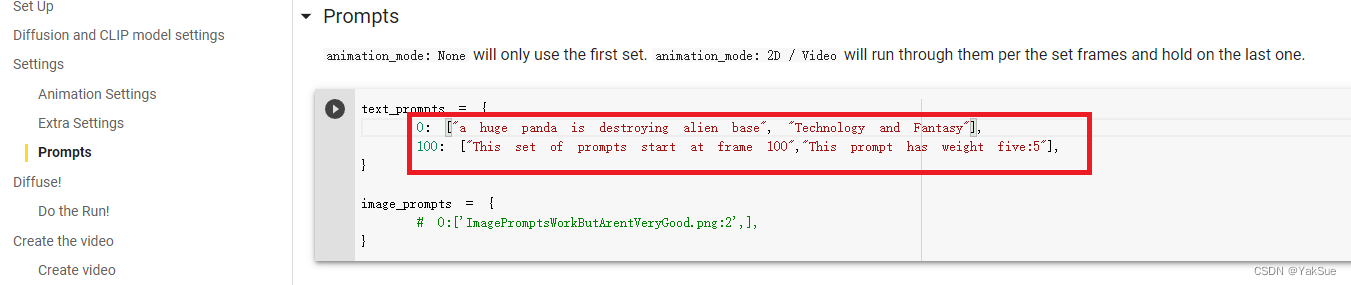
例如,我这里是:
“a huge panda is destroying alien base”, “Technology and Fantasy”
“大熊猫正在摧毁外星人基地”,“科技与奇幻”
4. 设置:显示间隔,批数目
这些设置在Diffuse中:
display_rate :没间隔几步就在Colab中显示
n_batches:总共运算几批(即输出几次完全不同的图片)
5. 开始运行!
在最上面,找到“全部运行”的按钮:
随后会弹出一些提示。
比如
还有些人机验证
还有关联GoogleDrive的提示:
等都搞定后,就开始运行这个文档中的代码了。
开始会需要几分钟等待安装所依赖的数据。
之后就可以在最下方看到计算的进展了:
6. 结果
运行完成后(大约经历了40分钟),就可以在自己的网盘中找到输出的图片了:
(其中 partials 文件夹存储了中间的过程)


评价下这个结果:
感觉 “外星人基地” 这感觉是有了,“熊猫”这个“巨大”的特征也能看出来,黑白的特征也能看出来,不过熊猫自己的细节,有点太抽象了(笑)。
总结
- 这个是基于 GoogleColab 的,所以最好了解下基础概念,(见前一篇)
- 到 DiscoDiffusion 的 GoogleColab地址,将其复制到自己的GoogleDrive网盘中。
- 打开自己网盘中的DiscoDiffusion副本,做最基础的设置,核心设置是 prompts。
- 点击运行,然后就可以在自己的GoogleDrive网盘中看到结果。
其他参考资料
新浪微博@Simon_阿文里有很多相关的资料,本篇的教程也是在这里看到的。
人工智能绘画工具 Disco Diffusion 入门教程 - 哔哩哔哩 也是一篇类似的中文教程,可以参考。
边栏推荐
- Keepalived 实现 Redis AutoFailover (RedisHA)17
- 史上最难618,TCL夺得电视行业京东和天猫份额双第一
- Tsinghua & Zhiyuan | cogview2: faster and better text image generation model
- The most difficult 618 in history, TCL won the first place in both jd.com and tmall.com shares in the TV industry
- 在连接数据库的时候遇到了点问题,请问怎么解决呀?
- Keepalived 实现 Redis AutoFailover (RedisHA)14
- memcached基础4
- The listing of Fuyuan pharmaceutical is imminent: the net amount raised will reach 1.6 billion yuan, and hubaifan is the actual controller
- Memcached Foundation
- Generate flow chart with code, and how to use markdown
猜你喜欢

3线spi屏幕驱动方式
Ml: a detailed introduction to the division of the top ten roles, backgrounds, responsibilities and outputs of the machine learning engineering team
Hid device descriptor and keyboard key value corresponding coding table in USB protocol

微博评论高性能高可用架构

Law of Large Numbers

XSS attack notes (Part 1)

Markdown table (consolidated)

理想L9产品力分析:售价45.98万,采用四缸发动机,续航1315公里
3線spi屏幕驅動方式
3-wire SPI screen driving mode
随机推荐
Keepalived 实现 Redis AutoFailover (RedisHA)17
Law of Large Numbers
Kept to implement redis autofailover (redisha) 11
CLIP:从自然语言监督中学习可迁移的视觉模型
Hid device descriptor and keyboard key value corresponding coding table in USB protocol
Recursion will make strtok more attractive
George Washington University: Hanhan Zhou | PAC: auxiliary value factor decomposition with counterfactual prediction in Multi-Agent Reinforcement Learning
1.44 inch TFT-LCD display screen mold taking tutorial
接口测试框架实战(一) | Requests 与接口请求构造
Custom class loader encrypts and decrypts classes
Esp32 experiment - self built web server distribution network 02
leetcode 1143. Longest Commom Subsequence 最长公共子序列(中等)
建模规范:环境设置
About Random Numbers
Reporting Classes中uvm_report_server的get_severity_count和get_server用法
Keepalived 实现 Redis AutoFailover (RedisHA)16
【毕业季】角色转换
Online text digit recognition list summation tool
SystemVerilog仿真速率提升
buuctf-pwn write-ups (6)