当前位置:网站首页>Sentinel integrated Nacos data source
Sentinel integrated Nacos data source
2022-06-25 11:30:00 【sermonlizhi】
1.1 install Sentinel Console
stay https://github.com/alibaba/Sentinel/releases Page download console jar package , Put it in a folder on the server
Start the console program with the following command ,-Dserver.port The specified port is 9010, If there is a port conflict , Other ports can be specified
java -Dserver.port=9010 -Dcsp.sentinel.dashboard.server=localhost:9010 -Dproject.name=sentinel-dashboard  -jar -Xms512m -Xmx512m -XX:+HeapDumpOnOutOfMemoryError  $APP_NAME >/dev/null 2>
&1 &
adopt http://localhost:9010 You can access the console , The user name and password are... By default sentinel/sentinel
1.2 To configure Sentinel
stay shop-user Modular pom Add the corresponding dependency to the file
<dependency>
    <groupId>com.alibaba.cloud</groupId>
    <artifactId>spring-cloud-starter-alibaba-sentinel</artifactId>
</dependency>
And then in yaml Configure the communication port between the client and the console and the console address in the file
spring:
  cloud:
    sentinel:
      transport:
      	# sentinel Communication port number between client and console ( The default is 8719, You can specify any )
        port: 8719
        dashboard: 120.79.221.55:9010
start-up shop-user application , Call any interface , You can go to sentinel The console sees shop-user Information about services
notes :sentinel It's lazy load mode , Only the interface is called , To see the service on the console , It can also be set spring.cloud.sentinel.eager:true, A heartbeat connection is established when the service is started
Detailed use reference :https://github.com/alibaba/spring-cloud-alibaba/wiki/Sentinel
1.3 Configuration persistence
stay Sentinel in , You can set various rules for each client through the console , But these rules are stored in memory by default , Every time the service is repeated , The configuration will be changed by , Not suitable for production environment . therefore Sentinel Provides pull and push Dynamic expansion of , These two methods correspond to different data sources
| Pattern | Support extended data sources | Get rule method | advantage | shortcoming |
|---|---|---|---|---|
| pull | Dynamic file data source 、Consul、Eureka | Poll regularly | Easy access | Poor real-time performance |
| push | Zookeeper、Redis、Nacos、Apollo | Monitoring rule changes | Uniformity , Real time high | It is complicated to synchronize rules to the data source |
With Sentinel Integrate Nacos Take data source as an example
stay shop-user Of pom Add the corresponding dependency to the file
<!-- sentinel Integrate nacos As a data source  -->
<dependency>
    <groupId>com.alibaba.csp</groupId>
    <artifactId>sentinel-datasource-nacos</artifactId>
</dependency>
Then configure the relevant properties of the data source in the configuration file , because spring.cloud.sentinel.datasource Attribute corresponds to a Map, So it needs to be customized Map Of KEY, In the following configuration ds Just as KEY, Then you can configure different data sources later
spring:
  cloud:
    sentinel:
      datasource:
        ds:
          nacos:
            server-addr: 127.0.0.1:8848
            namespace: 24712b7c-05ad-4b79-af97-1d202431f521
            dataId: shop-user-sentinel.json
            groupId: LZ_GROUP_MASTER
            rule-type: flow
            data-type: json
DataSourcePropertiesConfiguration You can see the attribute classes corresponding to different data sources in , You can refer to these attribute classes for specific parameters
public class DataSourcePropertiesConfiguration {


   private FileDataSourceProperties file;

   private NacosDataSourceProperties nacos;

   private ZookeeperDataSourceProperties zk;

   private ApolloDataSourceProperties apollo;

   private RedisDataSourceProperties redis;

   private ConsulDataSourceProperties consul;
}
And then in Nacos Create the configuration of flow restriction rules on the console of
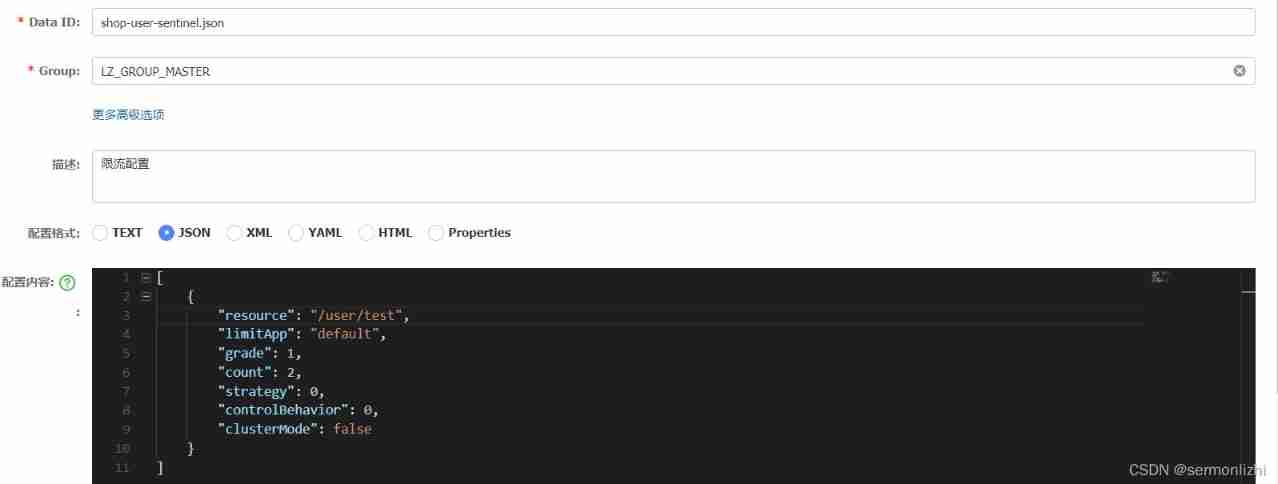
The configuration is as follows :
[
    {

        "resource": "/user/test",
        "limitApp": "default",
        "grade": 1,
        "count": 2,
        "strategy": 0,
        "controlBehavior": 0,
        "clusterMode": false
    }
]
- resource: Resource name , That is, the object of the current limiting rule
- limitApp: The call source of the flow control , if default It doesn't distinguish the source of the call
- grade: Current limiting threshold type (QPS Or the number of concurrent threads );0 It means to limit the flow according to the number of concurrent ,1 On behalf of QPS To control the flow
- count: Current limiting threshold
- strategy: Call relationship current limiting policy
- controlBehavior: Flow control effect ( Direct refused to 、Warm Up、 Line up at a constant speed )
- clusterMode: Is it cluster mode
Sentinel Console does not have synchronous modification Nacos The ability to configure , and Nacos Because you can use the Listener To automatically update . therefore , In the integration of Nacos After rule storage , You need to know that there are different effects of changes in the following two places :
Sentinel Modify rules in the console : Only exists in the memory of the service , Not modify Nacos Configuration value in , Restore the original value after restart .
Nacos Modify rules in the console : The in memory rules of the service are updated ,Nacos Persistence rules will also be updated , After restart, it still remains .
notes :《SpringCloudAlibaba Micro service principle and practice 》 This book provides Sentinel Console flow control rules to Nacos Synchronization of
In the configuration Sentinel The data source of , It must be in the back datasource Attribute followed by an extra string , As a data source Map Of KEY
边栏推荐
- Android: generic mapping analysis of gson and JSON in kotlin
- 杭州/北京内推 | 阿里达摩院招聘视觉生成方向学术实习生(人才计划)
- Presto Web UI introduction
- Wait (), notify (), notifyAll (), sleep (), condition, await (), signal()
- Comparator (for arrays.sort)
- Keywords serializable serialization and deserialization
- Hangzhou / Beijing neitui Ali Dharma academy recruits academic interns in visual generation (talent plan)
- Some assembly instructions specific to arm64
- CMU提出NLP新范式—重构预训练,高考英语交出134高分
- ZABBIX distributed system monitoring
猜你喜欢

Writing wechat applet with uni app

Leetcode 1249. 移除无效的括号(牛逼,终于做出来了)

Database Series: MySQL index optimization summary (comprehensive version)

CFCA Anxin sign access

基於Minifilter框架的雙緩沖透明加解密驅動 課程論文+項目源碼
Double tampon transparent cryptage et décryptage basé sur le cadre minifilter

基于超算平台气象预警并行计算架构研究

Introduction to JVM principle

Netease's open source distributed storage system curve officially became the CNCF sandbox project

Crawler scheduling framework of scratch+scratch+grammar
随机推荐
Kingbasees plug-in DBMS of Jincang database_ OUTPUT
Gaussdb cluster maintenance case set - slow SQL execution
GaussDB 如何统计用户sql的响应时间
Double buffer transparent encryption and decryption driven course paper + project source code based on minifilter framework
Niuke.com: Candy distribution
Keywords serializable serialization and deserialization
RPC typical framework
手机上股票开户安全吗?找谁可以开户啊?
How to use the markdown editor
Handler、Message、Looper、MessageQueue
A difficult mathematical problem baffles two mathematicians
推荐一款M1电脑可用的虚拟机软件
Netease's open source distributed storage system curve officially became the CNCF sandbox project
Very important very important very important very important very important very important very important very important very important
Spark history server and event log details
Spannable 和 Editable、SpannableString 和 SpannableString
Jincang database kingbasees plug-in force_ view
16 enterprise architecture strategies
金仓数据库 KingbaseES 插件dbms_session
try-catch-finally