当前位置:网站首页>ZABBIX distributed system monitoring
ZABBIX distributed system monitoring
2022-06-25 11:01:00 【A thought of going to war】
List of articles
Preface
As an operator , We need to learn to use the monitoring system to check the server status and website traffic indicators , Use the data of the monitoring system to understand the results released online , And the health status of the website .
Use an excellent monitoring software , We can :
- Browse all the server status of the whole website through a friendly interface
- Can be in Web The front end is convenient to view the monitoring data
- It can trace back to find the system problems and alarm conditions when the accident occurred
today , Introduce an enterprise class 、 Open source network monitoring system solution ------zabbix
One 、zabbix Introduce
1.1 zabbix What is it?
zabbix It's based on Web The interface provides enterprise level open source solutions for distributed system monitoring and network monitoring .
- zabbix Can monitor all kinds of network parameters , Ensure the safe operation of the server system ; And provide a flexible notification mechanism to allow system administrators to quickly locate / Solve all kinds of problems .
- zabbix from 2 Part of the form ,zabbix server With optional components zabbix agent. adopt C/S Mode acquisition data , adopt B/S Patterns in Web End display and configuration .
- zabbix server Can pass SNMP,zabbix agent,ping, Port monitoring and other methods are provided for remote servers / Monitoring of network status , Data collection and other functions , It can run in Linux Platforms such as .
- zabbix agent It needs to be installed on the monitored target server , It mainly completes the hardware information or memory related to the operating system ,CPU And so on .
1.2 zabbix Operation principle analysis
zabbix agent Installed on the monitored host ,zabbix agent Responsible for collecting local data of client regularly , And send it to zabbix server End ,zabbix server After receiving the data , Store data in database , User based zabbix WEB You can see the data showing the image in the front end . When zabbix Monitor a specific project , The project sets a trigger threshold , When the monitored indicator exceeds the reading value set by the trigger , Will do some necessary actions , Actions include : Send a message ( mail 、 WeChat 、 SMS )、 dispatch orders (shell command 、reboot、restart、install etc. ).

1.3 zabbix Five common procedures
- zabbix server:zabbix Server daemons , among zabbix_agent、zabbix_get、zabbix_sender、zabbix_proxy Most of the data are submitted to zabbix server;
- zabbix agent: Client daemons , Responsible for collecting client data , for example : collect CPU load 、 Memory 、 Hard disk usage, etc ;
- zabbix proxy:zabbix Distributed agent daemon , Usually greater than 500 Console host , Distributed monitoring architecture deployment is required ;
- zabbix get:zabbix Data receiving tools , Commands used alone , Usually in server perhaps proxy Command to obtain remote client information ;
- zabbix sender:zabbix Data sending tool , Users send data to server or proxy End , Usually, the user takes a long time to check .
Two 、Zabbix Deployment installation
2.1 Initial environment
| node | IP | Installation services |
|---|---|---|
| zabbix-server | 192.168.41.41 | |
| zabbix-agent | 192.168.41.42 |
systemctl stop firewalld && setenforce 0
2.2 Zabbix-Server
zabbix-server Memory at least 2G, recommend 4G;
# Change host name
hostnamectl set-hostname zbx-server && su
# obtain  zabbix  Download source
rpm -ivh https://mirrors.aliyun.com/zabbix/zabbix/5.0/rhel/7/x86_64/zabbix-release-5.0-1.el7.noarch.rpm
# Replace  zabbix.repo  For aliyuan
sed -i 's#http://repo.zabbix.com#https://mirrors.aliyun.com/zabbix#' /etc/yum.repos.d/zabbix.repo
# Installation services
yum install -y zabbix-server-mysql zabbix-agent
# install SCL(Software Collections), It is convenient for later installation of higher version of  php, Default  yum  Installed  php  Version is  5.4, Version is too low ,zabbix 5.0  Version pair  php  The minimum version is  7.2.0  edition .SCL  You can use multiple versions of software on the same machine , Without affecting the dependent environment of the whole system . The package will be installed in  /etc/opt/rh  Under the table of contents .
yum install -y centos-release-scl
# modify  zabbix-front  Front end source , install  zabbix  Front end environment to  scl  In the environment
vim /etc/yum.repo.d/zabbix.repo
[zabbix-frontend]
......
enabled=1          # Open the installation source

yum install -y zabbix-web-mysql-scl zabbix-apache-conf-scl

# install  zabbix  The required database
yum install -y mariadb-server mariadb

systemctl enable --now mariadb  # Start the database service immediately and add the startup and self startup
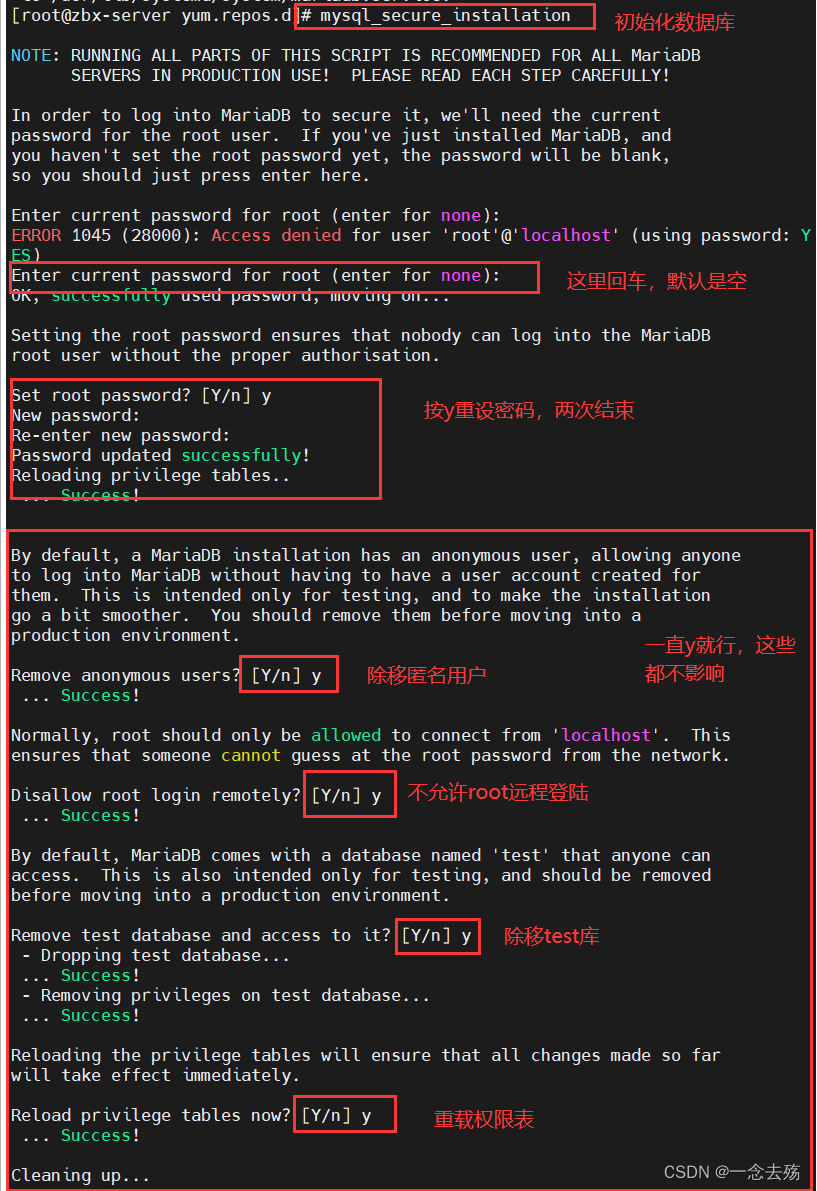
mysql_secure_installation         # Initialize database , And set the password , Such as  000000

# Add database users , as well as  zabbix  Required database information
mysql -u root -p000000

create database zabbix character set utf8 collate utf8_bin;

grant all on zabbix.* to 'zabbix'@'%' identified by 'zabbix';

flush privileges;

# Import database information
rpm -ql zabbix-server-mysql 		# Inquire about  sql  The location of the file

zcat /usr/share/doc/zabbix-server-mysql-*/create.sql.gz | mysql -uroot -p000000 zabbix

# modify  zabbix server  The configuration file , Change the password of the database
vim /etc/zabbix/zabbix_server.conf
......
DBPassword=zabbix					#124 That's ok , Appoint  zabbix  Database password

# modify  zabbix  Of  php  The configuration file
vim /etc/opt/rh/rh-php72/php-fpm.d/zabbix.conf
......
php_value[date.timezone] = Asia/Shanghai		#24 That's ok , uncomment , Change the time zone

# start-up  zabbix  Related services
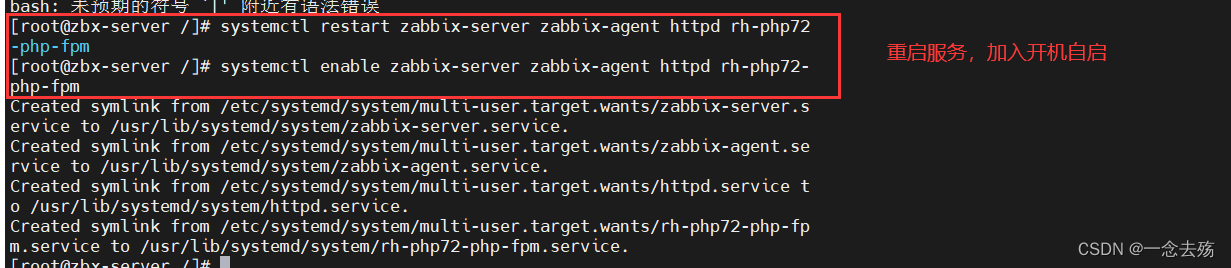
systemctl restart zabbix-server zabbix-agent httpd rh-php72-php-fpm
systemctl enable zabbix-server zabbix-agent httpd rh-php72-php-fpm

 Browser access :http://192.168.41.41/zabbix
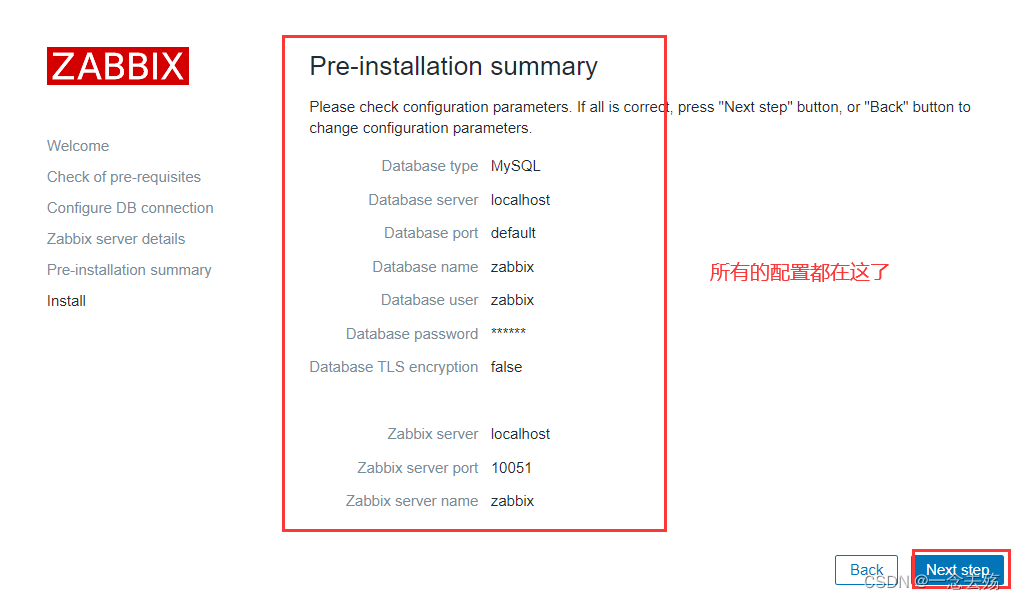
 Click next , Set the password of the database  zabbix
 After installation , The default login account and password are :Admin/zabbix
 Set the file interface : Click on the menu bar on the left 【User settings】,【Language】 choice  Chinese(zh_CN), Click again  Update  to update .

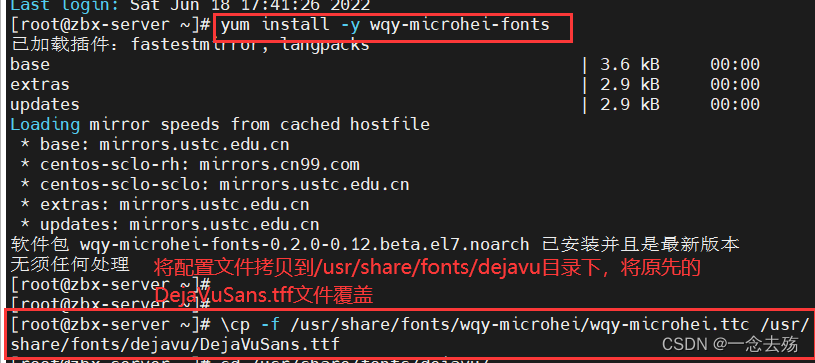
# solve  zabbix-server Web Page Chinese garbled problem
yum install -y wqy-microhei-fonts

\cp -f /usr/share/fonts/wqy-microhei/wqy-microhei.ttc /usr/share/fonts/dejavu/DejaVuSans.ttf








2.3 server-agent
zabbix 5.0 Version adopts golang A new version of language development client agent2 .
zabbix Server side zabbix_server By default 10051 port , client zabbix_agent2 By default 10050 port .
# The client modifies the host name
hostnamectl set-hostname zbx-agent01 && su
# Both the server and the client are configured with Alibaba cloud time synchronization
yum install -y ntpdate
ntpdate -u ntp.aliyun.com
# The client configures the time zone , Consistent with the server
mv /etc/localtime{
    ,.bak}
ln -s /usr/share/zoneinfo/Asia/Shanghai /etc/localtime
date
# Set up  zabbix  Download source , install  zabbix-agent2
rpm -ivh https://mirrors.aliyun.com/zabbix/zabbix/5.0/rhel/7/x86_64/zabbix-release-5.0-1.el7.noarch.rpm
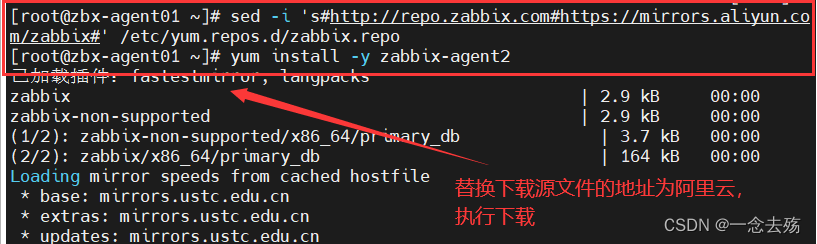
sed -i 's#http://repo.zabbix.com#https://mirrors.aliyun.com/zabbix#' /etc/yum.repos.d/zabbix.repo
yum install -y zabbix-agent2
# modify  agent2  The configuration file
vim /etc/zabbix/zabbix_agent2.conf
......
Server=192.168.41.41			#80 That's ok , Appoint  zabbix  Server side  IP  Address
ServerActive=192.168.41.41		#120 That's ok , Appoint  zabbix  Server side  IP  Address
Hostname=zbx-agent01			#131 That's ok , Specify the current  zabbix  Host name of the client

# start-up  zabbix-agent2
systemctl start zabbix-agent2
systemctl enable zabbix-agent2
netstat -natp | grep zabbix

# Verify... On the server side  zabbix-agent2  The connectivity of
 Switch to zabbix-server The server
yum install -y zabbix-get				# install  zabbix  Active data acquisition command
zabbix_get -s '192.168.41.42' -p 10050 -k 'agent.ping'
zabbix_get -s '192.168.41.42' -p 10050 -k 'system.hostname'
-------------------- Command interpretation -----------------------
zabbix_get:zabbix  Data receiving tools , Commands used alone , Usually in  server  perhaps  proxy  Command to obtain remote client information
-s: Designated host
-p: Designated port , Because it is a test client , So use 10050 port
-k: Specified key name
agent.ping:zabbix A built-in monitoring key
system.hostname: ditto
---------------------------------------------------
# stay  Web  Add... To the page  agent  host
 Click on the left menu bar 【 To configure 】 Medium 【 host 】, Click on 【 Create a host 】
【 Host name 】 Set to  zbx-agent01
【 Visible name 】 Set to  zbx-agent01-192.168.80.30
【 group 】 choice  Linux server
【Interfaces】 Of 【IP Address 】 Set to  192.168.80.30

 Then click on the menu bar above 【 Templates 】
【Link new tamplates】 Search for  Linux , choice  Template OS Linux by Zabbix agent
 Click on  【 add to 】




2.3 Custom monitoring content
Case study : Customize the number of login to the monitoring client server
demand : Limit the number of logins to no more than 3 individual , exceed 3 An alarm message will be sent out
# Create custom on the client side  key
1. Be clear about what needs to be done  linux  command
who | wc -l

2. establish  zabbix  Monitoring item configuration file , For customization  key
vim /etc/zabbix/zabbix_agent2.conf
# You can create a customized monitoring item configuration file in  zabbix_agent2.d  Directory
Include=/etc/zabbix/zabbix_agent2.d/*.conf   #268 Line assignment profile
##291 The format of the row custom monitor item is as follows , That is, the configuration file is written in this format
# Format: UserParameter=<key>,<shell command>

cd /etc/zabbix/zabbix_agent2.d/
vim User_login_num.conf
UserParameter=login.user,who|wc -l

systemctl restart zabbix-agent2   # Restart the service

3. Verify the newly created monitoring item on the server
zabbix_get -s '192.168.41.42' -p 10050 -k 'login.user'
-----------------------------------------------------------
# stay  Web  Page to create a custom monitor item template
1. Create a template
 Click on the left menu bar 【 To configure 】 Medium 【 Templates 】, Click on 【 Create a template 】
【 Template name 】 Set to  Template Login User
【 Visible name 】 Set to  Template Login User
【 group 】 choice  Template
【 describe 】 Customizable
 Click on  【 add to 】, At this point, you can 【 Linked templates 】 Search for  Template Login User  了

2. Create application set ( Used to manage monitored items )
 Click on the menu bar above 【 Application set 】, Click on 【 Create application set 】
【 name 】 Set to  Login User
 Click on  【 add to 】

3. Create monitor item
 Click on the menu bar above 【 Monitoring item 】, Click on 【 Create monitor item 】
【 name 】 Set to  Number of login users
【 Key value 】 Set to  login.user			# The key value must be consistent with that set in the user-defined monitoring item configuration file
【 Update interval 】 Set to  10s
【 How long the historical data is kept 】Storage period	30d		# The retention time can be customized
 Click on  【 add to 】

4. Create trigger ( When the monitored item obtains the monitored value, it is compared with the preset value of the trigger , Judge whether to alarm )
 Click on the menu bar above 【 trigger 】, Click on 【 Create trigger 】
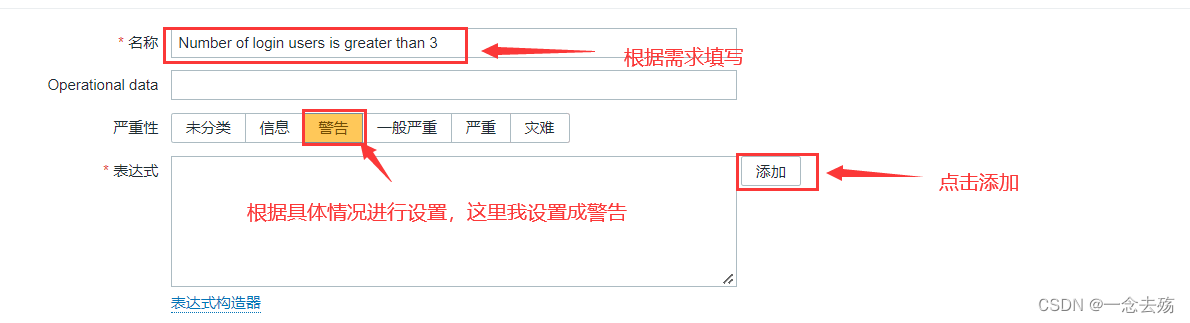
【 name 】 Set to  Number of login users is greater than 3
【 severity 】 Set to   Warning
【 expression 】 Click Add ,【 Monitoring item 】 Click Select  Number of login users,【 function 】 choice  last(),【 result 】 choice  > 3, Click on  【 Insert 】
 Click on  【 add to 】

5. Create graphics
 Click on the menu bar above 【 graphics 】, Click on 【 Create graphics 】
【 name 】 Set to  Number of login users
【 wide 】、【 high 】 The default value can be used directly
【 Monitoring item 】 Click Add and check relevant monitoring items  Number of login users,【 function 】 choice   Maximum , Others can keep the default value
 Click on  【 add to 】

6. Associate the host with the template ( A host can associate multiple templates )
 Click on the left menu bar 【 To configure 】 Medium 【 host 】, Click the host you want to associate
 Click on the menu bar above 【 Templates 】,【Link new tamplates】 Search for  login, choice  Template Login User, Click on 【 to update 】

 Click here 【 monitoring 】 Medium 【 host 】, Click your associated host 【 graphics 】, You can view the relevant monitoring items and indicators







2.4 Set mail alarm
 Click on the left menu bar 【 management 】 Medium 【 Alarm medium type 】, Click on 【 Create media type 】
【 name 】 Set to  qq_Email
【SMTP The server 】 Set to  smtp.qq.com
【SMTP Server port 】 Set to  25
【SMTP HELO】 Set to  qq.com
【SMTP Email 】 Set your email address , for example  934407250@qq.com
【 authentication 】 choice   User name and password
【 User name 】 Set to   My email address , for example  934407250@qq.com
【 password 】 You can log in QQ Email page , Click on 【 Set up 】-->【 Account 】 Medium 【 Generate authorization code 】, Get the authorization code through SMS
【 describe 】 Customizable
 Click on the menu bar above 【Message templates】, Click on 【 add to 】,【Message type】 choice   problem , Click on 【 to update 】
 Click on  【 add to 】, And test the function

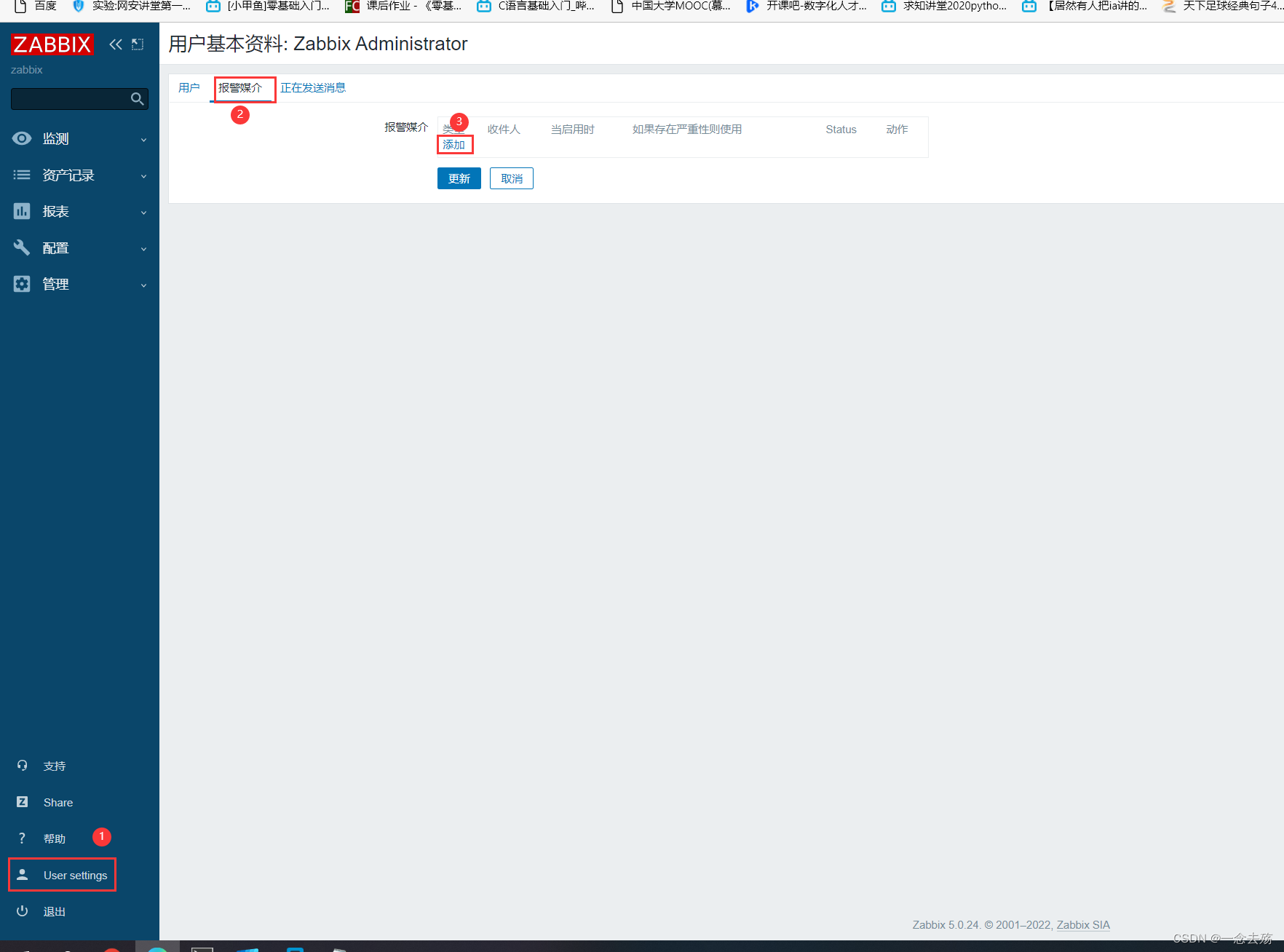
 Click on the left menu bar 【User settings】-->【 Alarm media 】, Click on 【 add to 】
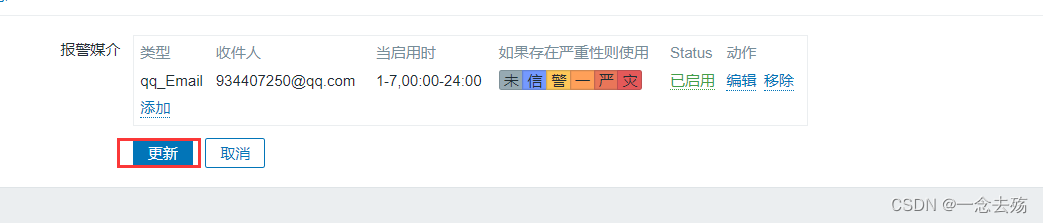
【 type 】 choice  qq_Email
【 The recipient 】 Set to  934407250@qq.com
【 When enabled 】 Set to  1-7,00:00-24:00
 Click on  【 add to 】
 Click again  【 to update 】

 Click on the left menu bar 【 To configure 】 Medium 【 action 】
 Select the corresponding action name and click to enter , Click on  【 add to 】
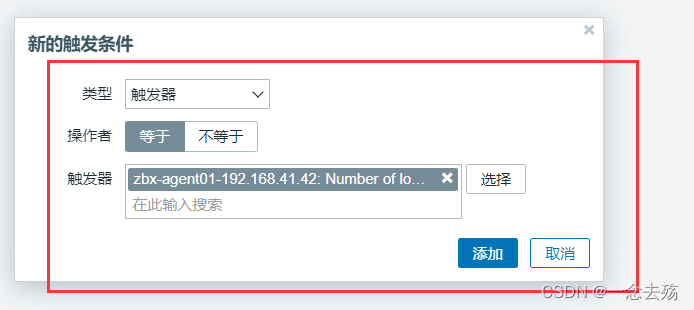
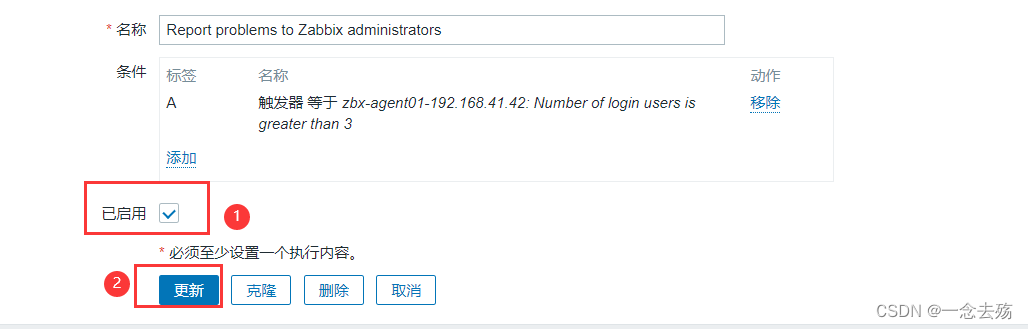
【 type 】 choice   trigger ,【 trigger 】 Click Select  Nunber of login users is greater than 3
 Click on 【 Enable 】

// Test email alarm
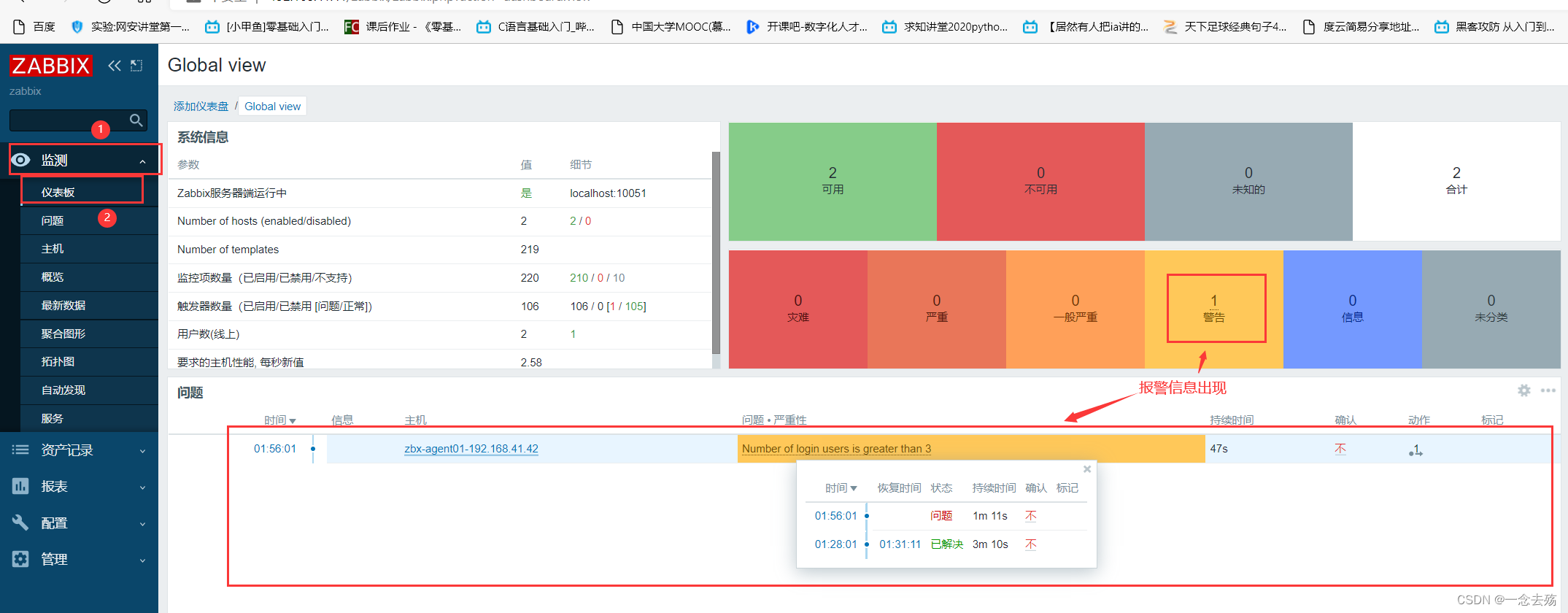
 Increasing the number of user logins on the test client exceeds the preset value of the trigger , see 【 monitoring 】-->【 The dashboard 】, Acknowledge the alarm








3、 ... and 、 summary
zabbix Port numbers of the server and client
Server side :10051
client :10050zabbix working principle
zabbix agent Installed on the monitored host ,zabbix agent Responsible for collecting local data of client regularly , And send it to zabbix server End ,zabbix server After receiving the data , Store data in database , User based Zabbix WEB You can see the data showing the image in the front end . When zabbix Monitor a specific project , The project sets a trigger threshold , When the monitored index exceeds the threshold set by the trigger , Will do some necessary actions , Actions include : Send a message ( mail 、 WeChat 、 SMS )、 dispatch orders (shell command 、reboot、restart、install etc. ).zabbix Five procedures and functions
- zabbix server:zabbix Server daemons , among zabbix_agent、zabbix_get、zabbix_sender、zabbix_proxy All the data will eventually be submitted to zabbix server;
- zabbix agent: Client daemons , Responsible for collecting client data , for example : collect CPU load 、 Memory 、 Hard disk usage, etc ;
- zabbix proxy:zabbix Distributed agent daemon , Usually greater than 500 Console host , Distributed monitoring architecture deployment is required ;
- zabbix get:zabbix Data receiving tools , Commands used alone , Usually in server perhaps proxy Command to obtain remote client information ;
- zabbix sender:zabbix Data sending tool , Users send data to server or proxy End , Usually, the user takes a long time to check .
边栏推荐
- Shardingsphere proxy 5.0 sub database and sub table (I)
- 【RPC】I/O模型——BIO、NIO、AIO及NIO的Rector模式
- Network protocol learning -- lldp protocol learning
- Performance memory
- Is it safe for Guosen Securities to open a securities account
- 1-7snapshots and clones in VMWare
- 好好思考
- Android之Kotlin语法详解与使用
- A random number generator
- Learn to learn self-study [learning to learn itself is more important than learning anything]
猜你喜欢
Flask blog practice - realize the latest articles and search in the sidebar

ES 学习

Ouverture de l'inscription | le troisième marathon des hackers de pagaie est arrivé comme prévu.

Android之Kotlin语法详解与使用

单片机开发---基于ESP32-CAM的人脸识别应用

【文件包含漏洞-03】文件包含漏洞的六种利用方式

网络远程访问的方式使用树莓派

SystemVerilog(十三)-枚举数据类型

Dell technology performs the "fast" formula and plays ci/cd
![[observation] objectscale: redefining the next generation of object storage, reconstruction and innovation of Dell Technology](/img/82/8cac87231e51698ab17f1274b3a0bd.jpg)
[observation] objectscale: redefining the next generation of object storage, reconstruction and innovation of Dell Technology
随机推荐
Nuxtjs actual combat case
Oracle彻底卸载的完整步骤
Network protocol learning -- lldp protocol learning
Floating window --- create a system floating window (can be dragged)
Learn to learn self-study [learning to learn itself is more important than learning anything]
FPGA displays characters and pictures based on VGA
Android:kotlin中Gson与JSON的泛型映射解析
【文件包含漏洞-03】文件包含漏洞的六种利用方式
Macro application connector\
单片机进阶---PCB开发之照葫芦画瓢(二)
【论文阅读|深读】DRNE:Deep Recursive Network Embedding with Regular Equivalence
Google Earth Engine (Gee) - evaluate réalise le téléchargement en un clic de toutes les images individuelles dans la zone d'étude (certaines parties de Shanghai)
【系统分析师之路】第六章 复盘需求工程(综合知识概念)
新学派:不诈骗经济学
Es learning
3 Questions par jour (3) - vérifier l'existence d'entiers et de leurs doubles
Flask blog practice - realize the latest articles and search in the sidebar
Identityserver4 definition concept
2022-06-24:golang选择题,以下golang代码输出什么?A:1;B:3;C:4;D:编译失败。 package main import ( “fmt“ ) func mai
[image fusion] image fusion based on morphological analysis and sparse representation with matlab code