当前位置:网站首页>网络远程访问的方式使用树莓派
网络远程访问的方式使用树莓派
2022-06-25 10:21:00 【Chleto】
一、软件准备
1.树莓派镜像
官网:Raspberry Pi OS – Raspberry P
2.SDCardFormatterv5i
SD Memory Card Formatter | SD Association (sdcard.org)
3.烧录工具Raspberry Pi
4.putty
Download PuTTY: latest release (0.77) (greenend.org.uk)
二、实现过程
打开下载好的SDCardFormatter将我们的SD卡进行格式化

进行烧录

打开sd卡建立一个空文本文件wpa_supplicant.conf
country=CN
ctrl_interface=DIR=/var/run/wpa_supplicant GROUP=netdev
update_config=1

network={
	ssid="你的无线网名称"
	psk="你的无线网密码"
	key_mgmt=WPA-PSK
	priority=1
}
将SD卡拔出插入树莓派并给树莓派接上电源,可以在手机上看到树莓派已经连入,查看树莓派的ip地址,可以下载一个Advanced IP Scanner,打开终端输入ipconfig,查看无线热点的IP地址,然后在IP Scanner中搜索


putty远程连接

进行树莓派配置sudo raspi-config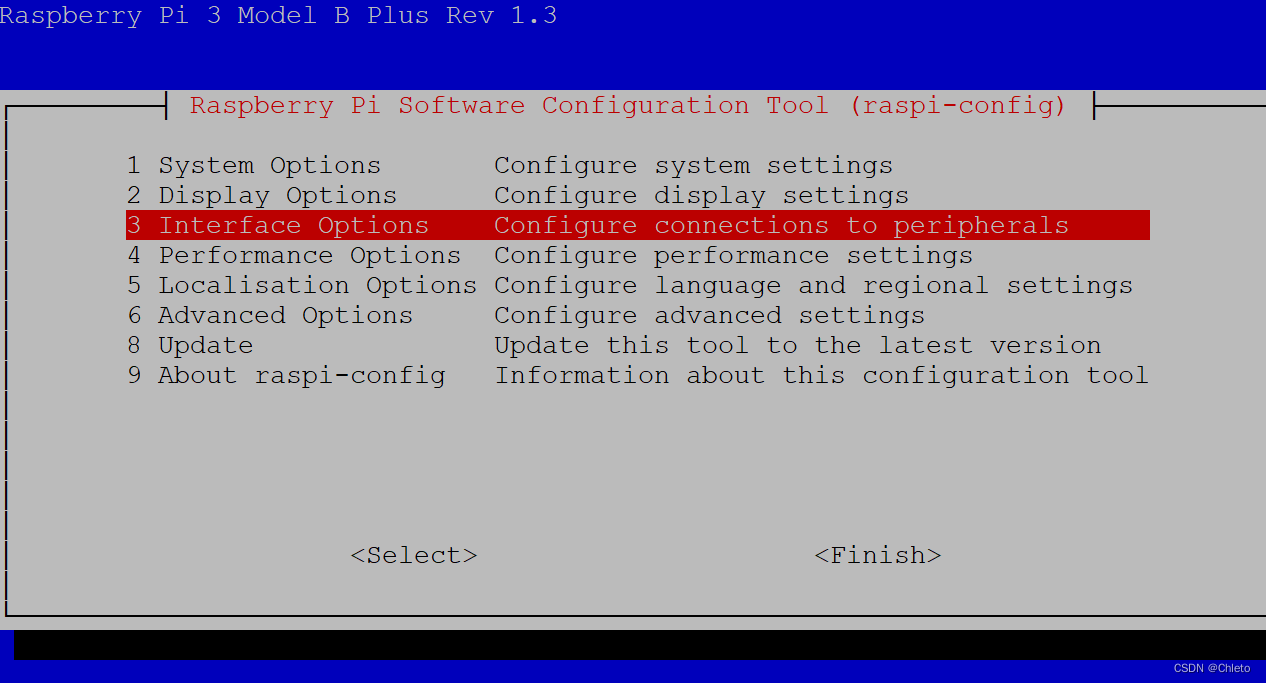
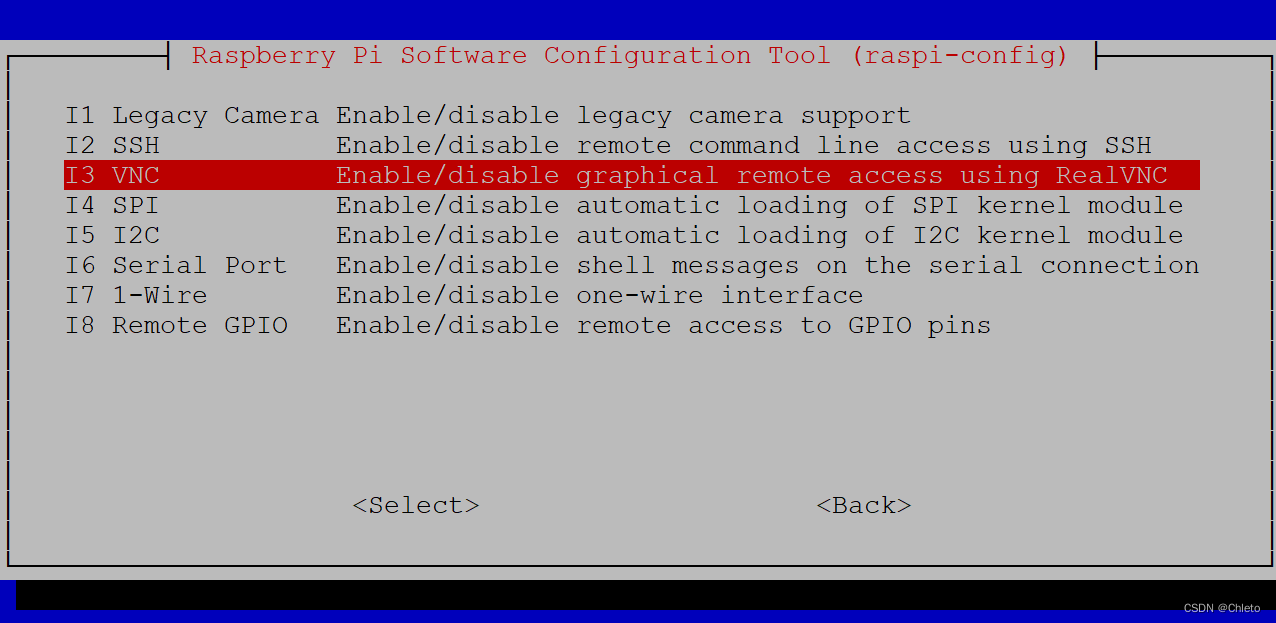

打开VNC Viewer
输入树莓派的ip,然后输入账户和密码

三、创建账号并在个人文件夹中创建assert断言c程序
1、创建用户

创建文件assert.c,在文件中输入
#include <assert.h>
#include <stdio.h>

int main()
{
   int a;
   char str[50];

   printf("请输入一个整数值: ");
   scanf("%d", &a);
   assert(a >= 10);

   printf("输入的整数是: %d\n", a);

   printf("请输入字符串: ");
   scanf("%s", str);
   assert(str != NULL);

   printf("输入的字符串是: %s\n", str);

   return(0);
}

使用gcc编译
四、使用scp命令在两台Linux系统之间传输数据
scp
scp是secure copy的简写, 是 linux 系统下基于 ssh 登陆进行安全的远程文件拷贝命令。scp 是加密的,rcp 是不加密的,scp 是 rcp 的加强版。
因为scp传输是加密的,可能会稍微影响一下速度。另外,scp还非常不占资源,不会提高多少系统负荷,在这一点上,rsync就远远不及它了。虽然 rsync比scp会快一点,但当小文件众多的情况下,rsync会导致硬盘I/O非常高,而scp基本不影响系统正常使用。
scp [-1246BCpqrv] [-c cipher] [-F ssh_config] [-i identity_file]
[-l limit] [-o ssh_option] [-P port] [-S program]
[[[email protected]]host1:]file1 [...] [[[email protected]]host2:]file2


//参数说明
-1: 强制scp命令使用协议ssh1
-2: 强制scp命令使用协议ssh2
-4: 强制scp命令只使用IPv4寻址
-6: 强制scp命令只使用IPv6寻址
-B: 使用批处理模式(传输过程中不询问传输口令或短语)
-C: 允许压缩。(将-C标志传递给ssh,从而打开压缩功能)
-p: 保留原文件的修改时间,访问时间和访问权限。
-q: 不显示传输进度条。
-r: 递归复制整个目录。
-v: 详细方式显示输出。scp和ssh(1)会显示出整个过程的调试信息。这些信息用于调试连接,验证和配置问题。
-c cipher:        以cipher将数据传输进行加密,这个选项将直接传递给ssh。
-F ssh_config:    指定一个替代的ssh配置文件,此参数直接传递给ssh。
-i identity_file: 从指定文件中读取传输时使用的密钥文件,此参数直接传递给ssh。
-l limit:         限定用户所能使用的带宽,以Kbit/s为单位。
-o ssh_option:    如果习惯于使用ssh_config(5)中的参数传递方式,
-P port:          注意是大写的P, port是指定数据传输用到的端口号
-S program:       指定加密传输时所使用的程序。此程序必须能够理解ssh(1)的选项。
边栏推荐
- XSS攻击
- OODA working method
- Oracle查询自带JDK版本
- tokenizers>=0.11.1,!= 0.11.3,<0.13 is required for a normal functioning of this module,
- [paper reading | deep reading] line: large scale information network embedding
- Is it safe to speculate in stocks by mobile phone?
- NuxtJS实战案例
- 在Microsoft Exchange Server 2007中安装SSL证书的教程
- NETCORE performance troubleshooting
- 【论文阅读|深度】Role-based network embedding via structural features reconstruction with degree-regularized
猜你喜欢

垃圾回收机制
Flask blog practice - realize the latest articles and search in the sidebar

Opencv learning (I) -- environment building

1-7Vmware中的快照与克隆

Flask博客实战 - 实现侧边栏文章归档及标签
![[paper reading | depth] role based network embedding via structural features reconstruction with degree regulated](/img/70/31a4eaec3f517089b220b35af2f3b7.png)
[paper reading | depth] role based network embedding via structural features reconstruction with degree regulated
【OpenCV 例程200篇】210. 绘制直线也会有这么多坑?

Mqtt beginner level chapter

我希望按照我的思路盡可能將canvas基礎講明白

ShardingSphere-Proxy 5.0 分库分表(一)
随机推荐
Opencv learning (I) -- environment building
Google Earth Engine(GEE)——evaluate实现一键批量下载研究区内的所有单张影像(上海市部分区域)
OODA工作法
Dell technology performs the "fast" formula and plays ci/cd
Basic use and principle of Minio
XSS攻击
一文了解Prometheus
Use of Siemens plcs7-200 (I) -- Introduction to development environment and configuration software
Opencv learning (II) -- installing opencv on raspberry pie
看完这篇 教你玩转渗透测试靶机Vulnhub——DriftingBlues-7
Houdini图文笔记:Could not create OpenCL device of type (HOUDINI_OCL_DEVICETYPE)问题的解决
数组结构整理
Linked list delete nodes in the linked list
Principle of distribution: understanding the gossip protocol
Is it safe to open a stock account on the compass?
Comparison and evaluation of digicert and globalsign single domain ov SSL certificates
WPF 绑定表达式和绑定数据源(一)
Macro application connector\
Difference between malloc and calloc
2022-06-24:golang选择题,以下golang代码输出什么?A:1;B:3;C:4;D:编译失败。 package main import ( “fmt“ ) func mai