当前位置:网站首页>Basic use and principle of Minio
Basic use and principle of Minio
2022-06-25 10:05:00 【@@Mr.Fu】
List of articles
One 、MinIo The core concept
- Concept
distributed file system , Referred to as OSS Object storage 【 file , picture …】.
Pictured :
Two 、MinIo Application scenarios
- Application scenarios
It is mainly used in micro service system .
Pictured :
3、 ... and 、MinIo Project landing
- Conditions
- Demo project
- MinIO
Download address :
link :https://pan.baidu.com/s/1x-xETi3hkmxbniJEFJkFyg
Extraction code :tbz9
- step
- Demo project
- step
add to Nuget package
// add to  Nuget package
 Minio
establish MinIo Client connection
MinioClient minioClient = new MinioClient("Ip Address : Port number "," user name "," password ");Create a file bucket
    //  Determine whether there is a file bucket
    if(!minioClient.BucketExistsAsync(" File bucket name ").Result)
    {
        minioClient.MakeBucketAsync(" File bucket name ");
    }
Upload object
    minioClient.PutObjectAsync(" File bucket name ", The name of the uploaded file , File stream , file length ).Wait();
    minioClient.PutObjectAsync(" File bucket name "," The name of the uploaded file "," File path 【D://... Path to file name . suffix 】").Wait();
    // Generate upload file link , Return the path of a generated file , You need to create a new one in the back-end system Access Key and Secret Key, Can be used ,
    // Change the user name and password of the client connection to Access Key and Secret Key, And set read and write permissions
    minioClient.PresignedPutObjectAsync(" File bucket name ", The name of the uploaded file , Expiration time 【 Company : second 】).Result;
Pictured :


Download objects
 minioClient.GetObjectAsync(" File bucket name ", File name , Output stream address ).Wait();
 minioClient.GetObjectAsync(" File bucket name ", File name , Where to start 【0】, Download length , Output stream address ).Wait();// Segmented download object
Delete object
- Single delete
minioClient.RemoveObjectAsync(" File bucket name ", Object name . suffix ); - Multiple deletions
minioClient.RemoveObjectAsync(" File bucket name ", Object name . Suffix set ).Wait();
- Single delete
Object Copy
minioClient.CopyObjectAsync(" Name of the original file bucket ", Source file name . suffix , " Destination file bucket name ", New file name . suffix ).Wait();
- The overall code is as follows
Upload files
   // Upload files
   public  IActionResult Upload(IFormFile fromFile)
   {
      // establish MinIo Client connection
      MinioClient minioClient = new MinioClient("127.0.0.1:9000","minioadmin","minioadmin");
      //  Determine whether there is a file bucket
      if(!minioClient.BucketExistsAsync("test").Result)
      {
        minioClient.MakeBucketAsync("test");
      }
      // Upload files
      minioClient.PutObjectAsync("test",fromFile.FileName,fromFile.OpenReadStream,fromFile.Length).Wait();
      return Ok (" File upload succeeded !");
   }
File upload link generation 【 The website server is not recommended to use 】
Purpose :MinIo Support upload 5TB The object of , But the website doesn't support uploading 5TB object , Therefore, the method of generating file upload link is adopted to solve , It is not recommended to use the website server to realize 【 The website server is not set key And signed api Method 】, It is recommended to use js Direct connection MinIo The way of client to upload large files .
newly build Access Key and Secret Key, And set read and write permissions , Pictured :

The code is as follows :
   // Upload files
   public  IActionResult UploadBigFile(IFormFile fromFile)
   {
      // establish MinIo Client connection
      MinioClient minioClient = new MinioClient("127.0.0.1:9000","Access Key","Secret Key");
      //  Determine whether there is a file bucket
      if(!minioClient.BucketExistsAsync("test").Result)
      {
        minioClient.MakeBucketAsync("test");
      }
      // Generate large file upload link , Return a file upload path
      string Url = minioClient.PresignedPutObjectAsync("test",fromFile.FileName,60*60*24).Result;
      return Ok (" File path generation succeeded !");
   }
Bulk file upload
     public IActionResult Upload(IFormFile[] formFiles)
     {
        foreach (var formFile in formFiles)
        {
            // establish MinIo Client connection
            MinioClient minioClient = new MinioClient("127.0.0.1:9000", "minioadmin", "minioadmin");
            //  Determine whether there is a file bucket
            if (!minioClient.BucketExistsAsync("test").Result)
            {
                minioClient.MakeBucketAsync("test");
            }
            // Generate large file upload link , Return a file upload path
            minioClient.PutObjectAsync("test", formFile.FileName, formFile.OpenReadStream(), formFile.Length);
        }
        return Ok(" File upload succeeded !");
     }
File download
- Single file download
// File download public IActionResult DownLoad(string fileName) { FileStreamResult fileStreamResult = null; try { // establish MinIo Client connection MinioClient minioClient = new MinioClient("127.0.0.1:9000","minioadmin","minioadmin"); var imaStream = new MemortStream() // Download the file minioClient.GetObjectAsync("test",fileName,stream=>{stream.CopyTo(imaStream)}).Wait(); imaStream.Position = 0; // Specify the object type fileStreamResult = new FileStreamResult(imaStream,"img/jpg"); } catch(Exception ex) { } return Ok (" File downloaded successfully !"); } - Segmented file download
// File download public IActionResult DownLoadShard(string fileName) { FileStreamResult fileStreamResult = null; try { // establish MinIo Client connection MinioClient minioClient = new MinioClient("127.0.0.1:9000","minioadmin","minioadmin"); var imaStream = new MemortStream() // Download files in segments Be careful : Numbers are byte units minioClient.GetObjectAsync("test",fileName,0,100,stream=>{stream.CopyTo(imaStream)}).Wait(); minioClient.GetObjectAsync("test",fileName,101,1000,stream=>{stream.CopyTo(imaStream)}).Wait(); imaStream.Position = 0; // Specify the object type fileStreamResult = new FileStreamResult(imaStream,"img/jpg"); } catch(Exception ex) { } return Ok (" File downloaded successfully !"); } - Delete file
/// <summary> /// Delete file /// </summary> /// <param name="fileName"></param> /// <returns></returns> [HttpDelete("{fileName}")] public IActionResult DeleteFile(string fileName) { // establish MinIo Client connection MinioClient minioClient = new MinioClient("127.0.0.1:9000", "minioadmin", "minioadmin"); // Determine whether there is a file bucket if (!minioClient.BucketExistsAsync("test").Result) { minioClient.MakeBucketAsync("test"); } // Generate large file upload link , Return a file upload path minioClient.RemoveObjectAsync("test", fileName); return Ok(" Delete successful !"); } - Delete files in bulk
/// <summary> /// Delete file /// </summary> /// <param name="fileName"></param> /// <returns></returns> [HttpDelete("DeleteBatchFile")] public IActionResult DeleteBatchFile(string[] fileNames) { // establish MinIo Client connection MinioClient minioClient = new MinioClient("127.0.0.1:9000", "minioadmin", "minioadmin"); // Determine whether there is a file bucket if (!minioClient.BucketExistsAsync("test").Result) { minioClient.MakeBucketAsync("test"); } // Generate large file upload link , Return a file upload path minioClient.RemoveObjectAsync("test", fileNames.ToList()).Wait(); return Ok(" Delete successful !"); } - Copy files
  /// <summary>
  ///  Copy file
  /// </summary>
  /// <param name="fileName"> Original file name </param>
  /// <param name="destFileName"> Name of copied file </param>
  /// <returns></returns>
  [HttpPost("FileCopy")]
  public IActionResult FileCopy(string fileName,string destFileName)
  {
      MinioClient minioClient = new MinioClient("127.0.0.1:9000", "minioadmin", "minioadmin");
      if (!minioClient.BucketExistsAsync("testnew").Result)
      {
          minioClient.MakeBucketAsync("testnew");
      }
      minioClient.CopyObjectAsync("test", fileName, "testnew", destFileName).Wait();
      return Ok(" Replication success !");
  }
- Single file download
- step
- start-up MinIO
Run the command
 # Execute the command under the root directory to start
 #minio.exe : Service start command
 #server: It is started as a server
 #--console-address ":9001": Change dynamic port to static port
 #D:\MinIo\data: Data directory
 minio.exe server --console-address ":9001" D:\MinIo\data
The results are as follows :

Verify that startup succeeded
visit http://10.1.57.35:9001, Pictured :
- Demo project
Four 、MinIo High availability of files
scene
- If the file is deleted by mistake , How to achieve high availability of files
- step
Use multiple data directories to store .
newly build 4 Data directory .- command
The operation result is as shown in the figure :minio.exe server --console-address ":9001" D:/Assembly/MinIo/data1 D:/Assembly/MinIo/data2 D:/Assembly/MinIo/data3 D:/Assembly/MinIo/data4
- command
- step
- If the file is deleted by mistake , How to achieve high availability of files
Erasure code
Concept
Erasure code is a data protection method , It divides the data into pieces , Expand redundant data blocks 、 code , And store it in different locations , For example, disk. 、 Storage node or other geographical location , Generally speaking, it is just a data coding .
It can be understood as splitting the object file , And then code it , Prevent any two copies of data from being lost .Implementation process
First split the object file into multiple copies , Encoding (2 Kind of code : Data coding and extension coding ).Purpose
Reduce the storage space of object files .How to ensure the recovery of object files by erasure code
Pictured :
If there is a file object , stay minIO Will be split into A1 and A2 Two copies of the same data , Then store the data as X1、X2、X3、X4 In the data file , Let them be equal to A1,A2,A1,A2; Let's assume that the data X1 and X2 Data lost , Then the data can be obtained from X3 and X4 To recover . But there will be problems with this storage : If data X1 and X3 Data lost , So the original data A1 It was completely recovered ; But you can use one of the following storage methods X1 and X2 Still the same ,X3 = A1+A2;X4=A1+2*A2, In this way, any two copies of data are lost , Can be recovered A1 and A2 了 , Pictured :
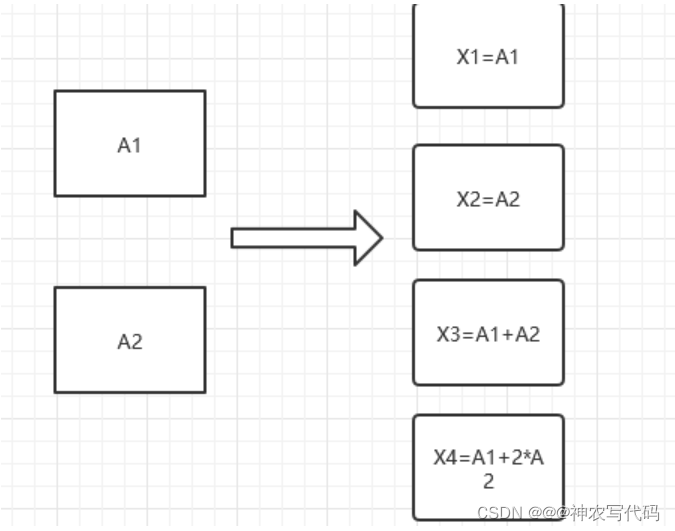
MinIo Using erasure codes
MinIo There are at least four data directories , And it's an even number of directories .- The rules
Half of the four data directories must be recovered without losing data . - Characteristics of erasure codes
Can recover any damaged data , such as : Delete by mistake , Disk damage , Disk poisoning, etc .
- The rules
5、 ... and 、MinIo File monitoring
Tools
- Mysql database
- MinIo
step
1、 open MinIo Background management system
2、 Click on Setting Catalog
3、 Click on Notification Catalog
4、 Click on Add Notification Target Button
5、 choice Mysql Databases or other databases ( The premise is to build the database manually ), Then input : Database IP Address , Database name , Database port number , Database user name and password , Database table name ( You don't have to create a new one manually );
6、 Then click save
7、 Restart... Again MinIo
8、 Associate the file bucket and send a message to the queue
command :# stay MinIo Execute... In the root directory # Establishing a connection mc.exe alias set Connection address alias 【 Pick up at will 】 http://10.1.57.35:9000 minioadmin minioadmin # Listen to a single associated file bucket mc event add --event "put,delete" Connection address alias / File bucket name arn:minio:sqs::_:mysqlPictured :


Realization principle
stay MinIo There will be a memory queue inside , Send to the database through the queue ;Mino Equivalent to producer —>MinIo Internal queues <— monitor –Mysql database ( consumer )
6、 ... and 、MinIo multi-tenancy
- Multiple services correspond to multiple MinIO
Just use different ports , And the data directory is different ;# stay MinIo Execute... In the root directory #9002 Minio API Connection port number #9003 MinIo Background management system port number #Window Environment minio.exe server --address :9002 --console-address ":9003" Data directory Data directory 1 #Linux Environment # Be careful : stay Linux Create a data directory in the system , If you have several data directories, you have to have several disks minio.exe server --address :9002 --console-address ":9003" Data directory { 1..4}
边栏推荐
猜你喜欢
![[buuctf.reverse] 117-120](/img/6c/8a90fff2bd46f1494a9bd9c77eeafc.png)
[buuctf.reverse] 117-120

WebApi性能优化

CYCA少儿形体礼仪 乐清市培训成果考核圆满落幕

How to "transform" small and micro businesses (II)?

Vscode attempted to write the procedure to a pipeline that does not exist

Remittance international empowers cross-border e-commerce: to be a compliant cross-border payment platform!

独步武林,架构选型手册(包含 PDF)
[buuctf.reverse] 117-120

Can two Mitsubishi PLC adopt bcnettcp protocol to realize wireless communication of network interface?

Learning notes of rxjs takeuntil operator
随机推荐
Kotlin advanced - class
Match a mobile number from a large number of mobile numbers
Neat Syntax Design of an ETL Language (Part 2)
Cocopod error failed: undefined method `map 'for nil:nilclass
Kotlin keyword and operator
Rxjs TakeUntil 操作符的学习笔记
Jetpack compose layout (IV) - constraintlayout
Redis(一)原理与基本使用
力扣-104. 二叉树的最大深度
An auxiliary MVP architecture project quick development library -mvpfastdagger
CyCa children's physical etiquette Yueqing City training results assessment successfully concluded
51 SCM time stamp correlation function
在指南针上面开股票账户好不好,安不安全?
8. Intelligent transportation project (1)
CyCa 2022 children's physical etiquette primary teacher class Shenzhen headquarters station successfully concluded
Grabcut image segmentation in opencv
Wearable devices may reveal personal privacy
BUG-00x bug description + resolve ways
‘Flutter/Flutter. h‘ file not found
manhattan_ Slam environment configuration