当前位置:网站首页>Jetpack compose layout (IV) - constraintlayout
Jetpack compose layout (IV) - constraintlayout
2022-06-25 09:52:00 【seevc】
The previous articles introduced layout related : Layout Basics 、Material Components and layout 、 Custom layout .
In this article, we will continue to introduce the last knowledge point of layout :Compose Use in ConstraintLayout.
ConstraintLayout It helps to place composable items on the screen according to their relative positions , Using multiple nesting Row、Column、Box And custom layout elements can be replaced by this layout . When implementing large layouts with complex alignment requirements ,ConstraintLayout It is useful to . similar Android View In the system ConstrantLayout Layout .
Use Compose Medium ConstraintLayout when , Need to be in build.gradle The following libraries are introduced into :
implementation "androidx.constraintlayout:constraintlayout-compose:1.0.0"
For specific version, please refer to :ConstraintLayout Version page
* notes : stay Android View The system uses ConstraintLayout To reduce layout nesting levels , Lifting performance , But in Compose UI There is no such problem in the system , It can efficiently handle deep layout hierarchies . So in Compose Whether to use ConstraintLayout It all depends on the developer's usage habits 、 Code legibility and maintainability .
Let's take a look at the usage :
Mode one : Use modifiers in composable items to set in-line
Use steps :
Step one 、 Use createRefs() or createRef() Create a reference associated with the component
Step two 、 By giving constraintAs Modifier sets the reference associated with it
Step three 、 call linkTo() Set constraints
parent Is an existing reference , Can be used to specify a pair of ConstraintLayout Constraints on composable items themselves .
example :
/**
 *  Mode one : Directly in ConstraintLayout Set constraint information internally in
 */
@Composable
fun StudyConstraintLayout(){
    ......
    // Constraint  Layout
    ConstraintLayout(
        modifier = Modifier.fillMaxSize()
    ) {
        // Step one 、 Use  createRefs()  or  createRef()  Create a reference associated with the component
        val (textTitle,tfUser,tfPassword,btnLogin,snack) = createRefs()

        Text(
            text = " Login screen ",
            modifier = Modifier
                // Step two 、 By giving constraintAs Modifier sets the reference associated with it
                .constrainAs(textTitle) {
                    // Step three 、 call linkTo() Set constraints
                    start.linkTo(parent.start)
                    end.linkTo(parent.end)
                    // Set the top constraint and margin
                    top.linkTo(parent.top,20.dp)
                }
        )
    ......
    }
}
Given the amount of sample code , Only part of the code is posted here , Detailed code (StudyConstraintLayout)
Running effect :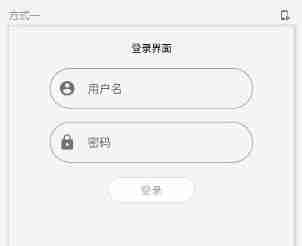
Mode two : Constraints and layout separation methods
In some cases we need to separate the constraints from the applied layout , Easy to use . Such as : Change constraints according to screen configuration , Or add animation effects between two constraint sets .
For such application scenarios, you can use ConstraintSet+Modifier.layoutId Combined way to achieve . The specific steps are as follows :
- Generate a
ConstraintSetobject , And pass it as a parameter toConstraintLayout; - Use
layoutIdThe modifier will be inConstraintSetReferences created in are assigned to composable items ;
Examples are as follows :
/**
 *  Mode two 、 By using ConstraintSet Set constraints
 */
@Composable
fun StudyConstraintSet(){
    val constraintSet = decoupledConstraints(0.dp)

    ConstraintLayout(constraintSet) {
        Button(
            onClick = { /* Do something */ },
            // Notification settings layoutId Implement control constraints
            modifier = Modifier.layoutId("button")
        ) {
            Text("Button")
        }

        Text("Text", Modifier.layoutId("text"))
    }
}

/**
 *  Create a ConstraintSet example
 */
private fun decoupledConstraints(margin:Dp):ConstraintSet{
    return ConstraintSet {
        val button = createRefFor("button")
        val text = createRefFor("text")

        constrain(button){
            top.linkTo(parent.top)
        }

        constrain(text){
            top.linkTo(button.bottom,10.dp)
        }
    }
}
// preview
@Preview(name = " Mode two  ConstraintSet")
@Composable
fun PreviewStudyConstraintLayout2(){
    StudyConstraintSet()
}
design sketch :
Come here Compose Of ConstrantLayout The content has been introduced .
Welcome to leave a message , Learning together , Common progress !
边栏推荐
- Force buckle -104 Maximum depth of binary tree
- 处理图片类库
- Flutter replaces the default icon of Gaud positioning
- Neo4jdesktop (neo4j desktop version) configures auto start (boot auto start)
- Work of the 15th week
- manhattan_ Slam environment configuration
- [competition - Rural Revitalization] experience sharing of Zhejiang Rural Revitalization creative competition
- Learning notes of rxjs takeuntil operator
- puzzle(019.2)六边锁
- Reza RA series - development environment construction
猜你喜欢
Summarize two methods of configuring pytorch GPU environment

Remittance international empowers cross-border e-commerce: to be a compliant cross-border payment platform!

Rxjs TakeUntil 操作符的学习笔记

The gradle configuration supports the upgrade of 64 bit architecture of Xiaomi, oppo, vivo and other app stores

Reza RA series - development environment construction
![[MySQL learning notes 22] index](/img/08/db7b765f7ddaa5706e3f7d00690d23.png)
[MySQL learning notes 22] index

How to "transform" small and micro businesses (I)?

manhattan_ Slam environment configuration

Neo4jdesktop (neo4j desktop version) configures auto start (boot auto start)
![[matlab] image binarization (imbinarize function)](/img/3e/066f460d9f436bbc43ea35e46093e2.jpg)
[matlab] image binarization (imbinarize function)
随机推荐
广发证券靠谱吗?是否合法?开股票账户安全吗?
从海量手机号中匹配某一个手机号
Use Navicat to compare data differences and structure differences of multi environment databases, and automatic DML and DDL scripts
Neat Syntax Design of an ETL Language (Part 2)
力扣-104. 二叉树的最大深度
How to "transform" small and micro businesses (I)?
The gradle configuration supports the upgrade of 64 bit architecture of Xiaomi, oppo, vivo and other app stores
51 SCM time stamp correlation function
Test Development Engineer
Wechat official account can reply messages normally, but it still prompts that the service provided by the official account has failed. Please try again later
Match a mobile number from a large number of mobile numbers
Use evo
Pytorch_Geometric(PyG)使用DataLoader报错RuntimeError: Sizes of tensors must match except in dimension 0.
puzzle(019.2)六边锁
Shuttle JSON, list, map inter transfer
Online notes on Mathematics for postgraduate entrance examination (9): a series of courses on probability theory and mathematical statistics
[MySQL learning notes 20] MySQL architecture
How much money have I made by sticking to fixed investment for 3 years?
Is it safe to open an account online? Who can I ask?
Pytorch_ Geometric (pyg) uses dataloader to report an error runtimeerror: sizes of tenants must match except in dimension 0