当前位置:网站首页>Use of Siemens plcs7-200 (I) -- Introduction to development environment and configuration software
Use of Siemens plcs7-200 (I) -- Introduction to development environment and configuration software
2022-06-25 10:21:00 【Fat brother, Miss Wang】
background
I have been doing industrial control development for several years , The entity's PLC Not much contact , Among them, Siemens s7-200 Count as PLC Products widely used in , So the recent project involves this production , Let's learn how to do simple PLC Programming and configuration software debugging .
Hardware
SIMATIC S7, CPU-200 SMART, 6ES7 288-1ST20-0AA1, Some treasure 700 many , Something 2000 many , The key is a piece of paper .
Three in the upper right corner IO It is the power connection port .

Power Supply 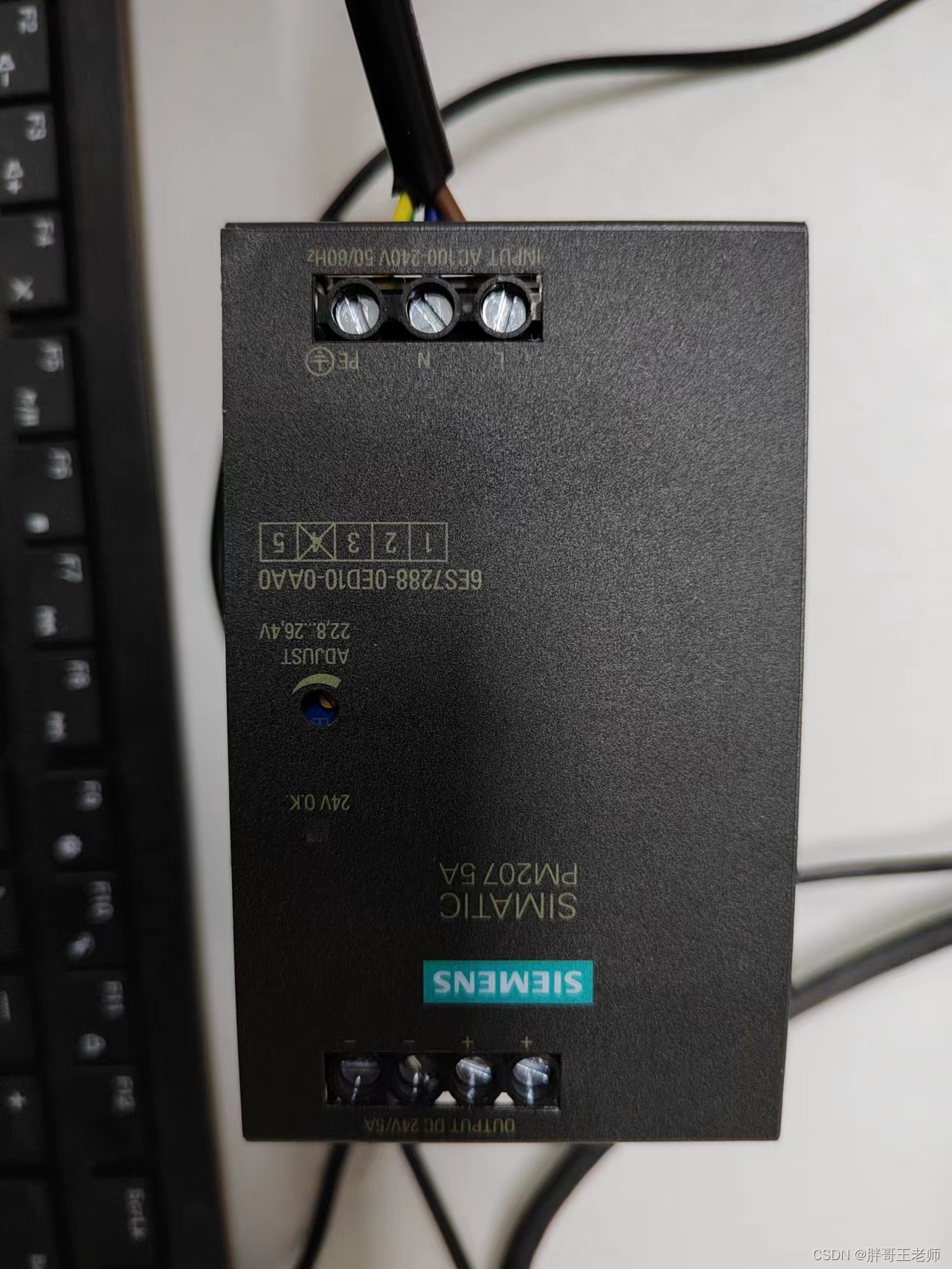
This is a matching one 24V Power Supply , It feels really good , Heavy , No loss is an official product .
Wiring way :
24V just ----------------L+
24V negative ----------------M
Then connect the Ethernet port of the computer PLC Of the Internet .
Software
The software used is the official tool of Siemens , The software can be downloaded from the official website
Download address
Programming software and configuration software are mainly used .
STEP 7- Micro/WIN SMART yes S7-200 SMART Programming software based on . Support Windows 7 or Windows 10, The installation file is smaller than 300 MB, Integrate Modbus ,USS,PROFINET, Motion control and other library instructions .
PC Access SMART yes S7-200 SMART Communication with host computer OPC Software . With this software , The operator can easily read through the upper computer S7-200 SMART The data of , So as to realize equipment monitoring or data archiving management .
Download the above two software from the website , And install . It doesn't need any cracking at all ……
STEP 7- Micro/WIN SMART
This is programming software , After running , First of all PC To work with plc Establishing a connection .

Then you can search 192.168.2.1 Of PLC 了 , The default address is usually this . If you want to establish a connection , Yours PC Must be set to the same network segment IP Address . That doesn't explain it .
Then we can write a simple test program , Download Software , see PLC Can it work properly .
Refer to the user manual , The following ladder program is written 
The general effect is , Timer 2s, stay 1s When Q0.0 Output high level , stay 2s When ,M0.0 Reset timer . The combined result is Q0.0 every other 1s Lighten up , Another time 1s Extinguish . Don't ask me why I understand , Because I don't understand either 
Then program burning 

Then the light starts flashing 
As for other programming methods , You need to learn by yourself , After all, I'm just a novice .
The configuration software uses
After running the software , First, select the network card , Click on the network interface card , Choose the network card you use 
Then build PLC, Interface and Step7 It's the same . Look up your PLC
After finding it , Right click in the space on the right , Insert entry 
Here is a new read Q0.0 The operation of 
Then add the entry to the following test client

Finally, open the test client 
See the following values in 0 and 1 Change between 

The simple configuration is completed . It's said that the configuration software on tall buildings needs to be charged , I don't dare to ask 
Data download
Siemens s7-200 Chinese user manual
Conclusion
Today, I saw a news that a student of Xi'an University of Electronic Science and technology was informed after recruiting a representative , Also think of now C The Q & a part of the station , Most of them are college students who ask questions , Find someone else to help with the design and problems , He even offered money to solve , I always think this is not a good phenomenon .
I watched a teaching video of Professor Guo Chengcheng at noon today , Talked about the mental outlook of college students in the new era , Treat western countries , Be able to look at them head on , Keep your eyes wide open , Think about , This is a good start , No longer worship or even kneel as before .
But the attitude of learning , Be pragmatic , If you want to look down on others , You have to have real skills , Otherwise, it's just blind arrogance . The gap between us and the west is still obvious , It even takes decades to catch up . As the hope of the motherland , Do a simple programming problem , Also come online to post , What else did you learn .
边栏推荐
- Mqtt beginner level chapter
- 在Microsoft Exchange Server 2007中安装SSL证书的教程
- Etcd tutorial - Chapter 4 etcd cluster security configuration
- 如何在Microsoft Exchange 2010中安装SSL证书
- 西门子PLCS7-200使用(一)---开发环境和组态软件入门
- How to apply for a widget on wechat how to get a widget on wechat
- Jetpack compose layout (III) - custom layout
- WebApi性能优化
- SQL to object thinking vs SQL of object thinking
- I have summarized the knowledge points of JS [intermediate and advanced] for you
猜你喜欢

manhattan_ Slam environment configuration

How to do the wechat selling applet? How to apply for applets

Modbus协议与SerialPort端口读写
【OpenCV 例程200篇】210. 绘制直线也会有这么多坑?

How to develop wechat applet? How to open a wechat store

Tiktok brand goes to sea: both exposure and transformation are required. What are the skills of information flow advertising?
MongoDB的原理、基本使用、集群和分片集群

Basic use and cluster construction of consult
Flask blog practice - realize the latest articles and search in the sidebar

Mengyou Technology: six elements of tiktok's home page decoration, how to break ten thousand dollars in three days
随机推荐
Basic use and cluster construction of consult
Tutorial on installing SSL certificates in Microsoft Exchange Server 2007
P2P network core technology: Gossip protocol
我希望按照我的思路盡可能將canvas基礎講明白
Use evo
ShardingSphere-Proxy 5.0 分库分表(一)
Jetpack compose layout (III) - custom layout
Create menu file
Force buckle -104 Maximum depth of binary tree
Jetpack compose layout (IV) - constraintlayout
CyCa children's physical etiquette Yueqing City training results assessment successfully concluded
SparseArray details
Redis (II) distributed locks and redis cluster construction
[RPC] i/o model - Rector mode of bio, NiO, AIO and NiO
Bitmap is converted into drawable and displayed on the screen
Principle of distribution: understanding the gossip protocol
Kotlin common standard functions
(forwarding articles) after skipping multiple pages, shuttle returns to the first page and passes parameters
MongoDB的原理、基本使用、集群和分片集群
【动态规划】—— 数字三角形