当前位置:网站首页>Opencv learning (I) -- environment building
Opencv learning (I) -- environment building
2022-06-25 10:21:00 【Fat brother, Miss Wang】
Learning goals
Occasionally looked at the recruitment , Many enterprises have some requirements for audio and video , Then enter the door first , Whole opencv To learn , The camera of the raspberry pie I just bought has arrived ,usb The camera has arrived , There is also a single-chip camera module , Learn all about , Now the environment is not good , Workers , It still needs to be more cost-effective , To find the way .
I didn't say I was leaving , Don't think much .
Installation environment
I studied under the virtual machine , Installation is ubuntu22.04 Version of .
System download address
First installed ssh service
sudo apt-get install openssh-server
This is not installed primarily to use command-line Software , It's about winscp It's easier to copy things .
Install pre dependency Software
sudo apt-get install cmake gcc g++ python3-dev python3-numpy libavcodec-dev libavformat-dev libswscale-dev libgstreamer-plugins-base1.0-dev libgstreamer1.0-dev libgtk-3-dev
Install some image dependent Libraries :
sudo apt-get install libpng-dev libjpeg-dev libopenexr-dev libtiff-dev libwebp-dev
download opencv Source code
git clone https://gitclone.com/github.com/opencv/opencv
Compile source code
cd opencv
mkdir build
cd bulid
cmake ../
Probably need 2 Hours , Bloggers who refer to blogs spend five hours , It seems that my computer is still rich 
Final installation
sudo make install
Then roll back printing , Check it out. cv2 Installation position of 
Then the output python3 Let's see if the environment is included
 python3 -c "import sys; print(sys.path)"
['', '/usr/lib/python310.zip', '/usr/lib/python3.10', '/usr/lib/python3.10/lib-dynload', '/home/xxx/.local/lib/python3.10/site-packages', '/usr/local/lib/python3.10/dist-packages', '/usr/lib/python3/dist-packages']
/usr/local/lib/python3.10/dist-packages Included , Just right , There is no need to add .
install pip
pip Mainly for python Install the module using
apt-get install python3-pip
install matplotlib modular
python3 -m pip install -U matplotlib
Matplotlib yes Python Drawing library of , It makes it easy for users to graph data , And provide a variety of output formats .
Matplotlib It can be used to draw all kinds of static , dynamic , Interactive charts .
Matplotlib It's a very powerful one Python drawing tools , We can use this tool to present a lot of data more intuitively in the form of charts .
Matplotlib You can draw a line diagram 、 Scatter plot 、 Contour map 、 Bar chart 、 Histogram 、3D graphics 、 Even graphic animation and so on .
Program testing
A test program , Pay attention to it python3 Command line
import matplotlib
import numpy as np
import cv2
from matplotlib import pyplot as plt
img = cv2.imread('/home/sunjin/work/123.jpg',0)
plt.imshow(img, cmap = 'gray', interpolation = 'bicubic')
plt.xticks([]), plt.yticks([])  # to hide tick values on X and Y axis
plt.show()
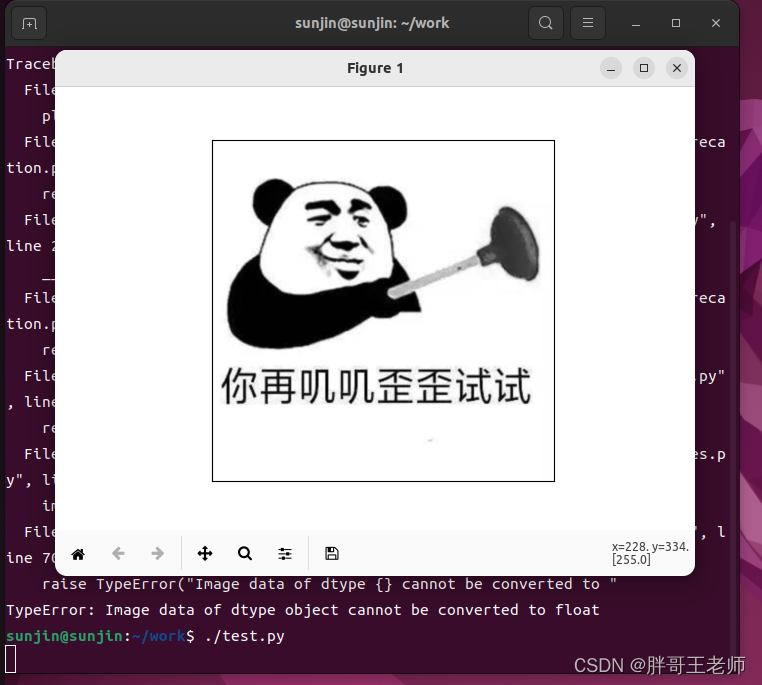
Because it is grayscale display , So the head of the plunger turned gray
The original picture is this 
Camera test
First, configure the in the virtual machine USB To configure , Change it to 3.0.
then USB The device is connected to the virtual machine , That is, disconnect from the host .
#!/usr/bin/python3
#1. introduce cv2
import cv2

#2. The main function
#if __name__ == '__main__':

#3. Turn on the laptop camera
cap = cv2.VideoCapture(0)
assert cap.isOpened(), 'Cannot capture source' # If the camera does not open normally, an error is reported

#4. If the camera can be turned on, the image frame can be obtained , Display images
while cap.isOpened():
    #read() Function returns two parameters , The first parameter is bool value , Indicates whether the image is obtained ,
    # The second parameter is the current frame image
    ret, frame = cap.read()
    #  Flip the acquired water products in the current frame
    #  The second parameter : 1  Indicates a horizontal flip ; 0  Indicates a vertical flip ;  Less than 0  Indicates a horizontal or vertical flip
    frame = cv2.flip(frame,1)
    cv2.imshow('mycreame',frame)  # Displays the current frame
    if ( cv2.waitKey(30)  == 27 ):   # Press down Esc Key to exit  waitKey() Method to wait for keyboard input , The unit is millisecond
        break
#5. Close all windows
cv2.destroyAllWindows()
Partial screenshots , So as not to cause discomfort 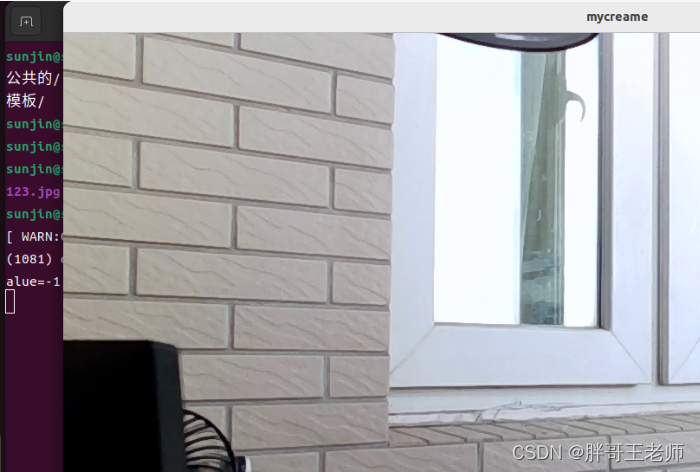
everything , All I owe is study 
Reference blog
B Standing Octopus radish cat 《Ubuntu Compile and install under environment OpenCV-Python》
Conclusion
Today, the epidemic situation in Haidian has been upgraded , All employees work at home , Everyone's life pressure is getting bigger again . Always say you don't want to go to work , If you really don't go to work , According to the minimum standard of treatment in Beijing , It's time to feel bad again .
therefore , It's an old saying , Study , Never betray you , Our leaders said , If the company asks me not to come tomorrow , I can always find my next job , True or false, no judgment , But this confidence , Or we all have to learn . What confidence comes from ? It has to be ability , What are we waiting for? , It's over .
边栏推荐
- Houdini图文笔记:Could not create OpenCL device of type (HOUDINI_OCL_DEVICETYPE)问题的解决
- 西门子PLCS7-200使用(一)---开发环境和组态软件入门
- Modbus protocol and serialport port read / write
- Mongodb's principle, basic use, clustering and partitioned clustering
- clang frontend command failed with exit code 250
- 字符串 最长公共前缀
- Byte interview: under what scenario will syn packets be discarded?
- DDS learning notes of opendds
- This is enough for request & response
- SQL to object thinking vs SQL of object thinking
猜你喜欢

Shardingsphere proxy 4.1 sub database and sub table

Redis(二)分布式锁与Redis集群搭建

Basic usage and principle of schedulemaster distributed task scheduling center

WPF Prism框架

How to make small programs on wechat? How to make small programs on wechat
虚幻引擎图文笔记:使用VAT(Vertex Aniamtion Texture)制作破碎特效(Houdini,UE4/UE5)上 Houdini端

Flask blog practice - archiving and labeling of sidebar articles

Jetpack compose layout (II) - material components and layout
Shardingsphere proxy 4.1 Sous - base de données sous - table

NetCore性能排查
随机推荐
Is GF Securities reliable? Is it legal? Is it safe to open a stock account?
字符串 实现 strStr()
Flask博客实战 - 实现侧边栏最新文章及搜索
【动态规划】—— 数字三角形
Jetpack compose layout (II) - material components and layout
Android database security: after the user exits, the transaction rollback log still stores relevant data information
Free platform for wechat applet making, steps for wechat applet making
Bitmap is converted into drawable and displayed on the screen
Jetpack compose layout (III) - custom layout
The real difference between i++ and ++i
Houdini图文笔记:Could not create OpenCL device of type (HOUDINI_OCL_DEVICETYPE)问题的解决
Learning notes of rxjs takeuntil operator
Mengyou Technology: six elements of tiktok's home page decoration, how to break ten thousand dollars in three days
Summary of considerations for native applet development
Shuttle JSON, list, map inter transfer
我希望按照我的思路尽可能将canvas基础讲明白
Unique Wulin, architecture selection manual (including PDF)
Use evo
ScheduleMaster分布式任务调度中心基本使用和原理
[dynamic planning] - Digital triangle