当前位置:网站首页>Mongodb's principle, basic use, clustering and partitioned clustering
Mongodb's principle, basic use, clustering and partitioned clustering
2022-06-25 10:05:00 【@@Mr.Fu】
List of articles
One 、MongoDB Core concept of
Concept
MongoDB It's a document database , Storage is similar json Of Bosn file .
json And Bosn difference- The same thing
The format is the same . - Difference
json Cannot define data type .Bosn You can define specific data types .
- The same thing
MongoDB Compared with traditional database
SQL The term / Concept MongoDB The term / Concept interpretative statement database database database table collection Database table \ aggregate row document That's ok \ file colum field Data field \ Domain index index Indexes table joins Table joins \MongoDB No table connection primary key primary key Primary key \MongoDB Automatically put _id Field set primary key
Two 、MongoDB Application scenarios of
scene
It is mainly used in micro service system .Microservices + Database way
Pictured :
defects
If the client obtains both product information and order information , Two microservice queries will be issued at the same time to obtain data .
1、 If one of the microservices goes down , Unable to query data
2、 If the client queries a large amount of data , This will cause performance problems in the system .programme
Use MongoDB; Pictured :
3、 ... and 、MongoDB Project implementation
- Conditions
- Demo Microservices
- MongoDB
link :https://pan.baidu.com/s/15WGk6KzjpLUnuIqWNN8YjA
Extraction code :gevi - MongoDB Compass
link :https://pan.baidu.com/s/14PQmbyKiRAkE9ePzo2LXjg
Extraction code :cul2
- step
install MongoDB




function Mongodb
D:\SoftWare\MogoDB\bin>mongod.exe --config "D:\SoftWare\MogoDB\bin\mongod.cfg"The operation result is as shown in the figure :

MongoDB Compass Installation free
Go directly to the root directory , function MongoDBCompass.exe that will do .
Click on Connect, Pictured :
install Nuget package
MongoDB.DriverProject implementation
- newly build Person Classes and IPersonServer Interface class
PersonServer Implementation class
IPersonServer Interface classusing MongoDB.Driver; namespace MongoDB.Demo.Server { public class PersonServer : IPersonServer { private readonly IMongoCollection<Person> mongoCollection; public PersonServer() { var client = new MongoClient("mongodb://localhost:27017"); mongoCollection = client.GetDatabase("PersonDB").GetCollection<Person>("person"); } /// <summary> /// Add data /// </summary> /// <param name="per"></param> public void Create(Person per) { mongoCollection.InsertOne(per); } } }namespace MongoDB.Demo.Server { public interface IPersonServer { void Create(Person per); } } - Create a new instance class Person
using MongoDB.Bson; using MongoDB.Bson.Serialization.Attributes; using System; namespace MongoDB.Demo { public class Person { // Set up self growth ID [BsonId] [BsonRepresentation(BsonType.ObjectId)] public string Id { get; set; } public string Name { get; set; } public string Sex { get; set; } public int Age { get; set; } public string CreateById { get; set; } public DateTime CreateByTime { get;set;} } } - In the project Startup Class registration
public void ConfigureServices(IServiceCollection services) { services.AddControllers(); services.AddSwaggerGen(c => { c.SwaggerDoc("v1", new OpenApiInfo { Title = "MongoDB.Demo", Version = "v1" }); }); services.AddTransient<IPersonServer, PersonServer>(); } - Call in controller
    using Microsoft.AspNetCore.Http;
    using Microsoft.AspNetCore.Mvc;
    using MongoDB.Demo.Server;
    namespace MongoDB.Demo.Controllers
    {
        [Route("api/[controller]")]
        [ApiController]
        public class HomeController : ControllerBase
        {
           private readonly IPersonServer personServer;
            public HomeController(IPersonServer _personServer)
            {
                personServer = _personServer;
            }
            /// <summary>
            ///  Add data to MongoDB
            /// </summary>
            /// <param name="per"></param>
            /// <returns></returns>
            [HttpPost]
            public IActionResult Post(Person per)
            {
                personServer.Create(per);
                return Ok(per);
            }
        }
    }
- newly build Person Classes and IPersonServer Interface class
Four 、MongoDB Operating principle
principle
All modules are hierarchical ,MongoDB There are five official types of modules : Core module 、 Configuration module 、 Event module 、HTTP modular 、mail modular 、stream modular , The relationship between them is shown in the figure :
Here 5 Of the modules , The configuration module and the core module are related to MongoDB The framework is closely related to . And the event module is HTTP Module and mail Foundation of the module .HTTP Module and mail Modular “ status ” similar , They all pay more attention to the application level .
WiredTiger Architecture design
principle
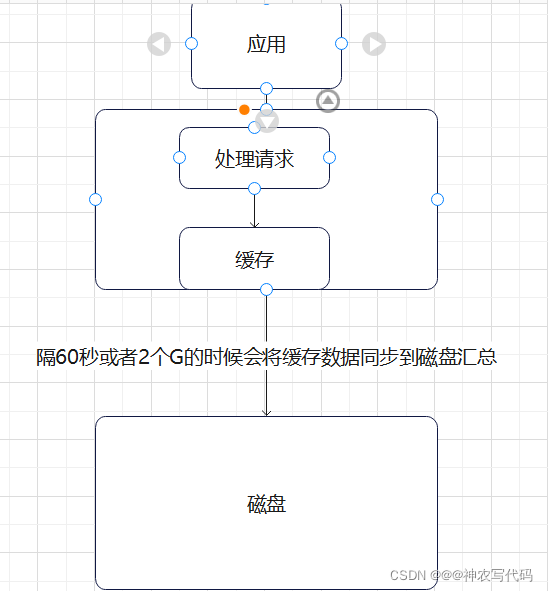
When MongoDB Receive data and convert it into Bosn File and send a request to WiredTiger engine ,WiredTiger Receive and process the request and store the data in the cache , Separate the data in the cache 60s Or the data arrives 2G Synchronize to disk when .
Mainly did two things :
1、 Save data to cache
Save data to cache ?
Reduce IO operation , Lifting performance .
2、 Synchronize cache to disk
Why 60s perhaps 2G Synchronize data when ?
When concurrency is high , Prevent the performance of cache processing data from being greater than that of disk , The cause of synchronization is the loss of data .
WiredTiger Principle of preventing data loss
Use double write architecture
Pictured :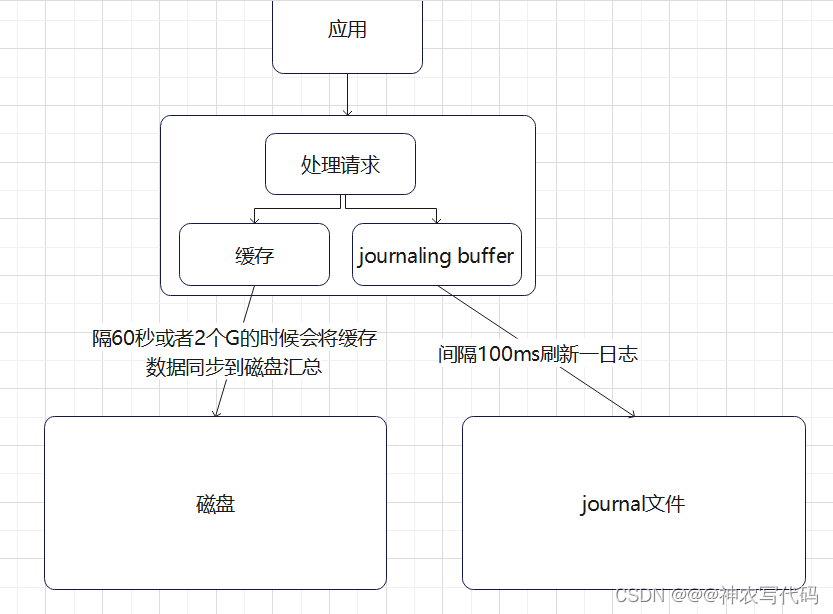
Add a buffer . Equivalent to the role of message queue .
When the upstream and downstream performance is inconsistent, you can use buffers .【RabbitMQ,kafka etc. 】WiredTiger Index structure of
Pictured :
MongoDB Data is cached and stored on disk through B+tree The data structure of ,Root Nodes and Internal Is to store index data 【 It's like a table of contents in a Book 】, and leaf Nodes are used to store data 【 Equivalent to pages in a Book 】.
5、 ... and 、MongoDB Of CURD operation
- Premise
using MongoDB.Driver; namespace MongoDB.Demo.Server { public class PersonServer : IPersonServer { private readonly IMongoCollection<Person> mongoCollection; public PersonServer() { var client = new MongoClient("mongodb://localhost:27017"); mongoCollection = client.GetDatabase("PersonDB").GetCollection<Person>("person"); } } } - Add data
/// <summary> /// Add data /// </summary> /// <param name="per"></param> public void Create(Person per) { mongoCollection.InsertOne(per); } - Query data
/// <summary> /// Get collection data /// </summary> /// <returns></returns> public IEnumerable<Person> GetList() { return mongoCollection.Find(p => true).ToList(); } - Paging query
/// <summary> /// Paging query /// </summary> /// <param name="pagesize"> Row number </param> /// <param name="index"> the number of pages </param> /// <returns></returns> public IEnumerable<Person> GetDataByPage(int pagesize,int index) { return mongoCollection.Find(p => true).Skip((index - 1) * pagesize).Limit(pagesize).ToList(); } - Sort
/// <summary> /// Get collection data and sort /// </summary> /// <returns></returns> public IEnumerable<Person> GetList() { return mongoCollection.Find(p => true).SortBy(per => per.CreateByTime).ToList(); } - Modifying data
/// <summary> /// Modify the data and add new fields /// </summary> /// <param name="id"></param> /// <param name="per"></param> public void Update(string id, Person per) { var update = Builders<Person>.Update; // update.AddToSet("modifybyid","admin");// New fields This field must be present in the entity Otherwise, an error will be reported when querying //mongoCollection.UpdateOne((p) => p.Id == id, update.AddToSet("modifybyid", "admin")); // Modify fields mongoCollection.UpdateOne((p) => p.Id == id, update.Set("Name", per.Name)); } - Delete data
/// <summary> /// Delete data /// </summary> /// <param name="id"></param> public void delete(string id) { mongoCollection.DeleteOne((p) => p.Id == id); } - Create index
      /// <summary>
      ///  Create index
      /// </summary>
      /// <returns></returns>
      public string CreateIndex()
      {
          var indexKeys = Builders<Person>.IndexKeys;
          return _products.Indexes.CreateOne(indexKeys.Descending(" Field name "));
      }
6、 ... and 、MongoDB Copy sets for
Concept
MongoDB A copy set is just a copy of one data . Pictured :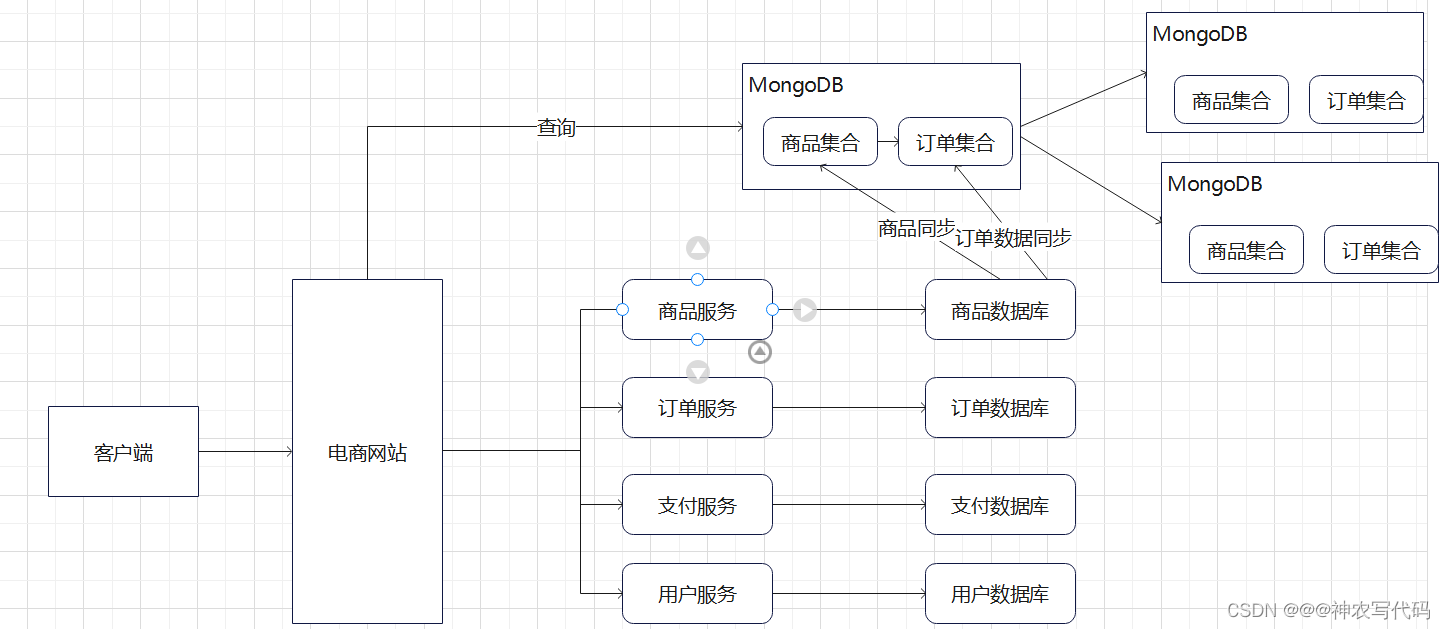
effect
When one MongoDB After downtime , And others MongoDB Examples can be provided to use . Guarantee MongoDB High availability .MongoDB Master slave node architecture diagram

- Master node :primary
Be responsible for reading and writing data . - From the node :secondary The suggestion is at least 3 Nodes
- When the primary node goes down , The client can read data from the node , Guarantee MongoDB High availability .
- Realize the separation of reading and writing data .
- Master node :primary
Realization
- Conditions
- MongoDB 3 Nodes
- MongoDB Of Demo project
- MongoDB Configuration steps
- Create three new node profiles , Create a new node data file storage folder and log folder
- 27018 The configuration file will replication open , And define the cluster name
# mongod.conf # for documentation of all options, see: # http://docs.mongodb.org/manual/reference/configuration-options/ # Where and how to store data. storage: dbPath: D:\SoftWare\MogoDB\ReplicaSet-data\data-27018 journal: enabled: true # engine: # wiredTiger: # where to write logging data. systemLog: destination: file logAppend: true path: D:\SoftWare\MogoDB\ReplicaSet-log\mongodb-27018.log # network interfaces net: port: 27018 bindIp: 127.0.0.1 #processManagement: #security: #operationProfiling: replication: replSetName: rs0 #sharding: ## Enterprise-Only Options: #auditLog: #snmp: - 27019 The configuration file will replication open , And define the cluster name
# mongod.conf # for documentation of all options, see: # http://docs.mongodb.org/manual/reference/configuration-options/ # Where and how to store data. storage: dbPath: D:\SoftWare\MogoDB\ReplicaSet-data\data-27019 journal: enabled: true # engine: # wiredTiger: # where to write logging data. systemLog: destination: file logAppend: true path: D:\SoftWare\MogoDB\ReplicaSet-log\mongodb-27019.log # network interfaces net: port: 27019 bindIp: 127.0.0.1 #processManagement: #security: #operationProfiling: replication: replSetName: rs0 #sharding: ## Enterprise-Only Options: #auditLog: #snmp: - 27020 The configuration file will replication open , And define the cluster name
    # mongod.conf

    # for documentation of all options, see:
    #   http://docs.mongodb.org/manual/reference/configuration-options/

    # Where and how to store data.
    storage:
      dbPath: D:\SoftWare\MogoDB\ReplicaSet-data\data-27020
      journal:
        enabled: true
    #  engine:
    #  wiredTiger:

    # where to write logging data.
    systemLog:
      destination: file
      logAppend: true
      path:  D:\SoftWare\MogoDB\ReplicaSet-log\mongodb-27020.log

    # network interfaces
    net:
      port: 27020
      bindIp: 127.0.0.1


    #processManagement:

    #security:

    #operationProfiling:

    replication:
       replSetName: rs0
    #sharding:

    ## Enterprise-Only Options:

    #auditLog:

    #snmp:
- 27018 The configuration file will replication open , And define the cluster name
- Operation example (3)
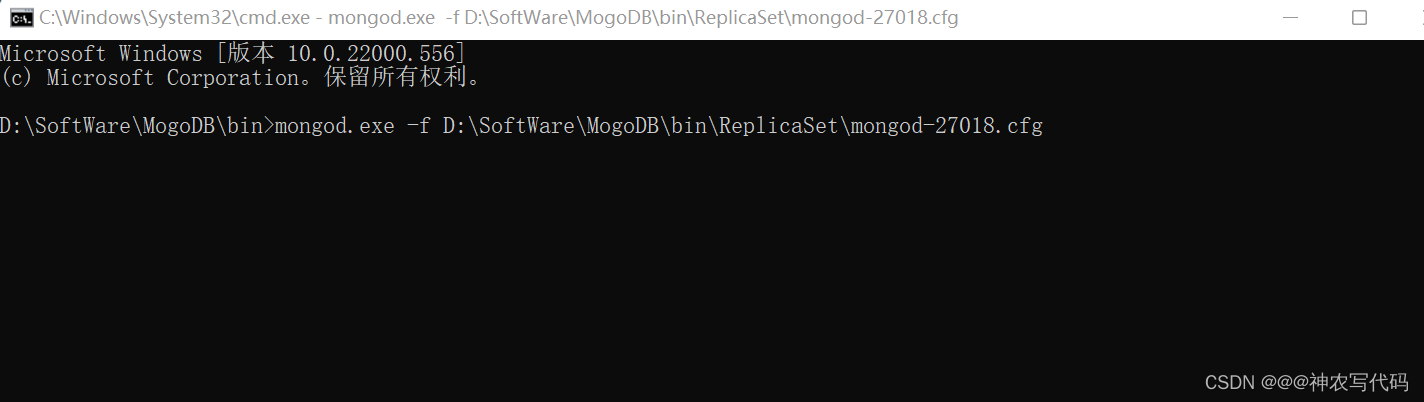
mongod.exe -f D:\SoftWare\MogoDB\bin\ReplicaSet\mongod-27018.cfg mongod.exe -f D:\SoftWare\MogoDB\bin\ReplicaSet\mongod-27019.cfg mongod.exe -f D:\SoftWare\MogoDB\bin\ReplicaSet\mongod-27020.cfg The operation result is as shown in the figure : 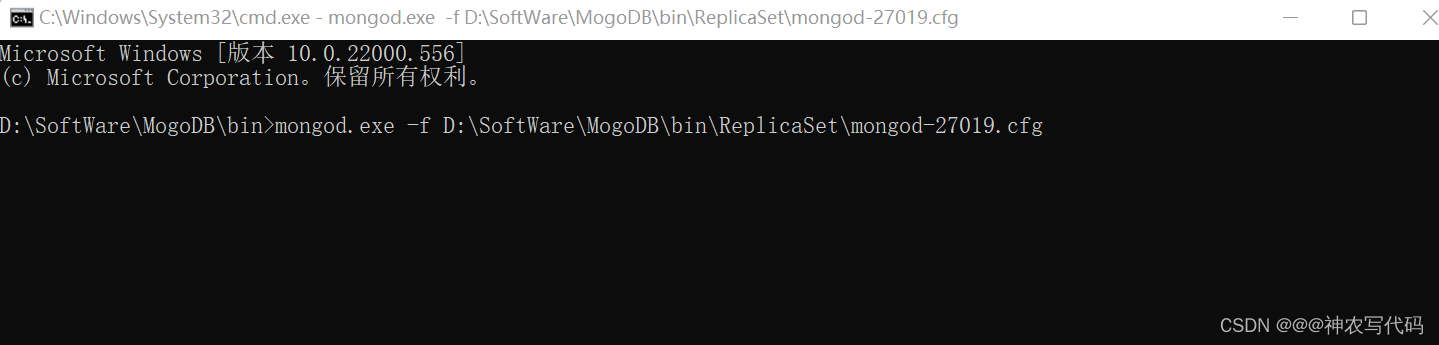
- Create three new node profiles , Create a new node data file storage folder and log folder
- Conditions

- Set up 27018 Establish the connection and set it as the master node , And add slave nodes # Establishing a connection stay bin Under the table of contents mongo.exe --host 127.0.0.1 --port 27018 # Use the command to set the master node rs.initiate()
Pictured : Add other nodes to Member in
 rs.add("127.0.0.1:27019") rs.add("127.0.0.1:27020")
Pictured :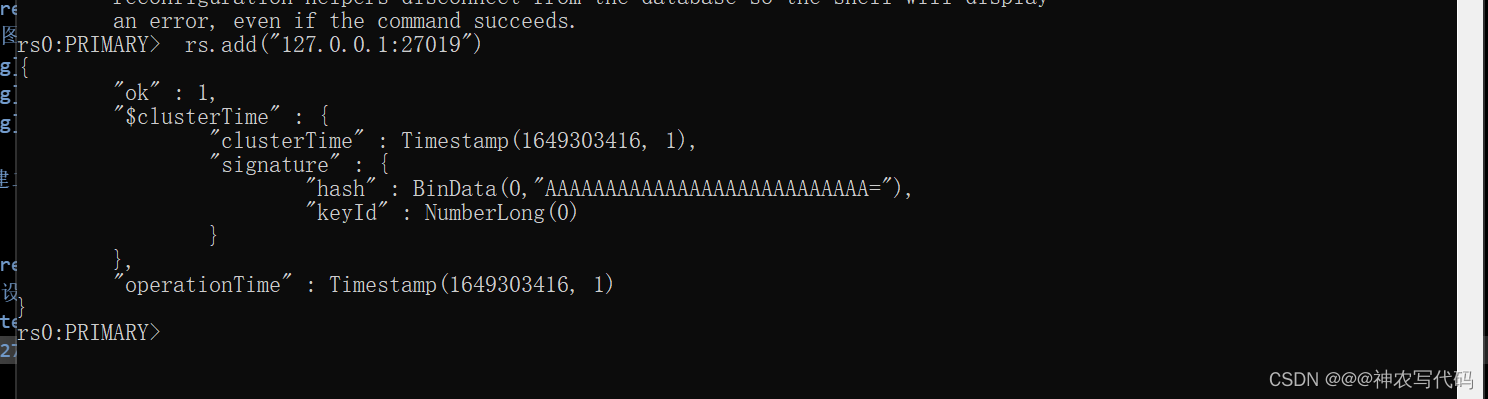

- View status command rs.status()
Log files : "members" : [ { "_id" : 0, "name" : "127.0.0.1:27018", "health" : 1, "state" : 1, "stateStr" : "PRIMARY", "uptime" : 308, "optime" : { "ts" : Timestamp(1649306184, 3), "t" : NumberLong(1) }, "optimeDate" : ISODate("2022-04-07T04:36:24Z"), "lastAppliedWallTime" : ISODate("2022-04-07T04:36:24.437Z"), "lastDurableWallTime" : ISODate("2022-04-07T04:36:24.437Z"), "syncSourceHost" : "", "syncSourceId" : -1, "infoMessage" : "", "electionTime" : Timestamp(1649306012, 2), "electionDate" : ISODate("2022-04-07T04:33:32Z"), "configVersion" : 5, "configTerm" : 1, "self" : true, "lastHeartbeatMessage" : "" }, { "_id" : 1, "name" : "127.0.0.1:27019", "health" : 1, "state" : 2, "stateStr" : "SECONDARY", "uptime" : 137, "optime" : { "ts" : Timestamp(1649306184, 3), "t" : NumberLong(1) }, "optimeDurable" : { "ts" : Timestamp(1649306184, 3), "t" : NumberLong(1) }, "optimeDate" : ISODate("2022-04-07T04:36:24Z"), "optimeDurableDate" : ISODate("2022-04-07T04:36:24Z"), "lastAppliedWallTime" : ISODate("2022-04-07T04:36:24.437Z"), "lastDurableWallTime" : ISODate("2022-04-07T04:36:24.437Z"), "lastHeartbeat" : ISODate("2022-04-07T04:36:30.077Z"), "lastHeartbeatRecv" : ISODate("2022-04-07T04:36:29.665Z"), "pingMs" : NumberLong(0), "lastHeartbeatMessage" : "", "syncSourceHost" : "127.0.0.1:27018", "syncSourceId" : 0, "infoMessage" : "", "configVersion" : 5, "configTerm" : 1 }, { "_id" : 2, "name" : "127.0.0.1:27020", "health" : 1, "state" : 2, "stateStr" : "SECONDARY", "uptime" : 129, "optime" : { "ts" : Timestamp(1649306184, 3), "t" : NumberLong(1) }, "optimeDurable" : { "ts" : Timestamp(1649306184, 3), "t" : NumberLong(1) }, "optimeDate" : ISODate("2022-04-07T04:36:24Z"), "optimeDurableDate" : ISODate("2022-04-07T04:36:24Z"), "lastAppliedWallTime" : ISODate("2022-04-07T04:36:24.437Z"), "lastDurableWallTime" : ISODate("2022-04-07T04:36:24.437Z"), "lastHeartbeat" : ISODate("2022-04-07T04:36:30.077Z"), "lastHeartbeatRecv" : ISODate("2022-04-07T04:36:30.169Z"), "pingMs" : NumberLong(0), "lastHeartbeatMessage" : "", "syncSourceHost" : "127.0.0.1:27019", "syncSourceId" : 1, "infoMessage" : "", "configVersion" : 5, "configTerm" : 1 } ],
- Project to connect MongoDB colony
- Establish connection code
according to MongoDB Default writing of , All data reading and writing are performed from the master node , The slave node only performs data replication tasks .// Data can only be read from the master node var client = new MongoClient("mongodb://localhost:27018,localhost:27019,localhost:27020"); // Data can be read from the node var client = new MongoClient("mongodb://localhost:27018,localhost:27019,localhost:27020/?readPreference=secondaryPreferred"); // perhaps var client = new MongoClient("mongodb://localhost:27018,localhost:27019,localhost:27020"); client.WithReadPreference(ReadPreference.PrimaryPreferred); //Primary: Default parameters Read data only from the master node // PrimaryPreferred: Most of the data is read from the master node , Only when the master node is not available Secondary Read data on //Secondary: Only from Secondary Read data operation on node , The problem is Secondary The data of the node will be better than Primary The data of the node is old , If no slave node is available , The read request will throw an exception . //SecondaryPreferred: Priority from Secondary Read data on node ,Secondary Read data from the master when the node is not available . //Nearest: Whether it's the master node ,Secondary node , Read data from the number of nodes with the lowest network delay .
- Establish connection code
- How the slave node becomes the master node after the master node goes down
Conditions
- Heartbeat
- Vote ( vote )
Pictured :
When the primary node goes down , The slave node will vote for itself first , Then go to other nodes to solicit votes , Who has the most votes , Who is the master node .
If the number of votes from the node is the same , There will be a heartbeat detection mechanism inside , Hold the election again 、 vote .
Voting rules : More than half of the votes can become the master node ;【 The optimal number of nodes is odd 】- The advantage of odd number of nodes
Improve the high availability of the cluster - The principles of the election
1、 Odd nodes
2、 More than half of the votes
7、 ... and 、MongoDB The fragmentation cluster of
Concept
MongoDB Internal split data , Separate storage .
Pictured :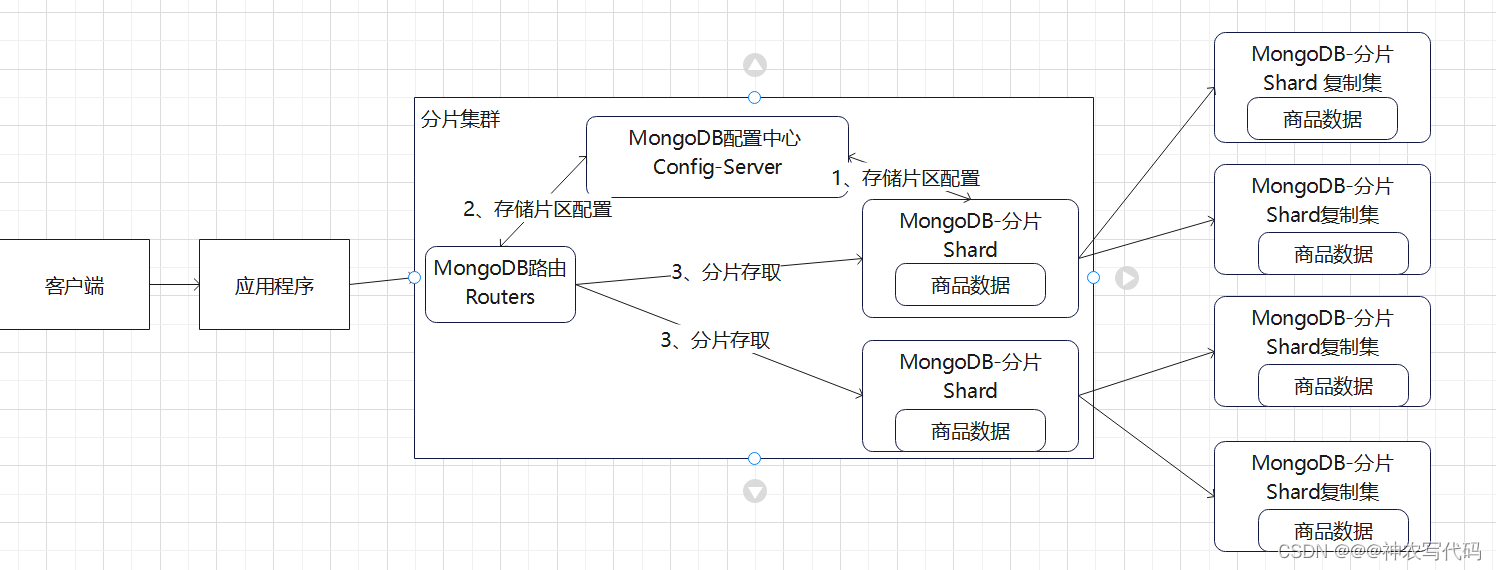
Core characters :
- Split roles shard
- Routing role Routers
- Configure roles config It is equivalent to the registration center in microservices
to ground
- Conditions
- MongoDB ( in total 10 An example )
- Demo project
- step
- Build a fragmented copy set (6 An example )
- mongod-27021.cfg The configuration file
# mongod.conf # for documentation of all options, see: # http://docs.mongodb.org/manual/reference/configuration-options/ # Where and how to store data. storage: dbPath: D:\SoftWare\MogoDB\shards-data\shard-27021 journal: enabled: true # engine: # wiredTiger: # where to write logging data. systemLog: destination: file logAppend: true path: D:\SoftWare\MogoDB\shards-log\mongodb-27021.log # network interfaces net: port: 27021 bindIp: 127.0.0.1 #processManagement: #security: #operationProfiling: replication: replSetName: sharding1 sharding: # Partition cluster name The role of the current instance (configsvr: Configuration center instance ,shardsvr: Slice instance ) clusterRole: shardsvr ## Enterprise-Only Options: #auditLog: #snmp: - mongod-27022.cfg The configuration file
# mongod.conf # for documentation of all options, see: # http://docs.mongodb.org/manual/reference/configuration-options/ # Where and how to store data. storage: dbPath: D:\SoftWare\MogoDB\shards-data\shard-27022 journal: enabled: true # engine: # wiredTiger: # where to write logging data. systemLog: destination: file logAppend: true path: D:\SoftWare\MogoDB\shards-log\mongodb-27022.log # network interfaces net: port: 27022 bindIp: 127.0.0.1 #processManagement: #security: #operationProfiling: replication: replSetName: sharding1 sharding: # Partition cluster name The role of the current instance (configsvr: Configuration center instance ,shardsvr: Slice instance ) clusterRole: shardsvr #sharding: ## Enterprise-Only Options: #auditLog: #snmp: - mongod-27023.cfg The configuration file
# mongod.conf # for documentation of all options, see: # http://docs.mongodb.org/manual/reference/configuration-options/ # Where and how to store data. storage: dbPath: D:\SoftWare\MogoDB\shards-data\shard-27023 journal: enabled: true # engine: # wiredTiger: # where to write logging data. systemLog: destination: file logAppend: true path: D:\SoftWare\MogoDB\shards-log\mongodb-27023.log # network interfaces net: port: 27023 bindIp: 127.0.0.1 #processManagement: #security: #operationProfiling: replication: replSetName: sharding1 sharding: # Partition cluster name The role of the current instance (configsvr: Configuration center instance ,shardsvr: Slice instance ) clusterRole: shardsvr ## Enterprise-Only Options: #auditLog: #snmp: - remarks
Of three configuration files replSetName: sharding1 The name must be consistent , Represents a set of partitioned copies .
Of ten profiles clusterRole:shardsvr The name must be consistent , Represents a group of clusters . - Start the service , And assign master and slave nodes
# stay MongoDB Of bin Execute under directory # Start the service mongod.exe -f D:\SoftWare\MogoDB\bin\shards\mongod-27021.cfg mongod.exe -f D:\SoftWare\MogoDB\bin\shards\mongod-27022.cfg mongod.exe -f D:\SoftWare\MogoDB\bin\shards\mongod-27023.cfg # Connect 27021, Assign master-slave nodes mongo.exe --host 127.0.0.1 --port 27021 # initialization 27021 Master node rs.initiate() # Add child nodes rs.add("127.0.0.1:27022") rs.add("127.0.0.1:27023") # View node status rs.status() - mongod-27024.cfg The configuration file
# mongod.conf # for documentation of all options, see: # http://docs.mongodb.org/manual/reference/configuration-options/ # Where and how to store data. storage: dbPath: D:\SoftWare\MogoDB\shards-data\shard-27024 journal: enabled: true # engine: # wiredTiger: # where to write logging data. systemLog: destination: file logAppend: true path: D:\SoftWare\MogoDB\shards-log\mongodb-27024.log # network interfaces net: port: 27024 bindIp: 127.0.0.1 #processManagement: #security: #operationProfiling: replication: replSetName: sharding2 sharding: # Partition cluster name The role of the current instance (configsvr: Configuration center instance ,shardsvr: Slice instance ) clusterRole: shardsvr ## Enterprise-Only Options: #auditLog: #snmp: - mongod-27025.cfg The configuration file
# mongod.conf # for documentation of all options, see: # http://docs.mongodb.org/manual/reference/configuration-options/ # Where and how to store data. storage: dbPath: D:\SoftWare\MogoDB\shards-data\shard-27025 journal: enabled: true # engine: # wiredTiger: # where to write logging data. systemLog: destination: file logAppend: true path: D:\SoftWare\MogoDB\shards-log\mongodb-27025.log # network interfaces net: port: 27025 bindIp: 127.0.0.1 #processManagement: #security: #operationProfiling: replication: replSetName: sharding2 sharding: # Partition cluster name The role of the current instance (configsvr: Configuration center instance ,shardsvr: Slice instance ) clusterRole: shardsvr ## Enterprise-Only Options: #auditLog: #snmp: - mongod-27026.cfg The configuration file
# mongod.conf # for documentation of all options, see: # http://docs.mongodb.org/manual/reference/configuration-options/ # Where and how to store data. storage: dbPath: D:\SoftWare\MogoDB\shards-data\shard-27026 journal: enabled: true # engine: # wiredTiger: # where to write logging data. systemLog: destination: file logAppend: true path: D:\SoftWare\MogoDB\shards-log\mongodb-27026.log # network interfaces net: port: 27026 bindIp: 127.0.0.1 #processManagement: #security: #operationProfiling: replication: replSetName: sharding2 sharding: # Partition cluster name The role of the current instance (configsvr: Configuration center instance ,shardsvr: Slice instance ) clusterRole: shardsvr ## Enterprise-Only Options: #auditLog: #snmp: - remarks
Of three configuration files replSetName: sharding2 The name must be consistent , Represents a set of partitioned copies .
Of ten profiles clusterRole:shardsvr The name must be consistent , Represents a group of clusters . - Start the service , And assign master and slave nodes
 # stay MongoDB Of bin Execute under directory
 # Start the service
 mongod.exe -f D:\SoftWare\MogoDB\bin\shards\mongod-27024.cfg
 mongod.exe -f D:\SoftWare\MogoDB\bin\shards\mongod-27025.cfg
 mongod.exe -f D:\SoftWare\MogoDB\bin\shards\mongod-27026.cfg
 # Connect 27024, Assign master-slave nodes
 mongo.exe --host 127.0.0.1 --port 27024
 # initialization  27024  Master node
 rs.initiate()
 # Add child nodes
 rs.add("127.0.0.1:27025")
 rs.add("127.0.0.1:27026")
 # View node status
 rs.status()
- mongod-27021.cfg The configuration file
- Set up configuration center
- mongod-27010.cfg The configuration file
# mongod.conf # for documentation of all options, see: # http://docs.mongodb.org/manual/reference/configuration-options/ # Where and how to store data. storage: dbPath: D:\SoftWare\MogoDB\shards-data\ConfigServer\configserver-27010 journal: enabled: true # engine: # wiredTiger: # where to write logging data. systemLog: destination: file logAppend: true path: D:\SoftWare\MogoDB\shards-log\ConfigServer\configserver-27010.log # network interfaces net: port: 27010 bindIp: 127.0.0.1 #processManagement: #security: #operationProfiling: replication: # Cluster name , If it's not a machine in the same cluster , Please do not duplicate the configuration replSetName: confset sharding: # Partition cluster name The role of the current instance (configsvr: Configuration center instance ,shardsvr: Slice instance ) clusterRole: shardsvr ## Enterprise-Only Options: #auditLog: #snmp: - mongod-27011.cfg The configuration file
# mongod.conf # for documentation of all options, see: # http://docs.mongodb.org/manual/reference/configuration-options/ # Where and how to store data. storage: dbPath: D:\SoftWare\MogoDB\shards-data\ConfigServer\configserver-27011 journal: enabled: true # engine: # wiredTiger: # where to write logging data. systemLog: destination: file logAppend: true path: D:\SoftWare\MogoDB\shards-log\ConfigServer\configserver-27011.log # network interfaces net: port: 27011 bindIp: 127.0.0.1 #processManagement: #security: #operationProfiling: replication: # Cluster name , If it's not a machine in the same cluster , Please do not duplicate the configuration replSetName: confset sharding: # Partition cluster name The role of the current instance (configsvr: Configuration center instance ,shardsvr: Slice instance ) clusterRole: shardsvr ## Enterprise-Only Options: #auditLog: #snmp: - mongod-27012.cfg The configuration file
# mongod.conf # for documentation of all options, see: # http://docs.mongodb.org/manual/reference/configuration-options/ # Where and how to store data. storage: dbPath: D:\SoftWare\MogoDB\shards-data\ConfigServer\configserver-27012 journal: enabled: true # engine: # wiredTiger: # where to write logging data. systemLog: destination: file logAppend: true path: D:\SoftWare\MogoDB\shards-log\ConfigServer\configserver-27012.log # network interfaces net: port: 27012 bindIp: 127.0.0.1 #processManagement: #security: #operationProfiling: replication: # Cluster name , If it's not a machine in the same cluster , Please do not duplicate the configuration replSetName: confset sharding: # Partition cluster name The role of the current instance (configsvr: Configuration center instance ,shardsvr: Slice instance ) clusterRole: shardsvr ## Enterprise-Only Options: #auditLog: #snmp: - remarks
Of three configuration files replSetName: confset The name must be consistent , Represents a set of configuration center clusters .
Of ten profiles clusterRole:shardsvr The name must be consistent , It represents a group of fragment clusters . - Start the service , And assign group master-slave nodes
  # stay MongoDB Of bin Execute under directory
  # Start the service
  mongod.exe -f D:\SoftWare\MogoDB\bin\shards\mongod-27010.cfg
  mongod.exe -f D:\SoftWare\MogoDB\bin\shards\mongod-27011.cfg
  mongod.exe -f D:\SoftWare\MogoDB\bin\shards\mongod-27012.cfg
  # Connect 27010, Assign master-slave nodes
  mongo.exe --host 127.0.0.1 --port 27010
  # initialization  27021  Master node
  rs.initiate()
  # Add child nodes
  rs.add("127.0.0.1:27011")
  rs.add("127.0.0.1:27012")
  # View node status
  rs.status()
- mongod-27010.cfg The configuration file
- Set up routes (1 An example )
- mongod-27000.cfg
# mongod.conf # for documentation of all options, see: # http://docs.mongodb.org/manual/reference/configuration-options/ # Where and how to store data. #storage: #dbPath: D:\SoftWare\MogoDB\ReplicaSet-data\data-27021 #journal: #enabled: true # engine: # wiredTiger: # where to write logging data. systemLog: destination: file logAppend: true path: D:\SoftWare\MogoDB\shards-log\Router\Router-27000.log # network interfaces net: port: 27000 bindIp: 127.0.0.1 #processManagement: #security: #operationProfiling: #replication: #replSetName: rs0 sharding: configDB: confset/127.0.0.1:27011,127.0.0.1:27010,127.0.0.1:27012 ## Enterprise-Only Options: #auditLog: #snmp: - remarks
- Start the service / Connection service , And register
# stay bin Start the service in the directory mongos.exe -f D:\SoftWare\MogoDB\bin\shards\Router\mongod-27000.cfg # Establishing a connection mongo.exe --host 127.0.0.1 --port 27000 # Register replication set 【6 An example 127.0.0.1:27021\27022\27023\27024\27025\27026】 To configure the service # Batch register with replica set name In the configuration file replSetName: sharding1 sh.addShard("sharding1/127.0.0.1:27021,127.0.0.1:27022,127.0.0.1:27023") # Check the status sh.status() sh.addShard("sharding2/127.0.0.1:27024,127.0.0.1:27025,127.0.0.1:27026") # Check the status sh.status() - Demo Project to connect MongoDB colony
# Multiple routes Load balancing is built in var client = new MongoClient("mongodb://127.0.0.1:27000,,,,,,"); - Data fragmentation rules
Divide the data equally according to the slice key .- Fragmentation rule
- Range fragmentation
- HASH Fragmentation
Use the route to set the slice key .
# Start routing service , Once the connection is established , Use command # grammar sh.shardCollection(" Database name . Collection name ",{" Patch key ":" Slice type 【hashed, The default is range slicing 】"}) # If enter is executed like this, an error will be reported , Setting the fragmentation rule does not allow you to create a database with code , You need to create a database in the route , The order is as follows sh.enableSharding(" Database name ") sh.shardCollection(" Database name . Collection name ",{" Patch key ":" Slice type 【hashed/(1 perhaps -1), The default is range slicing (1 In ascending order -1 For the descending order )】"}) # A set can only consist of one fragment key - Fragmentation rule
- mongod-27000.cfg
- Build a fragmented copy set (6 An example )
- Conditions
边栏推荐
- Solution to the problem of repeated startup of esp8266
- C语言刷题随记 —— 猴子吃桃
- The gradle configuration supports the upgrade of 64 bit architecture of Xiaomi, oppo, vivo and other app stores
- Kotlin Foundation
- Kotlin advanced set
- NFC read / write mode development - book summary
- What are the PMP scores?
- Nano data World Cup data interface, CSL data, sports data score, world cup schedule API, real-time data interface of football match
- 8、智慧交通项目(1)
- MongoDB的原理、基本使用、集群和分片集群
猜你喜欢

Etcd教程 — 第四章 Etcd集群安全配置

8. Intelligent transportation project (1)

How to make a self-service order wechat applet? How to do the wechat order applet? visual editing
![[wechat applet full stack development course] course directory (mpvue+koa2+mysql)](/img/1c/ab39cf0a69d90a85665a099f5dbd26.jpg)
[wechat applet full stack development course] course directory (mpvue+koa2+mysql)

Reza RA series - development environment construction

CyCa 2022 children's physical etiquette primary teacher class Shenzhen headquarters station successfully concluded

2台三菱PLC走BCNetTCP协议,能否实现网口无线通讯?

Rxjs TakeUntil 操作符的学习笔记

ShardingSphere-Proxy 5.0 分库分表(一)

Kotlin advanced generic
随机推荐
How do wechat applets make their own programs? How to make small programs on wechat?
Kotlin keyword and operator
Is GF Securities reliable? Is it legal? Is it safe to open a stock account?
JS tool function, self encapsulating a throttling function
Arduino bootloader burning summary
MySQL create given statement
瑞吉外卖项目(二)
How much money have I made by sticking to fixed investment for 3 years?
纳米数据世界杯数据接口,中超数据,体育数据比分,世界杯赛程api,足球比赛实时数据接口
ShardingSphere-Proxy 5.0 分库分表(一)
Vscode attempted to write the procedure to a pipeline that does not exist
What are the PMP scores?
Jetpack compose layout (II) - material components and layout
Unique Wulin, architecture selection manual (including PDF)
Repo sync will automatically switch the correspondence between the local branch and the remote branch - how to customize this behavior
Wechat official account can reply messages normally, but it still prompts that the service provided by the official account has failed. Please try again later
Why should the terminal retail industry choose the member management system
Etcd tutorial - Chapter 4 etcd cluster security configuration
vscode试图过程写入管道不存在
Minio基本使用与原理