当前位置:网站首页>Basic usage and principle of schedulemaster distributed task scheduling center
Basic usage and principle of schedulemaster distributed task scheduling center
2022-06-25 10:05:00 【@@Mr.Fu】
List of articles
- One 、ScheduleMaster The core concept
- Two 、ScheduleMaster Application scenarios
- 3、 ... and 、ScheduleMaster Project landing
- Four 、ScheduleMaster Operation principle
- 5、 ... and 、ScheduleMaster Assembly tasks
- 6、 ... and 、ScheduleMaster API Interface tasks ( Use custom code to create tasks )
- 7、 ... and 、ScheduleMaster Cluster and cluster principle
One 、ScheduleMaster The core concept
- Concept
Uniformly perform the tasks of multiple systems 【 Reclaim overtime orders , Clean up spam 】, Pictured :
Two 、ScheduleMaster Application scenarios
- scene
It is mainly used in micro service system .
Pictured :
3、 ... and 、ScheduleMaster Project landing
- Tools
- ScheduleMaster
Download address of online disk :
link :https://pan.baidu.com/s/1LcCHS__zRRJv_HHwsza3cg
Extraction code :eyup - Demo project
- ScheduleMaster
- step
function ScheduleMaster
Start command
# Get into Hos.ScheduleMaster.Web\bin\Release\netcoreapp3.1\publish Directory
# remarks : The default database is sqlserver, If other databases need to be in appsettings.json Modify the database type and database connection address
  dotnet Hos.ScheduleMaster.Web.dll
# Get into Hos.ScheduleMaster.QuartzHost\bin\Release\netcoreapp3.1\publish  Directory
  dotnet Hos.ScheduleMaster.QuartzHost.dll --urls http://*:30001
The operation result is as shown in the figure :


Browser run results :http://localhost:30000, user name :admin password :111111
Pictured :

Demo project
- Create a new order recycling API Interface
  private readonly ILogger<HomeController> logger;
  public HomeController(ILogger<HomeController> _logger) {
      logger = _logger;
  }
  /// <summary>
  ///  Timeout order recycling interface
  /// </summary>
  /// <returns></returns>
  [HttpPost]
  public IActionResult OrderCancel()
  {
      logger.LogInformation(" Recycle order task ");
      return Ok(" Recycle order task ");
  }
- Create a new order recycling API Interface
A new task
Click on the task list
Pictured :
Click the Create Task button -> choice “ Basic information configuration ”
Pictured :


choice “ Metadata configuration ”, Click on “ preservation ” that will do , Pictured :
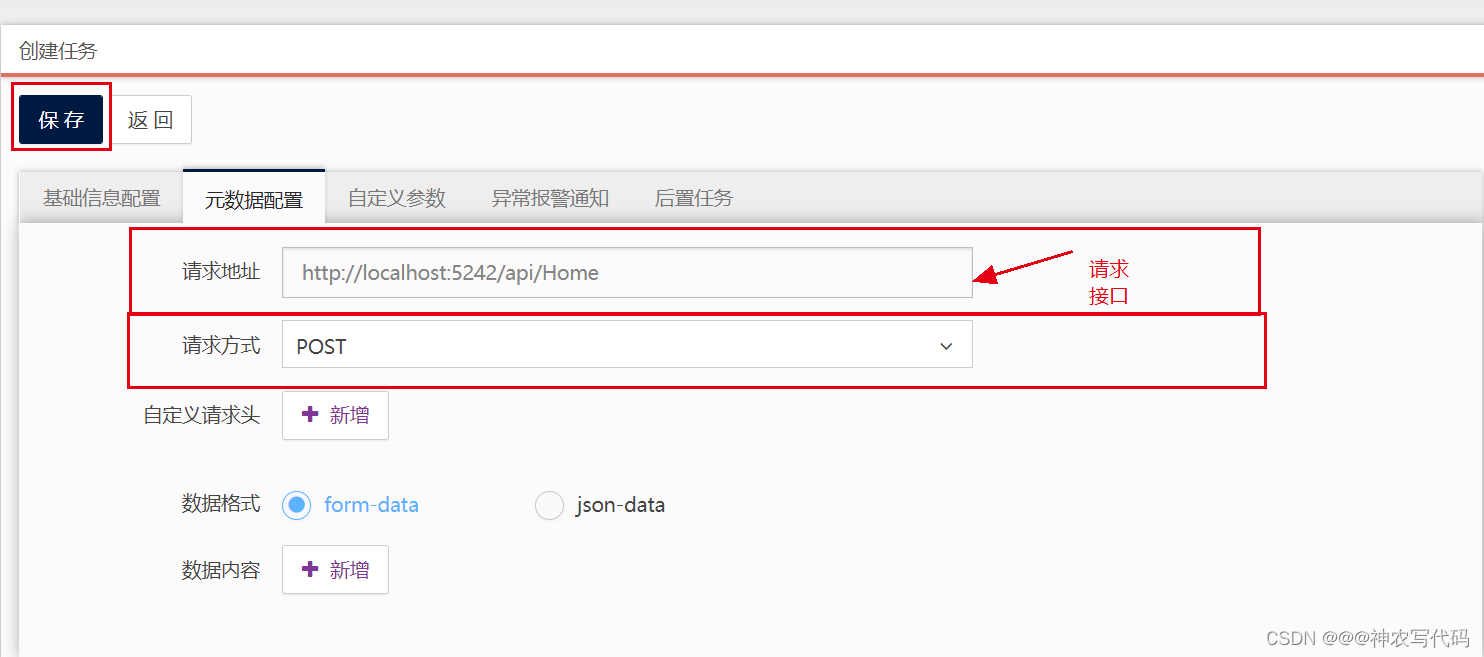
Running results ( every other 5 Second to call the order recycling interface ), Pictured :

Four 、ScheduleMaster Operation principle
- principle
Master Concept
Master node : Coordinate Hos.ScheduleMaster.WebNode Concept
Work node : Executive business Hos.ScheduleMaster.QuartzHostdatabase
Used to store task information .Global Architecture
Pictured :
Execution process
client ---->Hos.ScheduleMaster.Web(master node )---->Hos.ScheduleMaster.QuartzHost( Work node )----> Order recycling interface- master The core of the node
- Select the work node
- Specify the work node , Perform tasks
- The core of the work node
- Take out the task configuration information
- Use Quartz Run tasks according to configuration
- Use HttpClient Call interface
- Use reflection to call assembly methods
- master The core of the node
5、 ... and 、ScheduleMaster Assembly tasks
- Tools
- Console Demo project
- ScheduleMaster
- step
Create a new one Console project
  // Project installation
  ScheduleMaster
newly build OrderServer Class inheritance
public class OrderServer:TaskBase { public override void Run(TaskContext context) { // Timeout order logic context.WriteLog(" The order begins to be recycled ....... success "); } }- Console project packaging
After the project is compiled , Get into bin Document , take Hos.ScheduleMaster.Base.dll All files except are packed into compressed files , Pictured :
- Console project packaging
ScheduleMaster To configure
- Click on “ Task list ” Catalog , Click on “ Create tasks ” Button , Task type selection “ Assembly tasks ”, Pictured :


- Click on “ Task list ” Catalog , Click on “ Create tasks ” Button , Task type selection “ Assembly tasks ”, Pictured :
6、 ... and 、ScheduleMaster API Interface tasks ( Use custom code to create tasks )
The implementation code is as follows :
      /// <summary>
      ///  Create tasks from code
      /// </summary>
      /// <returns></returns>
      [HttpPost("CreateTask")]
      public async Task<IActionResult> CreateTask()
      {
          HttpClient client = new HttpClient();
          // Sign in   Set user name and password
          client.DefaultRequestHeaders.Add("ms_auth_user", "admin");
          client.DefaultRequestHeaders.Add("ms_auth_secret", MD5($"admin{MD5("111111")}admin"));
          List<KeyValuePair<string, string>> args = new List<KeyValuePair<string, string>>();
          args.Add(new KeyValuePair<string, string>("MetaType", "2"));
          args.Add(new KeyValuePair<string, string>("RunLoop", "true"));
          args.Add(new KeyValuePair<string, string>("CronExpression", "0/5 * * * * ?"));
          args.Add(new KeyValuePair<string, string>("Remark", "By Xunit Tester Created"));
          args.Add(new KeyValuePair<string, string>("StartDate", DateTime.Today.ToString("yyyy-MM-dd HH:mm:ss")));
          args.Add(new KeyValuePair<string, string>("Title", "order_cancel_http_api"));
          args.Add(new KeyValuePair<string, string>("HttpRequestUrl", "http://localhost:5000/Order"));
          args.Add(new KeyValuePair<string, string>("HttpMethod", "POST"));
          args.Add(new KeyValuePair<string, string>("HttpContentType", "application/json"));
          args.Add(new KeyValuePair<string, string>("HttpHeaders", "[]"));
          args.Add(new KeyValuePair<string, string>("HttpBody", "{ \"Posts\": [{ \"PostId\": 666, \"Title\": \"tester\", \"Content\":\"testtesttest\" }], \"BlogId\": 111, \"Url\":\"qweqrrttryrtyrtrtrt\" }"));
          HttpContent reqContent = new FormUrlEncodedContent(args);
          var response = await client.PostAsync("http://localhost:30000/api/Task/Create", reqContent);
          var content = await response.Content.ReadAsStringAsync();
          logger.LogInformation(content);
          return Ok(" Create success ");
      }
      /// <summary>
      /// MD5 encryption
      /// </summary>
      /// <param name="prestr"></param>
      /// <returns></returns>
      public static string MD5(string prestr)
      {
          StringBuilder sb = new StringBuilder(32);
          MD5 md5 = new MD5CryptoServiceProvider();
          byte[] t = md5.ComputeHash(Encoding.GetEncoding("UTF-8").GetBytes(prestr));
          for (int i = 0; i < t.Length; i++)
          {
              sb.Append(t[i].ToString("x").PadLeft(2, '0'));
          }
          return sb.ToString();
      }
official API
- API Server Docking process
For open interfaces , Using signature verification is already an essential part , This is an important means to ensure system security . Take a look at the core docking process :- Create a dedicated API Connect user accounts .
- The user name of the docking account is set to http header Medium
ms_auth_uservalue . - Set the hashed secret key to http header Medium
ms_auth_secret value, Calculation rules : Press { user name }{hash( password )}{ user name } The string is obtained by splicing the format of str, And then to str Do it once hash The secret key is the final operation ,hash The function is lowercase 32 position MD5 Algorithm . - Use form Format initiation http call , If the illegal user returns 401-Unauthorized.
Code example :
    HttpClient client = new HttpClient();
    client.DefaultRequestHeaders.Add("ms_auth_user", "admin");
    client.DefaultRequestHeaders.Add("ms_auth_secret", SecurityHelper.MD5($"admin{SecurityHelper.MD5("111111")}}admin"));
The design of signature verification is relatively simple , Specific source code logic can refer to
Hos.ScheduleMaster.Web.Filters.AccessControlFilter.API Returns the format
All interfaces adopt a unified return format , The fields are as follows :Parameter name Parameter type explain Success bool The success of Status int Result state ,0- request was aborted 1- The request is successful 2- Login failed 3- Parameter exception 4- Data exception Message string Returned message Data object Returned data Create assembly task
- Address of the interface :
http://yourip:30000/api/task/create - Request type :
POST - Parameter format :
application/x-www-form-urlencoded - Return results : Create successfully and return the task id
- parameter list :
Parameter name Parameter type If required explain MetaType int yes Task type , It's fixed here 1 Title string yes The name of the task RunLoop bool yes Whether to implement according to the cycle CronExpression string no cron expression , If RunLoop by true Is required AssemblyName string yes Assembly name ClassName string yes Execution class name , Include full namespace StartDate DateTime yes Mission start time EndDate DateTime no Task stop time , Blank means unlimited stop time Remark string no Task description Keepers List<int> no Guardian id Nexts List<guid> no Child tasks id Executors List<string> no Execution node name RunNow bool no If the creation is successful, whether to start immediately Params List<ScheduleParam> no Custom parameter list , It can also be done through CustomParamsJson The field is directly transferred to json Format string ScheduleParam:
Parameter name Parameter type If required explain ParamKey string yes Parameter name ParamValue string yes Parameter values ParamRemark string no Parameter description Code example :
    HttpClient client = new HttpClient();
    List<KeyValuePair<string, string>> args = new List<KeyValuePair<string, string>>();
    args.Add(new KeyValuePair<string, string>("MetaType", "1"));
    args.Add(new KeyValuePair<string, string>("RunLoop", "true"));
    args.Add(new KeyValuePair<string, string>("CronExpression", "33 0/8 * * * ?"));
    args.Add(new KeyValuePair<string, string>("Remark", "By Xunit Tester Created"));
    args.Add(new KeyValuePair<string, string>("StartDate", DateTime.Today.ToString("yyyy-MM-dd HH:mm:ss")));
    args.Add(new KeyValuePair<string, string>("Title", " Assembly interface test task "));
    args.Add(new KeyValuePair<string, string>("AssemblyName", "Hos.ScheduleMaster.Demo"));
    args.Add(new KeyValuePair<string, string>("ClassName", "Hos.ScheduleMaster.Demo.Simple"));
    args.Add(new KeyValuePair<string, string>("CustomParamsJson", "[{\"ParamKey\":\"k1\",\"ParamValue\":\"1111\",\"ParamRemark\":\"r1\"},{\"ParamKey\":\"k2\",\"ParamValue\":\"2222\",\"ParamRemark\":\"r2\"}]"));
    args.Add(new KeyValuePair<string, string>("Keepers", "1"));
    args.Add(new KeyValuePair<string, string>("Keepers", "2"));
    //args.Add(new KeyValuePair<string, string>("Nexts", ""));
    //args.Add(new KeyValuePair<string, string>("Executors", ""));
    HttpContent reqContent = new FormUrlEncodedContent(args);
    var response = await client.PostAsync("http://localhost:30000/api/Task/Create", reqContent);
    var content = await response.Content.ReadAsStringAsync();
    Debug.WriteLine(content);
What I want to mention is , Use API Upload package is not supported for task creation , So make sure that the package has been uploaded in other ways when the task needs to be started , Otherwise, it will fail to start .
- Address of the interface :
establish HTTP Mission
- Address of the interface :
http://yourip:30000/api/task/create - Request type :
POST - Parameter format :
application/x-www-form-urlencoded - Return results : Create successfully and return the task id
- parameter list :
Parameter name Parameter type If required explain MetaType int yes Task type , It's fixed here 2 Title string yes The name of the task RunLoop bool yes Whether to implement according to the cycle CronExpression string no cron expression , If RunLoop by true Is required StartDate DateTime yes Mission start time EndDate DateTime no Task stop time , Blank means unlimited stop time Remark string no Task description HttpRequestUrl string yes Request address HttpMethod string yes Request mode , Support only GET\POST\PUT\DELETE HttpContentType string yes Parameter format , Support only application/json and application/x-www-form-urlencoded HttpHeaders string no Custom request header ,ScheduleParam List json character string HttpBody string yes If it is json Format parameters , Is the corresponding parameter json character string ; If it is form Format parameters , It's a correspondence ScheduleParam List json character string . Keepers List<int> no Guardian id Nexts List<guid> no Child tasks id Executors List<string> no Execution node name RunNow bool no If the creation is successful, whether to start immediately Code example :
HttpClient client = new HttpClient(); List<KeyValuePair<string, string>> args = new List<KeyValuePair<string, string>>(); args.Add(new KeyValuePair<string, string>("MetaType", "2")); args.Add(new KeyValuePair<string, string>("RunLoop", "true")); args.Add(new KeyValuePair<string, string>("CronExpression", "22 0/8 * * * ?")); args.Add(new KeyValuePair<string, string>("Remark", "By Xunit Tester Created")); args.Add(new KeyValuePair<string, string>("StartDate", DateTime.Today.ToString("yyyy-MM-dd HH:mm:ss"))); args.Add(new KeyValuePair<string, string>("Title", "Http Interface test task ")); args.Add(new KeyValuePair<string, string>("HttpRequestUrl", "http://localhost:56655/api/1.0/value/jsonpost")); args.Add(new KeyValuePair<string, string>("HttpMethod", "POST")); args.Add(new KeyValuePair<string, string>("HttpContentType", "application/json")); args.Add(new KeyValuePair<string, string>("HttpHeaders", "[]")); args.Add(new KeyValuePair<string, string>("HttpBody", "{ \"Posts\": [{ \"PostId\": 666, \"Title\": \"tester\", \"Content\":\"testtesttest\" }], \"BlogId\": 111, \"Url\":\"qweqrrttryrtyrtrtrt\" }")); HttpContent reqContent = new FormUrlEncodedContent(args); var response = await client.PostAsync("http://localhost:30000/api/Task/Create", reqContent); var content = await response.Content.ReadAsStringAsync(); Debug.WriteLine(content);- Address of the interface :
Create a delay task
- Address of the interface :
http://yourip:30000/api/delaytask/create - Request type :
POST - Parameter format :
application/x-www-form-urlencoded - Return results : Create successfully and return the task id
- parameter list :
Parameter name Parameter type If required explain SourceApp string yes source Topic string yes The theme ContentKey string yes Business keywords DelayTimeSpan int yes Delay relative time DelayAbsoluteTime DateTime yes Delay absolute time NotifyUrl string yes token url NotifyDataType string yes Callback parameter format , Support only application/json and application/x-www-form-urlencoded NotifyBody string yes Callback Arguments ,json Format string Code example :
for (int i = 0; i < 5; i++) { int rndNum = new Random().Next(20, 500); List<KeyValuePair<string, string>> args = new List<KeyValuePair<string, string>>(); args.Add(new KeyValuePair<string, string>("SourceApp", "TestApp")); args.Add(new KeyValuePair<string, string>("Topic", "TestApp.Trade.TimeoutCancel")); args.Add(new KeyValuePair<string, string>("ContentKey", i.ToString())); args.Add(new KeyValuePair<string, string>("DelayTimeSpan", rndNum.ToString())); args.Add(new KeyValuePair<string, string>("DelayAbsoluteTime", DateTime.Now.AddSeconds(rndNum).ToString("yyyy-MM-dd HH:mm:ss"))); args.Add(new KeyValuePair<string, string>("NotifyUrl", "http://localhost:56655/api/1.0/value/delaypost")); args.Add(new KeyValuePair<string, string>("NotifyDataType", "application/json")); args.Add(new KeyValuePair<string, string>("NotifyBody", "{ \"Posts\": [{ \"PostId\": 666, \"Title\": \"tester\", \"Content\":\"testtesttest\" }], \"BlogId\": 111, \"Url\":\"qweqrrttryrtyrtrtrt\" }")); HttpContent reqContent = new FormUrlEncodedContent(args); var response = await client.PostAsync("http://localhost:30000/api/DelayTask/Create", reqContent); var content = await response.Content.ReadAsStringAsync(); Debug.WriteLine(content); }- Address of the interface :
- API Server Docking process
7、 ... and 、ScheduleMaster Cluster and cluster principle
Cluster is mainly used for work nodes
- step
- Enter the project root directory of the work node 【ScheduleMasterCore\Hos.ScheduleMaster.QuartzHost\bin\Release\netcoreapp3.1\publish】, Changing configuration files 【appsettings.json】, Because you have to start multiple nodes , Just change the node name and port number 【 Bear in mind : Node name cannot be duplicate 】, as follows :
"NodeSetting": { "IdentityName": "worker1", // The name of the node "Role": "worker", "Protocol": "http", "IP": "localhost", "Port": 30001, // Port number "Priority": 1, "MaxConcurrency": 20 } - start-up
# Get into Hos.ScheduleMaster.QuartzHost\bin\Release\netcoreapp3.1\publish Directory dotnet Hos.ScheduleMaster.QuartzHost.dll --urls http://*:30002 - Running results , Pictured :

- Enter the project root directory of the work node 【ScheduleMasterCore\Hos.ScheduleMaster.QuartzHost\bin\Release\netcoreapp3.1\publish】, Changing configuration files 【appsettings.json】, Because you have to start multiple nodes , Just change the node name and port number 【 Bear in mind : Node name cannot be duplicate 】, as follows :
- step
scene
If the current work node goes down , Will it be transferred to other work nodes ?
The execution node of the task needs to be changed , Select multiple execution nodes , Pictured :
There are two work nodes ,30001 and 30002, One of them 30001 It's down. [ There's a heartbeat detector API Interface , The scheduled task constantly detects whether the current node is available ], It will be directly transferred to other nodes to perform tasks , The operation results are as follows :

边栏推荐
- Methodchannel of flutter
- MongoDB的原理、基本使用、集群和分片集群
- WPF Prism框架
- Free platform for wechat applet making, steps for wechat applet making
- Remove the mosaic, there's a way, attached with the running tutorial
- vscode试图过程写入管道不存在
- Rxjs TakeUntil 操作符的学习笔记
- Ruiji takeout project (II)
- 独步武林,架构选型手册(包含 PDF)
- Chitubox micromake l3+ slicing software configuration correspondence
猜你喜欢

可穿戴设备或将会泄露个人隐私

Unique Wulin, architecture selection manual (including PDF)

Tiktok brand goes to sea: both exposure and transformation are required. What are the skills of information flow advertising?
Nano data World Cup data interface, CSL data, sports data score, world cup schedule API, real-time data interface of football match

CyCa children's physical etiquette Yueqing City training results assessment successfully concluded

【mysql学习笔记21】存储引擎

Simple waterfall effect
Creo makes a mobius belt in the simplest way
![[SSL: CERTIFICATE_VERIFY_FAILED] certificate verify failed: unable to get local issuer certificate](/img/75/a06e20b4394579cbd9f6d3a075907a.jpg)
[SSL: CERTIFICATE_VERIFY_FAILED] certificate verify failed: unable to get local issuer certificate

Can two Mitsubishi PLC adopt bcnettcp protocol to realize wireless communication of network interface?
随机推荐
Free applet making tool, how to make wechat applet
[smart agriculture program] smart agriculture small program project is currently popular.
Cubemx stm32f105rb USB flash drive reading and writing detailed tutorial
在指南针上面开股票账户好不好,安不安全?
[Ruby on rails full stack course] course directory
What functions should smart agriculture applet system design have
纳米数据世界杯数据接口,中超数据,体育数据比分,世界杯赛程api,足球比赛实时数据接口
Etcd tutorial - Chapter 4 etcd cluster security configuration
Jetpack compose layout (II) - material components and layout
ShardingSphere-Proxy 4.1 分库分表
瑞吉外卖项目(二)
Kotlin advanced generic
Wechat official account can reply messages normally, but it still prompts that the service provided by the official account has failed. Please try again later
Swift recursively queries the array for the number closest to the specified value
瑞萨RA系列-开发环境搭建
SQL to object thinking vs SQL of object thinking
js工具函数,自己封装一个节流函数
Kotlin Foundation
x86电脑上下载debian的arm64的包
Neat Syntax Design of an ETL Language (Part 2)