当前位置:网站首页>Redis安装及运行(linux)
Redis安装及运行(linux)
2022-07-26 23:06:00 【crazyK.】
目录
1.检测GCC环境,如果没有通过yum install gcc安装
一、准备工作
1.准备一台云服务器或虚拟机
2.在自定义目录下创建存放redis的文件夹
3.在redis中通过wget http://download.redis.io/releases/redis-6.0.6.tar.gz 或者在官网下载压缩包后手动上传。
mkdir redis
cd redis
wget http://download.redis.io/releases/redis-6.0.6.tar.gz 
二、安装
1.检测GCC环境,如果没有通过yum install gcc安装
//检查版本
gcc --version
//yum安装
yum install gcc
2.解压redis安装包
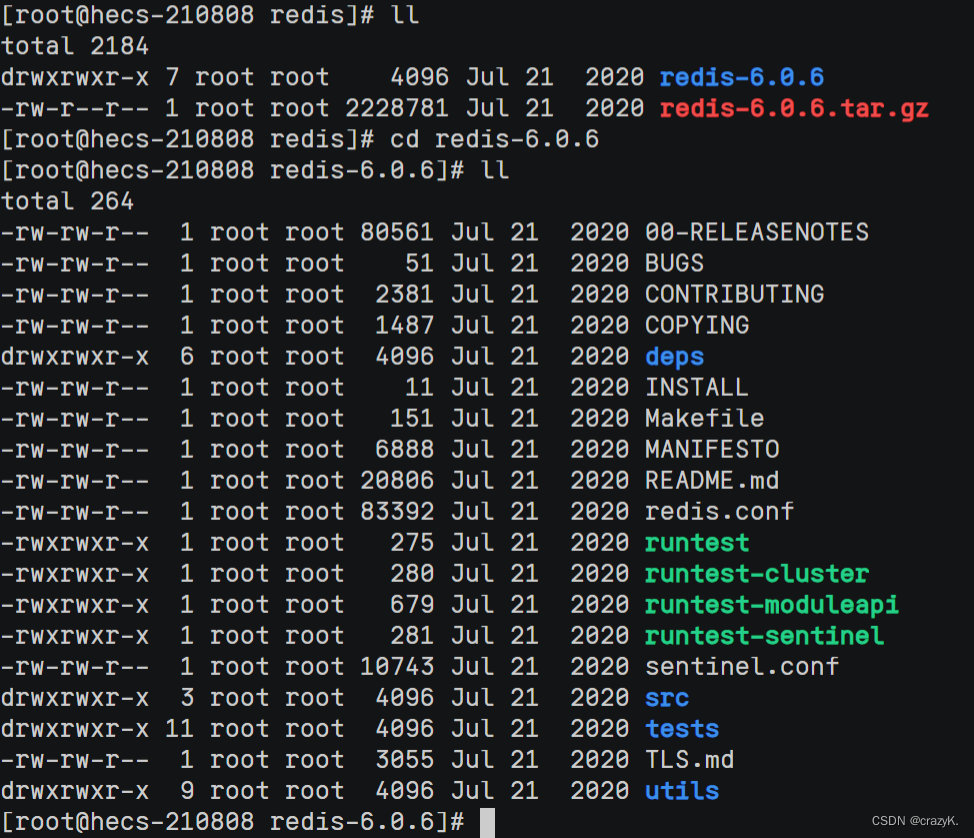
tar -zxvf redis-6.0.6.tar.gz 解压后进入redis文件夹,目录如下
3.执行make命令,等待完成
如报以下错误需要将gcc升级

yum -y install centos-release-scl

yum -y install devtoolset-9-gcc devtoolset-9-gcc-c++ devtoolset-9-binutils

scl enable devtoolset-9 bash

echo "source /opt/rh/devtoolset-9/enable" >> /etc/profile

gcc -v
然后执行make执行

4.执行 make install 安装redis
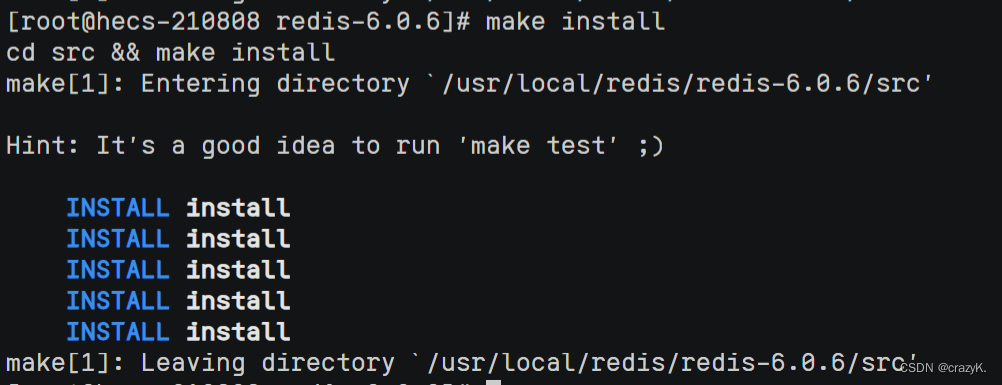
redis会默认安装在 /usr/ local/bin 目录下,到bin目录先看到一下说明redis安装成功

各文件对应功能
redis-benchmark:性能测试工具
redis-check-aof:修复有问题的aof文件
redis-sentinel:redis集群使用
redis-server:redis服务器启动命令
redis-cli:客户端操作入口
三、启动
1.redis-server前台启动(不推荐)
这种启动方式不能关闭当前状态,所以不推荐前台启动,停止命令 ctrl +C


2.后台启动 (推荐)
这种方式需要将redis进行一下配置
1.在redis-6.0.6文件夹里,将redis.conf复制到etc文件下
cp redis.conf /etc/redis.conf
2.进入etc目录下 修改redis.conf文件
vim redis.confi 进入编辑将daemonize后边的no 改为 yes。让服务可以在后台启动 ,esc,:wq保存退出

执行 redis-server /etc/redis.conf

redis启动成功
四、关闭
使用ps -aux | grep redis查看redis 进程号

直接使用 kill -9 '进程号' 关闭进程
边栏推荐
- 膜拜,阿里内部都在强推的321页互联网创业核心技术pdf,真的跪了
- Hcip day 6 OSPF static experiment
- [do you know cache - fully understand cache]
- go语言慢速入门——go运算符
- Hcip first day
- C language student information management system can access text files based on arrays
- Three handshakes and four disconnects of TCP
- 【C语言程序设计】分支结构
- C language - value range of data type and basic data type
- Fist guessing applet based on Object-C novice on the road
猜你喜欢





![[do you know cache - fully understand cache]](/img/65/df29f6f1ff6d0d119da4a3971db0fc.png)

随机推荐
C language -- while statement, dowhile statement, for loop and loop structure, break statement and continue statement
Area optimization of digital chips: detailed explanation of question 1 in the digital direction of the third "Huawei Cup" graduate innovation core competition
JUC concurrent programming
【C语言程序设计】分支结构
The pointer is really profound!!!
静态路由综合实验
30岁被裁,我想明白的几件事....
记录第N次SQL异常
指针得真正奥义!!!
RIP路由信息协议-拓扑实验
HCIP-第五天-OSPF扩展配置实验
小姐姐笔记:我是如何学习简单源码拓展视野的
hcip--ospf接口网络接口类型实验
Hcip day 5 OSPF extended configuration experiment
【洋哥带你玩转线性表(三)——双向链表】
Plato Farm有望通过Elephant Swap,进一步向外拓展生态
MGRE、PPP、HDLC综合实验
Rip routing information protocol topology experiment
Golang -- parse yaml file
在有序数组找具体某个数字