当前位置:网站首页>静态路由实验配置
静态路由实验配置
2022-07-26 22:50:00 【m0_72586049】
一、实验目的:
通过路由配置让如下图所示的拓扑环境实现全网可达

二、实验需求:
1.除AR5的环回地址固定外,整个其它所有的网段都需基于192.168.1.0/24进行合理的IP地址划分
2.AR1-AR4每个路由器存在两个环回接口,用于模拟连接PC的网段;地址也在192.168.1.0/24这个网络地址范围内
3.AR1-AR4上不能直接编写到达5.5.5.0/24的静态路由,但依然可以访问5.5.5.0/24网段
4.让整个拓扑环境实现全网可达,尽量减少每台路由器路由表条目的数量,避免环路出现
5.AR4与AR5之间,正常通信为1000M链路,1000M链路故障时则自动改为100M链路
三、实验步骤:
1.按实验得要求对192.168.1.0/24网段进行子网划分:
AR1-AR4每个路由器有两个环回接口,即AR1-AR4每个路由器有两个换回路段,总共为8个环回路段;
AR1-AR4路由器直连网段由图可得为6个骨干链路网段;
8个环回路段+6个骨干链路网段=14个网段;
因此总共需要将192.168.1.0/24分成14个网段;
总母网192.168.1.0/24(即192.168.1.0000 0000/24)
AR1-AR2:192.168.1.0/28 00000000
AR2-AR4:192.168.1.16/28 00010000
手工子网汇总:192.168.1.0/27
AR1-AR3: 192.168.1.32/28 00100000
AR3-AR4: 192.168.1.48/28 00110000
手工子网汇总:192.168.32.0/27
AR4-AR5: 192.168.1.64/28 01000000(preference:60)1000M链路
AR5-AR4: 192.168.1.80/28 01010000(preference:61)100M链路
手工子网汇总:192.168.64.0/27
AR1环回:
192.168.1.224/28 11100000
192.168.1.240/28 11110000
手工子网汇总:192.168.1.224/27
AR2环回:
192.168.1.128/28 10000000
192.168.1.144/28 10010000
手工子网汇总:192.168.1.128/27
AR3环回:
192.168.1.160/28 10100000
192.168.1.176/28 10110000
手工子网汇总:192.168.1.160/27
AR4环回:
192.168.1.192/28 11000000
192.168.1.208/28 11010000
手工子网总汇:192.168.1.192/27
四个手工总汇子网的总汇:192.168.1.128/25
两个保留的网段:
1)192.168.1.96/28
2)192.168.1.112/28
IP地址子网划分如图所示:
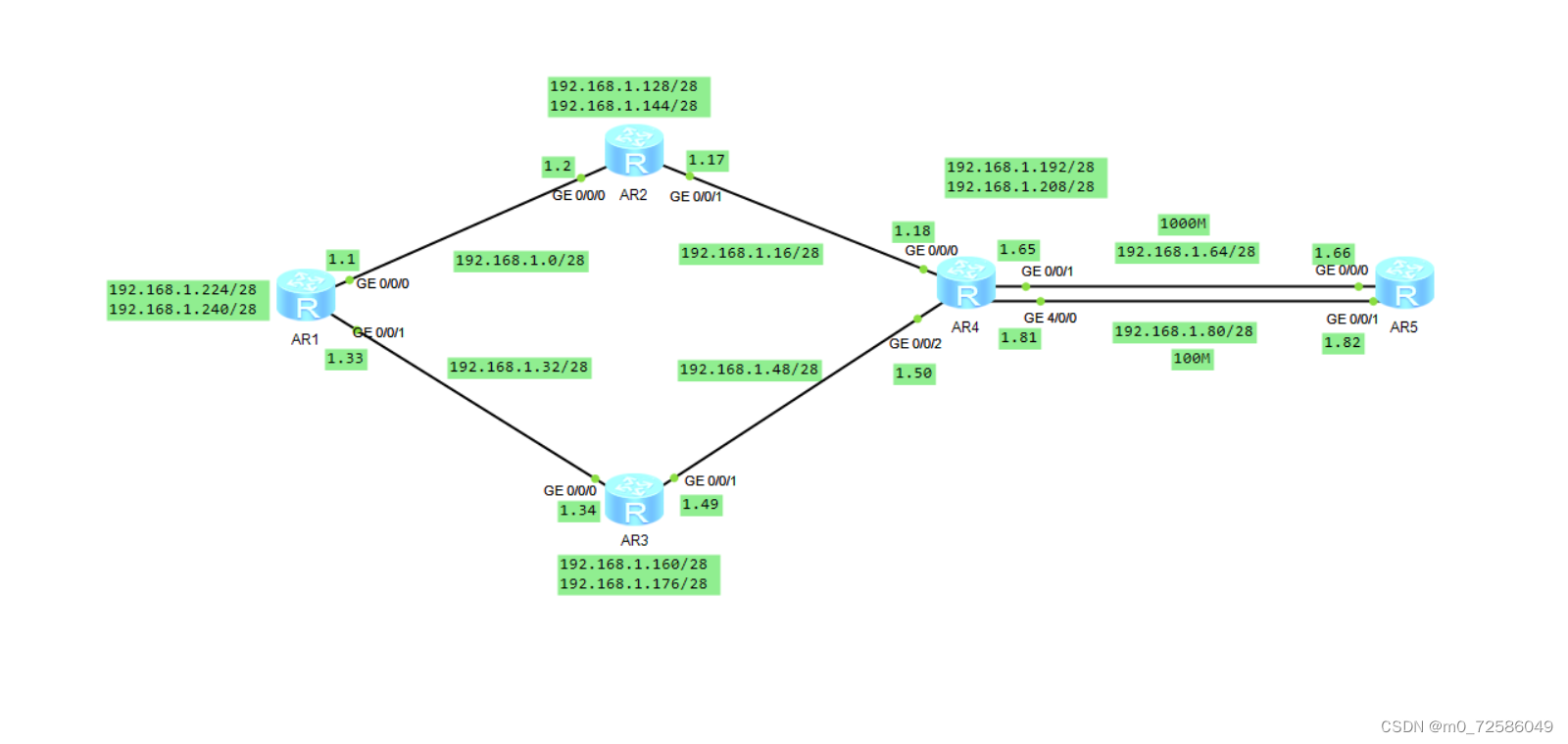
总结:通过这样的子网划分加手工子网总汇,可以减少路由黑洞的产生;
2.更改路由器名称:
以AR1为例:
<Huawei>system-view
[Huawei]sysname sw1
[sw1]

3.缺省路由的使用:
由于该实验要求AR1-AR4上不能直接编写到达5.5.5.0/24的静态路由,但依然可以访问5.5.5.0/24网段,因此我们只能通过缺省路由进行访问;
以AR1为例:
[sw1]ip route-static 0.0.0.0 0 192.168.1.2
[sw1]ip route-static 0.0.0.0 0 192.168.1.34
4.空接口路由的配置:
当汇总地址中包括了网络内实际不存在的网段时,将会导致流量有去无回,浪费链路资源,这就产生了路由黑洞;而当路由黑洞和缺省路由相遇时,将必然出现环回链路,因此我们得需给路由器配置一条到达汇总网段的空接口路由,以此来丢弃流量,避免环回链路的产生。
以AR1为例:[AR1]ip route-static 192.168.1.224 27 NULL 0
5.给AR4到AR5的路径设置优先级:
由实验要求AR4与AR5之间,正常通信为1000M链路,1000M链路故障时则自动改为100M链路;
因此我们需设置1000M网段和100M网段的路由优先级;
以AR1为例:
[sw1]ip route-static 192.168.1.64 28 192.168.1.2
[sw1]ip route-static 192.168.1.64 28 192.168.1.34
[sw1]ip route-static 192.168.1.80 28 192.168.1.2 preference 61
[sw1]ip route-static 192.168.1.80 28 192.168.1.34 preference 61
6.分配IP地址,环回地址,路由器端口地址:
1)AR1:
[sw1-GigabitEthernet0/0/0]ip address 192.168.1.1
[sw1-GigabitEthernet0/0/1]ip address 192.168.1.33
[sw1]interface LoopBack 0
[sw1-LoopBack0]ip address 192.168.1.224 28
[sw1]interface LoopBack 1
[sw1-LoopBack1]ip address 192.168.1.240 28
2)AR2:
[sw2-GigabitEthernet0/0/0]ip address 192.168.1.2
[sw2-GigabitEthernet0/0/1]ip address 192.168.1.17
[sw2]interface LoopBack 0
[sw2-LoopBack0]ip address 192.168.1.128 28
[sw2]interface LoopBack 1
[sw2-LoopBack0]ip address 192.168.1.144 28
3)AR3:
[sw3-GigabitEthernet0/0/0]ip address 192.168.1.34
[sw3-GigabitEthernet0/0/1]ip address 192.168.1.49
[sw3]interface LoopBack 0
[sw3-LoopBack0]ip address 192.168.1.160 28
[sw3]interface LoopBack 1
[sw3-LoopBack1]ip address 192.168.1.176 28
4)AR4:
[sw4-GigabitEthernet0/0/0]ip address 192.168.1.18
[sw4-GigabitEthernet0/0/1]ip address 192.168.1.65
[sw4-GigabitEthernet0/0/2]ip address 192.168.1.50
[sw4-GigabitEthernet4/0/0]ip address 192.168.1.81
[sw4]interface LoopBack 0
[sw4-LoopBack0]ip address 192.168.1.192 28
[sw4]interface LoopBack 1
[sw4-LoopBack1]ip address 192.168.1.208 28
5)AR5:
[sw5-GigabitEthernet0/0/0]ip address 192.168.1.66
[sw5-GigabitEthernet0/0/1]ip address 192.168.1.82
[sw5]interface LoopBack 0
[sw5-LoopBack0]ip address 5.5.5.1 24
6.静态路由、缺省路由、空接口的添加
以AR1和AR2为例:
1)AR1:
静态路由:
[sw1]ip route-static 192.168.1.16 28 192.168.1.2
[sw1]ip route-static 192.168.1.48 28 192.168.1.34
[sw1]ip route-static 192.168.1.64 28 192.168.1.2
[sw1]ip route-static 192.168.1.64 28 192.168.1.34
[sw1]ip route-static 192.168.1.128 27 192.168.1.2
[sw1]ip route-static 192.168.1.160 27 192.168.1.34
[sw1]ip route-static 192.168.1.192 27 192.168.1.2
[sw1]ip route-static 192.168.1.192 27 192.168.1.34
[sw1]ip route-static 192.168.1.80 28 192.168.1.2 preference 61
[sw1]ip route-static 192.168.1.80 28 192.168.1.34 preference 61
缺省路由:
[sw1]ip route-static 0.0.0.0 0 192.168.1.2
[sw1]ip route-static 0.0.0.0 0 192.168.1.34
空接口:
[sw1]ip route-static 192.168.1.224 27 NULL 0

2)AR2:
静态路由:
[sw2]ip route-static 192.168.1.32 28 192.168.1.1
[sw2]ip route-static 192.168.1.48 28 192.168.1.18
[sw2]ip route-static 192.168.1.64 28 192.168.1.18
[sw2]ip route-static 192.168.1.80 28 192.168.1.18 preference 61
[sw2]ip route-static 192.168.1.224 27 192.168.1.1
[sw2]ip route-static 192.168.1.192 27 192.168.1.18
[sw2]ip route-static 192.168.1.160 27 192.168.1.1
[sw2]ip route-static 192.168.1.160 27 192.168.1.18
缺省路由:
[sw2]ip route-static 0.0.0.0 0 192.168.1.1
[sw2]ip route-static 0.0.0.0 0 192.168.1.18
空接口:
[sw2]ip route-static 192.168.1.128 27 NULL 0

四、测试:
1)实现全网可达:


2)当1000M链路故障时,自动转为100M链路传输数据


终上所述:该实验的所有要求已经达成 ,实验成功。
边栏推荐
猜你喜欢

MySQL课程1.简单命令行--简单记录 欢迎补充纠错

HandsomeForum学习论坛
npm报错, Error: EPERM: operation not permitted, mkdir

C language - characters and strings, arithmetic operators, type conversions
OSPF basic experimental configuration

(the most detailed in History) codeforces round 805 (Div. 3) e Split Into Two Sets

C语言——关系运算符和逻辑运算符、if语句、switch语句、分支结构的嵌套

NAT (network address translation protocol)
C language - array, string handler, strlen, strcpy and strncpy, strcat and strncat, StrCmp and strncmp

Tim output comparison - PWM

随机推荐
HCIP-第六天-OSPF静态大实验
求解整数的每一位
微信小程序:用户微信登录流程(附:流程图+源码)
Esp8266wi fi data communication
C language -- nesting of relational and logical operators, if statements, switch statements, and branch structures
Wechat applet: user wechat login process (attached: flow chart + source code)
Hcip day 1
Codeforces Round #807 (Div. 2), problem: (C) Mark and His Unfinished Essay
Explain exi interrupt through the counting experiment of infrared sensor
(the most detailed in History) codeforces round 805 (Div. 3) e Split Into Two Sets
OSPF static experiment
多线程中 synchronized 锁升级的原理是什么?
RS-485 bus communication application
Golang - sync包的使用 (WaitGroup, Once, Mutex, RWMutex, Cond, Pool, Map)
怎么判断一个数是奇数还是偶数?
HCIA Basics (1)
lvs+keepalived项目实战
C language - array, string handler, strlen, strcpy and strncpy, strcat and strncat, StrCmp and strncmp
数字集成电路:MOS管器件章(一)
CAN总线通信应用