当前位置:网站首页>Torch learning (I): environment configuration
Torch learning (I): environment configuration
2022-06-23 18:04:00 【Inge】
List of articles
1 Anaconda install
Anaconda Refers to an open source Python Release version , It contains conda、Python And so on .
Installation can refer to :https://blog.csdn.net/ITLearnHall/article/details/81708148
2 Jupyter install
Jupyter It's data analysis 、 Common tools for machine learning , The advantage is :
Code can be 、 Documents, etc , Let users know at a glance .
Installation can refer to :https://jupyter.org/install perhaps https://blog.csdn.net/Lee_J_R/article/details/52791228
for example :
pip install jupyterlab
notes : If command "jupyter notebook" Report errors , Try the following ways to solve :
1) take "…/Python\Python37\site-packages" Add to path , The key for site-packages;
2) Use command "python -m notebook" command
Open the interface as follows :
3 CUDA install
In deep learning, it is inevitable to use GPU, Therefore, the installation of Torch Need to be GPU edition , So install first CUDA, Steps are as follows :
1) open NVIDIA Control panel , Click Help , Check system information :
2) Pay attention to your driver version : My is 399.24
3) Query driver version and CUDA Correspondence of :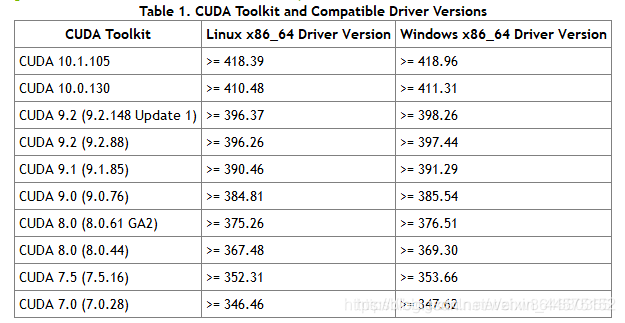
The source of the picture is as follows :
https://blog.csdn.net/zhw864680355/article/details/90411288
4) stay CUDA Find the corresponding version on the official website , The official website is as follows , I chose 9.2 edition :
https://developer.nvidia.com/cuda-toolkit-archive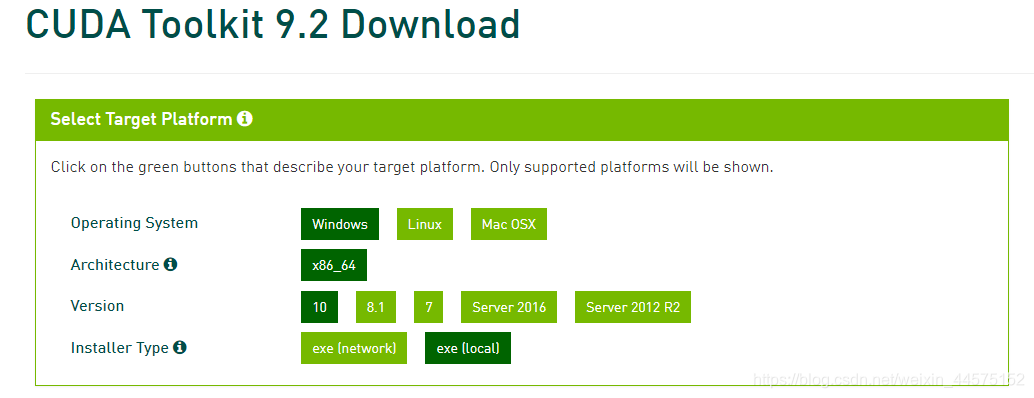
5) Download and install it , It should be noted that Please select a custom installation , And uncheck visual studio, Specific reference to :
https://blog.csdn.net/u010618587/article/details/82940528
4 Torch install
This article needs to use PyTorch frame , The installation address is as follows :
https://pytorch.org/get-started/locally/
Specific steps :
1) Select the appropriate installation command :
2) Use domestic image :
Due to timeout error during direct installation , Therefore, it needs to be moved to the domestic image , Common domestic images can be referred to :
https://blog.csdn.net/sinat_21591675/article/details/82770360
Take Alibaba cloud for example , The installation command can be as follows , Add the following statement to pythoch In the initial command :
-i http://mirrors.aliyun.com/pypi/simple/ --trusted-host mirrors.aliyun.com
The final order is as follows :
pip install -i http://mirrors.aliyun.com/pypi/simple/ --trusted-host mirrors.aliyun.com torch==1.3.1+cu92 torchvision==0.4.2+cu92 -f https://download.pytorch.org/whl/torch_stable.html
If it appears "Read time out" error , Please try a few more times , Or change to another image source (#^.^#)
3) Check to see if the installation was successful :
import torch
print(torch.cuda.is_available())
If output True, Installation succeeded .
thank
Thanks to Li Mu 、Aston Zhang Wait for the teacher's book 《 Hands-on deep learning 》 A Book , It has provided great help for my deep learning . A series of blogs about deep learning in this article have no intention of infringement , Just to record your in-depth learning process .
project Github Address :https://github.com/ShusenTang/Dive-into-DL-PyTorch
边栏推荐
- 【C工具】------点阵模拟测试2
- JS custom error
- 对抗攻击与防御 (2):对抗样本的反制策略
- Self taught programming introduction, what language to learn first?
- Wiley-中国科学院文献情报中心开放科学联合研讨会第二讲:开放获取期刊选择及论文投稿...
- 【win10 VS2019 opencv4.6 配置参考】
- How to make towel washing label
- What is the problem with TS File Error 404 when easynvr plays HLS protocol?
- QML类型:Loader
- Method of copying web page content and automatically adding copyright information (compatible with ie, Firefox and chrome)
猜你喜欢

Paper reading (47):dtfd-mil: double tier feature interpretation multiple instance learning for histopathology
FPN characteristic pyramid network
![微信小程序报错[ app.json 文件内容错误] app.json: app.json 未找到](/img/ab/5c27e1bb80ad662d1a220d29c328e0.png)
微信小程序报错[ app.json 文件内容错误] app.json: app.json 未找到

VNC Viewer方式的远程连接树莓派

Reading papers (51):integration of a holonic organizational control architecture and multiobjective
![[win10 vs2019 opencv4.6 configuration reference]](/img/51/62fb26123561b65f127304ede834a2.png)
[win10 vs2019 opencv4.6 configuration reference]
torch学习(一):环境配置

Customer service system building tutorial_ Installation and use mode under the pagoda panel_ Docking with official account_ Support app/h5 multi tenant operation

暂停更新公告—行走的皮卡丘

Paper reading (50):a novel matrix game with payoffs of maximal belt structure
随机推荐
Illustration of mongodb cluster deployment principle (3)
Lighthouse open source application practice: o2oa
论文阅读 (50):A Novel Matrix Game with Payoffs of Maxitive Belief Structure
The draganddrop framework, a new member of jetpack, greatly simplifies the development of drag and drop gestures!
iMeta | 南农沈其荣团队发布微生物网络分析和可视化R包ggClusterNet
Wiley-中国科学院文献情报中心开放科学联合研讨会第二讲:开放获取期刊选择及论文投稿...
[esp8266 - 01s] obtenir la météo, Ville, heure de Beijing
csdn涨薪秘籍之Jenkins集成allure测试报告全套教程
Ner's past, present and future Overview - Future
Analytic analog-to-digital (a/d) converter
Discussion on five kinds of zero crossing detection circuit
History of storage technology: from tape to hardware liquefaction
《致敬百年巨匠 , 数藏袖珍书票》
[websocket] knowledge points for developing online customer service system meaning of status code returned by websocket
[learning notes] tidb learning notes (III)
Cryptography involved in IOT device end
Transaction processing of cloud development database
Alien world, real presentation, how does the alien version of Pokemon go achieve?
Goframe framework: add tracing Middleware
MySQL transaction submission process