当前位置:网站首页>Application of ansible automation
Application of ansible automation
2022-06-26 15:42:00 【N64-HanYeWei】
1、ansible-playbook Realization MySQL Binary deployment of
Write give ssh key Certified scripts han_ssh.sh
#!/bin/bash
#
#*********************************************
#Author:            Cry 3 tears 4 me
#QQ:                2512129751
#Date:              2022-06-17
#FileName:         han_ssh.sh
#Mail:              [email protected]
#Description:      The best script
#Copyright (C):     2022 All rights reserved
#*********************************************
PASS=123456
# Set the last address of the network segment ,4-255 Between , The smaller the scan, the faster
END=254

IP=`ip a s eth0 | awk -F'[ /]+' 'NR==3{print $3}'`
NET=${IP%.*}.

rm -f /root/.ssh/id_rsa
[ -e ./SCANIP.log ] && rm -f SCANIP.log
for((i=3;i<="$END";i++));do
ping -c 1 -w 1  ${NET}$i &> /dev/null  && echo "${NET}$i" >> SCANIP.log &
done
wait

ssh-keygen -P "" -f /root/.ssh/id_rsa
rpm -q sshpass || yum -y install sshpass
sshpass -p $PASS ssh-copy-id -o StrictHostKeyChecking=no $IP

AliveIP=(`cat SCANIP.log`)
for n in ${AliveIP[*]};do
sshpass -p $PASS scp -o StrictHostKeyChecking=no -r /root/.ssh [email protected]${n}:
done

# hold .ssh/known_hosts Copy to all hosts , So that they don't need to enter carriage return when they visit each other for the first time
for n in ${AliveIP[*]};do
scp /root/.ssh/known_hosts ${n}:.ssh/
done
After the certification is completed, it is ansible The controlled host can communicate with each other :

(1) Experiment preparation :

mkdir roles/mysql/{tasks,vars,files} -pv(2) Configure database my.cnf file
[[email protected] files]# cat my.cnf
[mysqld]
server-id=1
log-bin
datadir=/data/mysql
socket=/data/mysql/mysql.sock
log-error=/data/mysql/mysql.log
pid-file=/data/mysql/mysql.pid
[client]
socket=/data/mysql/mysql.sock
(3) Prepare to change the parameters in vars Prepare under folder :
[[email protected] vars]# cat main.yml
mysql_version: 8.0.19
mysql_file: mysql-{
   {mysql_version}}-linux-glibc2.12-x86_64.tar.xz
mysql_root_password: 123456
(4) Get ready mysql-8.0.19-linux-glibc2.12-x86_64.tar.xz Install the package in files Under the document :
(5) To write yml modular , use role To achieve ansible Automated database installation :
[[email protected] tasks]# cat config.yml
- name: config my.cnf
  copy: src=/data/ansible/roles/mysql/files/my.cnf dest=/etc/my.cnf
[[email protected] tasks]# cat  data.yml
- name: data dir
  shell: /usr/local/mysql/bin/mysqld --initialize-insecure --user=mysql --datadir=/data/mysql
  tags: data
[[email protected] tasks]# cat  group.yml
- name: create mysql group
  group: name=mysql gid=306
[[email protected] tasks]# cat  install.yml
- name: install packages
  yum:
    name:
      - libaio
      - numactl-libs
[[email protected] tasks]# cat  linkfile.yml
- name: create linkfile /usr/local/mysql
  file: src=/usr/local/mysql-{
   { mysql_version }}-linux-glibc2.12-x86_64 dest=/usr/local/mysql state=link
[[email protected] tasks]# cat path.yml
- name: PATH variable
  copy: content='PATH=/usr/local/mysql/bin:$PATH' dest=/etc/profile.d/mysql.sh
[[email protected] tasks]# cat script.yml
- name: service script
  shell: /bin/cp /usr/local/mysql/support-files/mysql.server /etc/init.d/mysqld
[[email protected] tasks]# cat secure.yml
- name: change password
  shell: /usr/local/mysql/bin/mysqladmin -uroot password {
   {mysql_root_password}}
[[email protected] tasks]# cat service.yml
- name: enable service
  shell: chkconfig --add mysqld;/etc/init.d/mysqld start
  tags: service
[[email protected] tasks]# cat unarchive.yml
- name: copy tar to remote host and file mode
  unarchive: src={
   {mysql_file}} dest=/usr/local/ owner=root group=root
[[email protected] tasks]# cat user.yml
- name: create mysql user
  user: name=mysql uid=306 group=mysql shell=/sbin/nologin system=yes create_home=no home=/data/mysql
[[email protected] tasks]# cat main.yml
- include: install.yml
- include: group.yml
- include: user.yml
- include: unarchive.yml
- include: linkfile.yml
- include: data.yml
- include: config.yml
- include: script.yml
- include: path.yml
- include: service.yml
- include: secure.yml
(6) Finally, write the running script role_mysql.yml
[[email protected] ansible]# cat role_mysql.yml
---
- hosts: 10.0.0.6
  remote_user: root
  gather_facts: no

  roles:
    - mysql

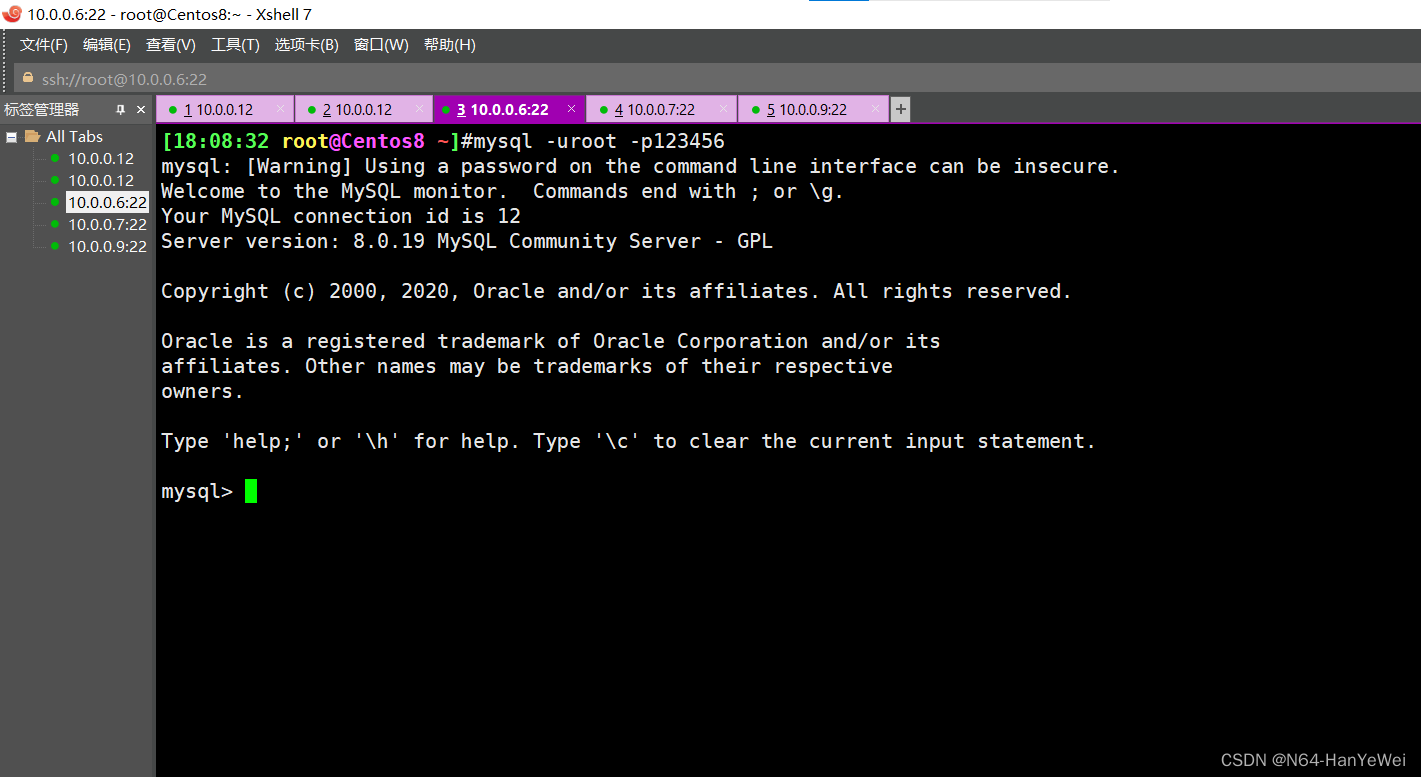
(7) Verify whether the experiment is successful

stay 10.0.0.6 Put on mysql The client program of :
yum -y  install  mysql-8.0.21-1.module_el8.2.0+493+63b41e36.x86_64
mysql -uroot -p123456
2、Ansible playbook Realization apache Mass deployment , Different hosts are provided with their own IP Address for content index.html、
roles: Collection directory of multiple roles , Multiple... Can be role, Put them into roles In a separate subdirectory under the directory ;
roles role :
simply ,roles It's about putting variables 、 file 、 Mission 、 Templates and processors are placed in separate directories , And it's easy to include Their - Species mechanism . Roles are generally used in the scenario of building services based on hosts , But it can also be used in scenarios such as building daemons .
Complex operation and maintenance scenarios : It is recommended to use roles, High code reuse
roles: Collection directory of multiple roles , Multiple... Can be role, Put them into roles In a separate subdirectory under the directory roles Each record 、roles/project/: Project name , There are the following subdirectories files/: Store by copy or script Module and so on ;
templates/: template The module looks up the directory of the required template file ;
tasks/: Definition task,role The basic elements of , There should be at least one named main.yml The file of ; Other files need to be passed in this file include To include
handlers/: There should be at least one named main.yml The file of ; Other files in this directory need to be communicated in this file include To include ;
vars/: Defining variables , There should be at least one named main.yml The file of ;
Other variable files in this directory need to pass... In this file include To include ;
metal: Define the special settings and dependencies of the current role , There should be at least one named main.yml The file of , Other documents need to be passed in this document include To include ;
defaultl: Use... In this directory when setting default variables main.yml file , Than vars The priority is low ;
Preparatory work :
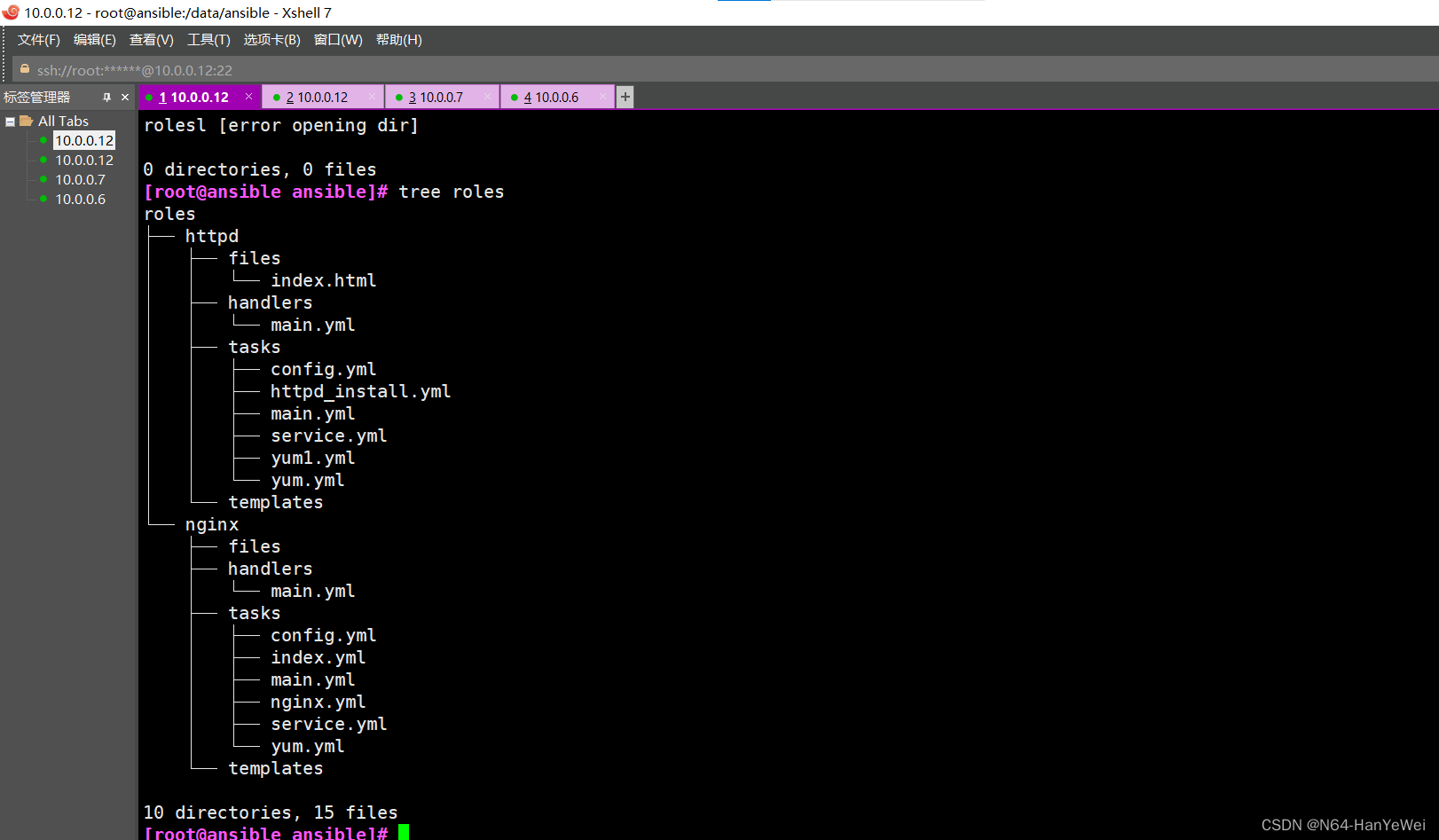
Get ready roles Folder of roles
mkdir roles/nginx/{tasks,templates,handlers,files} -pv
mkdir roles/httpd/{tasks,templates,handlers,files} -pv
Write installation nginx Of playbook Templates :
[[email protected] tasks]# cat yum.yml
- name: Install nginx
  yum: name=nginx  state=present
[[email protected] tasks]# cat config.yml.yml
cat: config.yml.yml: No such file or directory
[[email protected] tasks]# cat config.yml
- name: Modify web page
  copy: content='{
   { ansible_eth0.ipv4.address }}\n' dest=/usr/share/nginx/html/index.html
[[email protected] tasks]# cat service.yml
- name: start service
  service: name=nginx state=started enabled=yes
[[email protected] tasks]# cat main.yml
- include: yum.yml
- include: config.yml
- include: service.yml
[[email protected] nginx]# cd ..
[[email protected] nginx]# cd handlers/
[[email protected] handlers]# cat main.yml
- name: restart
  service: nmae=nginx state=restarted
To write nginx.yml
[[email protected] ansible]# cat nginx.yml
---
- hosts: websrvs
  remote_user: root

  roles:
    - nginx
Modify the file to control the host
[[email protected] ansible]# cat /etc/ansible/hosts 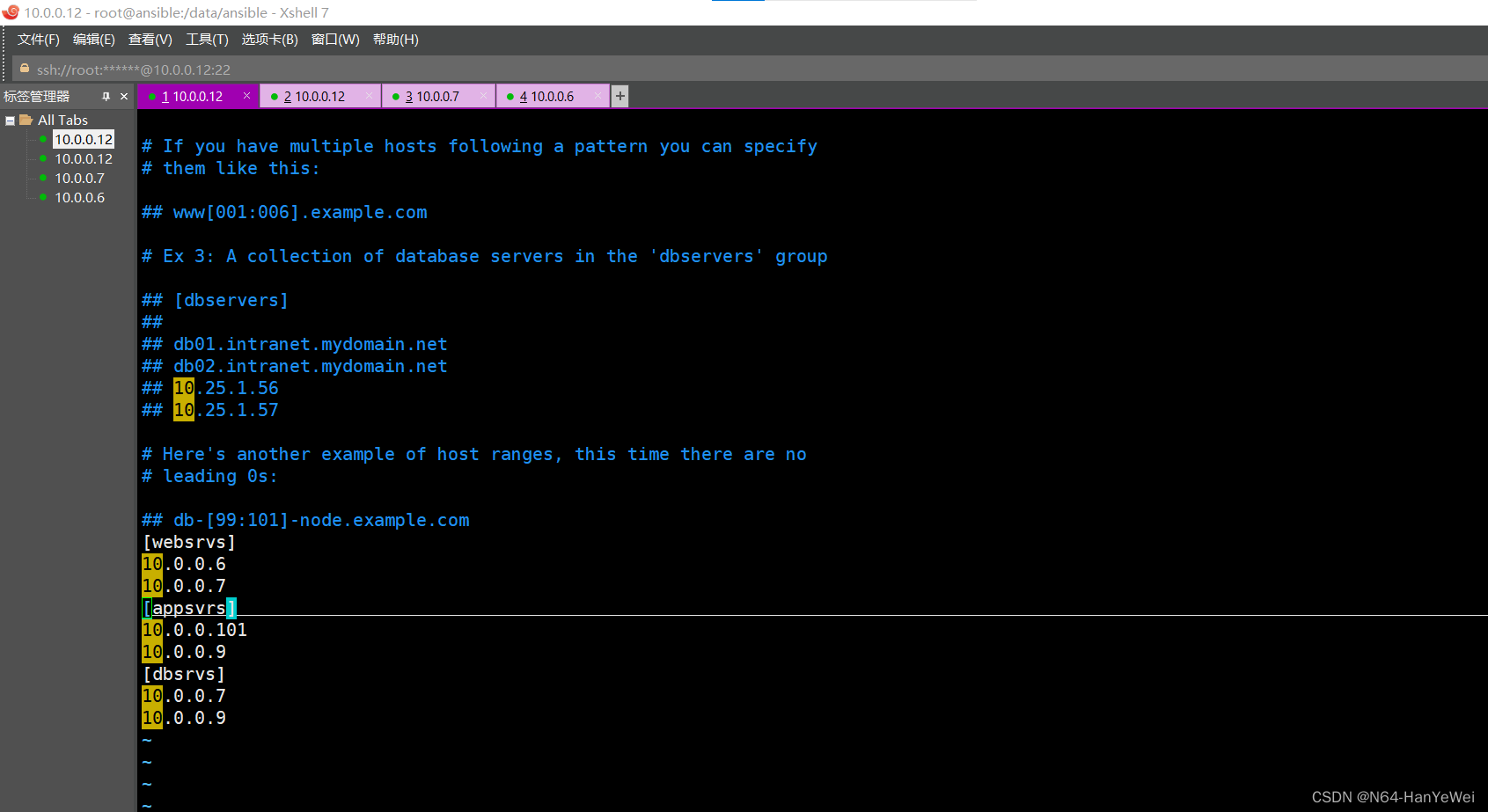
Check the script for problems
 Run script

Check the experimental phenomena :


httpd Construction and nginx Is very similar , But the best controlled hosts are installed net-tools Software for , To automatically create a file :
[[email protected] tasks]# cat config.yml
- name: Modify web page
  copy: content='{
   { ansible_eth0.ipv4.address }}\n' dest=/var/www/html/index.html
[[email protected] tasks]# cat yum.yml
- name: Install httpd
  yum: name=httpd  state=present
[[email protected] tasks]# cat yum1.yml
- name: Install net-tools
  yum: name=net-tools state=present
[[email protected] tasks]# cat service.yml
- name: start service
  service: name=httpd state=started enabled=yes
[[email protected] tasks]# cat main.yml
- include: yum.yml
- include: yum1.yml
- include: config.yml
- include: service.yml
To configure httpd.yml
[[email protected] ansible]# cat httpd.yml
---
# httpd role
- hosts: websrvs
  remote_user: root

  roles:
    - httpd
3、http Summary of message structure and status code
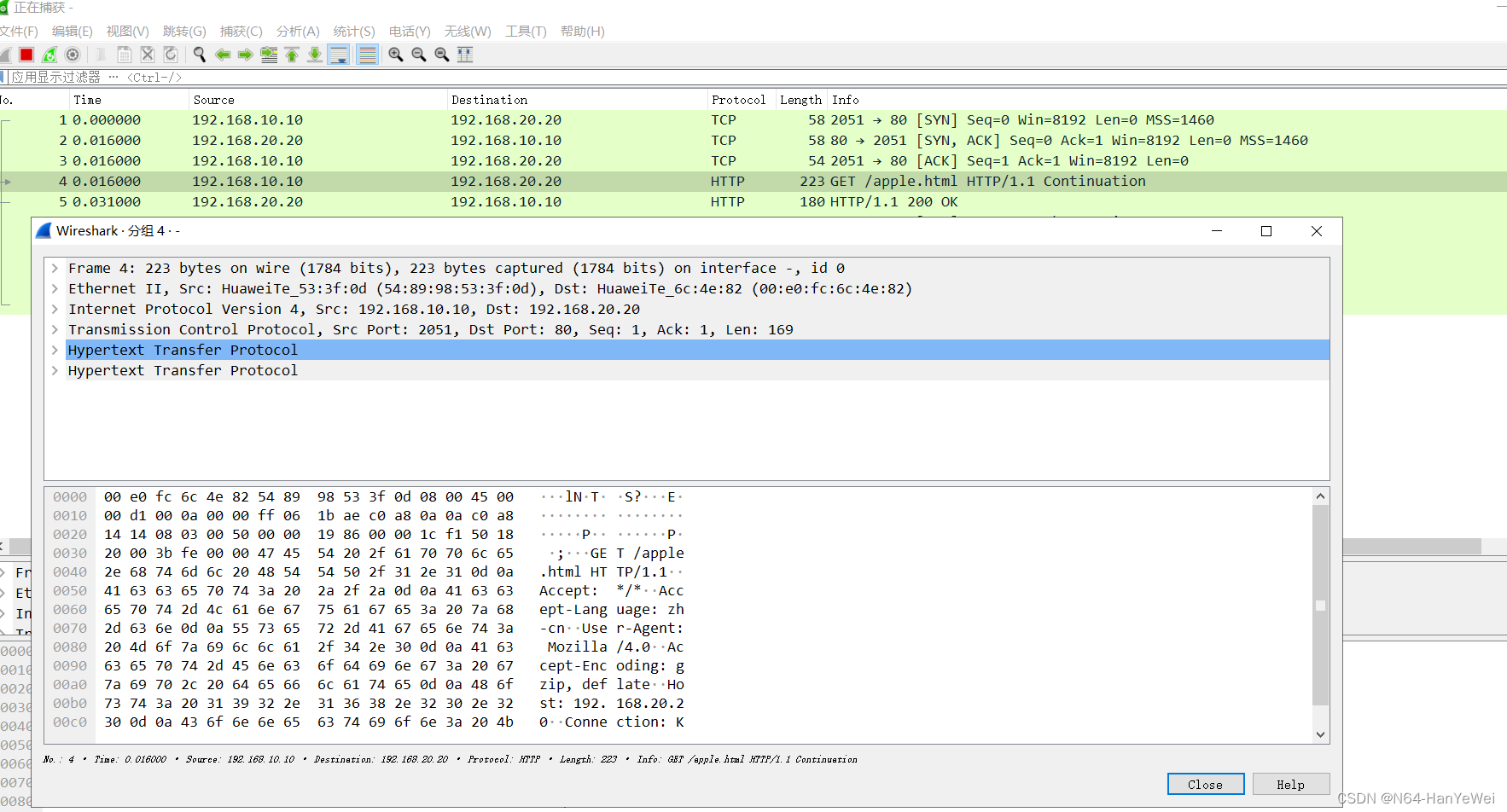

HTTP Message is divided into request message and response message , These two types of messages are composed of three parts :
(1) Go ahead : Distinguish between request message and response message
(2) Head office : Description browser 、 Some information about the subject of the server message
(3) Entity subject
The beginning line of the request message includes : Method ( The request method is as follows: get、post、put、trace etc. )、URL、 Protocol version
The beginning line of the response message includes : edition 、 Status code 、 The phrase ( Used to simply explain the status code )
The status codes in the response message are divided into five categories , common 33 Kind of :
1XX Means the notification information , If the request is received or is being processed
2XX It means success , To accept or know
3XX Indicates redirection , Further action must be taken to complete the request
4XX Indicates the customer's error , If the request contains syntax errors or cannot be completed
5XX Indicates a server error , If the server fails to complete the request
Common status code :
202 Accepted Accept
400 Bad Reque Wrong request
404 Not Found Can't find
边栏推荐
- 【TcaplusDB知识库】TcaplusDB常规单据介绍
- 面试高频 | 你追我赶的Flink双流join
- AbortController的使用
- AUTO sharding policy will apply DATA sharding policy as it failed to apply FILE sharding policy
- HW safety response
- Super double efficiency! Pycharm ten tips
- # 粒子滤波 PF——三维匀速运动CV目标跟踪(粒子滤波VS扩展卡尔曼滤波)
- English grammar_ Adjective / adverb Level 3 - original sentence pattern
- sqlite加载csv文件,并做数据分析
- AUTO sharding policy will apply DATA sharding policy as it failed to apply FILE sharding policy
猜你喜欢

【ceph】CephFS 内部实现(三):快照
![[CEPH] MKDIR | mksnap process source code analysis | lock state switching example](/img/4a/0aeb69ae6527c65a67be535828b48a.jpg)
[CEPH] MKDIR | mksnap process source code analysis | lock state switching example
![[tcapulusdb knowledge base] tcapulusdb OMS business personnel permission introduction](/img/7b/8c4f1549054ee8c0184495d9e8e378.png)
[tcapulusdb knowledge base] tcapulusdb OMS business personnel permission introduction
![[CEPH] Introduction to cephfs caps](/img/41/7d59ecbc1129503c8858dc0304a3f9.png)
[CEPH] Introduction to cephfs caps

Unable to download Plug-in after idea local agent
【TcaplusDB知识库】TcaplusDB系统用户组介绍

【TcaplusDB知识库】TcaplusDB系统管理介绍

Evaluation - TOPSIS

How to load the contour CAD drawing of the engineering coordinate system obtained by the designer into the new earth
![[tcapulusdb knowledge base] Introduction to tcapulusdb data structure](/img/64/4d7ec393d8469cdadc89078a8cf4b1.png)
[tcapulusdb knowledge base] Introduction to tcapulusdb data structure
随机推荐
svg上升的彩色气泡动画
[CEPH] Introduction to cephfs caps
Seurat转h5ad总结
English grammar_ Adjective / adverb Level 3 - original sentence pattern
买股票通过券商经理的开户二维码开户资金是否安全?想开户炒股
Binding method of multiple sub control signal slots under QT
[applet practice series] Introduction to the registration life cycle of the applet framework page
有Cmake的工程交叉编译到链接时报错找不到.so动态库文件
【TcaplusDB知识库】TcaplusDB单据受理-建表审批介绍
【TcaplusDB知识库】TcaplusDB数据构造介绍
2022 Beijing Shijingshan District specializes in the application process for special new small and medium-sized enterprises, with a subsidy of 100000-200000 yuan
[graduation season · advanced technology Er] what is a wechat applet, which will help you open the door of the applet
安全Json协议
el-dialog拖拽,边界问题完全修正,网上版本的bug修复
HW安全响应
Summary of students' learning career (2022)
反射修改final
[CEPH] cephfs internal implementation (II): example -- undigested
HW safety response
Keil4 opens the single-chip microcomputer project to a blank, and the problem of 100% program blocking of cpu4 is solved