当前位置:网站首页>Soft raid
Soft raid
2022-07-28 20:32:00 【Operation and maintenance log of Panax notoginseng】
RAID
Redundant array of independent disks , In fact, it is composed of multiple independent disks to form a large disk system , So as to achieve better storage performance and higher reliability than a single disk
RAID programme
RAID0
- RAID-0 :striping( Strip mode ) characteristic : When reading and writing, multiple hard disks can be read and written at the same time , Therefore, its reading and writing performance is the best , Each disk holds a portion of the complete data , Reading is also done in parallel , The more disks , The faster the read and write speeds . Because there's no redundancy , One hard disk is broken and all data is lost . At least two hard disks can form Raid0 array
- Do not have the ability of data backup and error repair
- Production application scenarios
1、 The load balancing cluster consists of several identical clusters RS Node server
2、 The master node or CHUNK server
3、MySQL Multiple master-slave copies slave The server
4、 High performance requirements , Related businesses with low redundancy requirements
characteristic
At least two hard disks are required , Improve reading and writing efficiency , But there is no data backup , Data loss due to hard disk damage
Working mechanism : Two hard drives , Each stores a portion of different data , Read and write at the same time


The source of this picture is forgotten , Reprint
RAID1
- RAID-1 :mirroring( Mirror volume ), At least two hard disks are required ,raid The size is equal to two raid The capacity of the smallest hard disk in the partition ( It's better to divide the partition size into the same ), The two hard disks backup each other , Write to two hard disks at the same time when storing , Realize data backup ;
- Disk utilization is 50%, namely 2 block 100G Disk structure of RAID1 Only available 100G Free space for .
- Generally, it is only used for system disk
characteristic
- At least two hard disks are required , Data backup can be fault tolerant , Not improving the efficiency of reading and writing
Working mechanism : Two hard drives , A piece of stored data , Another hard disk is used as data backup , When one is damaged , Another replacement


The source of this picture is forgotten , Reprint
RAID5
characteristic : Use parity , High reliability , Disk checksums are hashed into different disks , Increased read and write rate . Only when two disks are lost at the same time , Data cannot be recovered , There should be at least three hard disks and the hard disks should be equal in size to form Raid5 array .
Capacity : The sum of all hard disk capacities minus the capacity of one of them , The subtracted capacity is allocated to different areas of the three hard disks to store data verification information , Space utilization :n-1/n
characteristic
You need at least three hard disks , Parity check , Improve reading and writing efficiency , Data security and fault tolerance , Can damage a hard disk
Working mechanism : Every time you store data , The data is evenly distributed to ( Number of disks n)n-1 In a disk , The data is divided into several parts and stored on three hard disks in turn , Every two different copies of data are stored , Just store a copy of verification data ( Complete data ), Circular balanced storage on disk . When a disk breaks , Other disks can also be used , Recover the data in this disk . But if two disks are damaged , All data will be damaged

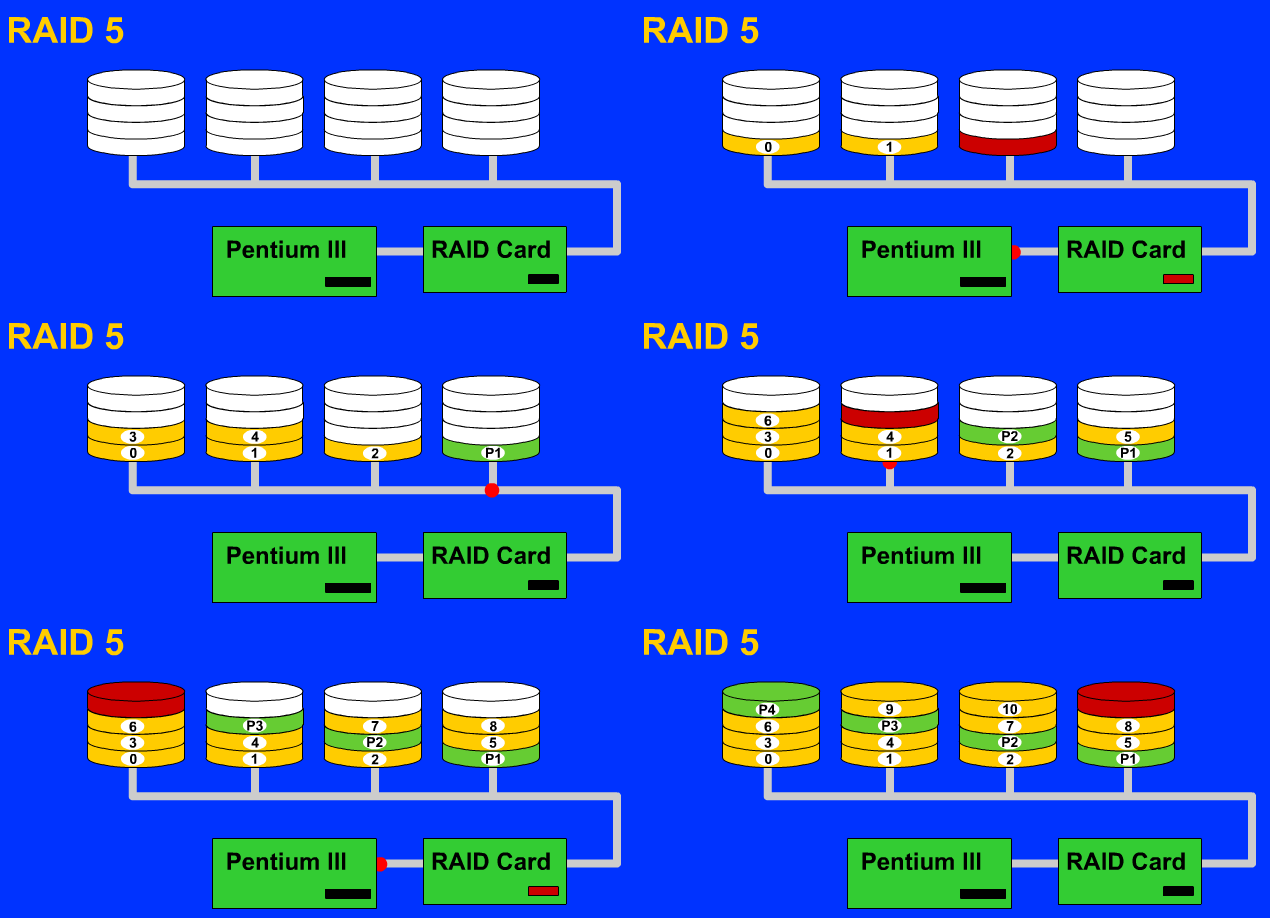
The source of this picture is forgotten , Reprint

RAID10
Raid10(Raid1+Raid0) It is a commonly used disk array level , Its fault tolerance is good , High efficiency of reading and writing data , But the funds are relatively high .
characteristic : Backup and concurrent access to data , High reliability .D1、D2 Form an array Raid1, among D1 It's a data disk ,D2 It's a backup disk ;D3、D4 Also form a Raid1, among D3 It's a data disk ,D4 It's a backup disk ; On this basis D1、D2 As a whole , take D3、D4 Also as a whole , Between these two whole forms a Raid0 array . This will not only read data, but also be very fast , The speed of concurrent writes will also increase with the increase of disks . At least four hard disks and each hard disk should be equal in size to form Raid10 array .
Capacity : Half of the total capacity of all hard drives ( Half write data , Half is used to back up data ).
characteristic
At least four hard disks are required , combination RAID1 and 0 The advantages of , Improve reading and writing efficiency and security ,
Working mechanism : It is equivalent to putting two groups RAID1 Group together RAID0, Two hard disks can be broken , But different groups of data cannot be damaged at the same time


command
Partition command
Add hard disk
Restart the host reboot
fdisk -l Check the disk partition of the current system
fdisk  /dev/sdb       Partition
 Partition commands in interactive mode :
m Get help on disk
n Add a new partition
p Primary partition
e Extended partitions
 Zoning 1-4  The fourth partition is the logical partition. All the remaining space is allocated to the logical partition , Then create a new partition , The new partition is automatically built inside the logical partition
+5G First partition 5g The capacity of
p Print out a list of partitions
d Delete partition
q Exit without saving
w Save and exit
Disk array commands
 Create a disk array mdadm
 Make RAID1+0 Example :
 A hard disk is divided into 11 District ,4 Zone unavailable
 Change the partition type to fd
 Save and exit
 Check whether there is a tool for making disk arrays
rpm -qa |grep mdadm

 Use sdb1 and sdb2 Create a raid1, The name is md11
[[email protected] ~]# mdadm -Cv /dev/md11 -a yes -n2 -l1 /dev/sdb1 /dev/sdb2
                           C establish v details   a Automatically create the required equipment   n Number of disks used   l Disk array level
mdadm: Note: this array has metadata at the start and
    may not be suitable as a boot device.  If you plan to
    store '/boot' on this device please ensure that
    your boot-loader understands md/v1.x metadata, or use
    --metadata=0.90
mdadm: size set to 1046528K
Continue creating array? y   ( If you ask during the process of creating a disk array “Continue creating array Continue to create array ?” reply y yes )
mdadm: Defaulting to version 1.2 metadata
mdadm: array /dev/md11 started.

 Use sdb3 and sdb5 Create a raid1, The name is md12
[[email protected] ~]# mdadm -Cv /dev/md12 -a yes -n2 -l1 /dev/sdb3 /dev/sdb5     md12 Name yourself after the establishment raid name
mdadm: Note: this array has metadata at the start and
    may not be suitable as a boot device.  If you plan to
    store '/boot' on this device please ensure that
    your boot-loader understands md/v1.x metadata, or use
    --metadata=0.90
mdadm: size set to 1046528K
Continue creating array? y
mdadm: Fail to create md11 when using /sys/module/md_mod/parameters/new_array, fallback to creation via node
mdadm: /dev/md11 is already in use.

 Use md11 and md12 Create a raid0, The name is md0
[[email protected] ~]# mdadm -Cv /dev/md0 -a yes -n2 -l0 /dev/md11 /dev/md12
mdadm: chunk size defaults to 512K
mdadm: Defaulting to version 1.2 metadata
mdadm: array /dev/md0 started.

 Check for success
[[email protected] ~]# cat /proc/mdstat
Personalities : [raid1] [raid0]
md0 : active raid0 md12[1] md11[0]
      2088960 blocks super 1.2 512k chunks

md12 : active raid1 sdb5[1] sdb3[0]
      1046528 blocks super 1.2 [2/2] [UU]

md11 : active raid1 sdb2[1] sdb1[0]
      1046528 blocks super 1.2 [2/2] [UU]

 Delete array
madam -S  /dev/md2    S stop it     Delete without mounting

 Another assumption md0 and md1 It's done md2 in , If you stop directly md0 perhaps md1 Will prompt :
mdadm: Cannot get exclusive access to /dev/md1:Perhaps a running process, mounted filesystem or active volume group?
mdadm: Cannot access exclusively /dev/md1: It may be a running process 、 Mounted file systems or active volume groups ?
get exclusive access to /dev/md1:Perhaps a running process, mounted filesystem or active volume group?
mdadm: Cannot access exclusively /dev/md1: It may be a running process 、 Mounted file systems or active volume groups ?
边栏推荐
- FPGA programming experience
- 读取json配置文件,实现数据驱动测试
- Wildcard ssl/tls certificate
- local/chain/run_ tdnn.sh:
- 【CodeForces】Educational Codeforces Round 132 (Rated for Div. 2)
- C语言数据 3(2)
- Music says
- 长轮询,iframe和sse三种web消息实时推送demo实践
- Zfoo adds routes similar to mydog
- How can Plato obtain premium income through elephant swap in a bear market?
猜你喜欢
![最大交换[贪心思想&单调栈实现]](/img/ad/8f0914f23648f37e1d1ce69086fd2e.png)


随机推荐
Item exception handling in SSM
WPF--实现WebSocket服务端
C语言数据 3(1)
What is the variance?
Simple example of C language 1
Reverse string
Character device drive structure
DSACTF7月re
Raspberry pie creation self start service
Common commands of raspberry pie
Gru neural network
9. Pointer of C language (3) classic program, exchange the value of two numbers for deep analysis, (easy to understand), are formal parameters and arguments a variable?
C语言数据 3(2)
LeetCode-297-二叉树的序列化与反序列化
Raspberry pie CM4 -- using metartc3.0 to integrate ffmpeg to realize webrtc push-pull streaming
Practice of real-time push demo of three web messages: long polling, iframe and SSE
Windows系统下Mysql数据库定时备份
进制及数的表示 2
读取json配置文件,实现数据驱动测试
File lookup and file permissions