当前位置:网站首页>Pytorch uses multi GPU parallel training and its principle and precautions
Pytorch uses multi GPU parallel training and its principle and precautions
2022-06-26 06:16:00 【Le0v1n】
1. More common GPU Usage method

- Model parallel (model parallel) -> Big networks ( No improvement in speed )
When the model needs a large graphics card , a sheet GPU When your video memory doesn't fit , In this way, a large network can be trained - Data parallelism (data parallel)-> Speed up your training
You can put the whole model on one sheet GPU when , We can put every model in every GPU On , Let them train at the same time ( Positive communication + Back propagation )
2. Training speed and GPU The relationship between numbers
Performance measurement : Data sources Thunderbolt Barra WZ
- PyTorch 1.7
- CUDA:10.1
- Model:ResNet-34
- Dataset:flower_photos( A very small data set )
- BatchSize:16
- Optimizer:SGD
- GPU:Tesla V100( The previous generation of Kahuang )

As can be seen from the picture above , Training speed and GPU Quantity is not a simple multiplication relation . With GPU An increase in quantity , The acceleration effect is getting worse , At this time, because of the difference GPU We need to communicate with each other , There will be performance loss .
3. a key
- How datasets are allocated between different devices
- How error gradients communicate between different devices
- Batch Normalization How to synchronize between different devices
3.1 Data set allocation
3.2 Error communication
Use more GPU During training , Each sheet GPU After a step Then there will be a gradient , We need to put all of GPU The gradient of is averaged ( Not every GPU Each learns his own , That would be meaningless ), Only in this way can each GPU Combined with your training results .
3.3 BN Sync
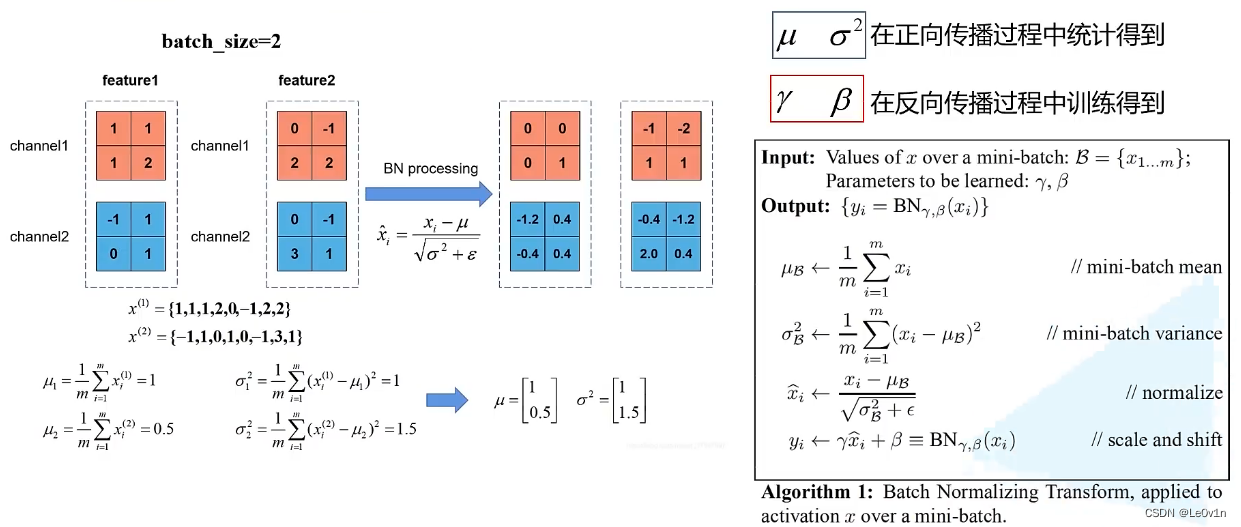
hypothesis BS=2,feature1 and feature2 It is the characteristic graph of a layer in the network after convolution operation , because BS=2, So there are two feature. In the process of positive propagation ,BN Be able to find each of the characteristic matrices channel The mean and variance of , Then the data on each channel is “ Minus the mean divided by the standard deviation ” The operation of , So we can get through BN The characteristic diagram of .
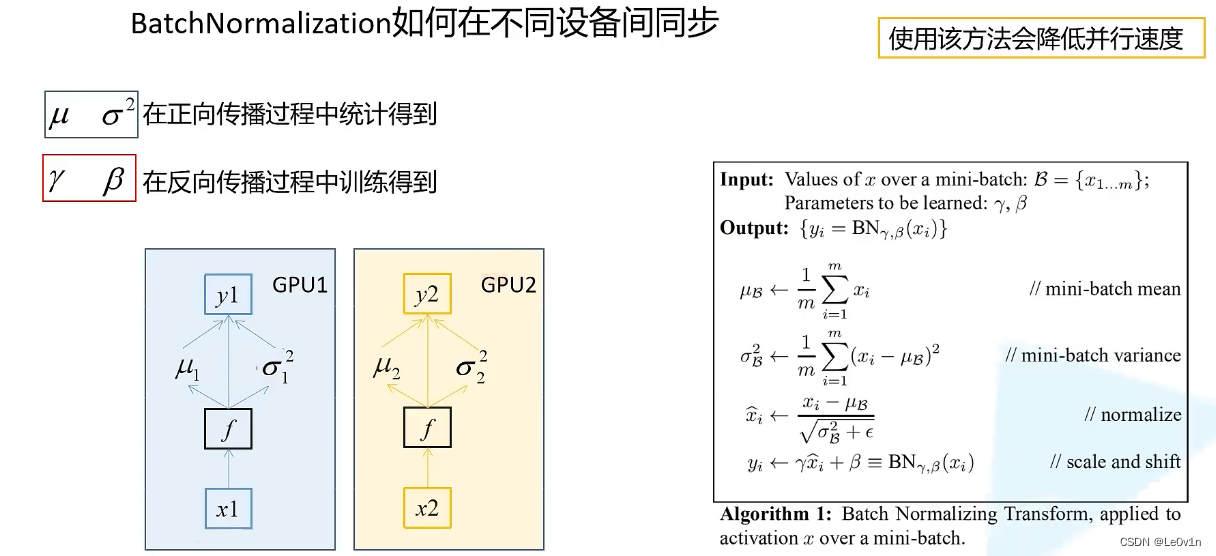
When we use more GPU During training , Every GPU Will calculate their respective mean and variance . Here we also assume that each GPU On the data BS=2, Then each BN The average value of the layer μ i \mu_i μi And variance σ i 2 \sigma^2_i σi2 Both are for two characteristic graphs .
We said before ,BS The bigger it is ,BN The closer the mean and variance are to all samples , The higher the accuracy .
So if we use more GPU Training , We should consider “ Should we ask everyone BN The mean and variance of the layer on all devices ”. In this way, the mean and variance obtained by us are more meaningful .
If we don't consider more GPU Between BN Parameter relationship of , So what we have got BN The mean and variance of the layer are for the two input samples (BS=2) To solve the .
What if we consider other equipment ?
GPU1 Of BN Layer to get two characteristic graphs 1 and 2,GPU2 Of BN Layer to get two characteristic graphs 3 and 4. If we ask BN Parameters are characteristic graphs 12+34, So our BN In disguise, it is equivalent to BS=4 The mean and variance obtained in the case of . This will be helpful to our final training results .
Thunderbolt Barra WZ say , If you do not use synchronized BN( The ordinary
nn.BatchNorm), Then the results obtained and the use sheet GPU The results are basically consistent .
Of course , Use different BN More GPU It is also very helpful for the training speed of the model
If you use synchronized BN after , The final result is generally improved by nearly one point
All synchronized BN It does have a certain effect
If your GPU The video memory is very large , It was on a GPU It can be very big BS, Then use synchronized BN It won't make much difference .
Sync BN Mainly used in : The network is relatively large , a sheet GPU its BS Can't be set in very large cases , synchronous BN It is of great help to accuracy .
Be careful : Used with synchronization BN Methods , many GPU The parallel speed of will decrease . It may reduce 30% The speed of .
- Want faster -> Do not use synchronized BN
- Higher precision -> Use synchronous BN
4. PyTorch Implementation of multi card parallel computing
Divided into two :
- DataParallel
PyTorch A plan given by the government a long time ago - DistributedDataParallel
A new generation of multi card training methods
DDP It is not limited to single machine with multiple cards , It is also applicable to multi-level and multi card scenarios .
- PyTorch About DP Documents
- [PyTorch About DDP Documents ](DistributedDataParallel — PyTorch 1.11.0 documentation)

- DP It's a single process 、 Multithreaded and can only work on a single device ( A single node , Not applicable to the case of multiple machines )
- DDP It's a multi process , It can work in single machine or multi machine scenarios
- DP Usually slower than DDP( Even on a single device )
The single machine and multi machine mentioned here are not single machines GPU And many GPU, It means single server and multiple servers
DP and DDP Can be used in the case of a single machine , single DDP It can be used in the case of multiple computers , And even in a single machine ( A machine has more than one GPU),DDP Is faster than DP Fast .
[PyTorch Training tutorial on single machine multi card and multi-level multi card ](PyTorch Distributed Overview — PyTorch Tutorials 1.11.0+cu102 documentation)
5. PyTorch Use more in GPU Common starting methods for training
torch.distributed.launch: Less code , It's fast to startpython -m torch.distributed.launch # -m: run library module as a script # --help: Can pass `torch.distributed.launch --help` This is a real way to see how to usestay PyTorch Officially realized Faster R-CNN Source code , many GPU Training is using
distributed.launchTo start , Therefore, the following will be mainly based ondistributed.launchTo start uptorch.multiprocessing: More code , But with better control and flexibility
matters needing attention :
- In the use of
torch.distributed.launchThe way to train . Once the training starts , Manually force the termination of the training program (ctrl + c), There is a small probability that the process is not killed .
At this time, the program will also occupy GPU Video memory and resources . So we need to put these processeskill -9fall
5.1 Single card training script
5.1.1 main
"""  Single card training script  ——  Training ResNet34/101 """


import os
import math
import argparse

import torch
import torch.optim as optim
from torch.utils.tensorboard import SummaryWriter
from torchvision import transforms
import torch.optim.lr_scheduler as lr_scheduler

from model import resnet34, resnet101
from my_dataset import MyDataSet
from utils import read_split_data
from multi_train_utils.train_eval_utils import train_one_epoch, evaluate


def main(args):
    #  Check the configuration of the machine ( Is there a GPU, No, GPU Then for CPU)
    device = torch.device(args.device if torch.cuda.is_available() else "cpu")

    print(args)  #  Print the incoming parameters
    print('Start Tensorboard with "tensorboard --logdir=runs", view at http://localhost:6006/')
    tb_writer = SummaryWriter()  #  establish Tensorborad object
    if os.path.exists("./weights") is False:  #  Check whether the folder where the weight file is saved exists , If it does not exist, create the folder
        os.makedirs("./weights")

    train_info, val_info, num_classes = read_split_data(args.data_path)
    train_images_path, train_images_label = train_info
    val_images_path, val_images_label = val_info

    # check num_classes
    assert args.num_classes == num_classes, "dataset num_classes: {}, input {}".format(args.num_classes,
                                                                                       num_classes)

    data_transform = {

        "train": transforms.Compose([transforms.RandomResizedCrop(224),
                                     transforms.RandomHorizontalFlip(),
                                     transforms.ToTensor(),
                                     transforms.Normalize([0.485, 0.456, 0.406], [0.229, 0.224, 0.225])]),
        "val": transforms.Compose([transforms.Resize(256),
                                   transforms.CenterCrop(224),
                                   transforms.ToTensor(),
                                   transforms.Normalize([0.485, 0.456, 0.406], [0.229, 0.224, 0.225])])}

    #  Instantiate training data sets
    train_data_set = MyDataSet(images_path=train_images_path,
                               images_class=train_images_label,
                               transform=data_transform["train"])

    #  Instantiate validation data sets
    val_data_set = MyDataSet(images_path=val_images_path,
                             images_class=val_images_label,
                             transform=data_transform["val"])

    batch_size = args.batch_size

    #  according to BS Quantity and training equipment CPU Core number num_worker Size
    nw = min([os.cpu_count(), batch_size if batch_size > 1 else 0, 8])  # number of workers
    print('Using {} dataloader workers every process'.format(nw))

    #  Read training data
    train_loader = torch.utils.data.DataLoader(train_data_set,
                                               batch_size=batch_size,
                                               shuffle=True,
                                               pin_memory=True,
                                               num_workers=nw,
                                               collate_fn=train_data_set.collate_fn)

    #  Read validation data
    val_loader = torch.utils.data.DataLoader(val_data_set,
                                             batch_size=batch_size,
                                             shuffle=False,
                                             pin_memory=True,
                                             num_workers=nw,
                                             collate_fn=val_data_set.collate_fn)

    #  Define the model object and add it to the equipment
    model = resnet34(num_classes=args.num_classes).to(device)
    #  If there are pre training weights, load
    if args.weights != "":
        if os.path.exists(args.weights):
            #  First use torch.load Load the weights in the specified file
            weights_dict = torch.load(args.weights, map_location=device)

            #  Load only key and value Element equal key value pairs
            load_weights_dict = {
    k: v for k, v in weights_dict.items()
                                 if model.state_dict()[k].numel() == v.numel()}
            # 1.  Model loading Dictionary ( Not strictly loaded );2.  Print
            print(model.load_state_dict(load_weights_dict, strict=False))
        else:
            raise FileNotFoundError("not found weights file: {}".format(args.weights))

    #  Whether to freeze the weight
    if args.freeze_layers:
        for name, para in model.named_parameters():  # name:  The name of the layer ; para:  The corresponding parameter
            #  Except for the last full connection layer , All other weights are frozen
            if "fc" not in name:  #  except fc Out of layer , The parameters of all layers have no gradient ( No back propagation , That is, no parameter update )
                para.requires_grad_(False)

    #  Pass parameters with gradients into pg This list in
    pg = [p for p in model.parameters() if p.requires_grad]

    #  Define parameter optimizer , The first parameter is the parameter to be updated , That is, the previous line pg Results in the list
    optimizer = optim.SGD(pg, lr=args.lr, momentum=0.9, weight_decay=0.005)

    #  Define the learning rate change function , Reference resources :Scheduler https://arxiv.org/pdf/1812.01187.pdf ->  It's actually a cosine function [0, pi]
    lf = lambda x: ((1 + math.cos(x * math.pi / args.epochs)) / 2) * (1 - args.lrf) + args.lrf  # cosine

    # scheduler It is the object of adjusting the change of learning rate , The regular change of learning rate can be realized by passing the optimizer and learning rate change curve to it
    scheduler = lr_scheduler.LambdaLR(optimizer, lr_lambda=lf)

    #  Start iterative training
    for epoch in range(args.epochs):
        # train
        """  You can see , there train The stage just returns the average loss, There is no predictive probability  """
        mean_loss = train_one_epoch(model=model,
                                    optimizer=optimizer,
                                    data_loader=train_loader,
                                    device=device,
                                    epoch=epoch)

        # epoch A , The learning rate changer needs to be updated ( bring optimizer The learning rate in )
        scheduler.step()

        # validate
        sum_num = evaluate(model=model,
                           data_loader=val_loader,
                           device=device)
        acc = sum_num / len(val_data_set)  # top-1 Accuracy rate  =  Predict the right number  /  Number of validation samples

        #  Print this epoch Accuracy under
        print("[epoch {}] accuracy: {}".format(epoch, round(acc, 3)))

        #  take train and validation The resulting data is added to tensorboard in
        # optimizer.param_groups[0]["lr"] That is, corresponding to epoch Learning rate of
        tags = ["loss", "accuracy", "learning_rate"]
        tb_writer.add_scalar(tags[0], mean_loss, epoch)
        tb_writer.add_scalar(tags[1], acc, epoch)
        tb_writer.add_scalar(tags[2], optimizer.param_groups[0]["lr"], epoch)

        #  Save the corresponding epoch Model of ( The best model is not selected here , Can pass acc Only the weight files with high accuracy are retained )
        torch.save(model.state_dict(), "./weights/model-{}.pth".format(epoch))


if __name__ == '__main__':
    parser = argparse.ArgumentParser()
    parser.add_argument('--num_classes', type=int, default=5)
    parser.add_argument('--epochs', type=int, default=30)
    parser.add_argument('--batch-size', type=int, default=16)
    parser.add_argument('--lr', type=float, default=0.001)
    # lrf Is the magnification factor , That is, the learning rate eventually decreases to the initial learning rate lr How many times .
    #  The final learning rate is lr * lrf
    parser.add_argument('--lrf', type=float, default=0.1)

    #  The root directory where the dataset is located
    # http://download.tensorflow.org/example_images/flower_photos.tgz
    parser.add_argument('--data-path', type=str,
                        default="/home/w180662/my_project/my_github/data_set/flower_data/flower_photos")

    # resnet34  Official weight download address
    # https://download.pytorch.org/models/resnet34-333f7ec4.pth
    parser.add_argument('--weights', type=str, default='resNet34.pth',
                        help='initial weights path')  #  by "" Indicates that the pre training model is not used
    parser.add_argument('--freeze-layers', type=bool, default=False)
    parser.add_argument('--device', default='cuda', help='device id (i.e. 0 or 0,1 or cpu)')

    opt = parser.parse_args()

    main(opt)
5.1.2 train_eval_utils
import sys

from tqdm import tqdm
import torch

from multi_train_utils.distributed_utils import reduce_value, is_main_process


def train_one_epoch(model, optimizer, data_loader, device, epoch):
    model.train()  #  Declare the state of the model
    loss_function = torch.nn.CrossEntropyLoss()  #  Define the loss function
    mean_loss = torch.zeros(1).to(device)  #  Generate shape by [1, ] All zero matrix of , And add it to the corresponding device  ->  Used to store the results of subsequent calculations mean_loss

    #  Clear the gradient residue in the optimizer
    optimizer.zero_grad()

    #  In the process 0 Print training progress in
    if is_main_process():  #  Determine whether the master process
        #  Use tqdm Pack it in the library data_loader This variable , After a while, I was traversing data_loader Will print a progress bar
        data_loader = tqdm(data_loader, file=sys.stdout)

    #  iteration data_loader, obtain step And the corresponding data
    """  stay data_loader It's defined in BS Size ,  So here step Namely $step =  Number of all pictures  / BS$ step That is to say BS The number of ,  Every time I walk step That is to say, the BS A picture   The first 1 individual step Corresponding to the first 1 individual bs  The first 2 individual step Corresponding to the first 2 individual bs  The first 3 individual step Corresponding to the first 3 individual bs ... """
    for step, data in enumerate(data_loader):
        images, labels = data  # data It contains two parts of data :1.  Preprocessed picture ;2.  The corresponding real label

        #  Get the prediction result of the picture through forward propagation
        pred = model(images.to(device))

        #  Calculate according to the predicted results and the real label loss
        loss = loss_function(pred, labels.to(device))

        #  Yes loss Back propagation
        loss.backward()

        #  Yes loss Perform averaging
        """ reduce_value: def reduce_value(value, average=True): world_size = get_world_size() if world_size < 2: #  single GPU The situation of  return value #  The original value returns  with torch.no_grad(): dist.all_reduce(value) if average: value /= world_size #  It needs to be divided by GPU Quantity before returning  return value """
        loss = reduce_value(loss, average=True)

        #  Average historical losses
        mean_loss = (mean_loss * step + loss.detach()) / (step + 1)  # update mean losses

        #  In the process 0 Print average in loss
        if is_main_process():  #  Determine whether the master process
            data_loader.desc = "[epoch {}] mean loss {}".format(epoch, round(mean_loss.item(), 3))

        #  Judge loss Limited data ( It can't be infty)
        if not torch.isfinite(loss):
            print('WARNING: non-finite loss, ending training ', loss)
            sys.exit(1)  #  If loss Is infinite , Then quit training

        optimizer.step()  #  The parameter optimizer updates the parameters
        optimizer.zero_grad()  #  After the parameter optimizer updates the parameters , The gradient needs to be emptied

    #  Wait for all processes to complete the calculation
    if device != torch.device("cpu"):
        torch.cuda.synchronize(device)  #  wait for CUDA All cores in all streams on the device are complete .

    #  Returns the calculated average loss
    return mean_loss.item()


"""  It's used here @torch.no_grad() This decorator modifies the method , You can also use  with torch.no_grad:  This context manager  """
@torch.no_grad()
def evaluate(model, data_loader, device):
    model.eval()  #  Declare model state  -> 1.  close BN; 2. Dropout

    #  Used to store the number of correctly predicted samples
    sum_num = torch.zeros(1).to(device)

    #  In the process 0 Print verification progress in
    if is_main_process():
        data_loader = tqdm(data_loader, file=sys.stdout)  #  Wrap in the main process dataloader

    for step, data in enumerate(data_loader):
        images, labels = data
        pred = model(images.to(device))  #  Get the prediction probability
        pred = torch.max(pred, dim=1)[1]  #  Get the best prediction probability max
        """ torch.eq(tensor, tensor/value)  For two tensors Tensor Make an element by element comparison , If two elements in the same position are the same , Then return to True; If different , return False. """
        sum_num += torch.eq(pred, labels.to(device)).sum()  #  Calculate all predicted correct quantities

    #  Wait for all processes to complete the calculation
    if device != torch.device("cpu"):
        torch.cuda.synchronize(device)

    sum_num = reduce_value(sum_num, average=False)  #  Count all predicted correct quantities

    return sum_num.item()
5.2 Distributed training
5.2.1 main
from cgi import test
import os
import math
import tempfile
import argparse

import torch
import torch.optim as optim
import torch.optim.lr_scheduler as lr_scheduler
from torch.utils.tensorboard import SummaryWriter
from torchvision import transforms

from model import resnet34
from my_dataset import MyDataSet
from utils import read_split_data, plot_data_loader_image
from multi_train_utils.distributed_utils import init_distributed_mode, dist, cleanup
from multi_train_utils.train_eval_utils import train_one_epoch, evaluate


def main(args):
    if torch.cuda.is_available() is False:  #  No, GPU The device will directly report an error
        raise EnvironmentError("not find GPU device for training.")

    #  Initialize each process environment  -> args There are several more parameters in the container :1. args.rank; 2. args.world_size; 3. args.gpu
    init_distributed_mode(args=args)

    #  take args In the new DDP Parameters are assigned to global variables
    rank = args.rank
    device = torch.device(args.device)
    batch_size = args.batch_size
    weights_path = args.weights
    """  When we are using more GPU In parallel training , A gradient is usually a combination of multiple blocks GPU The gradient of is averaged .  On the original single card , Every one of us learns step, Gradient forward 1m( This is for ease of understanding ), If you study two , Then the gradient advances 2m  Suppose our GPU The number of 2. So we seem to have learned a step , But because of 2 block GPU, So it's two pieces that work together , So it's a one-off   Count two step, But when we update, we average the gradient , So this 2 individual step The value of is only updated sequentially , It means that the gradient is only going forward 1m  The learning rate has been reduced in disguise , So we need to expand the learning rate  """
    args.lr *= args.world_size  #  The learning rate should be based on parallel learning GPU Multiply the number of  ->  Here is a simple and crude way to increase the learning rate

    """  Use DDP when , General write operations 、 The printing operation is put in the first process ( The main process ) Medium operated ( It is not necessary to perform the same operation in every process ) """
    if rank == 0:  #  Print information in the first process , And instantiate tensorboard( Print parameters only in the first process )
        print(args)
        print('Start Tensorboard with "tensorboard --logdir=runs", view at http://localhost:6006/')
        tb_writer = SummaryWriter()
        if os.path.exists("./weights") is False:
            os.makedirs("./weights")

    train_info, val_info, num_classes = read_split_data(args.data_path)
    train_images_path, train_images_label = train_info
    val_images_path, val_images_label = val_info

    # check num_classes
    assert args.num_classes == num_classes, "dataset num_classes: {}, input {}".format(args.num_classes,
                                                                                       num_classes)

    data_transform = {

        "train": transforms.Compose([transforms.RandomResizedCrop(224),
                                     transforms.RandomHorizontalFlip(),
                                     transforms.ToTensor(),
                                     transforms.Normalize([0.485, 0.456, 0.406], [0.229, 0.224, 0.225])]),
        "val": transforms.Compose([transforms.Resize(256),
                                   transforms.CenterCrop(224),
                                   transforms.ToTensor(),
                                   transforms.Normalize([0.485, 0.456, 0.406], [0.229, 0.224, 0.225])])}

    #  Instantiate training data sets
    train_data_set = MyDataSet(images_path=train_images_path,
                               images_class=train_images_label,
                               transform=data_transform["train"])

    #  Instantiate validation data sets
    val_data_set = MyDataSet(images_path=val_images_path,
                             images_class=val_images_label,
                             transform=data_transform["val"])

    #  For each rank The corresponding process allocates the training sample index
    train_sampler = torch.utils.data.distributed.DistributedSampler(train_data_set)
    val_sampler = torch.utils.data.distributed.DistributedSampler(val_data_set)

    #  Index the sample every batch_size The elements make up a list
    # BatchSampler It's right train_sampler Do further processing
    train_batch_sampler = torch.utils.data.BatchSampler(train_sampler,
                                                        batch_size,
                                                        drop_last=True)

    nw = min([os.cpu_count(), batch_size if batch_size > 1 else 0, 8])  # number of workers
    if rank == 0:  #  Printing is also in the first process
        print('Using {} dataloader workers every process'.format(nw))

    train_loader = torch.utils.data.DataLoader(train_data_set,  #  The incoming training set is still instantiated ( No DistributedSampler)
                                               batch_sampler=train_batch_sampler,  #  What's coming in here is BatchSampler, Not simply batch_size
                                               pin_memory=True,  #  Load data directly into GPU in , So as to achieve the effect of acceleration
                                               num_workers=nw,  # num workers
                                               collate_fn=train_data_set.collate_fn)

    val_loader = torch.utils.data.DataLoader(val_data_set,  #  The incoming validation set is still instantiated ( No DistributedSampler)
                                             batch_size=batch_size,  #  What comes in here is still batch_size, instead of BatchSampler
                                             sampler=val_sampler,  #  Because we didn't use BatchSampler Yes DistributedSampler To deal with , So here
                                                                   #  Direct in DistributedSampler, The verification set is randomly scrambled and evenly distributed to different devices
                                                                   #  The point here is not random disruption , It is distributed evenly to different devices .
                                             pin_memory=True,
                                             num_workers=nw,
                                             collate_fn=val_data_set.collate_fn)

    #  Instantiate the model and assign it to the specified device .
    # Note: I was just defining args when ,device The default is cuda, And in initialization DDP The environment sometimes has  torch.cuda.set_device(args.gpu)
    #  The corresponding GPU Identify args.gpu, There is something device = torch.device(args.device)
    #  So it's directly used here device That's all right.  ->  Will help us automatically assign to the corresponding GPU On
    model = resnet34(num_classes=num_classes).to(device)

    #  If there are pre training weights, load
    if os.path.exists(weights_path):
        weights_dict = torch.load(weights_path, map_location=device)
        load_weights_dict = {
    k: v for k, v in weights_dict.items()
                             if model.state_dict()[k].numel() == v.numel()}
        model.load_state_dict(load_weights_dict, strict=False)

        """  If we use more GPU Training , We must ensure that the initial weights on each device are identical ! So we use more GPU Training   That's right ; If we initialize the weights differently , So the gradient obtained in the training process is not aimed at the same group   Parameters .  So what should we do ? The following statement is used here : checkpoint_path = os.path.join(tempfile.gettempdir(), "initial_weights.pt")  among ,tempfile.gettempdir() Used to return the path of the folder where the temporary files are saved . So we can get a path to save the temporary file : xxxxtempfolder/initial_weights.pt  Then we save the weight file of the main process model to this temporary file  if rank == 0: #  Save the initialization weight of the module in the main process  torch.save(model.state_dict(), checkpoint_path)  Finally, let all models read the weight ( Whether it is the main process or other processes  <=>  Whether it's generating pt Of documents GPU Or something else GPU): model.load_state_dict(torch.load(checkpoint_path, map_location=device)) """
    else:  #  If there is no weight
        checkpoint_path = os.path.join(tempfile.gettempdir(), "initial_weights.pt")
        #  If there is no pre training weight , You need to save the weights in the first process , Then other processes load , Keep the initialization weight consistent
        if rank == 0:  #  Save the initialization weight of the module in the main process
            torch.save(model.state_dict(), checkpoint_path)

        dist.barrier()  #  Wait for all GPU To this point

        #  Note here , Be sure to designate map_location Parameters , Otherwise, it will lead to the first piece GPU Take up more resources
        # map_location For redirection , Reference resources :https://blog.csdn.net/qq_43219379/article/details/123675375
        model.load_state_dict(torch.load(checkpoint_path, map_location=device))

    #  Whether to freeze the weight
    if args.freeze_layers:
        for name, para in model.named_parameters():
            #  Except for the last full connection layer , All other weights are frozen (FC There is no... In the layer BN Of , So using the synchronization function BN It doesn't make sense )
            if "fc" not in name:
                para.requires_grad_(False)
    else:  #  Do not freeze weights
        #  Only training with BN When using a structured network SyncBatchNorm It makes sense ( No BN You don't have to )
        if args.syncBN:  #  Use... With synchronization BN
            #  Use SyncBatchNorm Post training will be more time-consuming
            #  This will BN Replace with sync_BN It doesn't matter BN yes 2d still 3d Of
            model = torch.nn.SyncBatchNorm.convert_sync_batchnorm(model).to(device)

    #  To DDP Model : Use torch.nn.parallel.DistributedDataParallel Package our model , Then identify the corresponding equipment ID
    model = torch.nn.parallel.DistributedDataParallel(model, device_ids=[args.gpu])

    # optimizer
    pg = [p for p in model.parameters() if p.requires_grad]
    optimizer = optim.SGD(pg, lr=args.lr, momentum=0.9, weight_decay=0.005)
    # Scheduler https://arxiv.org/pdf/1812.01187.pdf
    lf = lambda x: ((1 + math.cos(x * math.pi / args.epochs)) / 2) * (1 - args.lrf) + args.lrf  # cosine
    scheduler = lr_scheduler.LambdaLR(optimizer, lr_lambda=lf)

    for epoch in range(args.epochs):
        """  We mentioned that earlier , Use DistributedSampler It will disrupt the data and distribute the data evenly to each device .  But the data owned by the device is unchanged . After setting this method , Every time DistributedSampler The order of disruption is different , This leads to   Each device has different data  ->  Make every device have access to all samples  """
        train_sampler.set_epoch(epoch)

        mean_loss = train_one_epoch(model=model,
                                    optimizer=optimizer,
                                    data_loader=train_loader,
                                    device=device,
                                    epoch=epoch)

        scheduler.step()

        sum_num = evaluate(model=model,
                           data_loader=val_loader,
                           device=device)

        #  there val_sampler.total_size Is the total number of samples for the entire validation set ( Including supplementary data )
        acc = sum_num / val_sampler.total_size

        if rank == 0:  #  Give... In the main process Tensorboard Add data
            print("[epoch {}] accuracy: {}".format(epoch, round(acc, 3)))
            tags = ["loss", "accuracy", "learning_rate"]
            tb_writer.add_scalar(tags[0], mean_loss, epoch)
            tb_writer.add_scalar(tags[1], acc, epoch)
            tb_writer.add_scalar(tags[2], optimizer.param_groups[0]["lr"], epoch)

            #  Save the weight parameters in the main process
            torch.save(model.module.state_dict(), "./weights/model-{}.pth".format(epoch))

    #  Delete temporary cache file
    """  If you don't use pre training weights , So it's going to generate one temp file It is used to ensure that the initialization of all device models is consistent   So we're going to delete it  """
    if rank == 0:
        if os.path.exists(checkpoint_path) is True:
            os.remove(checkpoint_path)

    #  After training , We need to call  cleanup  This method destroys the process group  ->  Release resources
    cleanup()


if __name__ == '__main__':
    parser = argparse.ArgumentParser()
    parser.add_argument('--num_classes', type=int, default=5)
    parser.add_argument('--epochs', type=int, default=30)
    parser.add_argument('--batch-size', type=int, default=16)
    parser.add_argument('--lr', type=float, default=0.001)
    parser.add_argument('--lrf', type=float, default=0.1)
    #  Is it enabled? SyncBatchNorm
    parser.add_argument('--syncBN', type=bool, default=True)

    #  The root directory where the dataset is located
    # http://download.tensorflow.org/example_images/flower_photos.tgz
    parser.add_argument('--data-path', type=str, default="/home/wz/data_set/flower_data/flower_photos")

    # resnet34  Official weight download address
    # https://download.pytorch.org/models/resnet34-333f7ec4.pth
    parser.add_argument('--weights', type=str, default='resNet34.pth',
                        help='initial weights path')
    parser.add_argument('--freeze-layers', type=bool, default=False)

    #  Do not modify the following three parameters , The system will automatically assign
    parser.add_argument('--device', default='cuda', help='device id (i.e. 0 or 0,1 or cpu)')
    #  Number of processes opened ( Note that not threads ), Do not set this parameter , Will be based on nproc_per_node Automatic setting
    parser.add_argument('--world-size', default=4, type=int,
                        help='number of distributed processes')
    parser.add_argument('--dist-url', default='env://', help='url used to set up distributed training')
    opt = parser.parse_args()

    main(opt)
5.2.2 distributed_utils
import os

import torch
import torch.distributed as dist


def init_distributed_mode(args):
    """ DDP It can be used in : 1.  Multiple machines, multiple cards  2.  Single machine multi card  +  In the case of multiple machines and multiple cards ,WORLD_SIZE Corresponds to the number of processes used in all machines ( One process corresponds to one block GPU). + RANK Represents the number of processes in all processes  + LOCAL_RANK It corresponds to the processes in the current machine   Because we are talking about the single machine multi card scenario , So here : + WORLD_SIZE Just a few pieces GPU + RANK Which piece does it represent GPU + LOCAL_RANK and RANK It's the same   Because our script uses  torch.distributed.launch  This method , So we need to use  --use_env  This method (args.use_env==True) """
    if 'RANK' in os.environ and 'WORLD_SIZE' in os.environ:  #  We use this
        args.rank = int(os.environ["RANK"])  #  The environment RANK Forced to int And then it's coming in args.rank Variable
        args.world_size = int(os.environ['WORLD_SIZE'])
        args.gpu = int(os.environ['LOCAL_RANK'])
    elif 'SLURM_PROCID' in os.environ:
        args.rank = int(os.environ['SLURM_PROCID'])
        args.gpu = args.rank % torch.cuda.device_count()
    else:
        print('Not using distributed mode')
        args.distributed = False
        return

    args.distributed = True  #  Will distributed training be used flag Set to True

    #  Specifies the... Used by the current process GPU. When using a single machine with multiple cards , In fact, it is aimed at every GPU Started a process
    torch.cuda.set_device(args.gpu)

    args.dist_backend = 'nccl'  #  Communication back end ,nvidia GPU Recommended NCCL

    #  Print the currently used GPU Of RANK And its distributed url Information
    print('| distributed init (rank {}): {}'.format(args.rank, args.dist_url), flush=True)

    #  adopt  init_process_group Method to create a process group
    dist.init_process_group(backend=args.dist_backend,   #  Communication back end (N Card is recommended nccl)
                            init_method=args.dist_url,  #  Initialization method ( Use the default method directly  -> "env://")
                            world_size=args.world_size,  #  For different processes ( A piece of GPU Assign a process ),WORLD_SIZE It's the same
                            rank=args.rank)  #  But in a different process ,RANK It's different ( If there are two GPU parallel , The first one GPU Of RANK=0, The second GPU Of RANK=1)

    #  call barrier Method waits for all GPU They all run to this place and then go down
    dist.barrier()


def cleanup():
    dist.destroy_process_group()


def is_dist_avail_and_initialized():
    """ Check whether the distributed environment is supported """
    if not dist.is_available():
        return False
    if not dist.is_initialized():
        return False
    return True


def get_world_size():
    if not is_dist_avail_and_initialized():
        return 1
    return dist.get_world_size()


def get_rank():
    if not is_dist_avail_and_initialized():
        return 0
    return dist.get_rank()


def is_main_process():
    return get_rank() == 0


def reduce_value(value, average=True):
    world_size = get_world_size()
    if world_size < 2:  #  single GPU The situation of
        return value

    with torch.no_grad():  #  many GPU Under the circumstances
        dist.all_reduce(value)  #  adopt  all_reduce  Methods for different equipment value Do the sum operation
        #  adopt  all_reduce  After the operation ,value It becomes all the equipment value Sum of
        if average:  #  If you want to average
            value /= world_size  # world_size by GPU Number

        return value
5.2.3 train_eval_utils
import sys

from tqdm import tqdm
import torch

from multi_train_utils.distributed_utils import reduce_value, is_main_process


def train_one_epoch(model, optimizer, data_loader, device, epoch):
    model.train()  #  Declare the state of the model
    loss_function = torch.nn.CrossEntropyLoss()  #  Define the loss function
    mean_loss = torch.zeros(1).to(device)  #  Generate shape by [1, ] All zero matrix of , And add it to the corresponding device  ->  Used to store the results of subsequent calculations mean_loss

    #  Clear the gradient residue in the optimizer
    optimizer.zero_grad()

    #  In the process 0 Print training progress in
    if is_main_process():  #  Determine whether the master process
        #  Use tqdm Pack it in the library data_loader This variable , After a while, I was traversing data_loader Will print a progress bar
        data_loader = tqdm(data_loader, file=sys.stdout)

    #  iteration data_loader, obtain step And the corresponding data
    """  stay data_loader It's defined in BS Size ,  So here step Namely $step =  Number of all pictures  / BS$ step That is to say BS The number of ,  Every time I walk step That is to say, the BS A picture   The first 1 individual step Corresponding to the first 1 individual bs  The first 2 individual step Corresponding to the first 2 individual bs  The first 3 individual step Corresponding to the first 3 individual bs ... """
    for step, data in enumerate(data_loader):
        images, labels = data  # data It contains two parts of data :1.  Preprocessed picture ;2.  The corresponding real label

        #  Get the prediction result of the picture through forward propagation
        pred = model(images.to(device))

        #  Calculate according to the predicted results and the real label loss
        loss = loss_function(pred, labels.to(device))

        #  Yes loss Back propagation
        """  It's calculated here loss It's about the present GPU At present batch The loss obtained . But in the single machine multi card environment , We want to get all GPU The average loss of .  So we should find a way to find the difference between different devices loss The average of . This is through  reduce_value This method realizes  """
        loss.backward()

        #  Yes loss Perform averaging
        """ reduce_value: def reduce_value(value, average=True): world_size = get_world_size() if world_size < 2: #  single GPU The situation of  return value #  The original value returns  with torch.no_grad(): dist.all_reduce(value) if average: value /= world_size #  It needs to be divided by GPU Quantity before returning  return value """
        loss = reduce_value(loss, average=True)  #  This line of code does not work in the single card environment

        #  Average historical losses
        mean_loss = (mean_loss * step + loss.detach()) / (step + 1)  # update mean losses

        #  In the process 0 Print average in loss
        if is_main_process():  #  Determine whether the master process
            data_loader.desc = "[epoch {}] mean loss {}".format(epoch, round(mean_loss.item(), 3))

        #  Judge loss Limited data ( It can't be infty)
        if not torch.isfinite(loss):
            print('WARNING: non-finite loss, ending training ', loss)
            sys.exit(1)  #  If loss Is infinite , Then quit training

        optimizer.step()  #  The parameter optimizer updates the parameters
        optimizer.zero_grad()  #  After the parameter optimizer updates the parameters , The gradient needs to be emptied

    #  Wait for all processes to complete the calculation
    if device != torch.device("cpu"):
        torch.cuda.synchronize(device)  #  wait for CUDA All cores in all streams on the device are complete .

    #  Returns the calculated average loss
    return mean_loss.item()


"""  It's used here @torch.no_grad() This decorator modifies the method , You can also use  with torch.no_grad:  This context manager  """
@torch.no_grad()
def evaluate(model, data_loader, device):
    model.eval()  #  Declare model state  -> 1.  close BN; 2. Dropout

    #  Used to store the number of correctly predicted samples
    sum_num = torch.zeros(1).to(device)

    #  In the process 0 Print verification progress in
    if is_main_process():
        data_loader = tqdm(data_loader, file=sys.stdout)  #  Wrap in the main process dataloader

    for step, data in enumerate(data_loader):
        images, labels = data
        pred = model(images.to(device))  #  Get the prediction probability
        pred = torch.max(pred, dim=1)[1]  #  Get the best prediction probability max
        """ torch.eq(tensor, tensor/value)  For two tensors Tensor Make an element by element comparison , If two elements in the same position are the same , Then return to True; If different , return False. """
        sum_num += torch.eq(pred, labels.to(device)).sum()  #  Calculate all predicted correct quantities

    #  Wait for all processes to complete the calculation
    if device != torch.device("cpu"):
        torch.cuda.synchronize(device)

    #  Count all predicted correct quantities
    #  Use here  reduce_value  Method implements all GPU Of sum_num Sum of variables
    sum_num = reduce_value(sum_num, average=False)

    return sum_num.item()
6. Supplementary knowledge
6.1 Cosine Learning rate curve
lf = lambda x: ((1 + math.cos(x * math.pi / args.epochs)) / 2) * (1 - arg.lrf) + args.lrf
l r ( e p o c h ) = 1 2 [ 1 + cos π ⋅ e p o c h e p o c h s ] × ( 1 − α ) + α \mathrm{lr(epoch)} = \frac{1}{2}[1 + \cos\frac{\pi \cdot \mathrm{epoch}}{\mathrm{epochs}}] \times (1 - \alpha) + \alpha lr(epoch)=21[1+cosepochsπ⋅epoch]×(1−α)+α
among :
- l f \mathrm{lf} lf Is the current learning rate
- e p o c h \mathrm{epoch} epoch For the current iteration epoch Count
- e p o c h s \mathrm{epochs} epochs For the total epoch Count
- α \alpha α Is the magnification factor
Its function curve is :

6.2 DistributedSampler Explanation
#  Instantiate training data sets
train_data_set = MyDataSet(images_path=train_images_path,
                           images_class=train_images_label,
                           transform=data_transform["train"])

#  Instantiate validation data sets
val_data_set = MyDataSet(images_path=val_images_path,
                         images_class=val_images_label,
                         transform=data_transform["val"])

#  For each rank The corresponding process allocates the training sample index
train_sampler = torch.utils.data.distributed.DistributedSampler(train_data_set)
val_sampler = torch.utils.data.distributed.DistributedSampler(val_data_set)
Right now torch.utils.data.distributed.DistributedSampler Explain .

Assume that the current data set has 11 Samples -> [0, 1, 2, 3, 4, …, 10].
First DistributedSampler It's going to work on the data Shuffle Handle , obtain [6, 1, 9, 3, …, 7] Such a random data sequence . And then according to GPU The quantity of . Suppose we use 2 block GPU In parallel . that DistributedSampler:
- First, the total number of samples /2( Rounding up )=6.
- Then multiply the number obtained by GPU The number of , namely 6*2=12
- This 12 Namely 2 block GPU The total number of samples of data required . But our total number of samples is 11, Then it will be supplemented . How to add ?—— Copy the first data , And finally . Here we are short of 1 Data , All will be 6 Add to the end .( If we are bad 3 Data , will [6, 1, 9] replicate , Add later )
So we have 12 It's data , Can be evenly distributed to each GPU It's in the device .
Finally, the data is allocated . The distribution method is also very simple , It is to distribute data to different devices at intervals .
adopt DistributedSampler, We will divide all the data equally among the devices . The device can only use the assigned data , You cannot use data owned by other devices .
6.3 BatchSampler
#  For each rank The corresponding process allocates the training sample index
train_sampler = torch.utils.data.distributed.DistributedSampler(train_data_set)
val_sampler = torch.utils.data.distributed.DistributedSampler(val_data_set)

# -----------------------------------------------------------

#  Index the sample every batch_size The elements make up a list
# BatchSampler It's right train_sampler Do further processing
train_batch_sampler = torch.utils.data.BatchSampler(train_sampler,
                                                    batch_size,
                                                    drop_last=True)

Suppose we have 2 block GPU, adopt DistributedSampler after , The data is evenly distributed between the two devices . Let's take the first piece GPU For example , The data index to which it is assigned is [6, 9, 10, 1, 8, 7]. Suppose our Batch Size=2, that BatchSampler The data of different devices will be 2 One in a group .
stay BatchSampler There's another parameter in drop_last. This parameter means :
If our BS=4, So what we find is that , Only the front 4 Data can be packaged into a group , after 2 Not enough data :
- If
Droplast==True, So the rest 2 Data is discarded . - If
Droplast==False, So the rest 2 Data is packaged into one batch.
Note:
- commonly BatchSampler Only for training sets DistributedSampler, The validation set does not need to be processed .
7. summary
- Print 、 Save the model 、 Computing time and other operations should be executed in the main thread (rank==0)
- Don't forget to use... For the model DDP For packaging
- Don't forget to use... After loading the dataset DistributedSampler To deal with ; also BatchSampler Deal with the former
- Remember right loss formation
reduce_valueThe calculation of - Don't forget to use whatever you need to add up
reduce_valueCalculate loss.backward()Just do gradient back propagation directly , There is no need to doreduce_valueRe dissemination . Because of each card loss It's different , It is the value obtained from your own data ,mean loss Just for display , It's not actually back-propagation lossto(device)The method is very easy to use , You don't have to.cuda()了- tensorboard The order of things in it depends on the English order , Not a statement order
- If you pursue speed , Turn off synchronized BN(SyncBN)
Sources of knowledge
- https://www.bilibili.com/video/BV1yt4y1e7sZ?share_source=copy_pc
边栏推荐
- Transformer中的Self-Attention以及Multi-Head Self-Attention(MSA)
- The difference between overload method and override method
- Explore small program audio and video calls and interactive live broadcast from New Oriental live broadcast
- 302. minimum rectangular BFS with all black pixels
- Import export simple
- Tencent's 2022 school recruitment of large factories started with salary, and the general contracting of cabbage is close to 40W!
- Introduction to canal deployment, principle and use
- DPDK——TCP/UDP协议栈服务端实现(二)
- 去哪儿网BI平台建设演进史
- Thread status and stop
猜你喜欢

Message queue - function, performance, operation and maintenance comparison

Underlying principle of MySQL index

Logstash -- send an alert message to the nail using the throttle filter

跨域的五种解决方案

Deeply uncover Ali (ant financial) technical interview process with preliminary preparation and learning direction

Gof23 - prototype mode

MobileNets: Efficient Convolutional Neural Networks for Mobile Vision Applications

Handwritten background management framework template (I)

Design and practice of low code real-time data warehouse construction system
Redis multithreading and ACL
随机推荐
A tragedy triggered by "yyyy MM DD" and vigilance before New Year's Day~
Upgrading technology to art
DPDK——TCP/UDP协议栈服务端实现(一)
Prometheus和Zabbix的对比
302. minimum rectangular BFS with all black pixels
消息队列-消息事务管理对比
Explore small program audio and video calls and interactive live broadcast from New Oriental live broadcast
06. talk about the difference and coding between -is and = = again
Tencent's 2022 school recruitment of large factories started with salary, and the general contracting of cabbage is close to 40W!
"= =" difference from "equals"
04. basic data type - list, tuple
Class and object learning
Logstash——Logstash向Email发送告警邮件
MEF framework learning record
如何设计好的技术方案
Library management system
Keepalived to achieve high service availability
[spark] how to implement spark SQL field blood relationship
SQL server functions
numpy.tile()