当前位置:网站首页>CMake教程系列-02-使用cmake代碼生成二進制
CMake教程系列-02-使用cmake代碼生成二進制
2022-06-30 02:36:00 【喜歡打籃球的普通人】
1.Cmake的安裝
2.Win10下使用CMake GUI
Win10安裝文件:
創建的目錄以及代碼如下:
- CMakeLists.txt
cmake_minimum_required(VERSION 3.0)
project(sample CXX)
add_library(sample sample.cpp)
add_executable(sample_exe sample_exe.cpp)
- sample.cpp
#include <iostream>

int print_hello_world()
{

    std::cout << "hello world!" << std::endl;

    return 0;
}
- 目錄結構如下:注意多創建一個build目錄存放中間文件和最終二進制文件

點擊“Configure
- 我的的vs是2019,在Configure中選擇了

點擊“Configure”右邊的“Generate”。
點擊“Generate”右邊的“Open Projrct”。
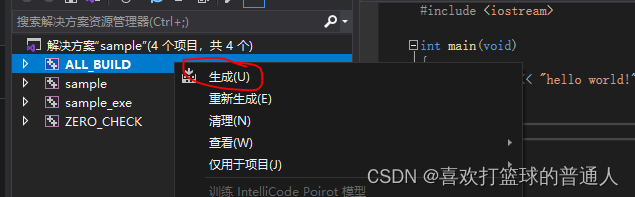
- 可以看到針對於Visual Studio的配置已經完全生成,此時只需要構建 ALL_BUILD 即可生成庫 sample 和可執行文件 sample_exe

2.win使用命令行生成項目
- 參考:cmake(1)
使用上面的代碼文件,打開命令行,並輸入以下命令:
E:\CmakeTest>cmake.exe -S E:\\CmakeTest -B E:\\CmakeTest\build -G "Visual Studio 16 2019" -A x64
-- Selecting Windows SDK version 10.0.19041.0 to target Windows 10.0.19044.
-- The CXX compiler identification is MSVC 19.29.30141.0
-- Detecting CXX compiler ABI info
-- Detecting CXX compiler ABI info - done
-- Check for working CXX compiler: C:/Program Files (x86)/Microsoft Visual Studio/2019/BuildTools/VC/Tools/MSVC/14.29.30133/bin/Hostx64/x64/cl.exe - skipped
-- Detecting CXX compile features
-- Detecting CXX compile features - done
-- Configuring done
-- Generating done
-- Build files have been written to: E:/CmakeTest/build
執行以下命令生成庫文件以及二進制程序:
E:\CmakeTest>cmake --build  E:\\CmakeTest\build
用於 .NET Framework 的 Microsoft (R) 生成引擎版本 16.11.2+f32259642
版權所有(C) Microsoft Corporation。保留所有權利。

  Checking Build System
  sample_exe.cpp
  sample.vcxproj -> E:\CmakeTest\build\Debug\sample.lib
  sample_exe.cpp
  sample_exe.vcxproj -> E:\CmakeTest\build\Debug\sample_exe.exe
  Building Custom Rule E:/CmakeTest/CMakeLists.txt
3.幾個重要的命令行參數
-S
- 頂級CMakeLists.txt(包含project聲明)所在路徑。
-B
- 存放臨時編譯的二進制文件(.obj、.ilk等)和編譯器對應的配置文件路徑。
-G
- 編譯器名稱
-A
- 架構名稱
-D
- 使用該變量以向cmake傳入各種參數。包括選項及覆蓋cmake提供的各種默認變量值。
--toolchain
- cmake toolchain文件路徑。
--install-prefix
- 安裝的二進制存放路徑。
--trace / --trace-expand
- 調試時使用,用於打印已執行的cmake代碼及行號。否則僅輸出函數message中的內容。
--build
- 使用cmake直接調用編譯器編譯項目。
--config
- 選擇需要編譯的項目配置類型。
--install
安裝已編譯好的二進制文件至 CMAKE_INSTALL_PREFIX 中。
边栏推荐
- 隐藏在科技教育中的steam元素
- Global and Chinese market of subscription revenue management software 2022-2028: Research Report on technology, participants, trends, market size and share
- dhu编程练习
- 什么是自签名证书?自签名SSL证书的优缺点?
- Quick sort
- SSL证书七大常见错误及解决方法
- Jupyter notebook显示k线图集合
- Vs realize quick replacement function
- Jupyter notebook displays a collection of K-line graphs
- Network neuroscience -- a review of network Neuroscience
猜你喜欢

SSL证书格式转化的两种方法
CMake教程系列-02-使用cmake代码生成二进制

Simple distinction between break and continue

Some configuration details about servlet initial development

Five cheapest wildcard SSL certificate brands

隐藏在科技教育中的steam元素

What is certificate transparency CT? How to query CT logs certificate logs?

What is a self signed certificate? Advantages and disadvantages of self signed SSL certificates?

Heap sort

最小栈详解
随机推荐
Unity TimeLine 数据绑定
Steam elements hidden in science and Technology Education
[dry goods sharing] the latest WHQL logo certification application process
A quick look at the statistical data of 23 major cyber crimes from 2021 to 2022
希尔排序
How difficult is the PMP Exam under the new syllabus? Comprehensive analysis
SSL证书格式转化的两种方法
Pytoch learning (II)
【干货分享】最新WHQL徽标认证申请流程
快速排序
学术汇报(academic presentation)/PPT应该怎么做?
2.8 【 weight of complete binary tree 】
CMake教程系列-02-使用cmake代码生成二进制
Global and Chinese markets for light cargo conveyors 2022-2028: Research Report on technology, participants, trends, market size and share
DHU programming exercise
Dynamic SQL
Entering Jiangsu writers and poets carmine Jasmine World Book Day
CMake教程系列-05-选项及变量
Linear algebra Chapter 4 Summary of knowledge points of linear equations (Jeff's self perception)
代码签名、驱动签名的常见问题解答