当前位置:网站首页>六、出库管理功能的实现
六、出库管理功能的实现
2022-06-13 01:35:00 【beyond谚语】
一、数据库的建立
这里仍使用yy_textile表
在fiber_yy数据库下创建yy_textile表

初始数据库信息
二、页面的完善
登录注册页面我就不演示了,前几篇博文也都有介绍
shipment出库管理页面
main_page页面进行功能完善
三、代码实现
shipment出库管理页面
using System;
using System.IO;
using System.Collections.Generic;
using System.ComponentModel;
using System.Data;
using System.Data.OleDb;
using System.Drawing;
using System.Linq;
using System.Text;
using System.Threading.Tasks;
using System.Windows.Forms;
using System.Data.Sql;
using System.Data.SqlClient;

namespace fiber_yy
{

    public partial class shipment : Form
    {

        private DataSet dsall;
        public string constr = "server=CY-20190824RMES;Initial Catalog=fiber_yy;User ID=sa;pwd=beyond";
        private SqlDataAdapter mDataAdapter;

        public shipment()
        {

            InitializeComponent();
            try
            {


                SqlConnection conn = new SqlConnection(constr);
                conn = new SqlConnection(constr);
                mDataAdapter = new SqlDataAdapter("SELECT name AS '纺织品名称',number AS '纺织品品号',warp_density AS '经密度' ,weft_density AS '纬密度',warp_linear_density AS '经纱线密度',weft_linear_density AS '纬纱线密度',material AS '原料成分',square_meter_weight AS '平方米重量',width_of_cloth AS '幅宽',horse_length AS '匹长',organization AS '所用组织',stock AS '库存量' FROM yy_textile", conn);
                dsall = new DataSet();
                mDataAdapter.Fill(dsall, "hard");
                dataGridView1.DataSource = dsall.Tables["hard"];

            }
            catch
            {

                MessageBox.Show("读取失败,请检查是否存在该织物");
            }
        }

        private void button1_Click(object sender, EventArgs e)
        {

            try
            {

                SqlConnection conn = new SqlConnection(constr);
                conn = new SqlConnection(constr);
                mDataAdapter = new SqlDataAdapter("SELECT name AS '纺织品名称',number AS '纺织品品号',warp_density AS '经密度' ,weft_density AS '纬密度',warp_linear_density AS '经纱线密度',weft_linear_density AS '纬纱线密度',material AS '原料成分',square_meter_weight AS '平方米重量',width_of_cloth AS '幅宽',horse_length AS '匹长',organization AS '所用组织',stock AS '库存量' FROM yy_textile", conn);
                dsall = new DataSet();
                mDataAdapter.Fill(dsall, "hard");
                dataGridView1.DataSource = dsall.Tables["hard"];
            }
            catch
            {

                MessageBox.Show("读取失败");
            }
        }

        private void button2_Click(object sender, EventArgs e)//查看织物信息
        {

            try
            {

                string number = textBox1.Text;
                byte[] MyData = new byte[0];
                string sql = "SELECT stock FROM yy_textile WHERE number='" + number + "'";

                SqlConnection conn = new SqlConnection(constr);
                SqlCommand cmd = new SqlCommand(sql, conn);
                conn.Open();
                string account = cmd.ExecuteScalar().ToString();
                int a = int.Parse(account);
                //MessageBox.Show(a.ToString());
                if (a > 100)
                {

                    SqlConnection conn1 = new SqlConnection(constr);
                    conn1.Open();
                    SqlCommand cmd1 = new SqlCommand();
                    cmd1.Connection = conn1;
                    cmd1.CommandText = "select * from yy_textile where number='" + number + "'";

                    SqlDataReader sdr = cmd1.ExecuteReader();
                    sdr.Read();
                    object o = sdr["picture"];
                    MyData = (byte[])sdr["picture"];//读取第一个图片的位流
                    MemoryStream memoryStream = null;
                    memoryStream = new MemoryStream(MyData);
                    pictureBox1.Image = Image.FromStream(memoryStream);//将图片赋给pictureBox1控件
                    MessageBox.Show("读取成功");

                }
                else
                {

                    MessageBox.Show("库存不足100请及时补充!!!");
                }

            }
            catch
            {

                MessageBox.Show("读取失败 over");
            }


        }
        private void button3_Click(object sender, EventArgs e)
        {

            try
            {

                string sql1;
                string number = this.textBox1.Text;
                int count = int.Parse(textBox2.Text);

                SqlConnection conn = new SqlConnection(constr);
                conn = new SqlConnection(constr);
                string sql = "SELECT number FROM yy_textile WHERE number='" + number + "'";
                SqlCommand cmd = new SqlCommand(sql, conn);
                conn.Open();
                string amount = cmd.ExecuteScalar().ToString();
                int a = int.Parse(amount);


                sql1 = "update yy_textile set stock = stock - '" + count + "' where number='" + number + "'";
                mDataAdapter = new SqlDataAdapter(sql1, conn);
                dsall = new DataSet();
                mDataAdapter.Fill(dsall, "hard");
                dataGridView1.DataSource = dsall.Tables["hard"];
                MessageBox.Show("出库成功!!!");


            }
            catch (Exception ex) {
     MessageBox.Show(ex.Message); }
            finally
            {
     }
        }

        private void button4_Click(object sender, EventArgs e)
        {

            this.Hide();
            new main_page().Show();
        }


    }
}
main_page页面
using System;
using System.Collections.Generic;
using System.ComponentModel;
using System.Data;
using System.Drawing;
using System.Linq;
using System.Text;
using System.Threading.Tasks;
using System.Windows.Forms;

namespace fiber_yy
{

    public partial class main_page : Form
    {

        public main_page()
        {

            InitializeComponent();
        }

        private void button1_Click(object sender, EventArgs e)
        {

            MessageBox.Show("退出成功");
            this.Close();
            new Form1().Show();
        }

        private void button2_Click(object sender, EventArgs e)
        {

            this.Close();
            new warehousing().Show();
        }

        private void button3_Click(object sender, EventArgs e)
        {

            this.Close();
            new shipment().Show();
        }

        private void button4_Click(object sender, EventArgs e)
        {

            this.Close();
            new query().Show();
        }
    }
}
四、效果演示
程序运行
注册我就不演示了,请参考前几篇博文
从yy_user表中找个账号密码,直接用户登录

登录成功
进入系统
演示出库管理功能

查看织物信息
出库20
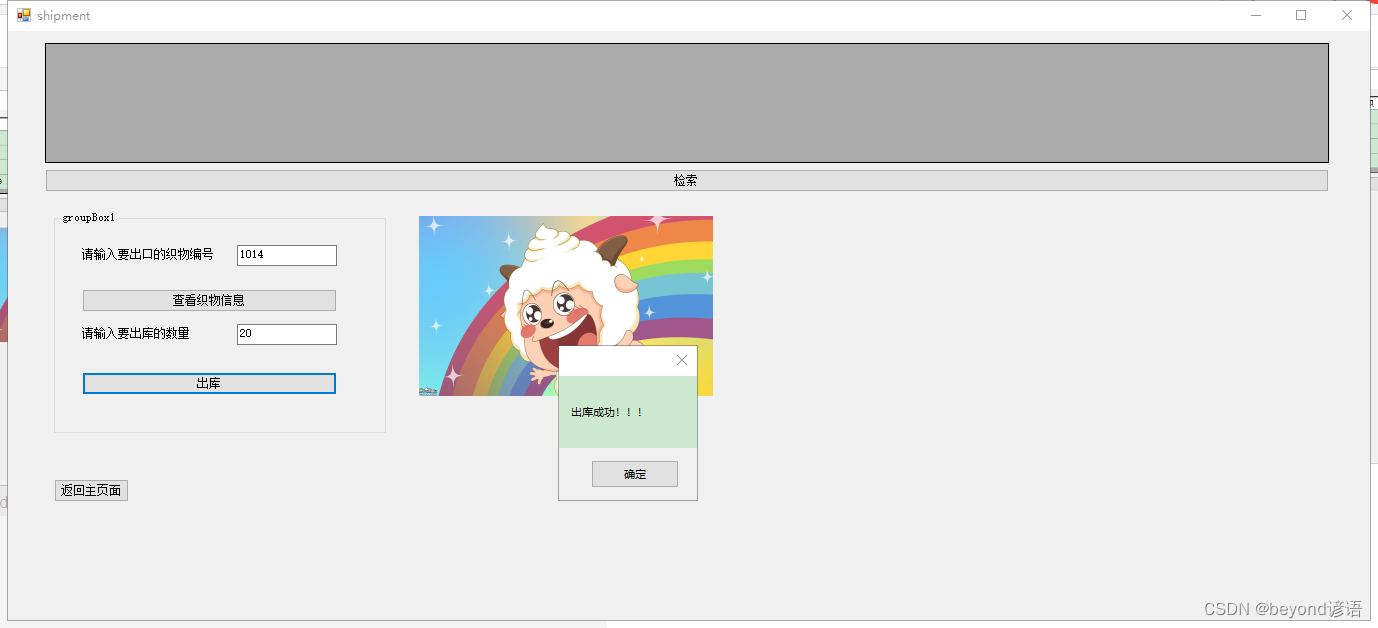
检索一下
当库存低于100的时候会提醒,且这时候就不能再出库了,需要补充织物
边栏推荐
- Use koa to mock data and set cross domain issues
- Wildcard usage of go standard library FMT
- Leetcode 05 tree
- Database query user mailbox
- Install pycharm process
- leetcode. 541. reverse string II
- Leetcode-19- delete the penultimate node of the linked list (medium)
- leetcode. 349. intersection of two arrays
- [WSL2]限制WSL2可访问的硬件资源(CPU/内存)
- 【斯坦福計網CS144項目】Lab1: StreamReassembler
猜你喜欢

Leetcode-19- delete the penultimate node of the linked list (medium)

How does Apple add QQ email?

关于tkinter.Canvas 不显示图片的问题

V-inline-date, similar to Ctrip, flying pig, time selection with price

4K sea bottom and water surface fabrication method and ocean bump displacement texture Download

csdn涨薪技术之Jmeter接口测试数据库断言的实现与设计

Summary of various installation methods of Lab View

【斯坦福计网CS144项目】Lab1: StreamReassembler

Leetcode question brushing 04 string
Stack and queue practice (C language): Demon King's language
随机推荐
Golang context (context summary)
【斯坦福計網CS144項目】Lab1: StreamReassembler
Wildcard usage of go standard library FMT
D template instance does not match declaration
How does Apple add QQ email?
How to turn on the hotspot for the mobile phone after the computer is connected to the network cable
Sonarqube local installation
Record the VMware installation process of VMware Tools and some problems encountered
A summary of global variables and typedef
【斯坦福计网CS144项目】Lab1: StreamReassembler
leetcode 206. Reverse linked list
Leetcode-19- delete the penultimate node of the linked list (medium)
Use koa to mock data and set cross domain issues
Tkinter library installation
Wikipedia API User Guide
#pragma comment(lib,“urlmon.lib“)
4K sea bottom and water surface fabrication method and ocean bump displacement texture Download
[wsl2] restrict wsl2 accessible hardware resources (cpu/ memory)
QT color extraction
leetcode. 151. flip the words in the string