当前位置:网站首页>Use koa to mock data and set cross domain issues
Use koa to mock data and set cross domain issues
2022-06-13 01:25:00 【Durian is not delicious】
brief introduction
Installation and use process
install
npm i -S koa
npm i -S koa-router
npm i -S koa-bodyparser
Import the following methods ;
const Koa = require('koa');
const router = require('koa-router')();
// post request , Request body required , At this time, you need to install  koa-bodyparser, It can be parsed from body The data transmitted from it
const bodyparser = require('koa-bodyparser');
const fs = require('fs');// fs The file system is nodejs Built in , No installation required .

app.use(bodyparser())
Print log
//  When the service period is accessed , Print out the request type and the requested url;
app.use(async (ctx, next) => {

    console.log(`${
      ctx.request.method} ${
      ctx.request.url}`);
    await next();
});
Interface
// post request
router.post('/api/postUser', async (ctx, next) => {

    // ctx.request.body  Requested parameters
    const {
     username, password } = ctx.request.body

    if (!username || !password) {

        ctx.response.body = {
     Msg: " User name or password cannot be empty ", ResultCode: 0}
        return;
    }

    let ret = null
    try {

        ret = await fs.readFileSync('./user.json')
        ret = JSON.parse(ret.toString())
    } catch (error) {

        ret = []
    }

    ret.push({
      username, password })
    ctx.response.body = {
     Msg: " Registered successfully ",  ResultCode: 1 }

    try {

        fs.writeFileSync('./user.json', JSON.stringify(ret))
        ctx.response.body = {
     Msg: `${
      username} Registered successfully `, ResultCode: 1}
    } catch (err) {

        if (err) ctx.response.body = {
     Msg: " Registration failed , Please re submit ", ResultCode: 0}
    }
});

// get request
router.get('/api/getUser', async (ctx, next) => {

    ctx.response.body = {

        name: ' Zhang San ',
        phone: '15111111111'
    }
});
Add router Middleware , And setting the service period host And port
app.use(router.routes());

const host = '131.122.2.55';
const port = '2255';

app.listen(port, host, () => {

    console.log(`http://${
      host}:${
      port}`);
});
Call in project :
 axios.post('http://131.122.2.55:2255/api/postUser',{
    username: " Zhang San 12"}).then(ret => {

   console.log(ret);
 })

 axios.get('http://131.122.2.55:2255/api/getUser').then(ret => {

   console.log(ret);
 })
The result is shown in Fig. 
To solve the cross domain
install npm i -S koa2-cors
const cors = require('koa2-cors');

app.use(
    cors({

        origin: function (ctx) {
     // Set to allow requests from the specified domain name
             return '*';
            // if (ctx.url === '/choose-city') { return '*'; //  Allow requests from all domain names  }
            // return 'http://localhost:8080'; //  Only http://localhost:8080 This domain name request
        },
        maxAge: 5, // Specify the validity period of this pre inspection request , The unit is in seconds .
        credentials: true, // Is it allowed to send Cookie
        allowMethods: ['GET', 'POST', 'PUT', 'DELETE', 'OPTIONS'], // Set the allowed HTTP Request method '
        allowHeaders: ['Content-Type', 'Authorization', 'Accept'], // Set all header information fields supported by the server
        exposeHeaders: ['WWW-Authenticate', 'Server-Authorization'] // Set get other custom fields
    })
);
Run again node mock.js The results are as follows 
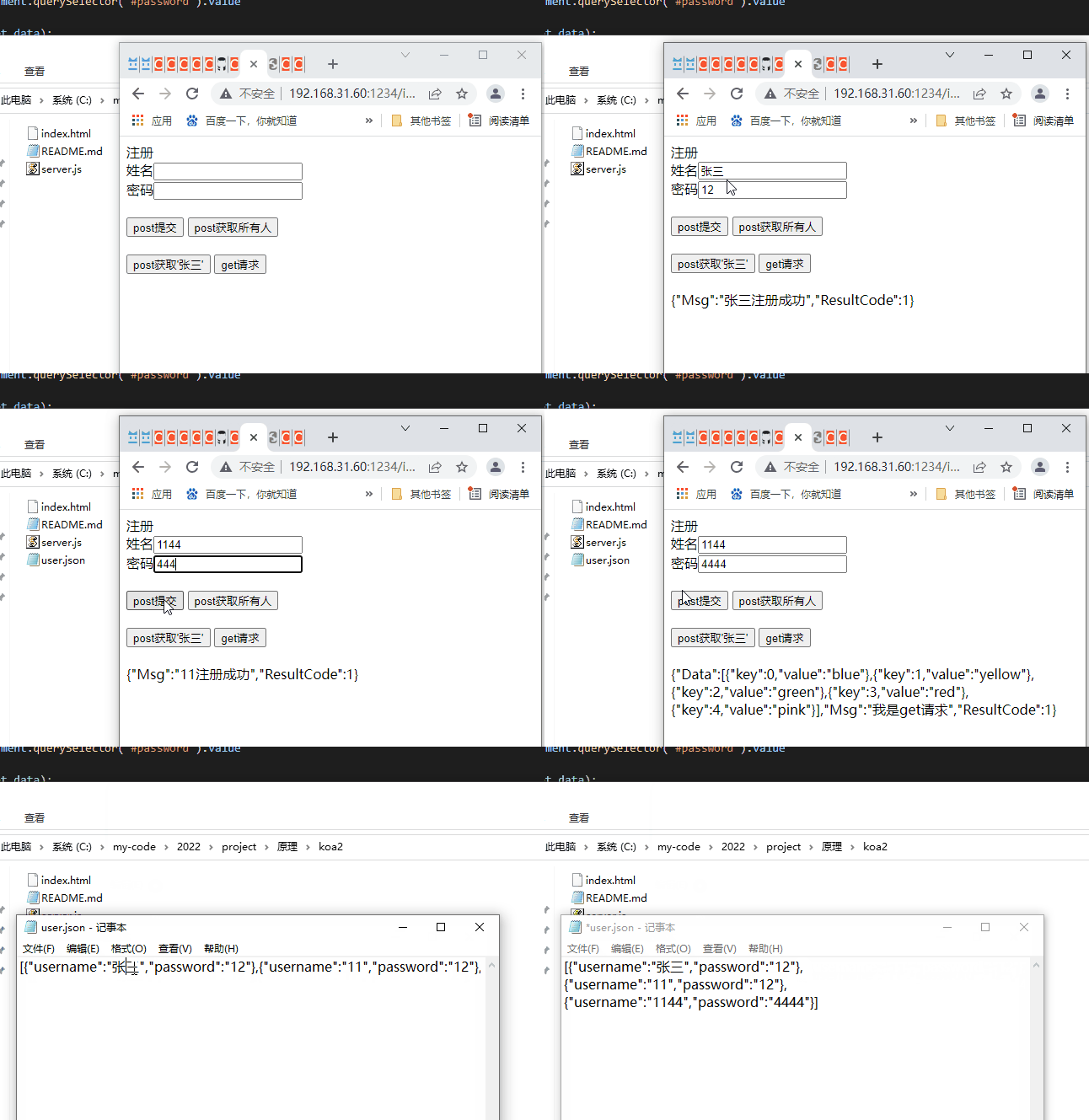
Complete code The results are shown in the figure below , The new data is stored locally user.json In the document
Please stamp the complete code
边栏推荐
- Docker install MySQL
- Application advantages of 5g industrial gateway in coal industry
- DFS and BFS notes (II): depth first search (implemented in C language)
- 论文笔记:STMARL: A Spatio-Temporal Multi-AgentReinforcement Learning Approach for Cooperative Traffic
- Loss calculation in pytorch
- Rasa对话机器人之HelpDesk (三)
- Idea installation tutorial
- np. Understanding of axis in concatenate
- Web Application & applet application deployment
- Leetcode-15- sum of three numbers (medium)
猜你喜欢

ES6解构赋值

Summary of various installation methods of Lab View

Sonarqube local installation

切线与切平面

spiral matrix visit Search a 2D Matrix

pycharm add configutions

Leetcode-11- container with the most water (medium)

Plusieurs catégories de tests logiciels sont claires à première vue

Rasa对话机器人之HelpDesk (三)

Temporary objects and compilation optimization
随机推荐
Leetcode-16- sum of the nearest three numbers (medium)
Rasa dialogue robot helpdesk (III)
MySQL performance optimization
Application advantages of 5g industrial gateway in coal industry
Jenkins continuous integration operation
4K sea bottom and water surface fabrication method and ocean bump displacement texture Download
生态聚合NFT来袭,Metaverse Ape引领Web 3.0元宇宙新范式革命
Loss calculation in pytorch
Thread code learning notes
The interviewer only asked me five questions and the interview was over
C language implementation of the classic eight queens problem
Work and life
Leetcode question brushing 04 string
The second round of mesa
How to choose stocks? Which indicator strategy is reliable? Quantitative analysis and comparison of strategic benefits of ASI, VR, arbr, DPO and trix indicators
spiral matrix visit Search a 2D Matrix
Characteristics of transactions - persistence (implementation principle)
切线与切平面
How to choose stocks? Which indicator strategy is reliable? Quantitative analysis and comparison of DBCD, ROC, vroc, Cr and psy index strategy income
軟件測試的幾種分類,一看就明了