当前位置:网站首页>Esp8266 connects to the IOT of Lexin cloud platform_ Demo
Esp8266 connects to the IOT of Lexin cloud platform_ Demo
2022-07-27 01:24:00 【Paradise_ Violet】
Preface
Introduce 8266 How to connect to Lexin cloud platform , And how to interact with Lexin cloud platform
Before that, we have created cloud devices on the Lexin cloud platform , And get the device secret key corresponding to the cloud device
Cloud devices and off cloud devices need to be connected by secret keys

We will download the secret key The secret key is a binary file , We can burn this binary file to 8266 Among modules , In this case 8266 You can use this binary secret key to connect to the Lexin cloud platform
that 8266 How to connect to this cloud platform and how to use this secret key ?
here 8266 Will use unencrypted tcp Communication to interact with Lexin cloud platform , The port number is 8000
Interaction between off cloud devices and Lexin cloud platform , He used json character string ,json There is... In the string GET Instructions ,“tock 000” Device key , And so on
When the receiver receives the json After the message , The receiver needs to respond to the sender


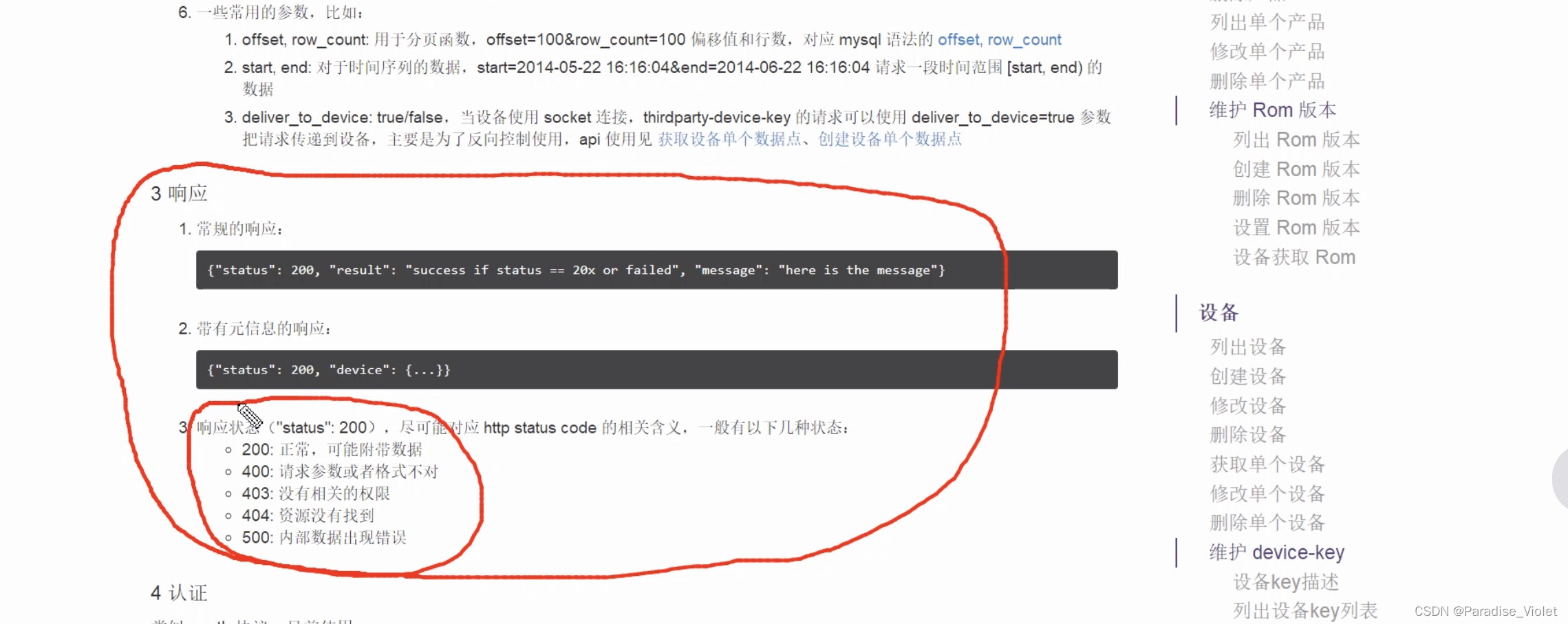
Note that the program will be based on our flash size , Determine the starting position of the system sector
        case FLASH_SIZE_32M_MAP_512_512:
            rf_cal_sec = 1024 - 5;
            priv_param_start_sec = 0x7C;	// 【 Device key 】 Burn to 【0x7D】
            break;
        case FLASH_SIZE_32M_MAP_1024_1024:
            rf_cal_sec = 1024 - 5;
            priv_param_start_sec = 0xFC;	// 【 Device key 】 Burn to 【0xFD】
            break;
user_init
We only care about this function
user_esp_platform_init(); // Query reset status 、 Parameter initialization user_esp_platform_init
First it reads 0x7D Sector data , There are device secret keys and other parameters ,
	system_param_load(priv_param_start_sec+1,0,&esp_param,sizeof(esp_param));	//  Read 【0x7D(0x7C+1) A sector 】 The data of (KEY_BIN)
	os_printf("esp_param.devkey = %s\n",esp_param.devkey);						//  Serial printing 【devkey】
	os_printf("esp_param.token = %s\n",esp_param.token);						//  Serial printing 【token】
	os_printf("esp_param.pad = %s\n",esp_param.pad);							//  Serial printing 【pad】
	os_printf("esp_param.activeflag = %d\n",esp_param.activeflag);				//  Serial printing 【activeflag】
Then connect WiFi
    //  Judge ESP8266 Is it SoftAP Pattern
    //-------------------------------------------------------------------------------------------
    if (wifi_get_opmode() != SOFTAP_MODE)	//  No SoftAP Pattern
    {
    	//  Set the timer ( Check regularly ESP8266 Of IP situation )
    	//----------------------------------------
    	os_timer_disarm(&client_timer);
        os_timer_setfn(&client_timer, (os_timer_func_t *)user_esp_platform_check_ip,(void *)1);	//  Parameters 3=1: Indicates that the current state is just reset
        os_timer_arm(&client_timer, 100, 0);	//  Enable the millisecond timer (100Ms timing )
    }
user_esp_platform_check_ip
If successfully connected to WiFi Words
    // ESP8266 Get IP Address
    //---------------------------------------------------------------------------
    if (wifi_station_get_connect_status()==STATION_GOT_IP && ipconfig.ip.addr!=0)
Conduct tcp connections setting up
		// TCP connections setting up
		//------------------------------------------------------------------
        user_conn.proto.tcp = &user_tcp;	//  Open up memory
        user_conn.type = ESPCONN_TCP;		//  Set to TCP Connect
        user_conn.state = ESPCONN_NONE;

        device_status = DEVICE_CONNECTING;	//  equipment (8266) Status set as 【 on connection 】

        if (reset_flag)				//  Judge whether it is just reset
        { device_recon_count = 0;}	//  After the system reset ,ESP8266_TCP Reconnection count =0(reset_flag==1 It means system reset )

#if (PLUG_DEVICE || LIGHT_DEVICE)
        os_timer_disarm(&beacon_timer);	//  Set the heartbeat timer
        os_timer_setfn(&beacon_timer, (os_timer_func_t *)user_esp_platform_sent_beacon, &user_conn);
And carry on DNS Domain name resolution
#ifdef USE_DNS
        user_esp_platform_start_dns(&user_conn);	// DNS Set up
If the domain name resolution succeeds , Then we will 8266 As tcp_client, Connect to tcp_server That is, Lexin cloud platform
        espconn_regist_connectcb(pespconn, user_esp_platform_connect_cb);	// TCP Successful connection _ Callback function
        espconn_regist_disconcb(pespconn, user_esp_platform_discon_cb);		// TCP Disconnection succeeded _ Callback function
        espconn_regist_reconcb(pespconn, user_esp_platform_recon_cb);		// TCP Abnormal disconnection _ Callback function

        user_esp_platform_connect(pespconn);	// ESP8266(Client) Connect TCP Server
When tcp After successful connection , We send datagrams to Lexin cloud platform
// TCP Successful connection _ Callback function
//==================================================================================================================
LOCAL void ICACHE_FLASH_ATTR user_esp_platform_connect_cb(void *arg)
{
    struct espconn *pespconn = arg;

    ESP_DBG("user_esp_platform_connect_cb\n");

    //  If it is connected with the server TCP Connection is established , Then close softAP Pattern
    //-----------------------------------------------
    if (wifi_get_opmode() ==  STATIONAP_MODE )	// 【 Turn on AP Mode makes it easy to use APP Come to ESP8266 Send router WIFI Of SSID、PASS】
    {
        wifi_set_opmode(STATION_MODE);		//  Set to STA Pattern
    }

#if (PLUG_DEVICE || SENSOR_DEVICE)
    user_link_led_timer_done();
#endif

    device_recon_count = 0;				// ESP8266_TCP Reconnection count  = 0

    espconn_regist_recvcb(pespconn, user_esp_platform_recv_cb);		//  Network data received successfully _ Callback function
    espconn_regist_sentcb(pespconn, user_esp_platform_sent_cb);		//  Network data sent successfully _ Callback function

    user_esp_platform_sent(pespconn);	// ESP8266 send out TCP data ( The device sends packets to the Lexin cloud platform )
}
8266 The cloud device activation will be sent to Lexin cloud platform according to whether the cloud device is activated json The string is also used to identify json character string
    if (pbuf != NULL)
    {
    	//【 Cloud devices 】 not active
    	//----------------------------------------------------------
        if (esp_param.activeflag == 0)	// 【0】: The cloud device is not activated
        {
            uint8 token[token_size] = {0};
            uint8 bssid[6];
            active_nonce = os_random()&0x7FFFFFFF;	//  First activation , Get random 【 Activate with password 】

            os_memcpy(token, esp_param.token, 40);	//  obtain esp_param.token value

            wifi_get_macaddr(STATION_IF, bssid);	//  obtain STA Of MAC Address


            //  format 【ACTIVE_FRAME】, Activate cloud devices .【 Parameters see "ACTIVE_FRAME" Definition 】
            //--------------------------------------------------------------------------------------
            os_sprintf(pbuf, ACTIVE_FRAME, active_nonce, token, MAC2STR(bssid),iot_version, devkey);
        }
//【 Cloud devices 】 Activate ( Similar to the execution of RESET operation )
//-------------------------------------------------------------------------------------------------------------
//【"nonce" Optional parameters : be used for  MD5-NONCE,SHA1-NONCE,HMAC-SHA1-NONCE  encryption algorithm , Is a random integer , Used to confuse encryption algorithms 】
//【"encrypt_method" Necessary parameters : Activation mode ( Set here as PLAIN The way )】
//【"token" Optional parameters : yes 40 Bit random character , be used for " Owner authorization ", In practice, it may be in the factory instructions “ QR code ”】
//【"bssid" Optional parameters : Set the device's MAC Address 】
//【"rom_version" Optional parameters : Version information 】
//【"Authorization" Required parameters : Verify device identity (Master Device Key)】
//--------------------------------------------------------------------------------------------------------------------------------------------------------------------------------------------------------------------------------------------------------------
#define ACTIVE_FRAME    "{\"nonce\": %d,\"path\": \"/v1/device/activate/\", \"method\": \"POST\", \"body\": {\"encrypt_method\": \"PLAIN\", \"token\": \"%s\", \"bssid\": \""MACSTR"\",\"rom_version\":\"%s\"}, \"meta\": {\"Authorization\": \"token %s\"}}\n"
//【 Under cloud devices 】 Identify yourself to the cloud platform , Indicates the connection sent by the device (ESP8266 After establishing a connection with Lexin cloud platform, you need to identify yourself to the cloud platform , After establishing the connection, you can use it once )
//-------------------------------------------------------------------------------------------------------------------------------
//【"nonce" Optional parameters : be used for  MD5-NONCE,SHA1-NONCE,HMAC-SHA1-NONCE  encryption algorithm , Is a random integer , Used to confuse encryption algorithms 】
//【"Authorization" Required parameters : Verify device identity (Master Device Key)】
//-----------------------------------------------------------------------------------------------------------------------------------------------
#define FIRST_FRAME     "{\"nonce\": %d, \"path\": \"/v1/device/identify\", \"method\": \"GET\",\"meta\": {\"Authorization\": \"token %s\"}}\n"
About creating data points , Modify data points , Many functions of timing and so on will not be discussed in detail
RPC(Remote Procedure Call Protocol) Remote procedure call protocol . A popular description is : The client doesn't know the details of the call , Call an object that exists on a remote computer , It's like calling an object in a local application
Finally, take a look at 8266 Receive the... Sent by Lexin cloud platform RPC request , What will he do , When 8266 Receive the... Sent by Lexin cloud platform RPC The request content is LED_ON when 8266 Will led Lighten up ,LED_OFF when ,8266 It will put led Extinguish
            	if( ((char *)os_strstr(pbuffer, "{\"deliver_to_device\": true, \"get\": {\"action\": \"LED_ON\"}")) != NULL )
            	{
            		PIN_FUNC_SELECT(PERIPHS_IO_MUX_GPIO4_U,	FUNC_GPIO4);
            		GPIO_OUTPUT_SET(GPIO_ID_PIN(4),0);		// LED bright
            	}
            	else if( ((char *)os_strstr(pbuffer, "{\"deliver_to_device\": true, \"get\": {\"action\": \"LED_OFF\"}")) != NULL )
            	{
            		PIN_FUNC_SELECT(PERIPHS_IO_MUX_GPIO4_U,	FUNC_GPIO4);
            		GPIO_OUTPUT_SET(GPIO_ID_PIN(4),1);		// LED destroy
            	}
The so-called device access cloud platform , In fact, it means that the device establishes a network connection with the cloud platform , Then, according to the data format specified by the cloud platform , To send and receive network data , Devices can interact with cloud platforms , Realize device access to cloud platform
边栏推荐
猜你喜欢

Tencent upgrades the live broadcast function of video Number applet. Tencent's foundation for continuous promotion of live broadcast is this technology called visual cube (mlvb)

Jenkins--基础--5.3--系统配置--全局安全配置

Android -- basic usage of litepal database framework

Six ways for the Internet of things to improve our lives

DataNode Decommision

下一代互联网:视联网

c语言实现动态顺序表的增删查改

More than live streaming: what other eye-catching functions does Tencent cloud live mlvb plug-in have besides streaming / streaming

Compile Darknet under vscode2015 to generate darknet Ext error msb3721: XXX has exited with a return code of 1.
Unity CharacterController
随机推荐
6. The world cup is coming
玩客云搭配zerotier保姆级教学,保证学废
In depth learning report (1)
Unity CharacterController
Li Hongyi machine learning (2017 Edition)_ P5: error
基于485总线的评分系统
Verilog过程赋值语句
4. European Champions League
The setup of KEIL development environment is delivered to the installation package
matlab基本介绍[1]
Scoring system based on 485 bus
How can Tencent cloud live plug-in mlvb make use of these advantages to become the divine assistant of anchor Live Streaming?
c语言实现动态顺序表的增删查改
if 与 else if 的区别
Play guest cloud with zerotier nanny level teaching to ensure learning waste
Surrounded area
数学建模简介-从现实对象到数学建模[2]
6. 世界杯来了
【unity】Unity界面scene视图[1]
Unity 使用NavMesh实现简易的摇杆功能