当前位置:网站首页>DSPACE set zebra crossings and road arrows
DSPACE set zebra crossings and road arrows
2022-06-25 02:52:00 【Fengyun Jue 4】
DSPACE Set zebra crossings and road arrows
List of articles
Problem description
We are using DSPACE When the platform is set up , Sometimes you need to Junction Set zebra crossing at the connecting place , And setting the direction of the lane at the exit of the road , This is more in line with the actual traffic scene .
As shown in the figure below .

resolvent
We build Junction After the connection , stay Surface Zebra crossings and road directional arrows can be found in .
The specific operation is as follows :
1、 build Road and Junction, double-click Junction Enter editor , choice Surface TAB .

2、 Right click in the blank , choice New Surface -> Texture Map

3、 On the right side of the attribute configuration page ,Texture choice ZebraCrossing, This is the zebra crossing .

4、 In the property page Length The length can be adjusted ,Width The width can be adjusted ,Relative position Medium Tangent angle The angle can be adjusted . As for the specific location of the zebra crossing , Drag directly with the mouse .
The zebra crossing is set as follows :

As for the direction arrow of the lane , It's the same operation .
The specific operation is as follows :
1、 Find out what to change Road, double-click Road Enter editor , choice Surface TAB .
2、 Right click in the blank , choice New Surface -> Texture Map
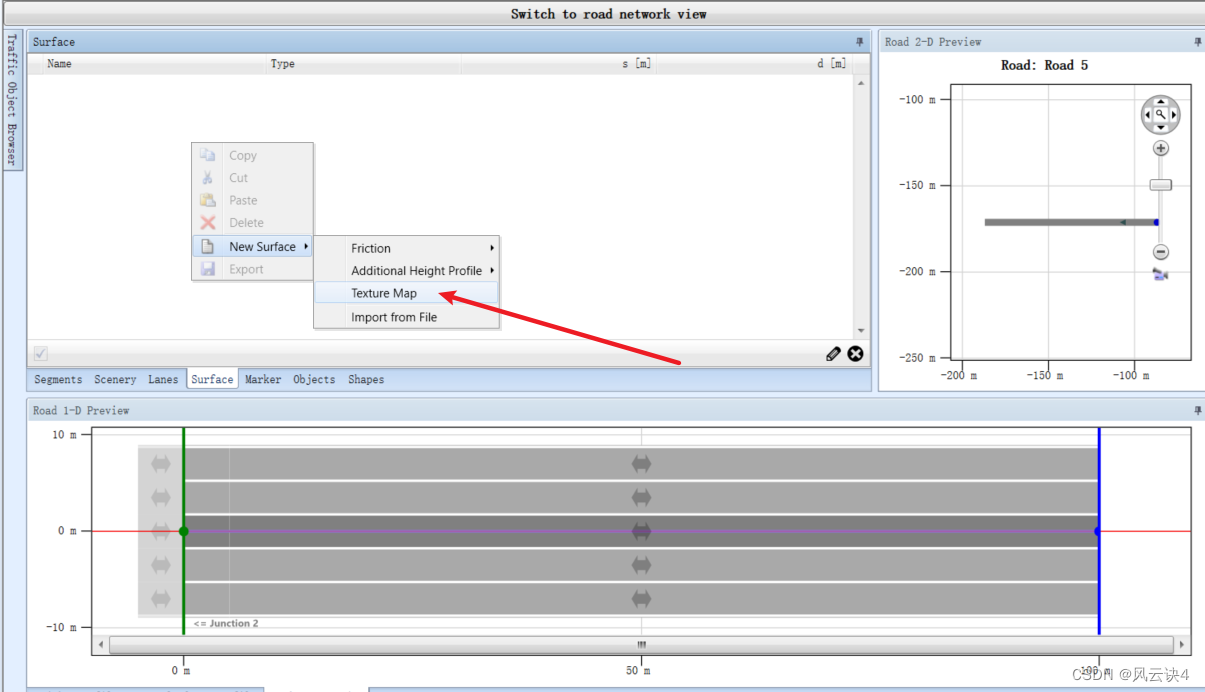
3、 On the right side of the attribute configuration page ,Texture choice ArrowStraightAhead, This is the straight arrow . Others include turning left 、 Right turn, etc. are all on the side , It's easy to see .

4、 similarly , Length The length can be adjusted ,Width The width can be adjusted , however Relative Position At this time, you can only adjust the arrow position .
5、 The direction of the arrow is determined by Orientation To adjust , The common one is Direct、Oncoming Two .

After setting the road arrow, see the following :

边栏推荐
- ERROR日志格式与注意点
- Internship: use of SVN
- AOSP ~ WIFI架构总览
- QT package the EXE file to solve the problem that "the program input point \u zdapvj cannot be located in the dynamic link library qt5cored.dll"
- ARM汇编中的栈桢小结
- Squid 代理服务器之 ACL 访问控制
- @PostConstruct
- Once beego failed to find bee after passing the go get command Exe's pit
- UnityShader入门精要——表面着色器
- 爱
猜你喜欢

Getting started with unityshader Essentials - PBS physics based rendering

记一次beego通过go get命令后找不到bee.exe的坑

Leecode learning notes - the shortest path for a robot to reach its destination
20年ICPC澳门站L - Random Permutation

Leetcode 210: curriculum II (topological sorting)

【STL源码剖析】STL六大组件功能与运用(目录)
Once beego failed to find bee after passing the go get command Exe's pit

数组-一口气冲完快慢指针

automated testing

使用ShaderGraph制作边缘融合粒子Shader的启示
随机推荐
Solution of separating matlab main window and editor window into two interfaces
UnityShader入门精要——表面着色器
MATLAB主窗口与编辑器窗口分开为两个界面的解决办法
3 years of testing experience. I don't even understand what I really need on my resume. I need 20K to open my mouth?
Can automate - 10k, can automate - 20K, do you understand automated testing?
商城项目 pc----商品详情页
Error log format and precautions
使用ShaderGraph制作边缘融合粒子Shader的启示
把 Oracle 数据库从 Windows 系统迁移到 Linux Oracle Rac 集群环境(4)—— 修改 oracle11g rac 集群的 scanIP
PSQL column to row
AI服装生成,帮你完成服装设计的最后一步
The Oracle 11g RAC cluster database cannot be started due to directory permission errors
ACL access control of squid proxy server
Computing service network: a systematic revolution of multi integration
js正则匹配数字、大小写字母、下划线、中线和点[通俗易懂]
vim的Dirvish中文文档
高数 | 精通中值定理 解题套路汇总
怎么开户打新债 开户是安全的吗
Mall project pc--- product details page
Jetson Nano 从入门到实战(案例:Opencv配置、人脸检测、二维码检测)