当前位置:网站首页>详解OpenCV的函数filter2D(),并提醒大家它做的运算并不是卷积运算而是相关运算
详解OpenCV的函数filter2D(),并提醒大家它做的运算并不是卷积运算而是相关运算
2022-06-10 14:45:00 【昊虹图像算法】
卷积运算和相关运算是咱们图像处理中最基本的两种线性运算,可以说,图像处理中的绝大部分算法,特别是与滤波有关的算法都是建立这两种运算之上的。
关于图像(矩阵)卷积运算和相关运算的详细知识,大家可以参考博文 https://blog.csdn.net/wenhao_ir/article/details/124109222
MATLAB提供了函数imfilter()实现对这两种运算的支持,其语法如下:
B = imfilter(A,h)
B = imfilter(A,h,options,...)
options的可选值如下:
所以当我们需要作卷积操作时可以像下面这样写:
imfilter(A,h,'conv')
当我们需要作相关操作时可以像下面这样写:
imfilter(A,h,'corr')
OpenCV作为图像处理的强有力工具,自然也少不了对这两种运算的支持。
OpenCV提供了函数filter2D()作图像(矩阵)的相关运算,注意是相关运算,而不是卷积运算。
它的运算公式如下:
dst ( x , y ) = ∑ 0 ≤ y ′ < kernel.rows 0 ≤ x ′ < kernel.cols , kernel ( x ′ , y ′ ) ∗ src ( x + x ′ − anchor.x , y + y ′ − anchor.y ) \texttt{dst} (x,y) = \sum _{ \stackrel{0\leq x' < \texttt{kernel.cols},}{0\leq y' < \texttt{kernel.rows}} } \texttt{kernel} (x',y')* \texttt{src} (x+x'- \texttt{anchor.x} ,y+y'- \texttt{anchor.y} ) dst(x,y)=∑0≤y′<kernel.rows0≤x′<kernel.cols,kernel(x′,y′)∗src(x+x′−anchor.x,y+y′−anchor.y)
上面这个式子看起来很复杂,实际上就是博文https://blog.csdn.net/wenhao_ir/article/details/124109222中介绍的相关运算的公式化表达。公式中的anchor代表kernel核的锚点,关于锚点的介绍,可以参考我的博文 https://blog.csdn.net/wenhao_ir/article/details/124173092
大家如果通过阅读上面两篇博文理解了相关运算及锚点的概念,那么这个公式是不难理解的。
那如果我们要做卷积运算怎么办呢?
根据卷积运算的定义,我们将核旋转180度再做相关运算就是卷积运算了。那么怎么将核旋转180度呢?根据博文https://blog.csdn.net/wenhao_ir/article/details/51443330我们知道将矩阵180度等效于先作一个水平镜像,再作一个垂直镜像,矩阵的镜像运算我们可以用函数flip()完成,函数flip()的原型如下:
void cv::flip(InputArray src, OutputArray dst, int flipCode)
这个函数的使用示例见博文 https://blog.csdn.net/wenhao_ir/article/details/51442792
我们只需要将参数flipCode的值写为负数值,即可实现对矩阵进行180度的旋转。
接下来看下函数filter2D()的原型:
C++原型如下:
void cv::filter2D(	InputArray 	src,
					OutputArray dst,
					int 	ddepth,
					InputArray 	kernel,
					Point 	anchor = Point(-1,-1),
					double 	delta = 0,
					int 	borderType = BORDER_DEFAULT)
Python原型如下:
dst = cv.filter2D(src, ddepth, kernel[, dst[, anchor[, delta[, borderType]]]])
各参数意义如下:
src—输入图像
dst—目标图像
ddepth—目标图像的数据深度
kernel—相关运算的运算核
anchor—kernel的锚点
delta—对运算结果的偏移处理,比如某个像素的相关运算结果为1,delta=2,那么最终在目标图像中这个像素的值为1+2=3。
borderType—边界扩展标志位,关于边界扩展,可以参考博文 https://blog.csdn.net/wenhao_ir/article/details/124177989
示例代码如下:
# 博主微信/QQ 2487872782
# 有问题可以联系博主交流
# 有图像处理需求也请联系博主
# 图像处理技术交流QQ群 271891601

# !/usr/bin/env python
# -*- coding: utf-8 -*-
# OpenCV的版本为4.1

import numpy as np
import cv2 as cv

A1 = np.array([[1, 1, 7, 3],
              [5, 5, 2, 7],
              [9, 9, 6, 1],
              [7, 7, 4, 9]], dtype='uint8')

kernel1 = np.array([[1, 1, 1],
                    [1, 1, 1],
                    [1, 1, 1]], dtype='uint8')

B1 = cv.filter2D(A1, cv.CV_8U, kernel1, anchor=(0, 0), borderType=cv.BORDER_CONSTANT)

B2 = cv.filter2D(A1, cv.CV_8U, kernel1, anchor=(-1, -1), borderType=cv.BORDER_CONSTANT)
运行结果如下:


结果分析:B1和B2的不同在于核的锚点不一样,B1用的是核左上角的点,B2用的是核的中心点。边界扩展方式为填充0值处理。
手工验证结果如下:
B1[0,0]=1*1+1*1+7*1+5*1+5*1+2*1+9*1+9*1+6*1=45

B1[0,3]=0*1+0*1+0*1+7*1+3*1+0*1+2*1+7*1+0*1=11

可见,B1的手工结果和程序运行的结果一致。
再来看B2:
B2[0,0]=0*1+0*1+0*1+0*1+1*1+1*1+0*1+5*1+5*1=12
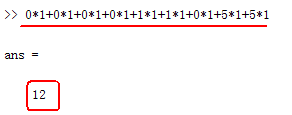
B2[0,3]=0*1+0*1+0*1+0*1+1*1+1*1+0*1+5*1+5*1=19
可见,B12的手工结果也和程序运行的结果一致。
补充说明:
函数filter2D()还支持in-place operation(就地操作)哦,关于这个操作的详情见博文 https://blog.csdn.net/wenhao_ir/article/details/125211437
边栏推荐
- Why should the R & D effectiveness team of Internet companies be independent? When is independence?
- 【離散數學期複習系列】二、一階邏輯(謂詞邏輯)
- Design tools and skills for beginners to build their own blog
- Adding, deleting, modifying and querying databases with JDBC
- Generate a dataset of training vectors for doc2vec
- 北京/上海内推 | 微软亚洲研究院系统与网络组招聘全职实习生
- 微信小程序 滑动到顶部
- 2022 examination question bank and online simulation examination for main principals of hazardous chemical business units
- 【离散数学期复习系列】五、一些特殊的图
- Insight technology was selected into the "Aijian · privacy computing manufacturer panorama report" and was rated as a representative manufacturer of financial solutions
猜你喜欢

KaTeX问题 —— csdn编辑时中打出等号对齐的样式

Basic concept of data warehouse

【原创】POI 5.x XSSF和HSSF使用自定义字体颜色

消息中间件的消费模式
![[discrete mathematics review series] i. propositional logic](/img/ae/7f062cfa416a26be3d32dfb1353c80.png)
[discrete mathematics review series] i. propositional logic
Mutual transformation among lists, arrays and tensors
![[logodetection dataset processing] (4) extract the logo area of each picture](/img/cf/a8d5f840f52a56d498fa36b2343c07.png)
[logodetection dataset processing] (4) extract the logo area of each picture
列表、数组和张量之间的相互转化

Orgin framework notes

2022南京国际智慧工地装备展览会
随机推荐
AUTOCAD——设置文字间距与行距
2022 examination question bank and online simulation examination for main principals of hazardous chemical business units
Cell asynchronously invokes method change records
2022 practice questions and online simulation test for the third batch of Guangdong Provincial Safety Officer a certificate (principal)
2022第十五届南京国际数字化工业博览会
WordPress的管理员用户名是如何泄露的
CRM对企业以及销售员有哪些帮助?
2022 the 14th Nanjing International artificial intelligence product exhibition
QT interface nested movement based on qscrollarea
Wechat applet date comparison, calculation days
BigDecimal 去除末尾多余的0
AutoCAD - set text spacing and line spacing
Consumption mode of Message Oriented Middleware
What is CAS and ABA in CAS
New exploration of meta company | reduce Presto latency by using alluxio data cache
This awesome low code generator is now open source!
Binary tree and figure 1
如何实现erp外网连接?
golang使用反射将一个结构体的数据直接复制到另一个结构体中(通过相同字段)
几种方式可以实现 JMeter 参数化?