当前位置:网站首页>【原创】POI 5.x XSSF和HSSF使用自定义字体颜色
【原创】POI 5.x XSSF和HSSF使用自定义字体颜色
2022-06-10 14:03:00 【DCTANT】
前言
目前网上已经有很多关于XSSF设置字体颜色的代码了,但是大部分都是错的,设置出来的颜色都是黑色,根本不是我设置的颜色,这不是坑人吗。还有就是POI目前为止版本已经非常多了,很多人写文章不标注所用的POI版本号,导致很多代码不通用。我这边明确一下,目前文章使用的POI版本号为5.2.2,并且经过我本人测试,代码能够正常运行,且能输出正确颜色。
直接上代码
测试用的java代码:
    public static void main(String[] args) throws Exception {
        Workbook workbook = null;
        String excelType = "xlsx";
        switch (excelType) {
            case "xlsx": {
                XSSFWorkbook xssfWorkbook = new XSSFWorkbook();
                workbook = xssfWorkbook;
                XSSFSheet sheet = xssfWorkbook.createSheet();
                XSSFCellStyle cellStyle = xssfWorkbook.createCellStyle();
                XSSFFont font = xssfWorkbook.createFont();
                font.setColor(new XSSFColor(new Color(0x3366ff), null));
                cellStyle.setFont(font);
                cellStyle.setFillForegroundColor(new XSSFColor(new Color(0x94ddff), null));
                cellStyle.setFillPattern(FillPatternType.SOLID_FOREGROUND);
                XSSFRow row = sheet.createRow(0);
                for (int i = 0; i < 4; i++) {
                    XSSFCell cell = row.createCell(i);
                    cell.setCellValue("dct" + i);
                    cell.setCellStyle(cellStyle);
                }
                break;
            }
            case "xls": {
                byte paletteIndex = 0x8;
                HSSFWorkbook hssfWorkbook = new HSSFWorkbook();
                workbook = hssfWorkbook;
                HSSFSheet sheet = hssfWorkbook.createSheet();
                HSSFCellStyle cellStyle1 = hssfWorkbook.createCellStyle();
                HSSFFont font = hssfWorkbook.createFont();
                HSSFPalette customPalette = hssfWorkbook.getCustomPalette();
                int fontColor = 0xff591f;
                byte[] fontColorBytes = hexColorToBytes(fontColor);
                customPalette.setColorAtIndex(paletteIndex, fontColorBytes[0], fontColorBytes[1], fontColorBytes[2]);
                font.setColor(paletteIndex);
                paletteIndex++;
                cellStyle1.setFont(font);
                int backgroundColor = 0xffcd91;
                byte[] backgroundColorBytes = hexColorToBytes(backgroundColor);
                customPalette.setColorAtIndex(paletteIndex, backgroundColorBytes[0], backgroundColorBytes[1], backgroundColorBytes[2]);
                cellStyle1.setFillForegroundColor(paletteIndex);
                cellStyle1.setFillPattern(FillPatternType.SOLID_FOREGROUND);
                HSSFCellStyle cellStyle2 = hssfWorkbook.createCellStyle();
                cellStyle2.setFillForegroundColor(IndexedColors.BLACK.index);
                HSSFRow row = sheet.createRow(0);
                for (int i = 0; i < 8; i++) {
                    if (i < 4) {
                        HSSFCell cell = row.createCell(i);
                        cell.setCellValue("dct" + i);
                        cell.setCellStyle(cellStyle1);
                    } else {
                        HSSFCell cell = row.createCell(i);
                        cell.setCellValue("black" + i);
                        cell.setCellStyle(cellStyle1);
                    }
                }
                break;
            }
        }

        FileOutputStream fileOutputStream = new FileOutputStream(new File("C:\\Tmp\\test_" + System.currentTimeMillis() + "." + excelType));
        workbook.write(fileOutputStream);
        workbook.close();
    }

    public static byte[] hexColorToBytes(int hexColor) {
        byte[] rgb = new byte[3];
        int red = (hexColor & 0xff0000) >> 16;
        int green = (hexColor & 0x00ff00) >> 8;
        int blue = hexColor & 0x0000ff;
        rgb[0] = (byte) (red);
        rgb[1] = (byte) (green);
        rgb[2] = (byte) (blue);
        return rgb;
    }
POI pom引入:
            <dependency>
                <groupId>org.apache.poi</groupId>
                <artifactId>poi</artifactId>
                <version>5.2.2</version>
            </dependency>

            <dependency>
                <groupId>org.apache.poi</groupId>
                <artifactId>poi-ooxml</artifactId>
                <version>5.2.2</version>
            </dependency>
踩坑说明和代码解析

先来看XSSF,图中第406行,font.setColor入参是可以传入XSSFColor的

从源码最好能够可以看出,这个方法是XSSFFont独有的方法,并没有overwrite,且不需要XSSFColor调用getIndexed()方法,这一点是大部分博客中都存在的问题,就这一点坑了我足足2小时,因为我在写框架的时候,用的是Font泛型,并没有用XSSFFont,然后我就没发现setColor可以传入XSSFColor这个类。如果用了Font的setColor入参是short color的,那就完蛋,根本出不来我想要的颜色,一般返回的都是黑色!!
图中第408行,设置单元格背景颜色需要调用setFillForegroundColor(),而不是setFillBackgroundColor(),这一点也非常坑,如果不设置setFillPattern(),则默认不填充,直接是空白的,不管设置什么颜色都没用!然后和Font一样,这里的setFillForegroundColor的入参还是XSSFColor,且不需要对XSSFColor调用getIndexed()方法!!POI算是整人整的明白,三管齐下,又是坑了好久。

然后看一下HSSF,图中428行是设置颜色到调色盘的地方,而HSSF支持的调色板只有56个

这个可以从源码PaletteRecord类中看出,且index从0x8开始。设置颜色的方法非常简单粗暴,向XLS调色板中覆盖颜色,颜色是覆盖的,而不是插入的,也就是说新加的颜色会覆盖默认颜色的index。第428行和第434行,分别覆盖了index为0x8和0x9这两个颜色。在第438行的cellStyle2中别看设置的背景颜色为黑色,实则是我们新自定义的颜色!这点非常坑人!注意后续引用,别踩坑了各位!
结果展示
XSSF对应的xlsx:
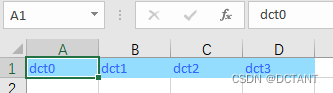
HSSF对应的xls:

边栏推荐
- C#多线程学习笔记二
- 【FAQ】運動健康服務REST API接口使用過程中常見問題和解决方法總結
- Flutter Icon Stack LIsttitle...学习总结3
- New features mail GPU counter module adds GPU primitive processing and GPU shader cycles
- Microsoft Word tutorial, how to change margins and create a newsletter column in word?
- 2022 Shandong Province safety officer C certificate retraining question bank and online simulation examination
- 【云计算】多云管理平台和公有云两者之间是啥关系?
- How to locate the hot problem of the game
- 【离散数学期复习系列】六、树
- 在启牛开户安全么
猜你喜欢

焱融看|混合云环境下,如何实现数据湖最优存储解决方案

【离散数学期复习系列】三、集合的概念及运算

2022大厂高频软件测试面试真题(附答案)

【C语言】指针函数与函数指针、数组函数

What does the multi cloud management platform CMP mean? Who can explain it clearly

Google Earth engine (GEE) - real time global 10 meter land use / land cover (LULC) data set based on S2 images

【云计算】多云管理平台和公有云两者之间是啥关系?

Flutter Wrap Button bottomNavigationBar学习总结4

C#多线程学习笔记二
什么是CAS 以及 CAS 中的 ABA 问题
随机推荐
【专题介绍】圆桌论坛——AI与音视频技术的融合之路
Gree mobile phone challenge Apple mobile phone? I'm afraid there's nothing else but hard talk
How to write a global notice component?
What can the graph of training and verification indicators tell us in machine learning?
[deep learning 05] cross entropy loss function
Flutter Wrap Button bottomNavigationBar学习总结4
[C language] pointer function, function pointer and array function
Analysis on the use of coordinatorlayout
《软件体系结构原理、方法与实践》第二版期末考试复习总结
[operation tutorial] how to correctly use the Hikvision demo tool to configure the channel to go online?
For the first time, the Pentagon admitted to funding 46 biological facilities in Ukraine. Russia once revealed that only three were safe
技术分享| 快对讲,全球对讲
[cloud computing] what is the relationship between a multi cloud management platform and a public cloud?
CentOS Linux 已死!Oracle Linux 可能是它的更好替代品
【重庆大学】初试复试资料分享(附考研群)
5.8G微波雷达模块使用,5.8G微波雷达模块工作原理和介绍
Resolve the error reported when installing gerapy: error: cannot uninstall 'certificate' It is a distutils installed project...
2022年制冷与空调设备运行操作理论题库模拟考试平台操作
UE5如何將屏幕坐標轉為世界坐標和世界方向
Bottomnavigationview is used in conjunction with viewpager, to modify icon size, to remove text, etc