当前位置:网站首页>Unity背包系统
Unity背包系统
2022-07-28 03:06:00 【MaNongSa】
提示:以下是本篇文章正文内容
简单说明
利用ScriptableObject自定义资源脚本保存数据
背包系统素材
- 场景

- GUI

3. Gear

UI简单创建
1、 创建Panel

2、Panel嵌套Img、button
效果:
3、Panel嵌套管理网格的的Img、舔加Grid Layout Group组件,使用组件调整网格布局

4、嵌套的网格Img再嵌套Img再嵌套Text
效果如下图所示:

同四嵌套的网格Img再嵌套Button再嵌套Text

实现数据的存储
5.创建Item储存数据脚本
using System.Collections;
using System.Collections.Generic;
using UnityEngine;
using UnityEngine.UI;

[CreateAssetMenu(fileName = "Item", menuName = "Item")]
public class Item : ScriptableObject
{
    [Header("装备图片")]
    public Sprite ItemSprite;
    [Header("装备名字")]
    public string ItemName;
    [Header("装备数量")]
    public int ItemCount;

    [Header("装备详细")]
    [TextArea]
    public string ItemInfo;

    [Header("装备")]
    public bool Equip;

}
7、.创建数据管理器


8、使用List创建储存数据背包系统
using System.Collections.Generic;
using UnityEngine;

[CreateAssetMenu(fileName = "InventoryScript", menuName = "InventoryScript")]
public class Inventory : ScriptableObject
{
    //创建背包系统:列表
    public List<Item> ItemList = new List<Item>();
}
9、.创建WorldEquip(世界中的准备):脚本
using UnityEngine;

public class WorldEquip : MonoBehaviour
{
    public Item item;
    public Inventory inventory;

    private void OnTriggerEnter2D(Collider2D collision)
    {
        if (collision.CompareTag("Player"))
        {
            if (!inventory.ItemList.Contains(item))
            {
                inventory.ItemList.Add(item);
            }
            else
            {
                item.ItemCount++;
            }
            捡到物品生成相应的物品
            InvensoryManager.UpdateEquipState();
        }
    }
}
流程:WorldEquip 地上装备碰到检测并舔加到ItemList(背包系统)
效果如下: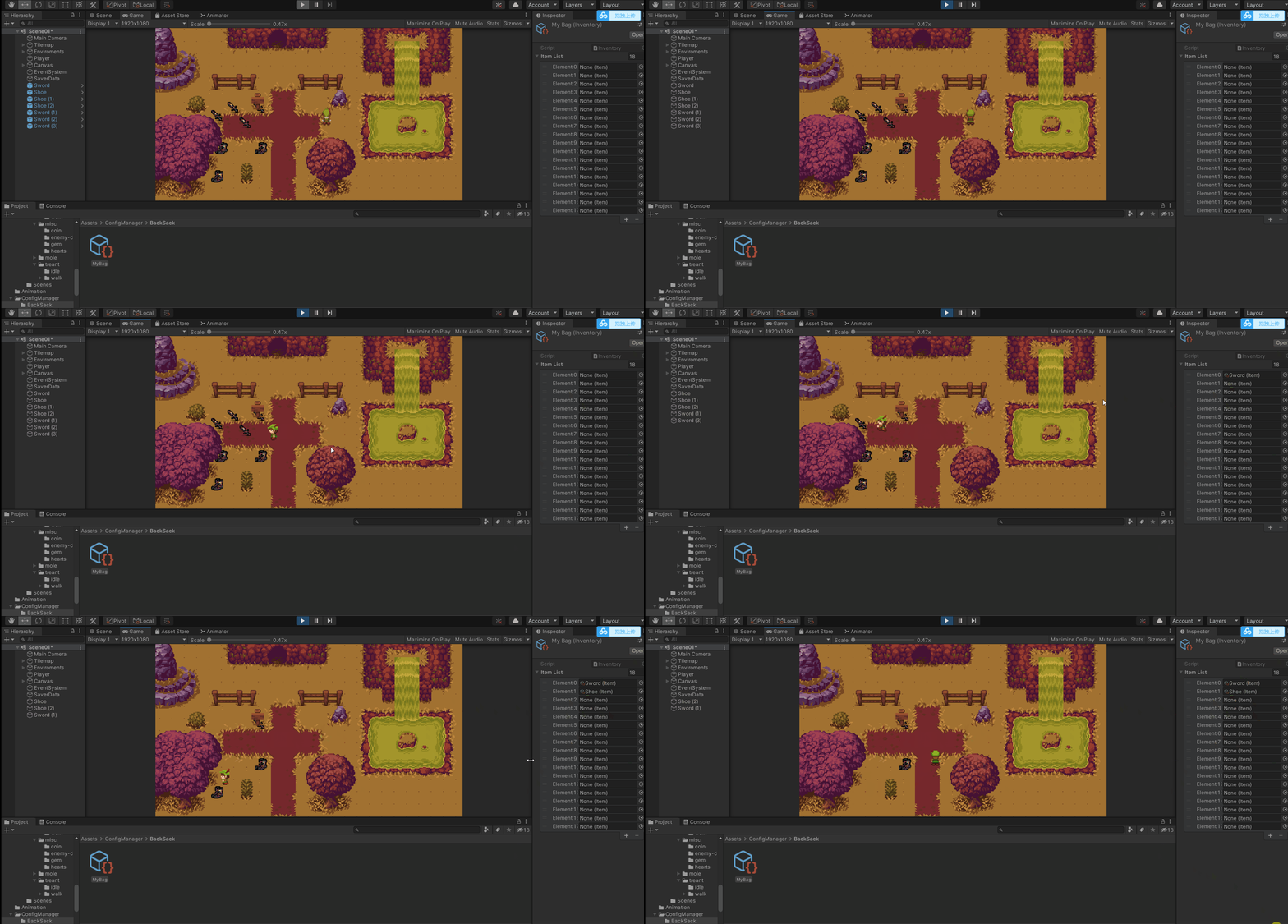
实现数据展示
10、.网格自身脚本、创建生成网格Grid脚本、显示装备、舔加装备详细信息等等
网格自身脚本
using UnityEngine;
using UnityEngine.UI;

public class Slot : MonoBehaviour
{
	点击装备显示对应的详细信息
    public Item slotItem;

    图片
    public Image slotImg;

    装备的数量
    public Text slotText;

	点击显示对应的详细信息
    public void ItemOnClick()
    {
        InvensoryManager.UpdateInformation(slotItem.ItemInfo);
    }
}

创建生成网格Grid脚本
using UnityEngine;
using UnityEngine.UI;

public class InvensoryManager : MonoBehaviour
{
    public static InvensoryManager Instance;

	背包
    public Inventory myBag;
	网格的父亲
    public GameObject slotGrid;
    装备的网格
    public Slot slotPrefeb;
    详细信息文本
    public Text itemInfromation;

    private void Awake()
    {
        if (Instance != null)
            Destroy(gameObject);
        Instance = this;
    }

	启动play更新背包装备
    private void OnEnable()
    {
        UpdateEquipState();
    }

    舔加装备详细信息函数
    public static void UpdateInformation(string informText)
    {
        Instance.itemInfromation.text = informText;
    }

	更新背包装备
    public static void UpdateBag(Item item)
    {
        Slot newItem = Instantiate(Instance.slotPrefeb,Instance.slotGrid.transform.position, Quaternion.identity);
        newItem.gameObject.transform.SetParent(Instance.slotGrid.transform);
        newItem.slotItem = item;
        newItem.slotImg.sprite = item.ItemSprite;
        newItem.slotText.text = item.ItemCount.ToString();
    }

    public static void UpdateEquipState()
    {
        for (int i = 0; i < Instance.slotGrid.transform.childCount; i++)
        {
            if (Instance.slotGrid.transform.childCount ==0)
                break;
            Destroy(Instance.slotGrid.transform.GetChild(i).gameObject);
        }
        for (int i = 0; i < Instance.myBag.ItemList.Count; i++)
        {
            UpdateBag(Instance.myBag.ItemList[i]);
        }
    }
}
流程:创建网格自生脚本Slot,图片、文字、点击等等通过装备的触发条件执行InvensoryManager管理脚本的函数然后给Slot赋值等
效果:如下
实现装备的拖拽
11、实现背包的拖拽与交换位子
因为要舔加交换位置等功能所以要做调整:
流程:先给背包系统Inventory设置好位子然后判断位置下的Item是否为空,空就隐藏,否者就显示然后赋值等
UI调整
代码调整

创建生成网格Grid脚本
using System.Collections.Generic;
using UnityEngine;
using UnityEngine.UI;

public class InvensoryManager : MonoBehaviour
{
    public static InvensoryManager Instance;

    public Inventory myBag;

    public GameObject slotGrid;

    //public Slot slotPrefeb;

    public GameObject slotObj;

    public Text itemInfromation;

    private List<GameObject> slotObjList = new List<GameObject>();

    private void Awake()
    {
        if (Instance != null)
            Destroy(gameObject);
        Instance = this;
    }

    private void OnEnable()
    {
        itemInfromation.text = "";
        UpdateEquipState();
    }
    //private void OnDisable()
    //{
    //    myBag.ItemList.Clear();
    //}

    public static void UpdateInformation(string informText)
    {
        Instance.itemInfromation.text = informText;
    }

    //public static void UpdateBag(Item item)
    //{
    //    Slot newItem = Instantiate(Instance.slotPrefeb,Instance.slotGrid.transform.position, Quaternion.identity);
    //    newItem.gameObject.transform.SetParent(Instance.slotGrid.transform);
    //    newItem.slotItem = item;
    //    newItem.slotImg.sprite = item.ItemSprite;
    //    newItem.slotText.text = item.ItemCount.ToString();
    //}

    public static void UpdateEquipState()
    {
        for (int i = 0; i < Instance.slotGrid.transform.childCount; i++)
        {
            if (Instance.slotGrid.transform.childCount ==0)
                break;
            Destroy(Instance.slotGrid.transform.GetChild(i).gameObject);
            Instance.slotObjList.Clear();
        }
        for (int i = 0; i < Instance.myBag.ItemList.Count; i++)
        {
            //updatebag(instance.mybag.itemlist[i]);
            Instance.slotObjList.Add(Instantiate(Instance.slotObj));
            Instance.slotObjList[i].transform.SetParent(Instance.slotGrid.transform);
            Instance.slotObjList[i].GetComponent<Slot>().SetUpSlot(Instance.myBag.ItemList[i]);
        }
    }


网格自身脚本
using UnityEngine;
using UnityEngine.UI;

public class Slot : MonoBehaviour
{
    public Item slotItem;
    public Image slotImg;
    public Text slotText;
    private string slotInfo;

    public GameObject itemInSlot;

    public void ItemOnClick()
    {
        InvensoryManager.UpdateInformation(slotInfo);
    }

    public void SetUpSlot(Item item)
    {
        if (item == null)
        {
            itemInSlot.SetActive(false);
            return;
        }
        slotImg.sprite = item.ItemSprite;
        slotText.text = item.ItemCount.ToString();
        slotInfo = item.ItemInfo;
    }
}
}

使用List创建储存数据背包系统
using UnityEngine;

public class WorldEquip : MonoBehaviour
{
    public Item item;
    public Inventory inventory;

    private void OnTriggerEnter2D(Collider2D collision)
    {
        Destroy(gameObject);

        if (collision.CompareTag("Player"))
        {
            if (!inventory.ItemList.Contains(item))
            {
                //inventory.ItemList.Add(item);
                for (int i = 0; i < inventory.ItemList.Count; i++)
                {
                    if (inventory.ItemList[i] == null)
                    {
                        inventory.ItemList[i] = item;
                        break;
                    }
                }
                item.ItemCount++;
            }
            else
            {
                item.ItemCount++;
            }
            InvensoryManager.UpdateEquipState();
        }
    }
}

背包的拖拽
using UnityEngine;
using UnityEngine.EventSystems;

public class MouseBag : MonoBehaviour,IDragHandler
{
    private RectTransform rectTransform;
    public Canvas canvas;

    private void Awake()
    {
        rectTransform = GetComponent<RectTransform>();
    }

    public void OnDrag(PointerEventData eventData)
    {
    	UI的中心位置+鼠标点击的位置(非常好用)
        rectTransform.anchoredPosition += eventData.delta;
    }
}

装备的交换
using UnityEngine;
using UnityEngine.EventSystems;

public class ItemOnDrag : MonoBehaviour, IBeginDragHandler, IDragHandler, IEndDragHandler
{

    private Transform originalPos;

	鼠标点击
    public void OnBeginDrag(PointerEventData eventData)
    {
        originalPos = transform.parent;
        transform.transform.SetParent(transform.parent.parent.parent);
        transform.position = eventData.position;
    }

	鼠标拖拽中
    public void OnDrag(PointerEventData eventData)
    {
        transform.position = eventData.position;

        Canvas Group组件
        GetComponent<CanvasGroup>().blocksRaycasts = false;

        打印射线处的对象
        Debug.Log(eventData.pointerCurrentRaycast.gameObject);

    }

	鼠标松开
    public void OnEndDrag(PointerEventData eventData)
    {
        if (eventData.pointerCurrentRaycast.gameObject.name == "Image")
        {
            transform.SetParent(eventData.pointerCurrentRaycast.gameObject.transform.parent.parent);
            transform.position = eventData.pointerCurrentRaycast.gameObject.transform.parent.parent.position;
            eventData.pointerCurrentRaycast.gameObject.transform.parent.position = originalPos.position;
            eventData.pointerCurrentRaycast.gameObject.transform.parent.SetParent(originalPos);

	        Canvas Group组件
            GetComponent<CanvasGroup>().blocksRaycasts = true;
            return;
        }
        transform.SetParent(eventData.pointerCurrentRaycast.gameObject.transform);
        transform.position = eventData.pointerCurrentRaycast.gameObject.transform.position;
        Canvas Group组件
        GetComponent<CanvasGroup>().blocksRaycasts = true;
    }
}
流程:使用using UnityEngine.EventSystems命名空间下的接口实现UI的移动结和Canvas Group组件判断
效果如下: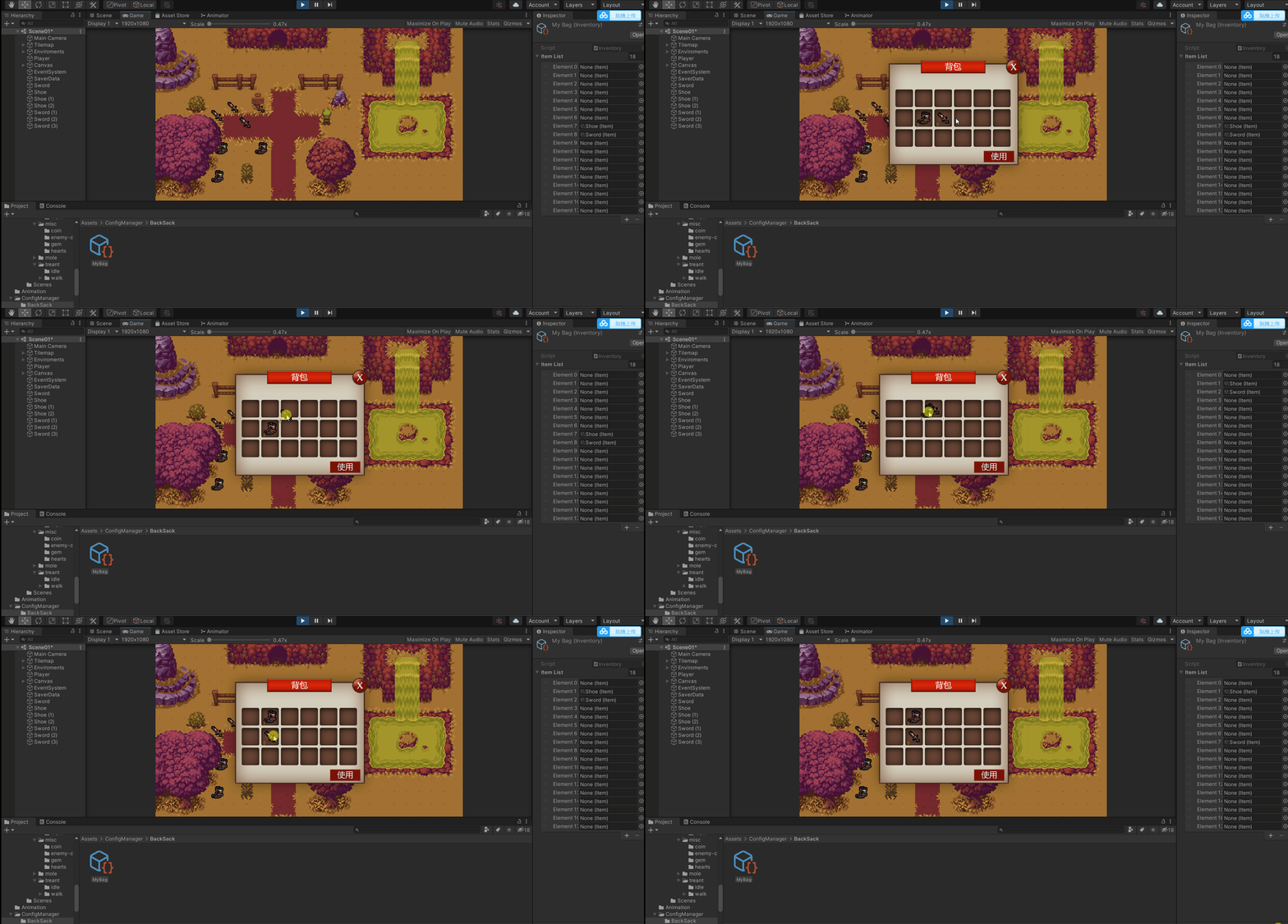
调整问题
12、调整小问题
修改后的代码如下
using UnityEngine;
using UnityEngine.EventSystems;

public class ItemOnDrag : MonoBehaviour, IBeginDragHandler, IDragHandler, IEndDragHandler
{

    private Transform originalPos;

    public Inventory MyBag;

    private int currentSoltID;

    public void OnBeginDrag(PointerEventData eventData)
    {
        originalPos = transform.parent;
        currentSoltID = originalPos.GetComponent<Slot>().slotID;
        transform.transform.SetParent(transform.parent.parent.parent);
        transform.position = eventData.position;
    }

    public void OnDrag(PointerEventData eventData)
    {
        transform.position = eventData.position;
        GetComponent<CanvasGroup>().blocksRaycasts = false;
    }

    public void OnEndDrag(PointerEventData eventData)
    {
        if(eventData.pointerCurrentRaycast.gameObject.name !=null)
            if (eventData.pointerCurrentRaycast.gameObject.name == "Image")
            {
                transform.SetParent(eventData.pointerCurrentRaycast.gameObject.transform.parent.parent);
                transform.position = eventData.pointerCurrentRaycast.gameObject.transform.parent.parent.position;

                //ItemList数据库文字交换
                var temp = MyBag.ItemList[currentSoltID];
                MyBag.ItemList[currentSoltID] = MyBag.ItemList[eventData.pointerCurrentRaycast.gameObject.transform.GetComponentInParent<Slot>().slotID];
                MyBag.ItemList[eventData.pointerCurrentRaycast.gameObject.transform.GetComponentInParent<Slot>().slotID] = temp;

                eventData.pointerCurrentRaycast.gameObject.transform.parent.position = originalPos.position;
                eventData.pointerCurrentRaycast.gameObject.transform.parent.SetParent(originalPos);
                GetComponent<CanvasGroup>().blocksRaycasts = true;

                return;
            }
            if(eventData.pointerCurrentRaycast.gameObject.name == "Grid(Clone)")
            {
                MyBag.ItemList[eventData.pointerCurrentRaycast.gameObject.GetComponentInParent<Slot>().slotID] = MyBag.ItemList[currentSoltID];
                if (eventData.pointerCurrentRaycast.gameObject.GetComponentInParent<Slot>().slotID!= currentSoltID)
                    MyBag.ItemList[currentSoltID] = null;

                transform.SetParent(eventData.pointerCurrentRaycast.gameObject.transform);
                transform.position = eventData.pointerCurrentRaycast.gameObject.transform.position;
                GetComponent<CanvasGroup>().blocksRaycasts = true;
                return;
            }
            //其他位置 装备归位
            transform.SetParent(originalPos);
            transform.position = originalPos.position;
            GetComponent<CanvasGroup>().blocksRaycasts = true;
    }
}
效果: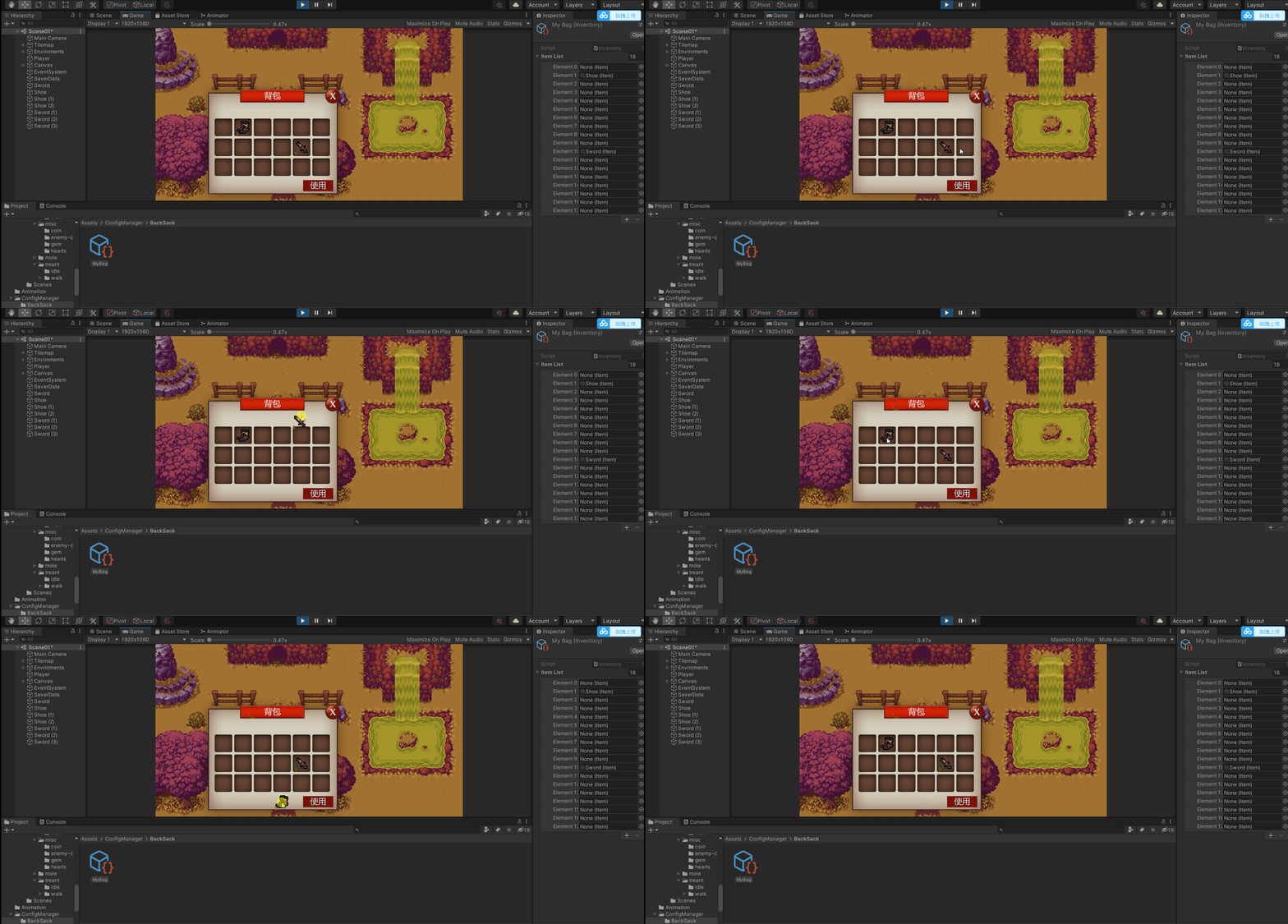
完成数据的储存
13、完成数据的储存
* 可以跳到数据存储看使用说明PlayerPrefs&&JsonUtility
using UnityEngine;

public class SaverData : MonoBehaviour
{
	//测试使用
    private void Update()
    {
        if (Input.GetKeyDown(KeyCode.R))
        {
             SaveBagData();
        }
        if (Input.GetKeyDown(KeyCode.T))
        {
            LoadBagData();
        }
    }

    private void OnEnable()
    {
        LoadBagData();
    }

    private void OnDisable()
    {
        SaveBagData();
    }


    public void SaveBagData()
    {
        for (int i = 0; i < inventory.ItemList.Count; i++)
        {
            if (inventory.ItemList[i] != null)
            {
                Save(inventory.ItemList[i], inventory.ItemList[i].name);
                Debug.Log(inventory.ItemList[i].ItemCount);
            }
        }
    }

    public void LoadBagData()
    {
        for (int i = 0; i < inventory.ItemList.Count; i++)
        {
            if (inventory.ItemList[i] != null)
            {
                Load(inventory.ItemList[i], inventory.ItemList[i].name);
            }
        }
    }

    pri请添加图片描述

}
效果: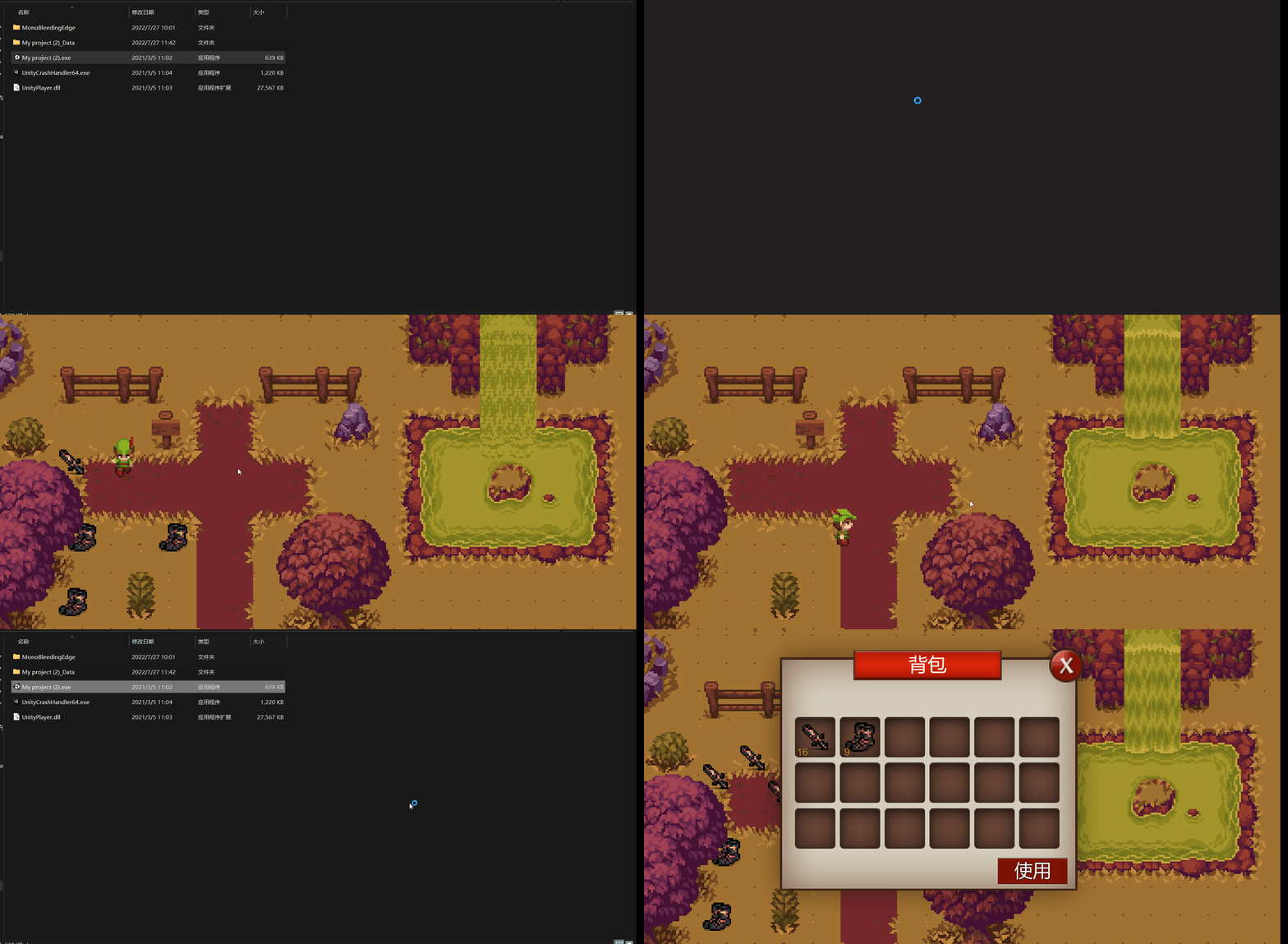
边栏推荐
猜你喜欢

C#实现弹出一个对话框的同时,后面的form不可用

Kubernetes -- Introduction

Shell:资源监控脚本和高负载报警

IronOCR for .NET 2022.8

What if the word selection box of win11 input method is missing?

Summary of redis classic interview questions

超好看的Nteam官网PHP程序源码

在线问题反馈模块实战(十六):实现查详情功能

Data Lake (XVII): Flink and iceberg integrate datastream API operations

工程电磁场复习基本知识点
随机推荐
动态内存管理中的malloc、free、calloc、realloc动态内存开辟函数
C语言实现动态版本的通讯录
Win11黑色桌面背景如何解决?
Summary of concurrent programming interview questions
静态博客搭建工具汇总
Redis memory recycling
[2022 Niuke multi school 2 K link with bracket sequence I] bracket linear DP
Win11如何重命名音频设备
20220726汇承科技的蓝牙模块HC-05的AT命令测试
Color recognition method and exploration based on MATLAB
Uniapp——拨打电话、发送短信
What are the fragments of MySQL
vba批量读取sql的create文来创建表
IronOCR for .NET 2022.8
Contour detection based on OpenCV (3)
C WinForm development: how to add pictures to project resources
【Codeforces Round #806 (Div. 4)(A~F)】
C # set TextBox control not editable
Summary of static blog building tools
Version compatibility issues