当前位置:网站首页>Static routing experiment configuration
Static routing experiment configuration
2022-07-27 02:30:00 【m0_ seventy-two million five hundred and eighty-six thousand an】
One 、 The experiment purpose :
Through routing configuration, the topology environment shown in the figure below can reach the whole network

Two 、 The experimental requirements :
1. except AR5 The loopback address of is fixed outside , All other network segments need to be based on 192.168.1.0/24 Make reasonable IP Address partition
2.AR1-AR4 Each router has two loopback interfaces , For analog connection PC The network segment ; The address is also 192.168.1.0/24 This network address range
3.AR1-AR4 You can't write directly to 5.5.5.0/24 Static routing of , But there's still access to 5.5.5.0/24 Network segment
4. Make the whole topology environment accessible to the whole network , Try to reduce the number of routing table entries per router , Avoid loop problems
5.AR4 And AR5 Between , Normal communication is 1000M link ,1000M When the link fails, it will be automatically changed to 100M link
3、 ... and 、 The experimental steps :
1. According to the requirements of the experiment 192.168.1.0/24 The network segment is divided into subnets :
AR1-AR4 Each router has two loopback interfaces , namely AR1-AR4 Each router has two loop changing sections , A total of 8 Loop road ;
AR1-AR4 The network segment directly connected to the router is shown as 6 Backbone link network segments ;
8 Loop road +6 Backbone link network segments =14 Net segment ;
Therefore, a total of 192.168.1.0/24 Divide into 14 Net segment ;
Master network 192.168.1.0/24( namely 192.168.1.0000 0000/24)
AR1-AR2:192.168.1.0/28 00000000
AR2-AR4:192.168.1.16/28 00010000
Manual subnet summary :192.168.1.0/27
AR1-AR3: 192.168.1.32/28 00100000
AR3-AR4: 192.168.1.48/28 00110000
Manual subnet summary :192.168.32.0/27
AR4-AR5: 192.168.1.64/28 01000000(preference:60)1000M link
AR5-AR4: 192.168.1.80/28 01010000(preference:61)100M link
Manual subnet summary :192.168.64.0/27
AR1 Loopback :
192.168.1.224/28 11100000
192.168.1.240/28 11110000
Manual subnet summary :192.168.1.224/27
AR2 Loopback :
192.168.1.128/28 10000000
192.168.1.144/28 10010000
Manual subnet summary :192.168.1.128/27
AR3 Loopback :
192.168.1.160/28 10100000
192.168.1.176/28 10110000
Manual subnet summary :192.168.1.160/27
AR4 Loopback :
192.168.1.192/28 11000000
192.168.1.208/28 11010000
Manual subnet summary :192.168.1.192/27
Summary of four manual summary subnets :192.168.1.128/25
Two reserved network segments :
1)192.168.1.96/28
2)192.168.1.112/28
IP The division of address subnet is shown in the figure :
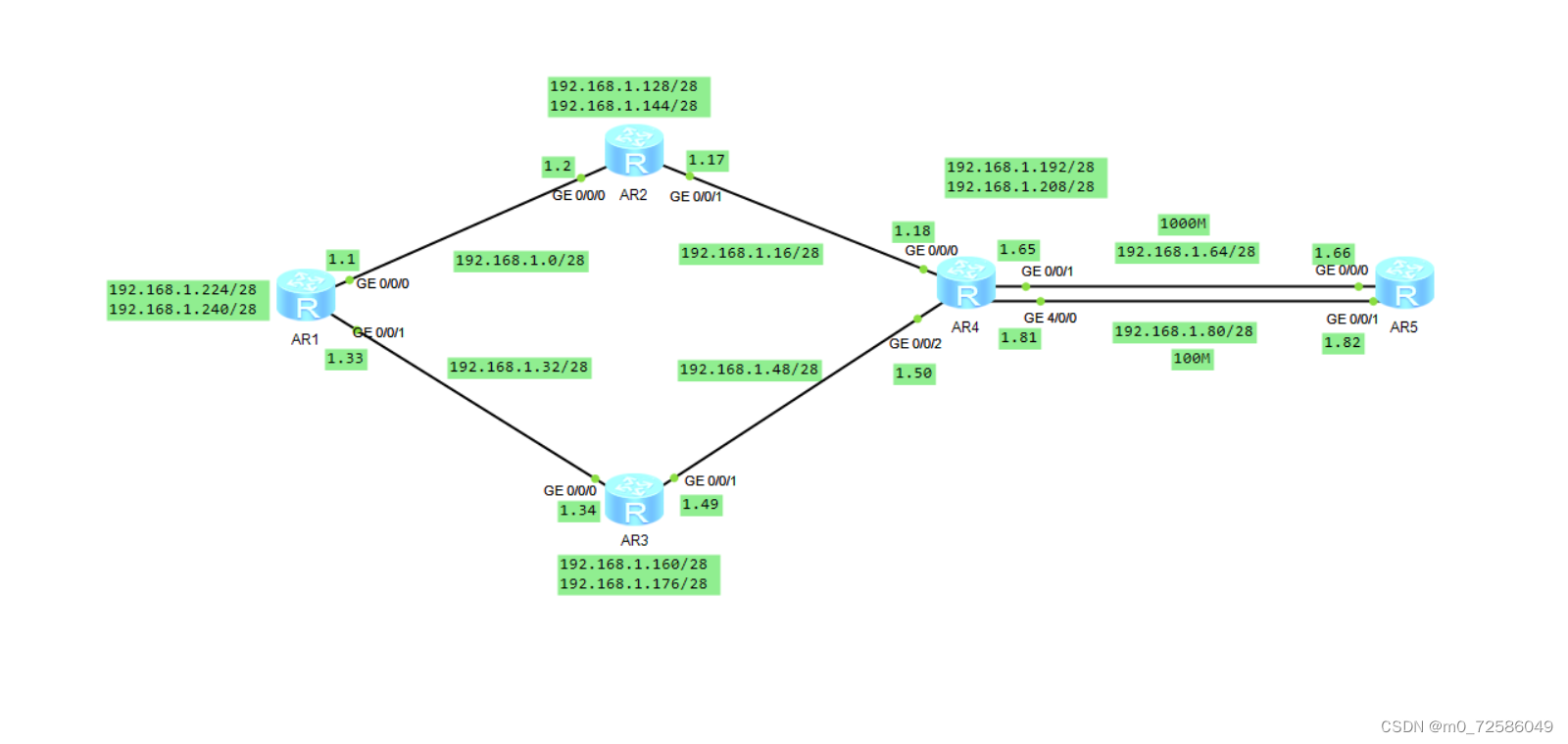
summary : Through such subnet division and manual subnet summary , It can reduce the generation of routing black holes ;
2. Change the router name :
With AR1 For example :
<Huawei>system-view
[Huawei]sysname sw1
[sw1]

3. Use of default routes :
Because the experiment requires AR1-AR4 You can't write directly to 5.5.5.0/24 Static routing of , But there's still access to 5.5.5.0/24 Network segment , Therefore, we can only access through the default route ;
With AR1 For example :
[sw1]ip route-static 0.0.0.0 0 192.168.1.2
[sw1]ip route-static 0.0.0.0 0 192.168.1.34
4. Configuration of empty interface route :
When the summary address includes network segments that do not actually exist in the network , It will cause the flow to have no return , Waste link resources , This creates a routing black hole ; When the routing black hole meets the default routing , There will inevitably be loopback links , Therefore, we need to configure a router with an empty interface route to the summary network segment , To discard traffic , Avoid loopback links .
With AR1 For example :[AR1]ip route-static 192.168.1.224 27 NULL 0
5. to AR4 To AR5 Set the priority of the path :
Required by the experiment AR4 And AR5 Between , Normal communication is 1000M link ,1000M When the link fails, it will be automatically changed to 100M link ;
So we need to set 1000M Segments and 100M Routing priority of network segment ;
With AR1 For example :
[sw1]ip route-static 192.168.1.64 28 192.168.1.2
[sw1]ip route-static 192.168.1.64 28 192.168.1.34
[sw1]ip route-static 192.168.1.80 28 192.168.1.2 preference 61
[sw1]ip route-static 192.168.1.80 28 192.168.1.34 preference 61
6. Distribute IP Address , Loopback address , Router port address :
1)AR1:
[sw1-GigabitEthernet0/0/0]ip address 192.168.1.1
[sw1-GigabitEthernet0/0/1]ip address 192.168.1.33
[sw1]interface LoopBack 0
[sw1-LoopBack0]ip address 192.168.1.224 28
[sw1]interface LoopBack 1
[sw1-LoopBack1]ip address 192.168.1.240 28
2)AR2:
[sw2-GigabitEthernet0/0/0]ip address 192.168.1.2
[sw2-GigabitEthernet0/0/1]ip address 192.168.1.17
[sw2]interface LoopBack 0
[sw2-LoopBack0]ip address 192.168.1.128 28
[sw2]interface LoopBack 1
[sw2-LoopBack0]ip address 192.168.1.144 28
3)AR3:
[sw3-GigabitEthernet0/0/0]ip address 192.168.1.34
[sw3-GigabitEthernet0/0/1]ip address 192.168.1.49
[sw3]interface LoopBack 0
[sw3-LoopBack0]ip address 192.168.1.160 28
[sw3]interface LoopBack 1
[sw3-LoopBack1]ip address 192.168.1.176 28
4)AR4:
[sw4-GigabitEthernet0/0/0]ip address 192.168.1.18
[sw4-GigabitEthernet0/0/1]ip address 192.168.1.65
[sw4-GigabitEthernet0/0/2]ip address 192.168.1.50
[sw4-GigabitEthernet4/0/0]ip address 192.168.1.81
[sw4]interface LoopBack 0
[sw4-LoopBack0]ip address 192.168.1.192 28
[sw4]interface LoopBack 1
[sw4-LoopBack1]ip address 192.168.1.208 28
5)AR5:
[sw5-GigabitEthernet0/0/0]ip address 192.168.1.66
[sw5-GigabitEthernet0/0/1]ip address 192.168.1.82
[sw5]interface LoopBack 0
[sw5-LoopBack0]ip address 5.5.5.1 24
6. Static routing 、 Default route 、 Add an empty interface
With AR1 and AR2 For example :
1)AR1:
Static routing :
[sw1]ip route-static 192.168.1.16 28 192.168.1.2
[sw1]ip route-static 192.168.1.48 28 192.168.1.34
[sw1]ip route-static 192.168.1.64 28 192.168.1.2
[sw1]ip route-static 192.168.1.64 28 192.168.1.34
[sw1]ip route-static 192.168.1.128 27 192.168.1.2
[sw1]ip route-static 192.168.1.160 27 192.168.1.34
[sw1]ip route-static 192.168.1.192 27 192.168.1.2
[sw1]ip route-static 192.168.1.192 27 192.168.1.34
[sw1]ip route-static 192.168.1.80 28 192.168.1.2 preference 61
[sw1]ip route-static 192.168.1.80 28 192.168.1.34 preference 61
Default route :
[sw1]ip route-static 0.0.0.0 0 192.168.1.2
[sw1]ip route-static 0.0.0.0 0 192.168.1.34
Empty interface :
[sw1]ip route-static 192.168.1.224 27 NULL 0

2)AR2:
Static routing :
[sw2]ip route-static 192.168.1.32 28 192.168.1.1
[sw2]ip route-static 192.168.1.48 28 192.168.1.18
[sw2]ip route-static 192.168.1.64 28 192.168.1.18
[sw2]ip route-static 192.168.1.80 28 192.168.1.18 preference 61
[sw2]ip route-static 192.168.1.224 27 192.168.1.1
[sw2]ip route-static 192.168.1.192 27 192.168.1.18
[sw2]ip route-static 192.168.1.160 27 192.168.1.1
[sw2]ip route-static 192.168.1.160 27 192.168.1.18
Default route :
[sw2]ip route-static 0.0.0.0 0 192.168.1.1
[sw2]ip route-static 0.0.0.0 0 192.168.1.18
Empty interface :
[sw2]ip route-static 192.168.1.128 27 NULL 0

Four 、 test :
1) The whole network can reach :


2) When 1000M When the link fails , Automatically turn to 100M Link transmission data


As mentioned above : All the requirements of the experiment have been met , Successful experiment .
边栏推荐
- Array methods and loops in JS
- The pointer is really profound!!!
- JVM interview questions (necessary for interview)
- Lora illumination sensor node data acquisition
- On the first day of staying in the blog [for 80000]!
- Fist guessing applet based on Object-C novice on the road
- 入住博客第一天【冲八万】!
- 猜拳小程序 基于Object-C 新手上路
- Record the star user of handsomeblog
- oSPF基础实验配置
猜你喜欢

有趣的C语言

MGRE, PPP, HDLC comprehensive experiment

全连MGRE与星型拓扑MGRE

HCIP oSPF综合实验
【洋哥带你玩转线性表(三)——双向链表】

Area optimization of digital chips: detailed explanation of question 1 in the digital direction of the third "Huawei Cup" graduate innovation core competition

(the most detailed in History) codeforces round 805 (Div. 3) e Split Into Two Sets

BigDecimal 的 4 个坑,你踩过几个?

RISC-V工具链编译笔记

C语言 学生信息管理系统 基于数组 可以存取到文本文件
随机推荐
Hcip day 1
多线程中 synchronized 锁升级的原理是什么?
勤写标兵——云小井
[C language] relevant distinction between strlen and sizeof
静态路由基本配置 实现全网可达
C语言的常数知识讲解
C language - characters and strings, arithmetic operators, type conversions
The pointer is really profound!!!
[use SQLite3 library to realize student information management system in Visual Studio 2019]
C language - assignment operator, compound assignment operator, self increasing and self decreasing operator, comma operator, conditional operator, goto statement, comment
C language -- while statement, dowhile statement, for loop and loop structure, break statement and continue statement
PPOCRLabel格式的数据集操作总结。
Guangguangzai's CSDN journey
【用C语言绘制谢尔宾斯基三角形】
(CF1691D) Max GEQ Sum
Esp8266wi fi data communication
Wechat applet: user wechat login process (attached: flow chart + source code)
HCIP第一天静态路由综合实验
HCIP-第二天
【C语言】strlen与sizeof相关区分