当前位置:网站首页>The bigger the project is, the bigger it is. This is how I split it
The bigger the project is, the bigger it is. This is how I split it
2022-07-26 07:39:00 【InfoQ】
Writing background :
PNPM Introduce :
PNPM Characteristics :
- Save disk space and increase installation speed ;
- Create a non flattened node_modules Folder .
PNPM And NodeJs Versioning support :
PNPM Compare with other package management functions :
install PNPM:
npm install -g pnpmQuick start command :
- In the project root Directory installs all dependencies :
pnpm install;
- In the project root Directory installation specifies dependencies :
pnpm add <pkg>;
- In the project root Directory operation CMD command :
pnpm <cmd>;
- Run in a specific subset CMD command :
pnpm -F <package_selector> <command>;
Together :
utilize [email protected] Templates to create root project :
pnpm create [email protected]

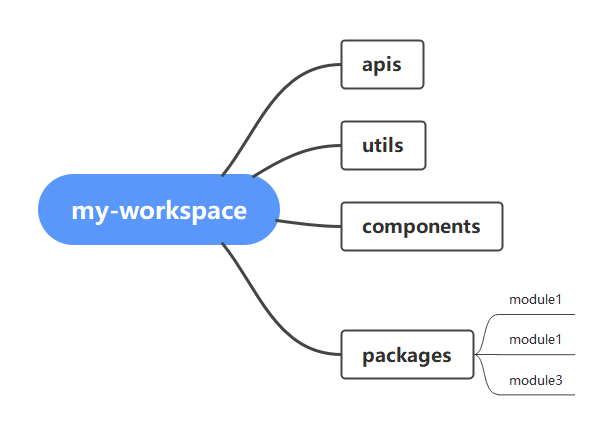
Define the workspace directory structure
pnpm-workspace.yamlpackages:
# all packages in direct subdirs of packages/
- 'packages/*'
# all packages in subdirs of components/
- 'components/**'
# Get data related packages in apis Under the table of contents
- 'apis/**'
# The packages related to general tools are utils Under the table of contents
- 'utils/**'
Use vite To initialize the common module :
establish apis project :
yarn create vite

establish utils project :
yarn create vite

adjustment apis、utils Project name and version number of :
Use vite To initialize the business module :
Create three module project , The overall directory structure is as follows :
my-workspace
├─ apis
│ ├─ src
│ ├─ package.json
│ └─ tsconfig.json
├─ utils
│ ├─ src
│ ├─ package.json
│ └─ tsconfig.json
├─ packages
│ ├─ module1
│ ├─ module2
│ └─ module3
├─ public
├─ src
├─ env.d.ts
├─ index.html
├─ package.json
├─ pnpm-lock.yaml
├─ pnpm-workspace.yaml
├─ README.md
├─ tsconfig.config.json
├─ tsconfig.json
└─ vite.config.ts
Adjust the name and version number of the three module projects
Use of unified package manager :
package.jsonscript"preinstall": "npx only-allow pnpm"
Development utils modular :
Development Clipboard Tool class ( Support mobile terminal and PC There are two prompt styles ):
Get ready Clipboard Tool class :
import Clipboard from 'clipboard'

export const handleClipboard = (text: string, event: MouseEvent) => {
 const clipboard = new Clipboard(event.target as Element, {
 text: () => text
 })
 clipboard.on('success', () => {
 clipboard.destroy()
 })
 clipboard.on('error', () => {
 clipboard.destroy()
 });
 (clipboard as any).onClick(event)
}
Configure dependencies :
- install
vueuseDependency Library , Monitor screen changes ;
- install
clipboardDependency Library , Complete the basic functions of the pasteboard ;
- install
element-plusPC Component library style ;
- install
vantMobile style component library ;
- install
vueDependency Library , Due to prompt Issues with peer dependencies found, Just install .
perfect Clipboard Tool classes to support different style prompts :
//  Manual import vant Notification component and style file in
import { Notify } from "vant";
import "vant/es/notify/style";

//  Manual import element-plus Notification component and style file in
import { ElMessage } from "element-plus";
import "element-plus/es/components/message/style/css";

//  Import the shear board foundation dependency
import Clipboard from "clipboard";
//  Import vueuse/core  Functions that monitor browser endpoint changes in
import { useBreakpoints, breakpointsTailwind } from "@vueuse/core";

const sm = useBreakpoints(breakpointsTailwind).smaller("sm");

/*  basis sm Value changes to change the use of different notification styles  */
export const clipboardSuccess = () =>
 sm.value
 ? Notify({
 message: "Copy successfully",
 type: "success",
 duration: 1500,
 })
 : ElMessage({
 message: "Copy successfully",
 type: "success",
 duration: 1500,
 });

/*  basis sm Value changes to change the use of different notification styles  */
export const clipboardError = () =>
 sm.value
 ? Notify({
 message: "Copy failed",
 type: "danger",
 })
 : ElMessage({
 message: "Copy failed",
 type: "error",
 });

export const handleClipboard = (text: string, event: MouseEvent) => {
 const clipboard = new Clipboard(event.target as Element, {
 text: () => text,
 });
 clipboard.on("success", () => {
 //  After the copy is successful, you will be prompted with the success notification
 clipboardSuccess();
 clipboard.destroy();
 });
 clipboard.on("error", () => {
 //  Prompt the failure notification content after the copy fails
 clipboardError();
 clipboard.destroy();
 });
 // eslint-disable-next-line @typescript-eslint/no-explicit-any
 (clipboard as any).onClick(event);
};
Export the relevant configuration of the tool class :
- Configure unified export file (
utils\index.ts):
export * from "./src/clipboard";
- modify
package.jsonOfmainField :
{
 "main": "index.ts"
}
take utils The module is installed to module1 project :
- The following command is available at root Directory execution , adopt
-FThe position to execute the command is@it200/module1, The command to be executed isadd.
pnpm -F @it200/module1 add @it200/utils
@it200/utilspnpm update- The dependency information after successful installation is as follows :
{
 "dependencies": {
 "@it200/utils": "workspace:^0.0.1"
 }
}
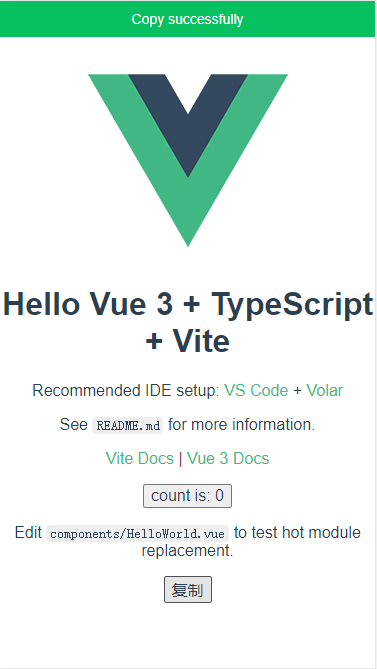
stay module1 Try to use Clipboard function :
- Add buttons in the template :
<button @click="copy"> Copy </button>
- stay
setupOfscriptAdd corresponding functions in and importhandleClipboard:
import { handleClipboard } from "@it200/utils";
const copy = (e) => {
 console.log("[ e ] >", e);
 handleClipboard("haha", e);
};

Development apis modular :
Development axios Tool class functions :
Get ready axios Tool class :
import axios, { AxiosRequestConfig } from "axios";

const pending = {};

const CancelToken = axios.CancelToken;
const removePending = (key: string, isRequest = false) => {
 if (Reflect.get(pending, key) && isRequest) {
 Reflect.get(pending, key)(" Cancel duplicate request ");
 }
 Reflect.deleteProperty(pending, key);
};
const getRequestIdentify = (config: AxiosRequestConfig, isReuest = false) => {
 let url = config.url;
 const suburl = config.url?.substring(1, config.url?.length) ?? "";
 if (isReuest) {
 url = config.baseURL + suburl;
 }
 return config.method === "get"
 ? encodeURIComponent(url + JSON.stringify(config.params))
 : encodeURIComponent(config.url + JSON.stringify(config.data));
};

//  Create a AXIOS example
const service = axios.create({
 baseURL: import.meta.env.VITE_BASE_API, // url = base url + request url
 // withCredentials: true, // send cookies when cross-domain requests
 timeout: 16000, //  request timeout
});

//  Request interceptor
service.interceptors.request.use(
 (config: AxiosRequestConfig) => {
 //  Block duplicate requests ( That is, the same request currently in progress )
 const requestData = getRequestIdentify(config, true);
 removePending(requestData, true);

 config.cancelToken = new CancelToken((c: any) => {
 Reflect.set(pending, requestData, c);
 });

 //  Preprocessing before request sending ( Such as : obtain token etc. )
 // if (store.getters.token) {
 // // let each request carry token
 // // ['X-AUTH-TOKEN'] is a custom headers key
 // // please modify it according to the actual situation
 // config.headers['X-AUTH-TOKEN'] = getToken()
 // }
 return config;
 },
 (error: any) => {
 // do something with request error
 console.log(error); // for debug
 return Promise.reject(error);
 }
);

// response interceptor
service.interceptors.response.use(
 (response: { config: AxiosRequestConfig; data: any }) => {
 //  Transfer completed requests from  pending  Remove
 const requestData = getRequestIdentify(response.config);
 removePending(requestData);
 const res = response.data;
 return res;
 },
 (error: {
 message: string;
 config: { showLoading: any };
 response: { status: any };
 request: any;
 }) => {
 console.log(error.message);
 if (error) {
 if (error.response) {
 switch (error.response.status) {
 case 400:
 error.message = " Wrong request ";
 break;
 case 401:
 error.message = " unauthorized , Please login again ";
 break;
 default:
 error.message = ` Connection error ${error.response.status}`;
 }
 const errData = {
 code: error.response.status,
 message: error.message,
 };
 console.log(" Unified error handling : ", errData);
 } else if (error.request) {
 console.log(" Unified error handling : ", " Network error , Please try again later ");
 }
 }
 return Promise.reject(error);
 }
);

export default service;
Configure dependencies :
- install
axiosDependency Library , Complete the sending and processing of data requests ;
- install
vantDependency Library , Status prompt after completing the request data .
apisperfect axios Tool class :
import { Dialog } from "vant";
import "vant/es/dialog/style";

import { Toast } from "vant";
import "vant/es/toast/style";

import axios, { AxiosRequestConfig } from "axios";

const pending = {};

const CancelToken = axios.CancelToken;
const removePending = (key: string, isRequest = false) => {
 if (Reflect.get(pending, key) && isRequest) {
 Reflect.get(pending, key)(" Cancel duplicate request ");
 }
 Reflect.deleteProperty(pending, key);
};
const getRequestIdentify = (config: AxiosRequestConfig, isReuest = false) => {
 let url = config.url;
 const suburl = config.url?.substring(1, config.url?.length) ?? "";
 if (isReuest) {
 url = config.baseURL + suburl;
 }
 return config.method === "get"
 ? encodeURIComponent(url + JSON.stringify(config.params))
 : encodeURIComponent(config.url + JSON.stringify(config.data));
};

//  Create a AXIOS example
const service = axios.create({
 baseURL: import.meta.env.VITE_BASE_API, // url = base url + request url
 // withCredentials: true, // send cookies when cross-domain requests
 timeout: 16000, //  request timeout
});

//  Request interceptor
service.interceptors.request.use(
 (config: AxiosRequestConfig) => {
 //  Block duplicate requests ( That is, the same request currently in progress )
 const requestData = getRequestIdentify(config, true);
 removePending(requestData, true);

 config.cancelToken = new CancelToken((c: any) => {
 Reflect.set(pending, requestData, c);
 });

 //  Open or not loading
 if (config.showLoading) {
 Toast.loading({
 duration: 0,
 mask: true,
 forbidClick: true,
 message: " Loading ...",
 loadingType: "spinner",
 });
 }

 //  Preprocessing before request sending ( Such as : obtain token etc. )
 // if (store.getters.token) {
 // // let each request carry token
 // // ['X-AUTH-TOKEN'] is a custom headers key
 // // please modify it according to the actual situation
 // config.headers['X-AUTH-TOKEN'] = getToken()
 // }
 return config;
 },
 (error: any) => {
 // do something with request error
 console.log(error); // for debug
 Toast.loading({
 message: " Network error , Please try again ",
 duration: 1500,
 type: "fail",
 });
 return Promise.reject(error);
 }
);

// response interceptor
service.interceptors.response.use(
 (response: { config: AxiosRequestConfig; data: any }) => {
 //  Transfer completed requests from  pending  Remove
 const requestData = getRequestIdentify(response.config);
 removePending(requestData);

 if (response.config.showLoading) {
 Toast.clear();
 }

 const res = response.data;
 return res;
 },
 (error: {
 message: string;
 config: { showLoading: any };
 response: { status: any };
 request: any;
 }) => {
 console.log(error.message);
 if (error) {
 if (error.config && error.config.showLoading) {
 Toast.clear();
 }
 if (error.response) {
 switch (error.response.status) {
 case 400:
 error.message = " Wrong request ";
 break;
 case 401:
 error.message = " unauthorized , Please login again ";
 break;
 default:
 error.message = ` Connection error ${error.response.status}`;
 }
 const errData = {
 code: error.response.status,
 message: error.message,
 };
 console.log(" Unified error handling : ", errData);
 Dialog({ title: " Tips ", message: errData.message || "Error" });
 } else if (error.request) {
 Toast.loading({
 message: " Network error , Please try again later ",
 duration: 1500,
 type: "fail",
 });
 }
 }
 return Promise.reject(error);
 }
);

export default service;
To write userApi class , Summary about user Object data reading :
import service from "./axios";
export const UserApi = {
getUsers: () => service.get<any>("/users"),
};
export userApi Class :
- Configure unified export file (
apis\index.ts):
export * from "./src/user";
- modify
package.jsonOfmainField :
{
 "main": "index.ts"
}
stay module2 Try to use userApi class :
- Define templates :
<template>
<button @click="getUserList"> Get the list of users </button>
<ul>
<li v-for="user in users" :key="user.id">
{{ user.name }}、{{ user.age }}
</li>
</ul>
</template>
- install 、 Import 、 Write logic :
pnpm -F @it200/module2 add @it200/apis
<script setup lang="ts">
import { UserApi } from "@it200/apis";
import { ref } from "vue";
const users = ref();
const getUserList = async () => {
const resp = await UserApi.getUsers();
users.value = resp;
};
</script>

Use
Mockend
Come on Mock data :
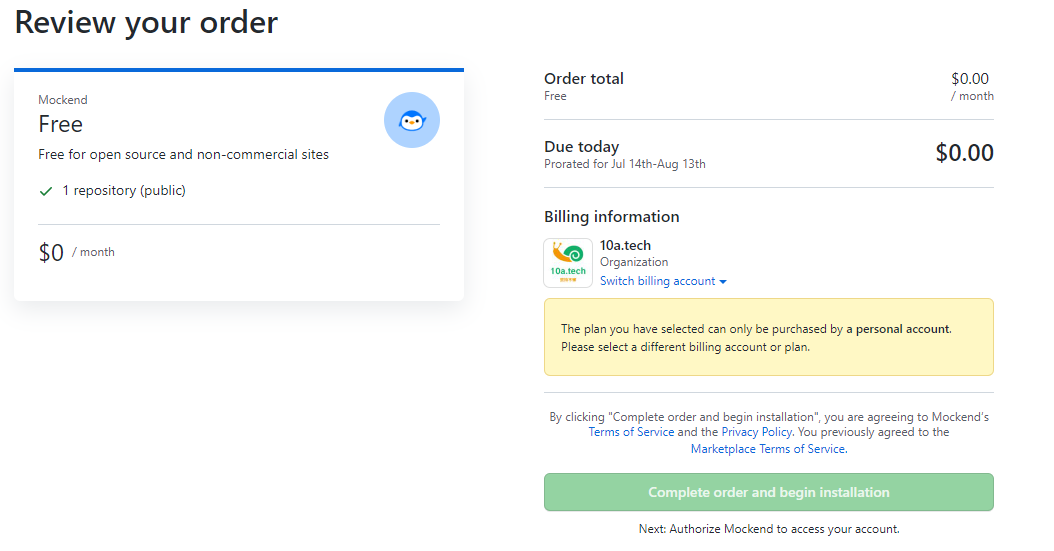
- Choose a plan that suits you :

- Select the public project warehouse to install ,Github Organizations do not support free ( Just for a screenshot ):
- In the project root New directory
.mockend.jsonfile :
{
 "User": {
 "name": {
 "string": {}
 },
 "avatarUrl": {
 "regexp": "https://i\\.pravatar\\.cc/150\\?u=[0-9]{5}"
 },
 "statusMessage": {
 "string": [
 "working from home",
 "watching Netflix"
 ]
 },
 "email": {
 "regexp": "#[a-z]{5,10}@[a-z]{5}\\.[a-z]{2,3}"
 },
 "color": {
 "regexp": "#[0-9A-F]{6}"
 },
 "age": {
 "int": {
 "min": 21,
 "max": 100
 }
 },
 "isPublic": {
 "boolean": {}
 }
 }
}
- adopthttps://mockend.com/OSpoon/data-mock/usersI can get it mock Data. ;
- Please refer to .
Development Components modular :
Development Card Components , And applied to module3 In the project :
Use pnpm create [email protected] To create a project template , Modify the project name and version number :
Create as follows card Component directory structure :
components
├─ card
│ ├─ src
│ │ ├─ card.scss
│ │ └─ index.vue
│ └─ index.ts
Component template and configuration :
<script lang="ts">
import { defineComponent } from "vue";
export default defineComponent({
name: "it-card",
});
</script>
<script setup lang="ts">
const props = defineProps({
shadow: {
type: String,
default: "always",
},
bodyStyle: {
type: Object,
default: () => {
return { padding: "20px" };
},
},
});
console.log("[ props ] >", props);
</script>
<template>
<div class="it-card">
<div :class="`is-${shadow}-shadow`"></div>
<div class="it-card__body" :style="bodyStyle">
<slot></slot>
</div>
</div>
</template>
<style lang="scss" scoped></style>
Component style file :
.it-card {
 border-radius: 4px;
 border: 1px solid #ebeef5;
 background-color: #fff;
 overflow: hidden;
 color: #303133;
 transition: 0.3s;

 .it-card__body {
 padding: 20px;
 }

 .is-always-shadow {
 box-shadow: 0 2px 12px 0 rgb(0 0 0 / 10%);
 }

 .is-hover-shadow:hover {
 box-shadow: 0 2px 12px 0 rgb(0 0 0 / 10%);
 }

 .is-never-shadow {
 box-shadow: none;
 }
}
Component installation plug-in :
import type { App } from "vue";
import Card from "./src/index.vue";

export default {
 install(app: App) {
 app.component(Card.name, Card);
 },
};
stay Components Try to use Card Components :
- Import component related configurations and install ,
components\src\main.ts
import Card from "./components/card/index";
import "./components/card/src/card.scss";

app.use(Card);
- stay
App.vueUsed in components :
<template>
<it-card style="width: 235px" :body-style="{ padding: '0px' }">
<img
src="https://shadow.elemecdn.com/app/element/hamburger.9cf7b091-55e9-11e9-a976-7f4d0b07eef6.png"
class="image"
/>
<div style="padding: 14px">
<span> Delicious hamburger </span>
<div class="bottom">
<time class="time">"2022-05-03T16:21:26.010Z"</time>
</div>
</div>
</it-card>
</template>

Prepare to import the relevant configuration of components :
- Configure unified export file :
import Card from "./src/components/card/index";
export default {
 Card,
};
- modify
package.jsonOfmainField :
{
 "main": "index.ts"
}
install 、 Import to module3:
- install
componentsThe component package :
pnpm -F @it200/module3 add @it200/components
- Import
componentsThe component package :
import Comps from "@it200/components";
import "@it200/components/src/components/card/src/card.scss";

app.use(Comps.Card);
- Use the same way Components Verification in the project , The effect is the same , I don't want to show it anymore .
Expand (Changesets Release changes ):
Add related configuration :
- install
changesetsTo the workspace root directory :
pnpm add -Dw @changesets/cli
- perform
changesetsInitialization command :
pnpm changeset init
Generate a new changesets:
pnpm changeset
git.changeset\config.jsonbaseBranchGenerate examples :
PS xxx> pnpm changeset
 Which packages would you like to include? · @it200/module3
 Which packages should have a major bump? · No items were selected
 Which packages should have a minor bump? · @it200/module3
 Please enter a summary for this change (this will be in the changelogs).
 (submit empty line to open external editor)
 Summary ·  increase components Configuration and use of modules

 === Summary of changesets ===
 minor: @it200/module3

 Note: All dependents of these packages that will be incompatible with
 the new version will be patch bumped when this changeset is applied.

 Is this your desired changeset? (Y/n) · true
 Changeset added! - you can now commit it

 If you want to modify or expand on the changeset summary, you can find it here
 info D:\daydayup\my-workspace\.changeset\purple-dodos-check.md
Release changes :
packageCHANGELOG.mdversionpnpm changeset version

summary :
边栏推荐
- WCF introductory tutorial II
- 动态性能视图概述
- OVSDB
- 「论文笔记」Next-item Recommendations in Short Sessions
- Command line execution and test report generation of JMeter performance test
- Network trimming: a data driven neuron pruning approach towards efficient deep architectures paper translation / Notes
- July training (day 18) - tree
- Summarize the common high-frequency interview questions of the software testing post
- PostgreSQL UUID fuzzy search UUID string type conversion SQL error [42883] explicit type casts
- 2022.7.22DAY612
猜你喜欢

系统架构&微服务

从Boosting谈到LamdaMART

机器学习相关比赛网站

Installation of Baidu flying paste deep learning framework tutorial in Anaconda
DADNN: Multi-Scene CTR Prediction via Domain-Aware Deep Neural Network
Devaxpress.xtraeditors.datanavigator usage

table 固定特定行

Fang Wenshan, Jay Chou's best partner, will officially announce "Hualiu yuancosmos" on July 25

JWT quick start
Now developers are beginning to do testing. Will there be no software testers in the future?
随机推荐
OAuth2.0系列博客教程汇总
元宇宙基础设施:WEB 3.0 chain33 优势分析
System architecture & microservices
[daily question 1] 919. Complete binary tree inserter
Database foundation
总结软件测试岗的那些常见高频面试题
漂洋过海来看你
keras学习之:获取神经网络中间层的输出结果
Basic knowledge of convolutional neural network
音视频学习(十)——ps流
Dynamic performance view overview
【Keras入门日志(3)】Keras中的序贯(Sequential)模型与函数式(Functional)模型
Fang Wenshan, Jay Chou's best partner, will officially announce "Hualiu yuancosmos" on July 25
Use of JMeter performance test to store response content to file listener
2022.7.22DAY612
WCF introductory tutorial II
Jmeter性能测试之命令行执行和生成测试报告
DevExpress.XtraEditors.DataNavigator用法
Polymorphism, final and interface
2019 ZTE touyue · model compression scheme