当前位置:网站首页>Dynamic performance view overview
Dynamic performance view overview
2022-07-26 07:34:00 【lemon】
Overview of dynamic performance view
The dynamic performance view belongs to the data dictionary , They are owned by SYS, And most dynamic performance views can only be accessed by privileged users and DBA User query .
When the database is in a different state , The dynamic performance views available are different .
When starting a routine ,ORACLE Dynamic performance views are automatically created ; When stopping a routine ,ORACLE The dynamic performance view is automatically deleted .
Data dictionary information is obtained from data files , The dynamic performance view information is from SGA And control documents .
therefore , There is a big difference between the two . Database administrators take advantage of these dynamic performance views , You can learn some basic information about database operation , Provide some data support for our database maintenance and database performance optimization .
The dynamic performance view is constantly updated as the database is opened and used , And their content is mainly about performance .
Although these views are much like ordinary database tables , But they don't allow users to make changes directly .
These views provide data about the internal disk structure and memory structure . Users can query these views , In order to manage and optimize the system .
All dynamic performance views are based on V_$ At the beginning ,ORACLE Synonyms are provided for each dynamic performance view (V$ start ). V$ yes V_$ A synonym for .
By inquiring V$FIXED_TABLE, All dynamic performance views can be displayed .
Dynamic performance view of database in different states
In general , We can master two kinds of important database operation information through dynamic performance data .
Understand the performance data related to database operation , Such as memory usage 、 Sort the disks The probability of birth and so on .
Get other information about disk and memory structure .
In general , The dynamic performance views of different database states are quite different :
NOMOUNT
When starting a routine ,ORACLE Will open the parameter file , Distribute SGA And start the background process . So the routine is in NOMOUNT In the state of , Can only access from SGA Dynamic performance view to get information from .
SGA----V$PARAMETER V$SGA V$OPTION V$PROCESS
V$SESSION V$VERSION V$INSTANCE
MOUNT
When loading the database ,ORACLE According to the initialization parameters control_file Open all control files . When the routine is in MOUNT In the state of , Not only can you access SGA Dynamic performance view to get information from , You can also access the dynamic performance view that gets information from the control file .
Control documents -------V$THREAD V$CONTROLFILE V$DATABASE
V$DATAFILE V$DATAFILE_HEADER V$LOGFILE
OPEN
When the database is open ,ORACLE Open all data files and redo logs according to the information recorded in the control file . In addition to being able to access SGA And control files to get information from the dynamic performance view , You can also visit ORACLE Performance related dynamic performance view (V$FILESTAT V$SESSION_WAIT V$WAITSTAT)
Pay attention to is , Only in OPEN In the state of , To access the data dictionary view .
V$, V_$, GV$, X$
X$ surface
X$ The table contains information about all aspects of a particular instance , yes Oracle Operation basis of database , Such as the current configuration information , The session connected to the instance , And rich and valuable performance information .
X$ Tables are not permanent or temporary tables that reside in database files . X$ Tables only reside in memory , When the instance starts , from Oracle Application dynamic creation , Real time maintenance in memory .
Most of them need at least databases that are loaded or already open .
X$ The table is SYS What the user owns , And it's read-only . Cannot be DML( to update , Insert , Delete ). Tables are critical to a database , therefore Oracle Don't allow SYSDBA Direct access to , Display authorization not allowed .
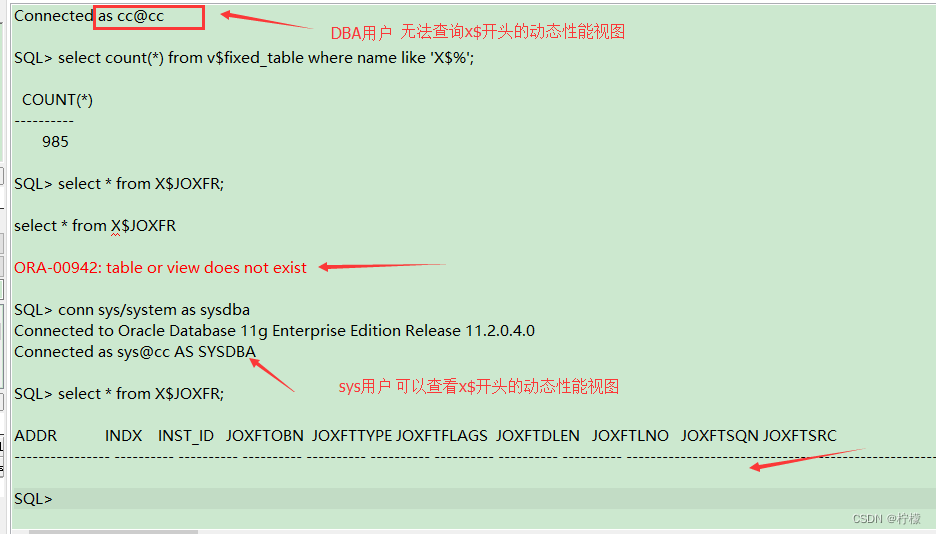
About X$ surface , We can also create information through bootstrap$ Table view , This table records the basic and driver information of database startup .
bootstrap$ What is actually stored is the definition of the base table of the data dictionary , Such as OBJ$,C_OBJ$,TAB$ wait .
Oracle Create the base table of the data dictionary by reading these definitions , And then create a data dictionary .
The query must be sys user ,dba The user with permission has no permission to query .

GV$ and V$ A synonym for
V$ View
The dynamic performance view is prefixed by V_$ identification . The common synonyms for these views have prefixes V$. data
Library administrators or users should only access V$ object , Instead of visiting V_$ object .
Once the instance starts , Read data from memory V$ The view is accessible .
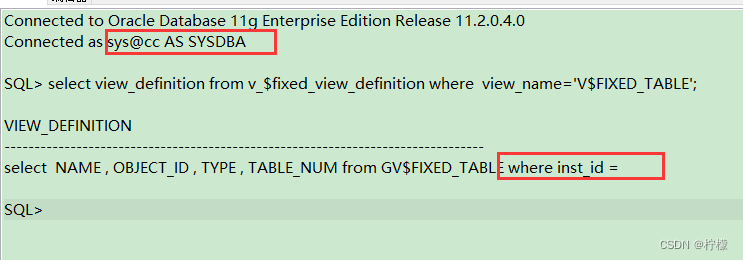
Be careful : Every V$ Views contain similar statements :
where inst_id = USERENV('Instance')
Used to restrict the return of current instance information .
We can do this through V$FIXED_VIEW_DEFINITION View To verify
select view_definition from v_$fixed_view_definition where
view_name='V$FIXED_TABLE';
You have to use sys User query .
边栏推荐
- Oauth2.0 series blog tutorial summary
- Deep learning model deployment
- 【Keras入门日志(3)】Keras中的序贯(Sequential)模型与函数式(Functional)模型
- Model pruning 3: learning structured sparsity in deep neural networks
- 数据库基础
- 2022.7.22DAY612
- 动态性能视图概述
- 2021全球机器学习大会演讲稿
- Program environment and pretreatment
- 现在开发人员都开始做测试了,是不是以后就没有软件测试人员了?
猜你喜欢

Practice of online question feedback module (XIV): realize online question answering function

NFT digital collection system development: the collision of literature + Digital Collections

Interview question set

The analysis, solution and development of the problem of router dropping frequently

Speech at 2021 global machine learning conference

爬虫->TpImgspider

Oauth2.0 series blog tutorial summary
Network Trimming: A Data-Driven Neuron Pruning Approach towards Efficient Deep Architectures论文翻译/笔记

PXE efficient batch network installation

PR subtitle production
随机推荐
Leetcode 206. reverse chain list (2022.07.25)
MMOE multi-objective modeling
Abnormal (2)
数据库基础
1.MySQL架构篇【mysql高级】
Anaconda 中安装 百度飞浆Paddle 深度学习框架 教程
2021-11-09
模型剪枝三:Learning Structured Sparsity in Deep Neural Networks
PR subtitle production
机器学习相关比赛网站
以太网交换安全
6. Backup and recovery of MySQL database
dcn(deep cross network)三部曲
20220209 create a basic Servlet
What is bloom filter in redis series?
NFT digital collection development: digital art collection enabling public welfare platform
总结软件测试岗的那些常见高频面试题
[daily question 1] 919. Complete binary tree inserter
Taishan office lecture: word error about inconsistent values of page margins
【每日一题】919. 完全二叉树插入器