当前位置:网站首页>H7-TOOL的I2C接口方式脱机烧录操作方法,已经发布(2022-07-16)
H7-TOOL的I2C接口方式脱机烧录操作方法,已经发布(2022-07-16)
2022-07-23 17:31:00 【硬汉eric2013】
通过Lua小程序,我们可以方便方便的在线方式做I2C接口方式固件烧录,也可以离线方式运行Lua小程序做烧录。
本次是说明是采用H7-TOOL的I2C接口连接我们V7板子做的操作说明。
【协议说明】
1、发送固件大小:符号‘*’ 来同步,然后发送固件大小,板子收到后,回复0x30表示擦除相应扇区大小成功,回复0x60表示擦除失败。
2、发送固件数据:符号‘$’ 来同步,然后发送固件数据,每次64字节大小,板子收到后,回复0x30表示数据编程成功,回复0x60表示擦除失败。如此反复,一直到发送完毕。
3、发送结束命令:符号‘#’ 表示传输结束,目标板可以加载到APP运行了。
要更新APP固件的I2C设备地址,我们设置为0x20,通信速度设置的100KHz。
【硬件接线】
H7-TOOL通过I2C接到V7板子的I2C接口上

【准备工作】
当前上位机还没有做专门的I2C接口脱机烧录一键下载界面,需要手动将Lua文件和app固件存到TOOL的eMMC
1、H7-TOOL进入虚拟U盘
上电首界面长按S键 -> 系统设置 -> USB eMMC磁盘, 进入eMMC模拟U盘后,在如下路径新建文件夹串口脱机烧录

将如下两个文件存到新建的文件夹下
app.bin (50.03 KB)
i2cbootloader.lua (5.97 KB)

2、将目标板程序下载到V7开发板
硬件I2C从机实现。
基于V7的I2C接口脱机烧录目标板程序.7z (5.39 MB)
【在线方式操作说明】
H7-TOOL可以采用USB,以太网或者WiFi方式连接上位机。
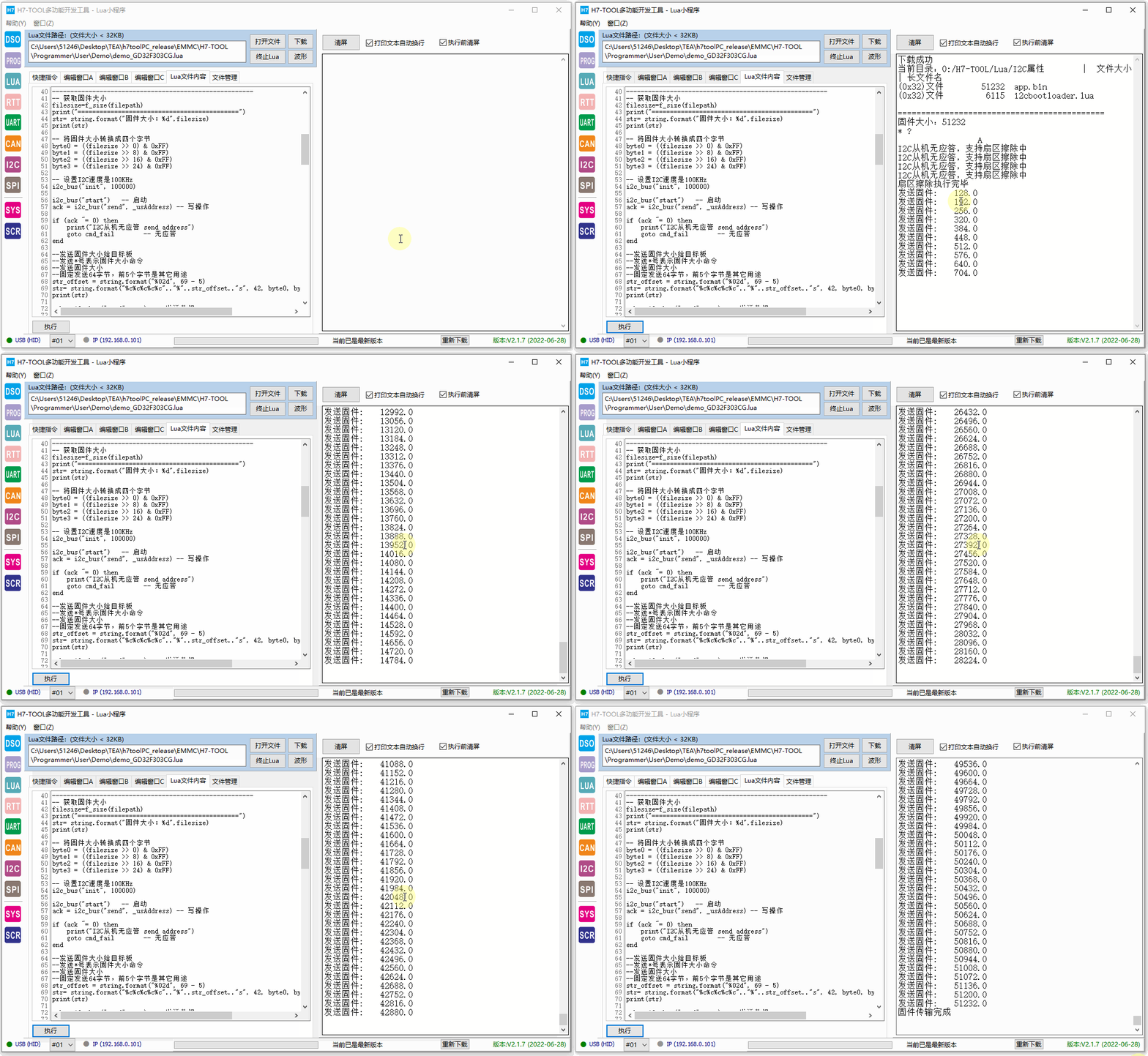
将前面lua小程序i2cbootloader.lua的内容复制到如下窗口:

点击下面的执行按钮就可以看到动图更新了:
【离线方式操作说明】
操作TOOL显示屏,进入Lua小程序界面:

执行uartfirmware.lua小程序。
执行效果如下:

【Lua小程序简单说明】
注释非常详细:
-------------------------------------------------------
--
--     H7-TOOL 的I2C脱机烧录Lua小程序实现
--
-------------------------------------------------------
local str
local len
local bytes
local bin
local offset
local value
local count
local filesize
local byte0
local byte1
local byte2
local byte3
local filepath = "0:/H7-TOOL/Lua/I2C脱机烧录/app.bin" -- 表示I2C脱机烧录文件夹下存的文件
local filepath1 = "0:/H7-TOOL/Lua/I2C脱机烧录"        -- 浏览I2C脱机烧录文件下存的文件
local ack
local i, m
local res
local str_offset
local str_offset1
local str_offset2

-------------------------------------------------------
--   I2C设备地址,更新需要修改
-------------------------------------------------------
local _usAddress = 0x20 -- I2C设备地址

-------------------------------------------------------
--   第1步:浏览串口脱机烧录文件夹下存的文件
-------------------------------------------------------
f_dir(filepath1)
print()

-------------------------------------------------------
--   第3步:发送固件大小,方便目标板擦除相应大小扇区
-------------------------------------------------------
-- 获取固件大小
filesize=f_size(filepath)
print("============================================")
str= string.format("固件大小:%d",filesize)
print(str)

-- 将固件大小转换成四个字节
byte0 = ((filesize >> 0) & 0xFF)
byte1 = ((filesize >> 8) & 0xFF)
byte2 = ((filesize >> 16) & 0xFF)
byte3 = ((filesize >> 24) & 0xFF)

-- 设置I2C速度是100KHz
i2c_bus("init", 100000)

i2c_bus("start")   -- 启动
ack = i2c_bus("send", _usAddress) -- 写操作

if (ack ~= 0) then
    print("I2C从机无应答 send address")
    goto cmd_fail        -- 无应答
end

--发送固件大小给目标板
--发送*号表示固件大小命令
--发送固件大小
--固定发送64字节,前5个字节是其它用途
str_offset = string.format("%02d", 69 - 5)
str= string.format("%c%c%c%c%c".."%"..str_offset.."s", 42, byte0, byte1, byte2, byte3, "A")
print(str)

ack = i2c_bus("send", str)  -- 发送数据

if (ack ~= 0) then
    print("I2C从机无应答 send data")
    goto cmd_fail        -- 无应答
end

i2c_bus("stop")

 -------查询,直到设备执行完毕擦除---------
 for m=1, 50, 1 do
    i2c_bus("start")
    ack = i2c_bus("send", _usAddress) -- 读操作

    if (ack ~= 0) then
        print("I2C从机无应答,支持扇区擦除中")
    else
        break
    end
    delayms(300)
end

 -------获取返回值-----------------------
i2c_bus("start")
ack = i2c_bus("send", _usAddress+1) -- 读操作

str = i2c_bus("recive", 1) -- 读取17个字节数据

if(str == '\x30') then
    print("扇区擦除执行完毕")
else
    print("扇区擦除执行失败")
end
i2c_bus("stop")

-------------------------------------------------------
--   第4步:发送固件大小
-------------------------------------------------------
offset = 0
-- 第1个参数是路径,第2个参数的偏移地址,第3个参数读取大小
-- 返回值bytes表示读取的字节数,bin表示都回的数据
bytes, bin = f_read(filepath, 0, 64)
offset = offset + bytes

-- 读取数据为0,表示传输完毕
while(bytes > 0)
do

    -- 发送$表示开始传输固件命令
    -- 发送固件数据给目标板
    -- 固定每次发送64个字节,前5个字节其它用途
    count = 69 - 2 - bytes
    str_offset = string.format("%02d", count)
    str_offset1 = string.format("%"..str_offset.."s", "A")
    str_offset2 =  string.format("$%c", bytes)
    str= str_offset2..bin..str_offset1

    i2c_bus("start")   -- 启动
    ack = i2c_bus("send", _usAddress) -- 写操作

    if (ack ~= 0) then
        print("I2C从机无应答 send address")
        goto cmd_fail        -- 无应答
    end

    ack = i2c_bus("send", str)  -- 发送数据

    if (ack ~= 0) then
        print("I2C从机无应答 send data")
        goto cmd_fail        -- 无应答
    end

    i2c_bus("stop")

    -------查询,直到设备执行完毕扇区编程---------
    for m=1, 50, 1 do
        i2c_bus("start")
        ack = i2c_bus("send", _usAddress) -- 写操作

        --ack = i2c_bus("check", _usAddress)

        if (ack ~= 0) then
            --print("I2C从机无应答 send address")
        else
            break
        end
        delayms(1)
    end

     -------获取返回值-----------------------
    i2c_bus("start")
    ack = i2c_bus("send", _usAddress+1) -- 读操作
    str = i2c_bus("recive", 1) -- 读取1个字节数据
    i2c_bus("stop")
    if(str == '\x30') then  -- 如果返回值是0x30,继续读取
        bytes, bin = f_read(filepath, offset, 64)  -- 继续读取数据
        offset = offset + bytes
        if(bytes ~= 0) then                       -- 读取不为0,打印发送的总字节数
            print("发送固件:", offset)
        end
    else
        print("扇区编程执行失败")
    end
end

-------------------------------------------------------
--   第5步:发送传输结束命令
-------------------------------------------------------
str_offset = string.format("%02d", 69 - 1)
str= string.format("#".."%"..str_offset.."s", "A")

i2c_bus("start")   -- 启动
ack = i2c_bus("send", _usAddress) -- 写操作

if (ack ~= 0) then
    print("I2C从机无应答 send address")
    goto cmd_fail        -- 无应答
end

ack = i2c_bus("send", str)  -- 发送数据

if (ack ~= 0) then
    print("I2C从机无应答 send data")
    goto cmd_fail        -- 无应答
end

i2c_bus("stop")

print("固件传输完成")

::cmd_fail::
    --  命令执行失败后,切记发送停止信号,避免影响I2C总线上其他设备
    --  发送I2C总线停止信号
    i2c_bus("stop")

-------------------------------------------------------
--  end of file
-------------------------------------------------------
【目标板程序简单说明】
最关键的就是I2C程序处理:
/*
*********************************************************************************************************
*        函 数 名: main
*        功能说明: c程序入口
*        形    参: 无
*        返 回 值: 错误代码(无需处理)
*********************************************************************************************************
*/
int main(void)
{
        uint32_t SectorCount = 0;
        uint32_t SectorRemain = 0;
        uint32_t i;
    uint32_t TotalSize = 0;
        uint8_t ucState;


        bsp_Init();                /* 硬件初始化 */
        PrintfLogo();        /* 打印例程信息到串口1 */
        PrintfHelp();        /* 打印操作提示信息 */

        bsp_StartAutoTimer(0, 100);        /* 启动1个100ms的自动重装的定时器 */

        /* 首次使用,先设置64字节接收 */
        g_i2cLen = 69;
        bsp_i2cReceive();

        /* 进入主程序循环体 */
        while (1)
        {
                bsp_Idle();                /* 这个函数在bsp.c文件。用户可以修改这个函数实现CPU休眠和喂狗 */

                /* 判断定时器超时时间 */
                if (bsp_CheckTimer(0))
                {
                        /* 每隔100ms 进来一次 */
                        bsp_LedToggle(2);
                }

        if (wTransferState != TRANSFER_WAIT)
        {
                        /* 传输固件 */
                        if(g_i2cRxBuf[0] == '*')
                        {
                                /* 获取文件大小 */
                                filesize = g_i2cRxBuf[1] + (g_i2cRxBuf[2] << 8) + (g_i2cRxBuf[3] << 16) + (g_i2cRxBuf[4] << 24);
                                uwAppSize = filesize;
                                for(int i = 0; i < 69; i++)
                                {
                                        printf("%x ", g_i2cRxBuf[i]);
                                }

                                /* 根据文件大小执行擦除 */
                                SectorCount = filesize/(128*1024);
                                SectorRemain = filesize%(128*1024);

                                printf("filesize = %d\r\n", filesize);
                                for(i = 0; i < SectorCount; i++)
                                {
                                        bsp_EraseCpuFlash((uint32_t)(AppAddr + i*128*1024));
                                }

                                if(SectorRemain)
                                {
                                        bsp_EraseCpuFlash((uint32_t)(AppAddr + i*128*1024));
                                }

                                /* 返回0x30,表示擦除成功 */
                                g_i2cLen = 1;
                                g_i2cTxBuf[0] = 0x30;
                                bsp_i2cTransfer();

                                /* 继续执行下次接收 */
                                g_i2cLen = 69;
                                bsp_i2cReceive();
                        }

                        /* 传输完成命令 **************/
                        if(g_i2cRxBuf[0]  == '#')
                        {
                                JumpToApp();
                        }

                        /* 开始传输固件命令 **************/
                        if(g_i2cRxBuf[0]  == '$')
                        {
                                /* 接收数据个数 */
                                RecSize = g_i2cRxBuf[1];

                                /* 编程内部Flash, */
                                ucState = bsp_WriteCpuFlash((uint32_t)(AppAddr + TotalSize),  (uint8_t *)&g_i2cRxBuf[2], RecSize);
                                TotalSize += RecSize;
                                printf("=====%d\r\n", TotalSize);

                                /* 如果返回非0,表示编程失败 */
                                if(ucState != 0)
                                {
                                        /* 返回0x60,表示编程失败 */
                                        g_i2cLen = 1;
                                        g_i2cTxBuf[0] = 0x60;
                                        bsp_i2cTransfer();
                                }

                                /* 返回0x30,表示编程成功 */
                                g_i2cLen = 1;
                                g_i2cTxBuf[0] = 0x30;
                                bsp_i2cTransfer();

                                /* 继续执行下次接收 */
                                g_i2cLen = 69;
                                bsp_i2cReceive();
                        }

                }
        }
}
【参考资料】
之前更新过三期BootLoader的视频教程,可以作为参考学习:
单片机bootloader专题,启动,跳转配置和调试下载的各种用法
BSP视频教程第17期:单片机bootloader专题,启动,跳转配置和调试下载的各种用法(2022-06-10) - STM32H7 - 硬汉嵌入式论坛 - Powered by Discuz!
基于NAND,eMMC,SD卡和U盘的BootLoader实战,带CRC完整性校验
BSP视频教程第18期:基于NAND,eMMC,SD卡和U盘的BootLoader实战,带CRC完整性校验(2022-06-16) - STM32H7 - 硬汉嵌入式论坛 - Powered by Discuz!
单片机BootLoader的AES加密实战,含上位机和下位机代码全开源
BSP视频教程第19期:单片机BootLoader的AES加密实战,含上位机和下位机代码全开源(2022-06-26) - STM32H7 - 硬汉嵌入式论坛 - Powered by Discuz!
边栏推荐
- Synopsys TCL of Tcl language (3) (Digital IC)
- [shutter -- layout] linear layout (row and column)
- Mbio | the sun Chaomin formation of Ocean Institute has verified in situ the new pathway of microbial mediated elemental sulfur formation in the deep sea
- C # split usage, split split split string
- 【C语言】程序环境和预处理
- 1、 Reptile concept and basic process
- .net core implements background tasks (scheduled tasks) longbow Tasks component (III)
- mBio | 海洋所孙超岷组在深海原位验证了微生物介导的单质硫形成新通路
- LM393 low power dual voltage comparator parameters, pins, application details
- [machine learning] Wu Enda: lifelong learning
猜你喜欢

基於FPGA的UART接口設計
Mee | Zhejiang University Chenglei group develops a new method for designing and constructing synthetic flora

Tcl 语言之Synopsys Tcl篇(3)(数字IC)

Detailed explanation: tmp1750 chip three channel linear LED driver

LeetCode每日一题(1514. Path with Maximum Probability)
![[2020] [paper notes] optically controlled spectral ratio adjustable y based on two-dimensional photonic crystal——](/img/d5/b4c82b2a9b34036e182ea9f1b14618.png)
[2020] [paper notes] optically controlled spectral ratio adjustable y based on two-dimensional photonic crystal——

Error reporting caused by the use of responsebodyadvice interface and its solution

J9数字论:数字行业的FOMO现象我们应该怎么克服?

How to understand: common code block, construction block, static block? What does it matter?

【机器学习】吴恩达:终生学习
随机推荐
使用 frp 实现内网穿透
Paddlenlp's UIE classification model [taking emotional propensity analysis news classification as an example] including intelligent annotation scheme)
DevStack云计算平台快速搭建
多线程&高并发(全网最新:面试题+导图+笔记)面试手稳心不慌
Gvim/vim tips
.NET Core 实现后台任务(定时任务)Longbow.Tasks 组件(三)
VB connecting access database customization
lendingclub贷款状态loan status业务详解-current,charge off,issued,Fully Paid,grace period
正则化不同导致的tuple错误
CTF misc learning summary "suggestions collection"
Know two things: how does redis realize inventory deduction and prevent oversold?
Ros2 self study notes: rviz visualization tool
Detailed explanation: tmp1750 chip three channel linear LED driver
Digital security giant entrust revealed that it was attacked by blackmail software gangs in June
识别引擎ocropy-&gt;ocropy2-&gt;OCRopus3总结
Three ways to realize multithreading
软件测试岗位就业竞争压力大,985毕业的“打工人“同样存在苦不堪言
What content does the software test plan include and how to write it. Share test plan template
Handwriting bind, call, apply is actually very simple
Leetcode daily question 2022/7/18-2022/4/24