当前位置:网站首页>How to download and install stm32cubemx
How to download and install stm32cubemx
2022-06-13 08:12:00 【Cimswxy】
STM32CubeMX Is an automatic generation stm32 MCU initialization program software , It's very convenient to use , The author will record how to install this software . meanwhile STM32CubeMX After the software is installed , You also need to download the firmware library package to work properly , See my blog for details :https://blog.csdn.net/weixin_44056757/article/details/108197199
First step , Get into ST Official website :https://www.st.com/zh/development-tools/stm32cubemx.html Click the get software button as shown in the figure :

The second step , Click to accept the license agreement :

The third step , Fill in your name and email address here and click download , You can fill in any name , No email address , Because it involves entering this email address to open the download link sent to you :

Step four , Click download and the prompt shown in the following figure will pop up , You can see that you need to enter the email you just entered to start downloading the software :

Step five , Open the received after entering the mailbox ST Email from the company , And click download now :

Step six , You can see that the software has been downloaded :

Step nine , install STM32CubeMX It needs to be installed JRE Environmental , Otherwise, it cannot be installed at the root , install JRE The environment can be downloaded from the official website :https://www.java.com/en/download/manual.jsp, Click... As shown in the figure below Windows Offline (64-bit):

Step 10 , You can see that you are downloading :

The twelfth step , After downloading, right-click to run as administrator JRE Install the software :
Thirteenth Step , Check the change target folder in the lower left corner , Click on the install :

The fourteenth step , Click Change , Change the installation directory to the desired location :

The fifteenth step , Installation in progress :

The sixteenth step , Click Close after installation , Close the installation window :

The seventeenth step , Unzip the previously downloaded STM32CubeMX Compressed package , Right click to run the installer shown in the following figure as an administrator :

The eighteenth step , Click on NEXT:

The nineteenth step , Check I accept········ And click the Next:

The twentieth step , Check these two boxes , Click on Next:

Step 21 , Click on Browse, Change the installation directory to the desired location :

Step 22 , No need to change , Default is good , Click on Next:

Step 23 , Installing :

Step 24 , installation is complete , Click on Done, The installer closes automatically :
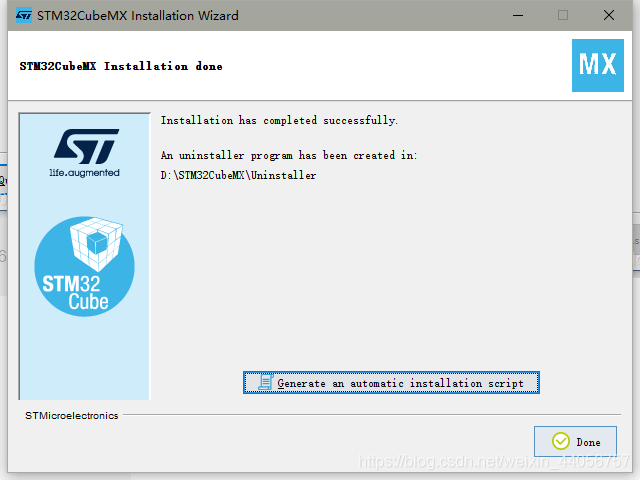
Step 25 , Double click the installed icon on the desktop to open the software , You can see that the software can be opened normally , Installation successful :


That's all of this , You are welcome to leave a message in the comment area to discuss with each other , I also welcome your criticism and correction O(∩_∩)O~
边栏推荐
- Plane merging (matlab)
- 酒水批发行业应当如何高效管理商品与库存
- 第115页的gtk+编程例子——最简单的进度条2附带使用Anjuta写gtk程序的步骤
- 19 | establish data path (bottom): instruction + operation =cpu
- CCNP_ Bt-ospf big experiment (1)
- Local shooting range 2- file upload vulnerability (III) - Network Security
- 18 | establish data path (middle): instruction + operation =cpu
- Go interface implementation principle [advanced level]: type_ interface struct
- How to install the bdtab (BD) new tab plug-in in edge browser (Graphic tutorial)
- ERP基础数据 金蝶
猜你喜欢

AcWing 1977. 信息中继(基环树,并查集)

关于redis使用分布式锁的封装工具类

MySQL table partitioning

21 | pipeline oriented instruction design (Part 2): How did Pentium 4 fail?

Differences between Merkle DAG and Merkle tree

ERP basic data Huaxia
![[game theory complete information static game] Nash equilibrium](/img/db/9923f5a7465c8b57182f09810b65bf.jpg)
[game theory complete information static game] Nash equilibrium

ERP基础数据 金蝶

微服务系统架构搭建一:环境搭建

适合生鲜批发行业的几种精准接单方式
随机推荐
Go interface implementation principle [advanced level]: type_ interface struct
Word中批注的使用方法
第115页的gtk+编程例子——最简单的进度条2附带使用Anjuta写gtk程序的步骤
Selenium reports an error deprecationwarning: executable_ path has been deprecated, please pass in a Service object
Disk C is full? A few simple tips teach you to release and clean up tens of gigabytes of space on the C disk, the most effective way to clean up the C disk
17. how to understand multi version concurrency control and read / write sets of fabric smart contracts? (vernacular version)
BD新标签页(BdTab)插件如何登入?
26 | superscalar and VLIW: how to make the CPU throughput exceed 1
2022年G3锅炉水处理操作证考试题库模拟考试平台操作
Altium Designer中导入和导出设置的方法
疫情之下的远程办公解决方案
sizeof、strlen求字符长度
Live broadcast review | bas technology innovation exploration under active defense system
字符串的逆序与比较
Did decentralized digital identity
批发商为什么要使用订单系统
18 | establish data path (middle): instruction + operation =cpu
Get properties of class
微服务系统架构搭建一:环境搭建
Dfinity (ICP) identity authentication and ledger quick start-3