当前位置:网站首页>Flutter与原生通信(上)
Flutter与原生通信(上)
2022-06-26 09:37:00 【可可鸭~】
一 、flutter中通信的三种方式
BasicMessageChannel:用于传递字符串和半结构化的信息
MethodChannel:用于传递方法调用(method invocation)通常用来调用native中某个方法
EventChannel: 用于数据流(event streams)的通信。有监听功能,比如电量变化之后直接推送数据给flutter端。
二 、MethodChannel的使用
1.搭建流程:
Flutter ------>Native
MethodChannel是Flutter和原生交互的基础,通过传入Flutter插件的名字,调用invokeMethod方法,便可以调用原生的方法,有点类似于Java的反射。
注册渠道:在两端同时创建一个MethodChannel对象,注册相同的字符串值。
Android端
MethodChannel a2FChannel = new MethodChannel((FlutterView)flutterView,"A2FChannel");
Flutter端
 var channel = MethodChannel("A2FChannel");
 final String result = await channel.invokeMethod(nativeMethod, args);
setMethodCallHandler 方法注解
channel.setMethodCallHandler {
     call, result ->
           //call.method 来获取方法名
           //call.arguments 来获取入参
           //result.success来放回成功处理结果
           //result.error来放回失败后的结果
           //result.notImplemented来放回为实现该方法
     }
Native ------>Flutter
在( Flutter ——> Native)代码基础上面
Native端
channel.invokeMethod(flutterMethod, args, new MethodChannel.Result () {

			 //方法重写
        @Override
        public void success(@Nullable Object o) {

        }
       @Override
       public void error(String s, @Nullable String s1, @Nullable Object o) {

			}
			@Override
       public void notImplemented() {

                }
            });
Flutter端
_channel.setMethodCallHandler((MethodCall call) {

      //call.method 来获取方法名
      //call.arguments 来获取参数
    });
2.本地方法编写
在 Flutter 1.12 ,插件 API 升 级到了 2.0 。
API 2.0 之前。
开发者通常要在 MainActivity 的onCreate()方法中手动调用GeneratedPluginRegistrant.registerWith()来执行插件类中的一个静态方法初始化插件。
API 2.0 之后,出现了FlutterPlugin接口。
开发者只要让创建的插件类实现它,并把初始化代码放到一个重写的方法中就好了。
//API 2.0 之前。
public class MainActivity extends FlutterActivity {

	 @Override
	 protected void onCreate(Bundle savedInstanceState) {

	 super.onCreate(savedInstanceState);
	 GeneratedPluginRegistrant.registerWith(this);
 }
}
 //API2.0之后
     @Override
     public void configureFlutterEngine(@NonNull FlutterEngine flutterEngine) {

     super.configureFlutterEngine(flutterEngine);
  }
PS知识点
- 启动一个 Android 应用,启动的通常是一个 Activity ,如果这个应用是 Flutter 应用,那么这个 Activity 是 FlutterActivity 。
- 在 FlutterActivity 的 onCreate() 方法中,创建了一个 FlutterEngine ,是一个单独的 Flutter 执行环境,通过它,可以让一个 Android 应用运行 Dart 代码。
FlutterEngine提供了,FlutterRenderer负责渲染视图。DartExecutor作为BinaryMessenger用来和 Flutter 端通信。我们创建MethodChannel就要用到这个。
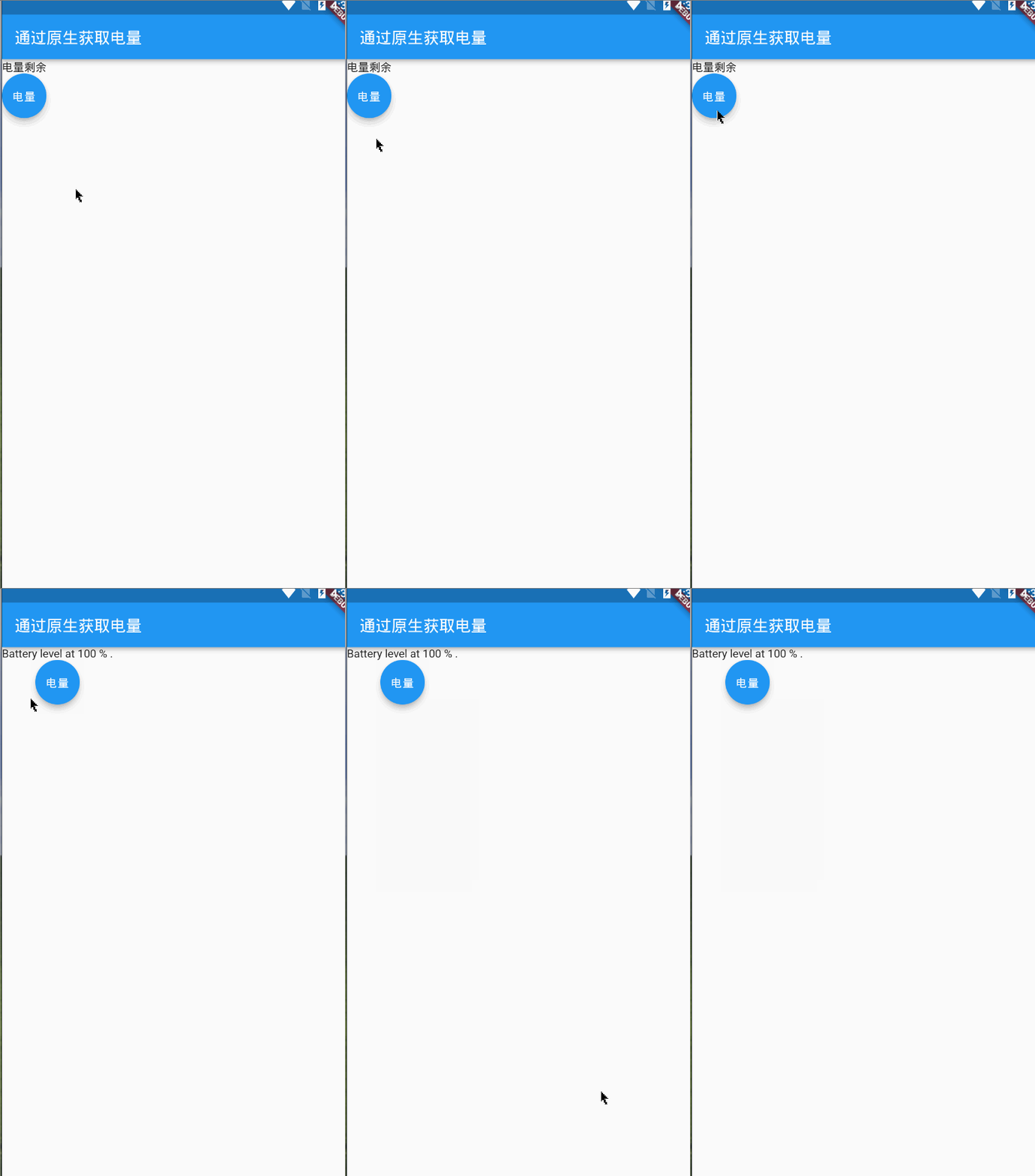
3.flutter通过原生获取手机电量示例代码如下:

MainActivity
package com.example.item_1;

import androidx.annotation.NonNull;

import io.flutter.embedding.android.FlutterActivity;

import io.flutter.embedding.engine.FlutterEngine;

import io.flutter.plugins.GeneratedPluginRegistrant;

import io.flutter.plugin.common.MethodChannel;

import android.content.ContextWrapper;

import android.content.Intent;

import android.content.IntentFilter;

import android.os.BatteryManager;

import android.os.Build.VERSION;

import android.os.Build.VERSION_CODES;

import android.os.Bundle;
//单独打开android环境下能够查看目录
public class MainActivity extends FlutterActivity {

    //定义一个私有的静态成员变量
    private static final String CHANNEL = "com.jk/battery";
    //初始化
    @Override
    public void configureFlutterEngine(@NonNull FlutterEngine flutterEngine) {

        super.configureFlutterEngine(flutterEngine);
        //创建MethodChannel对象,添加调用方法
        //写法1:
// new MethodChannel(getFlutterView(), CHANNEL).setMethodCallHandler(
// new MethodChannel.MethodCallHandler() {

// @Override
// public void onMethodCall(MethodCall methodCall, MethodChannel.Result result) {

// // 通过methodCall可以获取参数和方法名 执行对应的平台业务逻辑即可
// if(methodCall.method.equals("getBatteryLevel")){

// int batteryLevel = getBatteryLevel();
// if(batteryLevel != -1){

// result.success(batteryLevel);
// }else{

// result.error("UNAVAILABLE", "Battery level not available.", null);
// }
// }else{

// result.notImplemented();
// }
// }
// }
// );
        //写法2:
        //新版的Flutter SDK默认使用的是 import io.flutter.embedding.android.FlutterActivity; 包,
        // 则在MethodChannel方法中的第一个参数填写 getFlutterEngine().getDartExecutor().getBinaryMessenger()
        //如果你使用的Flutter的SDK是旧版本,那么默认的是 import io.flutter.app.FlutterActivity; 包
        // 则MethodChannel方法中的第一个参数填写 getFlutterView()
        MethodChannel methodChannel = new MethodChannel(flutterEngine.getDartExecutor().getBinaryMessenger(), CHANNEL);
        methodChannel.setMethodCallHandler(
                (call, result) -> {

                    //如果等于flutter中传过来的方法名称
                    if (call.method.equals("getBatteryInfo")) {

                        //调用另外一个自定义方法回去电量信息
                        int batteryLevel = getBatteryLevel();
                        if (batteryLevel != -1) {

                            result.success(batteryLevel);
                        } else {

                            result.error("UNAVAILABLE", "Battery level not available.", null);
                        }
                    } else {

                        //如果没有这个方法名称就返回没有这个接口
                        result.notImplemented();
                    }
                }
        );
    }
    private int getBatteryLevel() {


        int batteryLevel = -1;

        if (VERSION.SDK_INT >= VERSION_CODES.LOLLIPOP) {


            BatteryManager batteryManager = (BatteryManager) getSystemService(BATTERY_SERVICE);

            batteryLevel = batteryManager.getIntProperty(BatteryManager.BATTERY_PROPERTY_CAPACITY);

        } else {


            Intent intent = new ContextWrapper(getApplicationContext()).

                    registerReceiver(null, new IntentFilter(Intent.ACTION_BATTERY_CHANGED));

            batteryLevel = (intent.getIntExtra(BatteryManager.EXTRA_LEVEL, -1) * 100) /

                    intent.getIntExtra(BatteryManager.EXTRA_SCALE, -1);

        }
        return batteryLevel;
    }
}
Flutter
import 'package:flutter/material.dart';
import 'package:flutter/services.dart';
class PageOne extends StatefulWidget {

  const PageOne({
    Key key}) : super(key: key);

  @override
  State<PageOne> createState() => _Page_oneState();
}
class _Page_oneState extends State<PageOne> {

  String value = "电量剩余";
  //建立与原生交互的连接点
  static const channel = const MethodChannel("com.jk/battery");
  @override
  Widget build(BuildContext context) {

    return Scaffold(
      appBar: AppBar(
        title: Text("通过原生获取电量"),
      ),
      body: Container(
        child: Column(
          children: [
            Text("$value"),
            FloatingActionButton(onPressed: ()=>getData(),child: Text("电量"),)
          ],
        ),
      ),
    );
  }
  Future getData()async{

    String batteryLevel;
    final int result = await channel.invokeMethod("getBatteryInfo");
    try{

      //从原生种获取当前channel中的方法值
      final int result = await channel.invokeMethod("getBatteryInfo");
      batteryLevel = 'Battery level at $result % .';
    }on PlatformException catch(e){

      batteryLevel = "Failed to get battery level: '${
      e.message}'.";
    }
    setState(() {

      value = batteryLevel;
    });
  }
}
边栏推荐
- libmagic 介绍
- MySQL job 11 - application de la vue
- Tensorflow dynamically allocates video memory
- MySQL第五章总结
- JVM的符号引用和直接引用是什么
- Searchview click failure
- Renesas electronics launched a complete intelligent sensor solution for Internet of things applications
- MySQL learning summary
- Various errors encountered by tensorflow
- Crawler related articles collection: pyppeter, burpsuite
猜你喜欢

MySQL learning summary

What is the web SSH service port of wgcloud

How to start the learning journey of webrtc native cross platform development?
Automated testing -- Introduction and use of pytest itself and third-party modules

A list of common methods for customizing paint and canvas of view

MySQL第十一作业-视图的应用
118. 杨辉三角

Cloud native essay using Hana expression database service on Google kubernetes cluster

jar版本冲突问题解决
MySQL job 11 - application de la vue
随机推荐
Call API interface to generate QR code of wechat applet with different colors
Appium自动化测试基础 — 移动端测试环境搭建(二)
Cmake / set command
MySQL learning summary
MySQL第十三次作业-事务管理
Redis master-slave replication in win10 system
SSM项目小例子,SSM整合图文详细教程
Today's headline adaptation scheme code
36 qtextedit control input multiline text
Leetcode intermediate node of linked list
LSP 是什么
Full introduction to flexboxlayout (Google official flexible implementation of flow layout control)
Global and Chinese market of recycled paper 2022-2028: Research Report on technology, participants, trends, market size and share
What is the web SSH service port of wgcloud
Control setting layout in linear layout_ Gravity doesn't work?
Retrofit common request methods and comments, post, get heard file upload
MySQL project 8 summary
调用api接口生成不同颜色的微信小程序二维码
【LeetCode】59. Spiral matrix II
118. Yanghui triangle