当前位置:网站首页>Full introduction to flexboxlayout (Google official flexible implementation of flow layout control)
Full introduction to flexboxlayout (Google official flexible implementation of flow layout control)
2022-06-26 09:58:00 【Bai Ze】
One 、FlexboxLayout What is it?
FlexboxLayout yes Google A powerful open source control , Direct inheritance ViewGroup, The effect is similar to the enhanced version LinearLayout, But with LinearLayout There is no connection .
The official original words are :
FlexboxLayout is a library project which brings the similar capabilities of CSS Flexible Box Layout Module to Android.
intend :FlexBoxLayout Is for Android Brought with CSS Flexible Box Layout(CSS Elastic box ) Libraries with similar functions .
Github Address :https://github.com/google/flexbox-layout
Two 、 How to use FlexboxLayout
FlexBoxLayout There are many properties , Next, verify the functions of each attribute one by one
Citation depends on
dependencies {
    implementation 'com.google.android:flexbox:1.1.0'
}
If you haven't used it yet AndroidX:
dependencies {
    implementation 'com.google.android:flexbox:1.0.0'
}
Simple use in layout
<com.google.android.flexbox.FlexboxLayout
        android:layout_width="match_parent"
        android:layout_height="wrap_content"
        android:background="@color/colorPrimary"
        app:flexWrap="wrap">

        <TextView
            style="@style/TextStyle"
            android:text=" Push and instant messaging "/>

        <TextView
            style="@style/TextStyle"
            android:text=" bluetooth " />

        <TextView
            style="@style/TextStyle"
            android:text=" The programmer "/>

        <TextView
            style="@style/TextStyle"
            android:text=" Movie paradise " />

        <TextView
            style="@style/TextStyle"
            android:text=" Guo Degang " />

        <TextView
            style="@style/TextStyle"
            android:text=" travel —— On the road " />

        <TextView
            style="@style/TextStyle"
            android:text=" The avengers 4" />

    </com.google.android.flexbox.FlexboxLayout>
TextStyle as follows :
 <style name="TextStyle">
        <item name="android:layout_margin">5dp</item>
        <item name="android:layout_width">wrap_content</item>
        <item name="android:layout_height">wrap_content</item>
        <item name="android:background">@drawable/shape_pink_border</item>
        <item name="android:ellipsize">end</item>
        <item name="android:maxLines">1</item>
        <item name="android:padding">8dp</item>
        <item name="android:textColor">@android:color/white</item>
    </style>
shape_pink_border file :
<shape xmlns:android="http://schemas.android.com/apk/res/android">
    <corners android:radius="8dp"/>
    <stroke android:width="1dp" android:color="@android:color/holo_red_light"/>
</shape>
Run to see the effect :
You can see that the content has come out , But they are all in the same line , This is obviously not the effect I want .
Then the next step is FlexboxLayout The properties have come out to save the field :
3、 ... and 、FlexboxLayout Property introduction
FlexboxLayout Direct attributes
1. app:flexWrap=“nowrap”
Simply speaking , This attribute indicates whether the line breaks and the direction of the line breaks .
Visible from above ,flexWrap Property has three enumerated values , Namely nowrap、wrap and wrap_reverse
nowrap: Single line display , Don't wrap , The default is this property .wrap: When the content exceeds one line , Word wrap . effect :
wrap_reverse: Reverse wrap ( The next line is above the current line )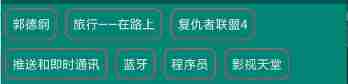
2. app:flexDirection=“row”
This attribute indicates the direction of the spindle , The arrangement of sub elements is added according to the axis direction .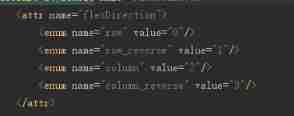
Take a look at the source code , so flexDirection The enumeration values of are row and row_reverse,column and column_reverse
row: The spindle direction shall be horizontal ( That's ok ) Direction layout , The default is this property . effect :
row_reverse: The spindle direction shall be horizontal ( That's ok ) The direction is reversed . effect :
As can be seen from the renderings ,rowIs drawn from left to right ,row_reverseyes row The reverse of , That is, draw from right to left . EmpathycolumnIs the same .column: The spindle direction shall be vertical ( Column ) Direction layout . effect :
column_reverse: The spindle direction shall be vertical ( Column ) The direction is reversed ( From the bottom up ).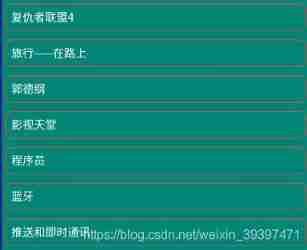
3. app:justifyContent=“flex_start”
About this property , There is an official statement :
<!-- Omitting flex-flow property since it's reflected in the parent flex container. Set the flexDirection and/or flexWrap to the parent flex container explicitly if you want to use the flex-flow similar way to the web. -->
The function is to control the alignment of elements on the spindle , Need to cooperate with flexDirection or flexWrap Attribute to use .
Look at the source code , so app:justifyContent Attributes are flex_start、flex_end、center、space_between、space_around and space_evenly6 Enumeration values .
Next, change the above two attributes to :
		app:flexWrap="wrap"
        app:flexDirection="row"
Look at the effect .
flex_start: Align left , The default value is .flex_end: Right alignment .
center: Align center .
space_between: full-justified .
space_around: Spread alignment .
space_evenly: The child elements are evenly distributed in a row .
4. app:alignItems=“stretch”
This attribute indicates that the element is in Each axis Alignment on .
Be careful : If set
alignContent, And it's not worth it stretch, Then the attribute is invalid .

app:alignItems Attributes are flex_start、flex_end、center、baseline and stretch
The following FlexBoxLayout Specify a height , And for TextView Add different padding Look at the effect .
stretch: The default value is , If the child element has no height set , The height of the parent layout .
flex_start: Top alignment .
flex_end: Bottom alignment .
center: Align center .
baseline: Align according to the baseline of the first element .
The following picture can directly express the function of this attribute . picture source 
5. app:alignContent=“stretch”
The attribute represents Each axis Alignment throughout the layout .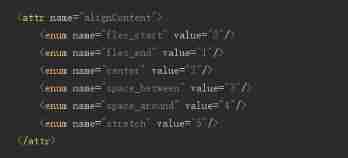
app:alignContent Attributes are flex_start、flex_end、center、space_between、space_around and stretch6 Enumeration values .
stretch: The default value is , The axis occupies the entire parent layout .flex_start: Align all grid lines at the top .
flex_end: Align all grid lines at the bottom .
center: Center all grid lines .
space_between: Align all grid lines at both ends .
space_around: Align all grid lines dispersedly .
A word in , The axis direction can be determined byflexDirectionProperty to specify , Pay attention to attribute collocation , The lines .
6. dividerDrawable (reference)
Horizontal and vertical split lines .
7. dividerDrawableHorizontal / dividerDrawableVertical (reference)
level / Vertical split line .
8. showDivider
Displays the horizontal and vertical split line method .
Enumeration values are :
none
No display .beginning
middle
end
9. showDividerHorizontal / showDividerVertical
Display level / Vertical split line method .
FlexboxLayout Child element attribute
1. app:layout_order=“1”
Specify the child element sorting priority , The smaller the value, the higher the ranking , The default value is 1. Set the value type as float.
Pictured , bluetooth TextView The elements are in xml Is ranked as the second , But for it layout_order Property specified as 2, bluetooth Ranked last .
2. app:layout_flexGrow=“0”
Assign the weight of the remaining controls on the same axis , The default value is 0, Means not participating in the distribution . The usage is similar to LinearLayout Of weight, however weight The entire parent layout control is assigned , and layout_flexGrow The same row is allocated / The remaining space of the column .
for instance : take bluetooth Of layout_flexGrow Set to 1, Program Of layout_flexGrow Property set to 2
Pictured , bluetooth And Program Are involved in the allocation of remaining space , because Program The weight set is 2, So than bluetooth Double the space allocated .
3. app:layout_flexShrink=“0”
Sub element scaling , If line feed is set (flexWrap=“wrap or wrap_reverse”) The property is invalid .
Set the value type as float,0 Means no zoom , The greater the numerical , Larger scale , The default is 1, Invalid negative value .
Example : Push and instant messaging Set to 0( Don't zoom ), travel —— On the road Set to 2( Double zoom )
4. app:layout_flexBasisPercent="-1"
Official explanation :
	<!--
            The initial length in a percentage format relative to its parent. This is similar to the
            flex-basis property in the original CSS specification.
            (https://www.w3.org/TR/css-flexbox-1/#flex-basis-property)
            But unlike the flex-basis property, this attribute only accepts a value in fraction
            (percentage), whereas flex-basis property accepts width values such as 1em, 10px and
            the 'content' string.
            But specifying initial fixed width values can be done by specifying width values in
            layout_width (or layout_height, varies depending on the flexDirection). Also the same
            effect can be done by specifying "wrap_content" in layout_width (or layout_height) if
            developers want to achieve the same effect as 'content'.
            Thus, this attribute only accepts fraction values, which can't be done through
            layout_width (or layout_height) for simplicity.
        -->
Indicates that the child element length is a percentage of its parent layout length , Sets the of the element layout_flexBasisPercent The original length of the child element will be overwritten , The default value is -1. It should be noted that , Only when the length of the parent layout is specifically set can it take effect .
The set value is percentage , for example 50%.
Example : Set the width of the first element to that of the parent layout 50%(app:layout_flexBasisPercent="50%").
5. app:layout_alignSelf=“auto”

Used and alignItems Same property , The difference is alignItems All elements are set , and layout_alignSelf Act on a single element .
One thing to note is that , If the parent layout is set alignContent, And the enumeration value is not stretch, Then the modified attribute is invalid .
layout_alignSelf The enumeration values of are auto,flex_start,flex_end,center,baseline and stretch, The functions and alignItems Same attribute .
Example : take Push and instant messaging Set to flex_start, Bluetooth layout_alignSelf Set to stretch. effect :

6.app:layout_wrapBefore=“false”
Forced line wrap , The default is false.
If... Is set for child element layout_wrapBefore The attribute is false, Then this child element will start a new line .
example : by bluetooth Set up layout_wrapBefore The attribute is true
7. layout_minWidth / layout_minHeight
Limit FlexboxLayout Child elements ( Width or height ) Not less than the minimum , No matter what layout_flexShrink What are the attributes , Child elements will not be reduced to less than the minimum value set .
8. layout_maxWidth / layout_maxHeight
Limit FlexboxLayout Child elements ( Width or height ) Not greater than minimum , No matter what layout_flexGrow What are the attributes , Child elements will not be magnified to greater than the minimum value set .
Summary
FlexBoxLayout There are so many common attributes of , The combination of these attributes can achieve a very flexible effect .
Four 、 And RecyclerView In combination with
The official not only provides FlexboxLayout Layout , It also provides FlexboxLayoutManager Come and RecyclerView In combination with .
The second one is FlexboxLayoutManager that can be used within RecyclerView.
although RecyclerView Before that StaggeredGridLayoutManager To provide a waterfall effect , But still specify the row / Number of columns 、 by comparison ,FlexboxLayoutManager More flexible , And the application scenarios are different .
Next RecyclerView Of layoutManager Set to FlexboxLayoutManager
Let's take a look at the effect :
The white background is set to FlexboxLayoutManager Of RecyclerView, The green background is FlexboxLayout, so FlexboxLayoutManagery And FlexboxLayout Can achieve the same effect .
Main code :
		val flexboxLayoutManager = FlexboxLayoutManager(this)
        flexboxLayoutManager.flexWrap = FlexWrap.WRAP
        flexboxLayoutManager.flexDirection = FlexDirection.ROW
        flexboxLayoutManager.justifyContent = JustifyContent.FLEX_START
        flexboxLayoutManager.alignItems = AlignItems.FLEX_START
		//flexboxLayoutManager.alignContent = AlignContent.FLEX_START

        val adapter = FlexAdapter()
        initData(adapter)
        rv_flex.layoutManager = flexboxLayoutManager
        rv_flex.adapter = adapter
Be careful :flexboxLayoutManager.alignContent,
FlexboxLayoutManagerI won't support it alignContent attribute
to glance at setAlignContent Source code :
	@Override
    public void setAlignContent(@AlignContent int alignContent) {
        throw new UnsupportedOperationException("Setting the alignContent in the "
                + "FlexboxLayoutManager is not supported. Use FlexboxLayout "
                + "if you need to use this attribute.");
    }
so ,FlexboxLayoutManager I won't support it alignContent attribute , If the setting is forced, the following exceptions will be reported .
Caused by: java.lang.UnsupportedOperationException: Setting the alignContent in the FlexboxLayoutManager is not supported. Use FlexboxLayout if you need to use this attribute.
that FlexboxLayoutManager and FlexboxLayout What other uses are different ? The official table gives a good explanation .
| Attribute / Feature | FlexboxLayout | FlexboxLayoutManager (RecyclerView) |
|---|---|---|
| flexDirection |  | |
| flexWrap | | (except wrap_reverse) |
| justifyContent | | |
| alignItems | | |
| alignContent | | - |
| layout_order | | - |
| layout_flexGrow | | |
| layout_flexShrink | | |
| layout_alignSelf | | |
| layout_flexBasisPercent | | |
| layout_(min/max)Width | | |
| layout_(min/max)Height | | |
| layout_wrapBefore | | |
| Divider | | |
| View recycling | - | |
| Scrolling | *1 | |
5、 ... and 、 practice

Such a drain layout , If you encounter , It seems that you can only customize View, Or seek the library written by others .
But there is. FlexboxLayout Then it can be solved perfectly .
The above examples can be referred to :https://gitee.com/zhengyz_0430/CloudReaderKotlin
6、 ... and 、 summary
Empty talk misses the country , Work hard to prosper the country
If you really want to understand FlexboxLayout Properties of , It is essential to practice and read the source code yourself , Don't talk much , Let's practice more .
FlexboxLayout And FlexboxLayoutManager Flexible streaming layout can be perfectly realized , And the library has been added to androidX 了 ,Google Dada really broke her heart for our development .
Reference resources
https://blog.csdn.net/tabolt/article/details/51799226
https://www.jianshu.com/p/3c471953e36d
https://www.oschina.net/news/73442/google-flexbox-layout
边栏推荐
- Speed test of adding, deleting, modifying and querying 5million pieces of data in a single MySQL table
- c语言语法基础之——函数 小程序 求阶乘
- Does the go compiled executable have dynamic library links?
- SQL function
- Click the mask layer to close the pop-up window
- 自动化测试——pytest本身及第三方模块介绍及使用
- Flutter's brain map notes are easy to find and search!
- 爬虫相关文章收藏:pyppeteer 、Burpsuite
- Redis notes (13) - scan and keys search for specific prefix key fields (command format, usage examples, locating large keys)
- Automated testing -- on the coexistence of Unitest and pytest initialization
猜你喜欢

mysql 数据库字段查询区分大小写设置

Test instructions - common interface protocol analysis

Cloud native essay using Hana expression database service on Google kubernetes cluster

c语言语法基础之——指针( 多维数组、函数、总结 ) 学习

Install new version cmake & swig & tinyspline

My creation anniversary

install opencv-contrib-dev to use aruco code
我的创作纪念日

Druid data source for background monitoring

install realsense2: The following packages have unmet dependencies: libgtk-3-dev
随机推荐
How to create an IE tab in edge browser
Tensorflow dynamically allocates video memory
英语常用短语
Use recursion or a while loop to get the name of the parent / child hierarchy
Software testing - how to select the appropriate orthogonal table
The basis of C language grammar -- learning of local variables and storage categories, global variables and storage categories, and macro definitions
微软 Edge 浏览器 IE 模式标签页出现卡死情况,已通过回滚更新修复
The basis of C language grammar -- function definition learning
Automated testing -- Introduction and use of pytest itself and third-party modules
Redis notes (14) - persistence and data recovery (data persistence RDB and AOF, data recovery, mixed persistence)
调用api接口生成不同颜色的微信小程序二维码
Speed test of adding, deleting, modifying and querying 5million pieces of data in a single MySQL table
thymeleaf中抽取公共片段
Leetcode connected to rainwater series 42 (one dimension) 407 (2D)
install realsense2: The following packages have unmet dependencies: libgtk-3-dev
From TF 1 X to TF 2.6 (update if you encounter it)
WIN10系统实现Redis主从复制
Automated testing -- Introduction and example of pytest framework
Redis master-slave replication in win10 system
2021-11-29 quintic polynomial of trajectory planning