当前位置:网站首页>mysql57 zip文件安装
mysql57 zip文件安装
2022-06-28 07:02:00 【Seele_1018】
转载自:https://www.cnblogs.com/guardwhy/p/14906539.html
MySQL5.7 安装
1.1-Windows 上安装 MySQL
1、进入官方下载地址
下载安装MySQL5.7版本::https://dev.mysql.com/downloads/mysql/
2.选择直接下载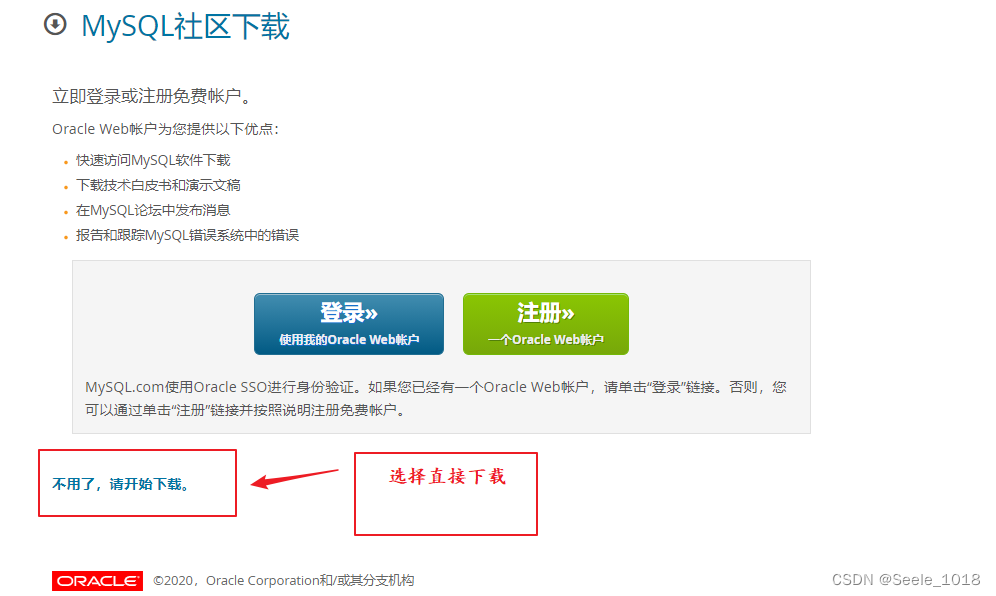
3.解压安装
3.1、将下载完的 zip 包解压到相应的目录,这里我将解压后的文件夹放在E:\Develop\MySQL-5.7.30下,解压文件如图所示
3.2、在该文件夹下创建 my.ini 配置文件,编辑 my.ini 配置以下基本信息:
[mysql]
# 设置mysql客户端默认字符集
default-character-set=utf8

[mysqld]
# 设置3306端口
port = 3306

# 设置mysql的安装目录
basedir=E:\\Develop\\MySQL-5.7.30

# 设置 mysql数据库的数据的存放目录(MySQL8.0+ 不需要以下配置,系统自己生成即可,否则有可能报错)
datadir=E:\\Develop\\WorkPlace\\SqlData

# 允许最大连接数
max_connections=20

# 服务端使用的字符集默认为8比特编码的latin1字符集
character-set-server=utf8

# 创建新表时将使用的默认存储引擎
default-storage-engine=INNODB
3.3、以管理员身份打开 cmd 命令行工具,进入目录:
E:
cd E:E:\Develop\MySQL-5.7.30
初始化数据库: mysqld --initialize --console

3.4、运行mysqld install,若提示 “Service successfully installed.” 表示安装成功。
4.修改密码
4.1、执行net start mysql启动MySQL
4.2、运行mysql -u root -p后根据提示输入初始密码,回车后即可登录进MySQL。
4.3、修改密码命令的格式为
修改格式:set password for [email protected] = password(‘newPassword’);
密码设置为:set password for [email protected] = password(‘root’);
输入exit后回车,再运行mysql -u root -p后就可以用新密码登录了。
5.配置环境变量
5.1、右键此电脑 >> 高级系统设置 >> 环境变量 ,新建系统变量 MYSQL_HOME,变量值是安装MySQL的根目录:
5.2、编辑系统变量 Path >> 新建 >> 将 %MYSQL_HOME%\bin 添加到尾行 >> 确定。
5.3、配置好后,不用进入MySQL安装目录,以管理员身份打开命令行后,就可以直接登录MySQL了
边栏推荐
- [rust daily] published on rust 1.43.0 on April 23, 2020
- Introduction to Qualcomm platform WiFi -- Wi Fi display software
- 微信小程序编译页面空白bug的原因
- Is it safe to open a stock trading account on your mobile phone?
- 普歌 -- 单例模式
- Self discipline challenge 30 days
- Tryout title code
- Speech enhancement - spectrum mapping
- Causes of wechat applet compilation page blank bug
- 2 startup, interrupt and system call
猜你喜欢
![[interval DP] stone consolidation](/img/d2/493badf59b63498782ada81be9aa43.jpg)
[interval DP] stone consolidation

Rn7302 three-phase electric quantity detection (based on STM32 single chip microcomputer)

Triode driven brushless motor

VM332 WAService. js:2 Error: _ vm. Changetabs is not a function

MySQL master-slave replication, detailed configuration, create unable to connect processing prompt

Freeswitch使用originate转dialplan

微信小程序编译页面空白bug的原因

Batch import of pictures into WPS table by date

全方位透析真实企业软件测试流程

【网络教程】IPtables官方教程--学习笔记1
随机推荐
Freeswitch uses origin to dialplan
File header information cross reference table
调接口事件API常用事件方法
[C#][转载]furion框架地址和教程地址
Comment la passerelle BACnet / IP recueille - t - elle les données du système central de contrôle des bâtiments?
Using interceptor and cache to complete interface anti brushing operation
《微信小程序-基础篇》带你了解小程序中的生命周期(一)
QT -- 通讯协议
Call interface event API common event methods
【星海出品】 运维巡检合集
XML序列化向后兼容
面经---测试工程师web端自动化---大厂面试题
OPC 协议认识
【C语言】详解 C 语言获取数组长度
Introduction to Qualcomm platform WiFi -- Wi Fi display software
What if the applet page is set to 100% height or left blank?
FPM tool installation
SQL statement optimization steps (1)
@RequestParam
C语言教程大全