当前位置:网站首页>Reverse analysis of Huawei housekeeper software [transfer]
Reverse analysis of Huawei housekeeper software [transfer]
2022-06-12 10:25:00 【Free gift, juvenile】
This article focuses on the essence of snow forum
Look at the author of snow forum ID:shinratensei
Analyze the environment
Software version :11.1.6.31 (PCManager_Setup_11.1.6.31(C233D005).exe)
virtual machine :windows 10 21H2 x64
Real machine :windows 10 21H1 x64
Tools :IDA 、VS 2019
Test cell phones : Huawei Mate 30 5G
First installation analysis
From the official website of Huawei computer steward (https://consumer.huawei.com/cn/support/pc-manager/) After downloading the latest version of the installation package , It gives me a feeling similar to msi Installation package . Drag the installation package into the virtual machine , Open at the same time process monitor Capture a wave of installation behavior , Convenient for subsequent analysis .
Start by opening , appear :


Analyze the installation package
Drag the installation package to ida in , An obvious hint was found at the entry function :
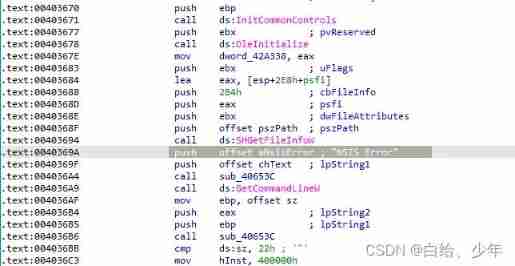
The Huawei computer manager installation package should be through NSIS(https://nsis.sourceforge.io/Main_Page) It's packaged .
NSIS
NSIS(Nullsoft Scriptable Install System) It's an open source Windows System installation program production Program . It provides install 、 uninstall 、 System settings 、 file decompression And so on . As the name suggests ,NSIS Through it Scripting language To describe the behavior and logic of the installer .NSIS The script language has a similar structure and syntax to common programming languages , But it's designed for applications like installers .
Used before NSIS Packed , The tool mainly writes a script file (*.nsi/*.ini etc. ) Complete a series of operations . Examples are as follows :
use 7Z Direct decompression PCManager_Setup_11.1.6.31(C233D005).exe See if it is possible to bypass the detection of devices by repackaging the modified script .

But the relevant script file was not found in the root directory of the compressed package , So this method is not feasible . But now that you have unzipped it, try whether the unzipped executable file can run . In the unzipped directory, find PCManager.exe function .

It can run directly , Is this the end ? Follow the various prompts in the window and click all the way " agree! ", But there are still problems .
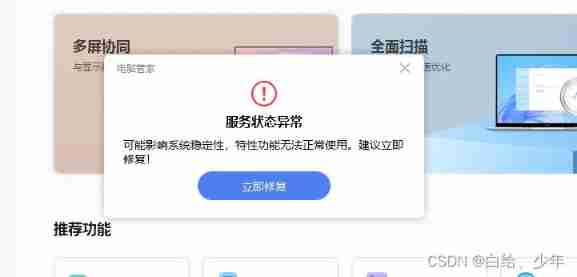
It may be that the installation process was skipped and the service was not installed , Click on " Repair ". Connect your phone and enter " Multi screen collaboration ". At this time, the mobile phone cannot be recognized normally .
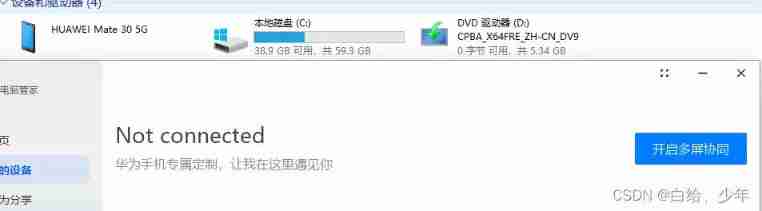 So far , It doesn't seem to work properly by decompressing " Huawei computer housekeeper ".
Analyze the modules in the installation process
Knowing that the installation package does not contain the main logic code , Then you need to start with the modules included in the installation package .
Go back to the beginning with process monitor Captured information , You can see a message in the log .

You can make a bold guess through the command line parameters , This may be the function to verify the compatibility of the device . stay IDA To MBAInstallPre.exe On the parameter isSupportDevice The position of judgment .

By observing the process, the function Func_isSupportDevice There are two possible return values , Namely : 1 or 2

Let's go to the function first sub_1400162D0

This function calls the import function once at the entrance and then enters the string splicing link .
Here we mainly look at the workflow of the import function .


Follow up here many times ProductAdapt::MachineType::GetInstance After that, it will enter a function __int64 __fastcall ProductAdapt::MachineType::LoadConfig(ProductAdapt::MachineType *this)
In function ProductAdapt::MachineType::LoadConfig Found again Func_isSupportDevice A class instance used in SmBiosHelper::GetInstance()

Looks like this SmBiosHelper This class is really working . The function consists of HardwareHal.dll export .

The following calls were found in its initialization function :

Here are the functions sub_180032750 Main logic of :

adopt MSDN GetSystemFirmwareTable It is found that this function can read SMBIOS Firmware table . The function also mentions the use of WMI You can also get .
adopt GitHub Code DumpSMBIOS Trying to get data .

adopt wbemtest.exe open ROOT\WMI And open the class MSSMBios_RawSMBiosTables find SMBiosData

Show SMBiosData Field has no data .
It's not clear why it passed WMI GUI The tool did not get the data , Has been run in administrator mode .
It can be seen from the above figure that GetSystemFirmwareTable You can really get the motherboard information . As can be seen from the above figure , If you pass GetSystemFirmwareTable After you can get the information, you skip through WMI How to get data .
Get the SMBiosData Field or SMBIOSTableData Field after , The procedure is as follows .

Mainly for 5 Fields were parsed ( At the end of the article BIOS For more information ). Namely :
BIOS Information (Type 0)System Information (Type 1)Baseboard (or Module) Information (Type 2)System Enclosure (Type 3)OEM Strings (Type 11)
Back to function sub_1400162D0 Inside , Function as ProductCheckSupport::GetDeviceTypeEx After the return , You will get the... Of the corresponding equipment GetProductName, By returning ProductName And software Config It contains ProductName Compare .

If the Config Medium ProductName Agreement , Then the function returns 1 Otherwise return to 0.
So far, the function sub_1400162D0 Process analysis finished . The following term Func_isSupportDevice Medium else Branch .

else Branch directly through SmBiosHelper::GetSysManufactor To get the motherboard manufacturer . And convert the string to uppercase and HUAWEI and XXXX Compare .

If the motherboard manufacturer is HUAWEI Then the function returns 1, Otherwise, the function returns 2.
thus MBAInstallPre.exe Medium Func_isSupportDevice Function analysis finished .
Module analysis summary
Through the above to one of the MBAInstallPre.exe->isSupportDevice The general analysis of the process shows that , modular HardwareHal.dll Class in SmBiosHelper Through functions GetSystemFirmwareTable perhaps WMI To get the motherboard information .
The next step is through hook function GetSystemFirmwareTable Process its return value .
adopt MSDN GetSystemFirmwareTable Know the correct way to call the function as follows :
DWORD error = ERROR_SUCCESS;
DWORD smBiosDataSize = 0;
RawSMBIOSData* smBiosData = NULL; // Defined in this link
DWORD bytesWritten = 0;

// Query size of SMBIOS data.
//  The first call is to get SMBIOSData The data size of
smBiosDataSize = GetSystemFirmwareTable('RSMB', 0, NULL, 0);

// Allocate memory for SMBIOS data
smBiosData = (RawSMBIOSData*) HeapAlloc(GetProcessHeap(), 0, smBiosDataSize);
if (!smBiosData) {
    error = ERROR_OUTOFMEMORY;
    goto exit;
}

// Retrieve the SMBIOS table
//  The second call is to get SMBIOSData The data of

bytesWritten = GetSystemFirmwareTable('RSMB', 0, smBiosData, smBiosDataSize);

if (bytesWritten != smBiosDataSize) {
    error = ERROR_INVALID_DATA;
    goto exit;
}

// Process the SMBIOS data and free the memory under an exit label
The main codes are as follows ( Modified from GitHub Code DumpSMBIOS).
more BIOS Structure information provides relevant links at the end of the article .
UINT WINAPI Hooked_GetSystemFirmwareTable(
 _In_ DWORD FirmwareTableProviderSignature,
 _In_ DWORD FirmwareTableID,
 _Out_writes_bytes_to_opt_(BufferSize, return) PVOID pFirmwareTableBuffer,
 _In_ DWORD BufferSize
)
{
    PTF_LOG_A("Hooked_GetSystemFirmwareTable.");
    UINT uRetValue = 0;

    uRetValue = g_FUNC_GetSystemFirmwareTable(FirmwareTableProviderSignature, FirmwareTableID, pFirmwareTableBuffer, BufferSize);

    if (FirmwareTableProviderSignature != 'RSMB')
    {
        PTF_LOG_A("Hooked_GetSystemFirmwareTable. Signature is not \'RSMB\'");
        return uRetValue;
    }

    if (pFirmwareTableBuffer != NULL && BufferSize > 0 && uRetValue <= BufferSize)
    {
        PTF_LOG_A("Hooked_GetSystemFirmwareTable. Modify Data.");
        const PRawSMBIOSData pDMIData = (PRawSMBIOSData)pFirmwareTableBuffer;
        // Modify the returned data
        DumpSMBIOSStruct(pDMIData, pDMIData->Length);
        PTF_LOG_A("Hooked_GetSystemFirmwareTable. Modify Data Finish.");
    }
    return uRetValue;
}

void DumpSMBIOSStruct(void* pAddress, unsigned int Len)
{
    LPBYTE p = (LPBYTE)(pAddress);
    const LPBYTE lastAddress = p + Len;
    PSMBIOSHEADER pHeader;

    for (;;) {
        pHeader = (PSMBIOSHEADER)p;

        if (ModiySysInfo(pHeader) == true)
            break;

        if ((pHeader->Type == 127) && (pHeader->Length == 4))
            break; // last avaiable tables
        LPBYTE nt = p + pHeader->Length; // point to struct end
        while (0 != (*nt | *(nt + 1))) nt++; // skip string area
        nt += 2;
        if (nt >= lastAddress)
            break;
        p = nt;
    }
}

/*
ModiySysInfo  function   To prevent format recognition errors , It is best to delete the current System Information section .
 Rebuild a section by yourself and add it to the end of all data .
 Also need to update GetSystemFirmwareTable Size of return value .
 The above premise is provided to GetSystemFirmwareTable The output buffer of is long enough .
*/
bool ModiySysInfo(PSMBIOSHEADER pHeader)
{
    if (pHeader->Type == 1)
    {
        /*https://consumer.huawei.com/cn/support/laptops/matebook-e/*/
        PSystemInfo pSystem = (PSystemInfo)pHeader;
        char* str = (char *)pHeader + pHeader->Length;
        const char* pszManufacturer = "HUAWEI";// Motherboard manufacturer
        const char* pszProductName = "BLl-W19";// Product name
        const char* pszVersion = "1.0";// edition
        //https://consumer.huawei.com/cn/support/warranty-query/
        // there SerialNumber A small problem was found in the test
        // If no one is available SN Some networking functions cannot be used in the software
        // Such as  " Playing machine skills " " Fast service "  etc.
        const char* pszSerialNumber = "ASM51ASMASM51ASM";//16 Bit motherboard serial number

        // Get the original field information
        const char* pszOldManufacturer = LocateStringA(str, pSystem->Manufacturer);
        const char* pszOldProductName = LocateStringA(str, pSystem->ProductName);
        const char* pszOldVersion = LocateStringA(str, pSystem->Version);
        const char* pszOldSerialNumber = LocateStringA(str, pSystem->SN);

        if (
            strlen(pszOldManufacturer) > strlen(pszManufacturer) &&
            strlen(pszOldProductName) > strlen(pszProductName)&&
            strlen(pszOldVersion) > strlen(pszVersion)&&
            strlen(pszOldSerialNumber) > strlen(pszSerialNumber)
            )
        {
            // If the original motherboard information is long enough, it can be modified directly
            PTF_LOG_A("Data length enough.");
            str = ModiyStringData(str, pszManufacturer);
            str = ModiyStringData(str, pszProductName);
            str = ModiyStringData(str, pszVersion);
            str = ModiyStringData(str, pszSerialNumber);
            return true;
        }
        else
        {
            // The original motherboard information is short , You need to find another way
            //...
        }
    }
    return false;
}

char * ModiyStringData(char* pAddress, const char* pszTargetData)
{
    if (0 == *pAddress)
        return pAddress;
    int nTragetLen = strlen(pszTargetData) + 1;
    strcpy_s(pAddress, nTragetLen, pszTargetData);
    return (pAddress + nTragetLen);
}
Final effect


Statement : If there is any infringement in the above contents , Please let me know , Will be changed in time .
Relevant references
BIOS For more information
(https://www.dmtf.org/standards/smbios/)
GitHub DumpSMBIOS
(https://github.com/KunYi/DumpSMBIOS)
MSDN GetSystemFirmwareTable
(https://docs.microsoft.com/en-us/windows/win32/api/sysinfoapi/nf-sysinfoapi-getsystemfirmwaretable)
Huawei matebook
(https://consumer.huawei.com/cn/support/laptops/matebook-e/)
边栏推荐
- 验收标准到底是不是测试用例?
- Implementation principle of redisson distributed lock
- Pagoda chevereto1.6.2 the latest version of stepping on the pit tutorial in Chinese
- 性能指标的信仰危机
- 1268_ Implementation of FreeRTOS task context switching
- PHP generate schedule
- MySQL v Index and algorithm
- Halcon combined with C # to detect surface defects -- affine transformation (III)
- 2. factory mode
- Jump to wechat in app and open wechat
猜你喜欢

验收标准到底是不是测试用例?

Basic use of scratch

Circuitbreaker fuse of resilience4j - Summary

How to refund the pre-sale deposit of JD 618 in 2022? Can JD 618 deposit be refunded?

Solution to invalid small program scroll into view

Win10 professional edition user name modification
![[experiment] MySQL master-slave replication and read-write separation](/img/aa/7d0799013ff749cacf44ba3b773dff.png)
[experiment] MySQL master-slave replication and read-write separation
![[CEGUI] resource loading process](/img/52/819843db21549b5e5031258f2c5cb0.jpg)
[CEGUI] resource loading process
![[Wayland] Wayland introduction and customized guidance](/img/4e/655d484ca7787f39aab446fdb1ae74.jpg)
[Wayland] Wayland introduction and customized guidance
2022京东618预售定金怎么退?京东618定金能退吗?
随机推荐
93. 獲得內網的所有IP地址
3. Abstract Factory
【实验】MySQL主从复制及读写分离
Pycharm view the current version of opencv
Remote desktop cannot copy and paste solution
1268_ Implementation of FreeRTOS task context switching
Circuitbreaker fuse of resilience4j - Summary
用于图像处理的高性能计算框架
[experiment] MySQL master-slave replication and read-write separation
Class selectors and using pseudo class selectors with
2022淘宝618超级喵运会怎么玩?2022淘宝618喵运会玩法技巧
[DDS] ddsi-rtps specification
MySQL VI Database lock
Binassii module - converting between binary and ASCII
JS string combination
pycharm 查看opencv当前的版本
2021-09-15
Timers in golang
MYSQL用户与权限管理,角色管理
How to refund the pre-sale deposit of JD 618 in 2022? Can JD 618 deposit be refunded?