当前位置:网站首页>Odoo13 build a hospital HRP environment (detailed steps)
Odoo13 build a hospital HRP environment (detailed steps)
2022-07-02 22:55:00 【It's still Tong Weiwei】
Catalog
1.1 Select the image address of Alibaba cloud
2..2 Check on Install OpenSSH server [X]
2. Offline installation docker( There is no network in the hospital's intranet )
2.1. Put the application image and database image into Ubuntu On the system
2.2. install docker (deb Mode of installation ===> Precompiled package )
3. Load the database image and start it successfully
3.2 Configure database docker-compose.yml file
3.5 Verify whether the database is started successfully
4.1 Apply image on container loading
4.2 Create an application directory
4.3 modify odoo Systematic conf file , You can also edit it in advance and send it to the system
4.4 Configure the of the application docker-compose.yml file
4.5 An example of a configured path
4.6 modify odoo-bin File format , And give permission
4.7 Start the application and enter HRP System
1. install Ubuntu System
1.1 Select the image address of Alibaba cloud
It's used here ubuntu-20.04.2-live-server-amd64.iso
Pay attention to the installation and selection of agents , Change to the image address of Alibaba cloud
Mirror address: http://mirrors.aliyun.com/ubuntu
2..2 Check on Install OpenSSH server [X]
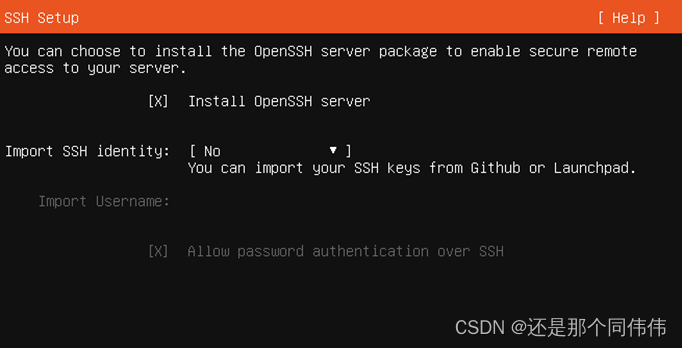
2. Offline installation docker( There is no network in the hospital's intranet )
2.1. Put the application image and database image into Ubuntu On the system
After installing the system , Entry system , Use xftp And other similar tools can also be shared folders ,
enocareodoo_13_base-2021-06-18.tar Apply image file
postgres_10.0-2020-08-24.tar Database image file
Create a source Folder , Put these two image files into source Under the path
2.2. install docker (deb Mode of installation ===> Precompiled package )
- In the created source Folder , establish docker Folder
- mkdir docker
- take docker-compose.zip File decompression , Then transfer the unzipped file to Ubuntu Created in the docker Folder
- Use the command to batch install deb The file of , Enter into docker The superior directory of the file , Just created source In the path of
sudo dpkg -i docker/*It can be installed in batches
Add the current user to the corresponding docker Command user group
sudo usermod -aG docker The current userUpdate user groups ( Restarting the system can also take effect )
newgrp docker3. Load the database image and start it successfully
3.1. Create directory
establish /eno/hrp/db Catalog
mkdir -p /eno/hrp/db3.2 Configure database docker-compose.yml file
stay hrp Under the file directory of Face creation docker-compose.yml file , Copy the following
version: '2'
services:
  db:
    image: postgres:10.0
    container_name: hrp_10.0_db
    ports:
      - "5432:5432"
    volumes:
      - ./db:/var/lib/postgresql/data
    environment:
      POSTGRES_USER: enocare
      POSTGRES_PASSWORD: enodev
    restart: always
Once you've created it , Open again docker-compose.yml file , Modify the format
① direct vim docker-compose.yml
② :set ff=unix enter
③ :wq enter
3.3 Load database image
Enter into souce Under the table of contents , Which contains postgres_10.0-2020-08-24.tar The path of the database image file
Load mirror command
docker load -i  The corresponding image
 namely :docker load -i postgres_10.0-2020-08-24.tar
3.4 Start database mirroring
In the docker-compse.yml Folder
Enter the start command
docker-compose up -d3.5 Verify whether the database is started successfully
The current verification method is to use the same network segment Navicat Tool connection verification
At the time of verification IP That is, systematic IP Address ,
user name : enocarepassword : enodev
The user name is in docker-compose.yml It's configured inside
If you can connect, the database deployment is successful
4. Application deployment
4.1 Apply image on container loading
Enter include enocareodoo_13_base-2021-06-18.tar A directory of
Enter the load command
docker load -i  Mirror image
 namely  docker load -i enocareodoo_13_base-2021-06-18.tar
4.2 Create an application directory
establish /eno/hrp/app/code Catalog
mkdir -p /eno/hrp/app/code
- establish enocare( Production code )、localization( Personalized code )
- Pull in odoo(odoo Source code )、OCA( Community code )
- To configure item-server.conf file , namely odoo Configuration file for
4.3 modify odoo Systematic conf file , You can also edit it in advance and send it to the system
odoo.conf
You need to pay attention to your production code 、 And personalized code directory should be set , And your actual correspondence , stay odoo.conf In file
[options]
admin_passwd = admin
addons_path = /opt/odoo/odoo/addons, /opt/odoo/enocare, /opt/odoo/localization, /opt/odoo/reporting-engine
data_dir = /var/lib/odoo

db_host =  Yours IP
db_port = 5432

db_user = enocare
db_password = enodev

log_handler = :INFO,odoo.addons.eno_accounting_platform:DEBUG,odoo.addons.eno_cost_medical_income:DEBUG
server_wide_modules = base,web,eno_base
logrotate = True
logfile = /var/lib/odoo/logs/hrp.log

max_cron_threads = 2
#workers = 0
limit_time_cpu = 1200
limit_time_real = 1200
db_maxconn = 128
Once you set it up , Use vim open , And the database set above docker-compose.yml equally , Change the format of the file
① :set ff=unix enter
② :wq enter
4.4 Configure the of the application docker-compose.yml file
stay /eno/app In the path of , After creating or editing locally , Put it under the changed path
The name of your container is usually the acronym of the project
version: '2'
services:
   Your container name :
    image: harbor.enocare-china.com/public/enocareodoo:13.0-base
    container_name:  Your container name
    volumes:
      - ./data:/var/lib/odoo
      - ./code:/opt/odoo
    ports:
      - "8069:8069"
    environment:
      LD_LIBRARY_PATH: /opt/odoo/instantclient_12_2
    restart: always
    command:
    - /opt/odoo/odoo/odoo-bin
    - --config=/opt/odoo/odoo.conf
Modify the file format in the same steps as above set ff=unix
4.5 An example of a configured path
4.6 modify odoo-bin File format , And give permission
① Modify the file format in the same steps as above set ff=unix
② modify odoo-bin Authority , Go to include odoo-bin In the path of
sudo chmod 777 odoo-bin③ modify odoo Path permissions
sudo chmod 777 odoo4.7 Start the application and enter HRP System
stay /eno/hrp Under the path , That is, including the application docker-compose.yml Under the system
Enter the start command
docker-compose up -dNote that after unsuccessful startup or unable to access the system , It may be generated data Folder , No authority , Also give all permissions , Then restart

边栏推荐
- 【外刊】睡眠与减肥
- Jielizhi, production line assembly link [chapter]
- 大一学习分享
- Higher order operation of bits
- Introduction and response to high concurrency
- LeetCode 968. 监控二叉树
- [LeetCode] 存在重复元素【217】
- [leetcode] number of palindromes [9]
- Methods of adding styles to native JS
- Uniapp wechat login returns user name and Avatar
猜你喜欢
![Gas station [problem analysis - > problem conversion - > greed]](/img/15/5313f900abedb46ce82d8ab81af1d7.png)
Gas station [problem analysis - > problem conversion - > greed]
Uniapp wechat login returns user name and Avatar
![[error record] the flutter reports an error (could not read script 'xxx\flutter\u tools\gradle\app\u plugin\u loader.gradle')](/img/02/67448df1817e8b34b654722df8ecd4.jpg)
[error record] the flutter reports an error (could not read script 'xxx\flutter\u tools\gradle\app\u plugin\u loader.gradle')

Kubernetes uses the host name to allocate the pod on the specified node

【硬件】标准阻值的由来

世界环境日 | 周大福用心服务推动减碳环保
World Environment Day | Chow Tai Fook serves wholeheartedly to promote carbon reduction and environmental protection
牛客网:最大子矩阵
![Jielizhi, production line assembly link [chapter]](/img/0d/102596ad13aafd9c6133509d9064dd.png)
Jielizhi, production line assembly link [chapter]

【板栗糖GIS】arcmap—如何批量修改注记要素的字体,颜色,大小等
随机推荐
Unity publishes a method of webgl playing sound
Additional: [login information storage] and [login status verification]; (including: summarizing all the contents of [login information storage] and [login status verification] so far;)
[chestnut sugar GIS] ArcMap - why should the tick of classic capture be removed when using custom capture?
Baidu AI Cloud - create a face recognition application
stop slave卡住--事务的事件没有复制完整
Uniapp wechat login returns user name and Avatar
NC50965 Largest Rectangle in a Histogram
Xiaopeng P7 had an accident and the airbag did not pop up. Is this normal?
How can I use knockout's $parent/$root pseudovariables from inside a . computed() observable?
Il n'est pas nécessaire d'appuyer longtemps sur la fonction de démarrage pour modifier Jelly [chapitre]
uniapp微信登录返显用户名和头像
Oracle PL / SQL programming
U++ learning note pile
Mask R-CNN
#include errors detected. Please update your includePath.
Notes on key vocabulary in the English original of the biography of jobs (11) [chapter nine]
The kth largest element in the [leetcode] array [215]
[LeetCode] 反转字符串【344】
Qt QScrollArea
JS solution for obtaining the width and height of hidden elements whose display is none