当前位置:网站首页>神经网络-使用Sequential搭建神经网络
神经网络-使用Sequential搭建神经网络
2022-07-01 04:35:00 【booze-J】
我们以这个神经网络图为例子,来搭建对比看看正常情况搭建神经网络和使用Sequential搭建神经网络的区别,以及搭建神经网络中一些要注意的点。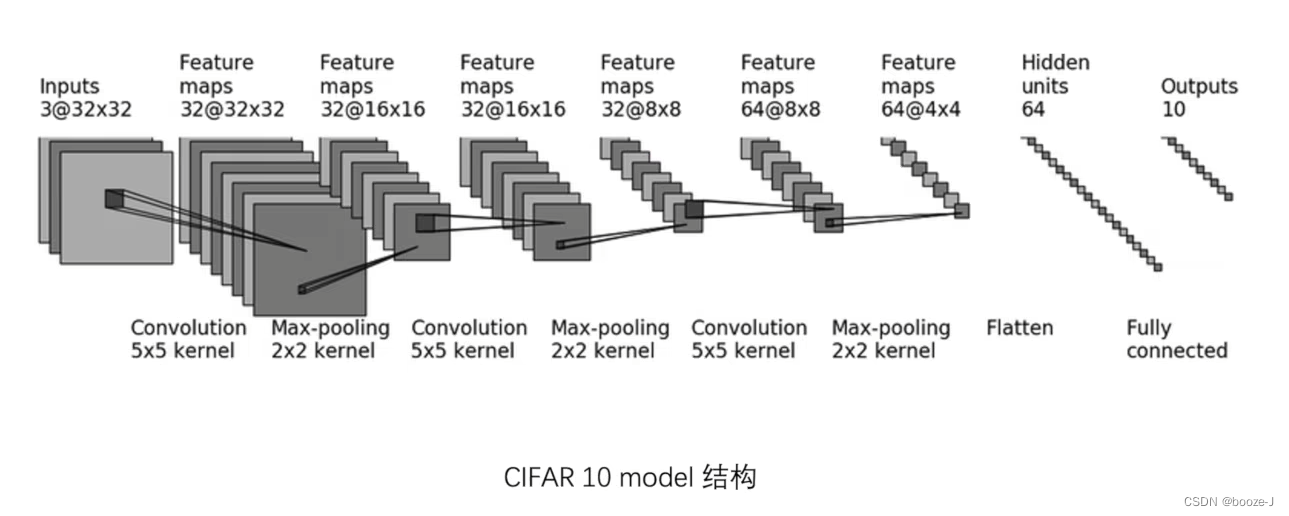
正常情况下搭建神经网络
搭建神经网络代码:
import torch
from torch import nn
from torch.nn import Conv2d, MaxPool2d, Flatten, Linear, Sequential


class Booze(nn.Module):

    def __init__(self):
        super(Booze, self).__init__()
        # 1.根据网络图搭建网络的时候,有些参数网络图上没给,是需要自己去计算的,像是padding,stride等等
        self.conv1 = Conv2d(3,32,5,padding=2)
        self.maxpool1 = MaxPool2d(2)
        self.conv2 = Conv2d(32,32,5,padding=2)
        self.maxpool2 = MaxPool2d(2)
        self.conv3 = Conv2d(32,64,5,padding=2)
        self.maxpool3 = MaxPool2d(2)
        self.flatten = Flatten()
        # 2.设置这个线性层的时候in_feature和out_feature可能也需要自己算,这个in_feature也可以通过打印flatten来查看
        self.linear1 = Linear(1024,64)
        self.linear2 = Linear(64,10)


    def forward(self,x):
        x = self.conv1(x)
        x = self.maxpool1(x)
        x = self.conv2(x)
        x = self.maxpool2(x)
        x = self.conv3(x)
        x = self.maxpool3(x)
        x = self.flatten(x)
        x = self.linear1(x)
        x = self.linear2(x)
        return x

obj = Booze()
print(obj)
'''3.对网络结构进行一个简单的检验'''
input = torch.ones((64,3,32,32))
output = obj(input)
print(output.shape)
上述代码中有一些要注意的点,需要单独的拿出来讲讲。
1. 根据网络图搭建网络的时候,有些参数网络图上没给,是需要自己去计算的,像是padding,stride等等
像是搭建第一个卷积层的时候,就需要自己去计算padding和stride。那么如何计算呢?这个时候我们就要用到官方文档提供的计算公式了。
2.搭建这个线性层的时候in_feature可能也需要自己算,这个in_feature也可以通过打印flatten来查看
torch.nn.Linear(in_features, out_features, bias=True, device=None, dtype=None)
Flatten可以通过官方文档中的介绍来使用。
# (batch_size,channels,H,W)=(32, 1, 5, 5)
input = torch.randn(32, 1, 5, 5)
# With default parameters
m = nn.Flatten()
output = m(input)
output.size()
# torch.Size([32, 25]) batch_size=32
# With non-default parameters
m = nn.Flatten(0, 2)
output = m(input)
output.size()
# torch.Size([160, 5]) batch_size=160
使用Sequential搭建神经网络
搭建神经网络代码:
import torch
from torch import nn
from torch.nn import Conv2d, MaxPool2d, Flatten, Linear, Sequential
from torch.utils.tensorboard import SummaryWriter


class Booze(nn.Module):

    def __init__(self):
        super(Booze, self).__init__()
        self.model1 = Sequential(
            Conv2d(3, 32, 5, padding=2),
            MaxPool2d(2),
            Conv2d(32, 32, 5, padding=2),
            MaxPool2d(2),
            Conv2d(32, 64, 5, padding=2),
            MaxPool2d(2),
            Flatten(),
            Linear(1024, 64),
            Linear(64, 10)
        )

    def forward(self,x):
        x = self.model1(x)
        return x

obj = Booze()
print(obj)
'''对网络结构进行一个简单的检验'''
input = torch.ones((64,3,32,32))
output = obj(input)
print(output.shape)

'''对网络模型进行可视化'''
writer = SummaryWriter("logs")
writer.add_graph(obj,input)
writer.close()
上述代码中也有一些要注意的点,需要单独的拿出来讲讲。
3.搭建完了网络之后,需要对网络结构进行一个简单的检验
obj = Booze()
print(obj)
'''对网络结构进行一个简单的检验'''
input = torch.ones((64,3,32,32))
output = obj(input)
print(output.shape)
就像上述代码一样,运行之后不会报错就行。
4.网络搭建完了之后,是可以使用tensorboard对网络模型进行可视化的
'''对网络模型进行可视化'''
writer = SummaryWriter("logs")
writer.add_graph(obj,input)
writer.close()
这里用到了add_graph这个方法,具体使用方法可以参考官方文档,其实使用方法和add_images和add_scalar差不多。
显示结果如下:
具体区别
其实看代码就很容易看出来哈。
正常情况:
def __init__(self):
        super(Booze, self).__init__()
        self.conv1 = Conv2d(3,32,5,padding=2)
        self.maxpool1 = MaxPool2d(2)
        self.conv2 = Conv2d(32,32,5,padding=2)
        self.maxpool2 = MaxPool2d(2)
        self.conv3 = Conv2d(32,64,5,padding=2)
        self.maxpool3 = MaxPool2d(2)
        self.flatten = Flatten()
        self.linear1 = Linear(1024,64)
        self.linear2 = Linear(64,10)


    def forward(self,x):
        x = self.conv1(x)
        x = self.maxpool1(x)
        x = self.conv2(x)
        x = self.maxpool2(x)
        x = self.conv3(x)
        x = self.maxpool3(x)
        x = self.flatten(x)
        x = self.linear1(x)
        x = self.linear2(x)
        return x
Sequential搭建:
class Booze(nn.Module):

    def __init__(self):
        super(Booze, self).__init__()
        self.model1 = Sequential(
            Conv2d(3, 32, 5, padding=2),
            MaxPool2d(2),
            Conv2d(32, 32, 5, padding=2),
            MaxPool2d(2),
            Conv2d(32, 64, 5, padding=2),
            MaxPool2d(2),
            Flatten(),
            Linear(1024, 64),
            Linear(64, 10)
        )

    def forward(self,x):
        x = self.model1(x)
        return x
```
边栏推荐
- Web server: how to choose a good web server these five aspects should be paid attention to
- Collect the annual summary of laws, regulations, policies and plans related to trusted computing of large market points (national, ministerial, provincial and municipal)
- Question bank and answers for chemical automation control instrument operation certificate examination in 2022
- How to ensure the idempotency of the high concurrency interface?
- 做网站数据采集,怎么选择合适的服务器呢?
- Maixll dock quick start
- Dual contractual learning: text classification via label aware data augmentation reading notes
- 【LeetCode】100. Same tree
- 如何看待智慧城市建设中的改变和机遇?
- Summary of testing experience - Testing Theory
猜你喜欢

Rule method: number of effective triangles

Introduction to JVM stack and heap

How to use maixll dock

使用WinMTR软件简单分析跟踪检测网络路由情况

2022 t elevator repair question bank and simulation test

Question bank and answers for chemical automation control instrument operation certificate examination in 2022

MySQL winter vacation self-study 2022 12 (5)

Account sharing technology enables the farmers' market and reshapes the efficiency of transaction management services

Possible problems and solutions of using scroll view to implement slider view

Custom components in applets
随机推荐
1. Mobile terminal touch screen event
Codeforces Round #721 (Div. 2)B1. Palindrome Game (easy version)B2. Palindrome game (hard version)
Odeint and GPU
网站服务器:好用的网站服务器怎么选这五方面要关注
Maixll-Dock 使用方法
Rule method: number of effective triangles
2022.2.7-2.13 AI industry weekly (issue 84): family responsibilities
JS rotation chart
2022年上海市安全员C证考试题模拟考试题库及答案
Question bank and online simulation examination for special operation certificate of G1 industrial boiler stoker in 2022
Maixll dock quick start
数据加载及预处理
一些小知识点
TCP/IP 详解(第 2 版) 笔记 / 3 链路层 / 3.4 桥接器与交换机 / 3.4.2 多属性注册协议(Multiple Registration Protocol (MRP))
Daily question - line 10
Maixll-Dock 快速上手
Dual Contrastive Learning: Text Classification via Label-Aware Data Augmentation 阅读笔记
[pat (basic level) practice] - [simple simulation] 1064 friends
Difference between cookie and session
2022年聚合工艺考试题及模拟考试