当前位置:网站首页>Notepad++--列编辑模式--用法/实例
Notepad++--列编辑模式--用法/实例
2022-06-28 01:47:00 【IT利刃出鞘】
原文网址:Notepad++--列模式--用法/实例_IT利刃出鞘的博客-CSDN博客
简介
说明
本文用示例来介绍Notepad++的列编辑功能。
列编辑概述
Notepad++有列编辑功能,我们可以通过它很方便地操作列:删除列、插入列、复制粘贴列。
有了它,原本需要重复做的事情很快就可以搞定。
列的插入
需求描述
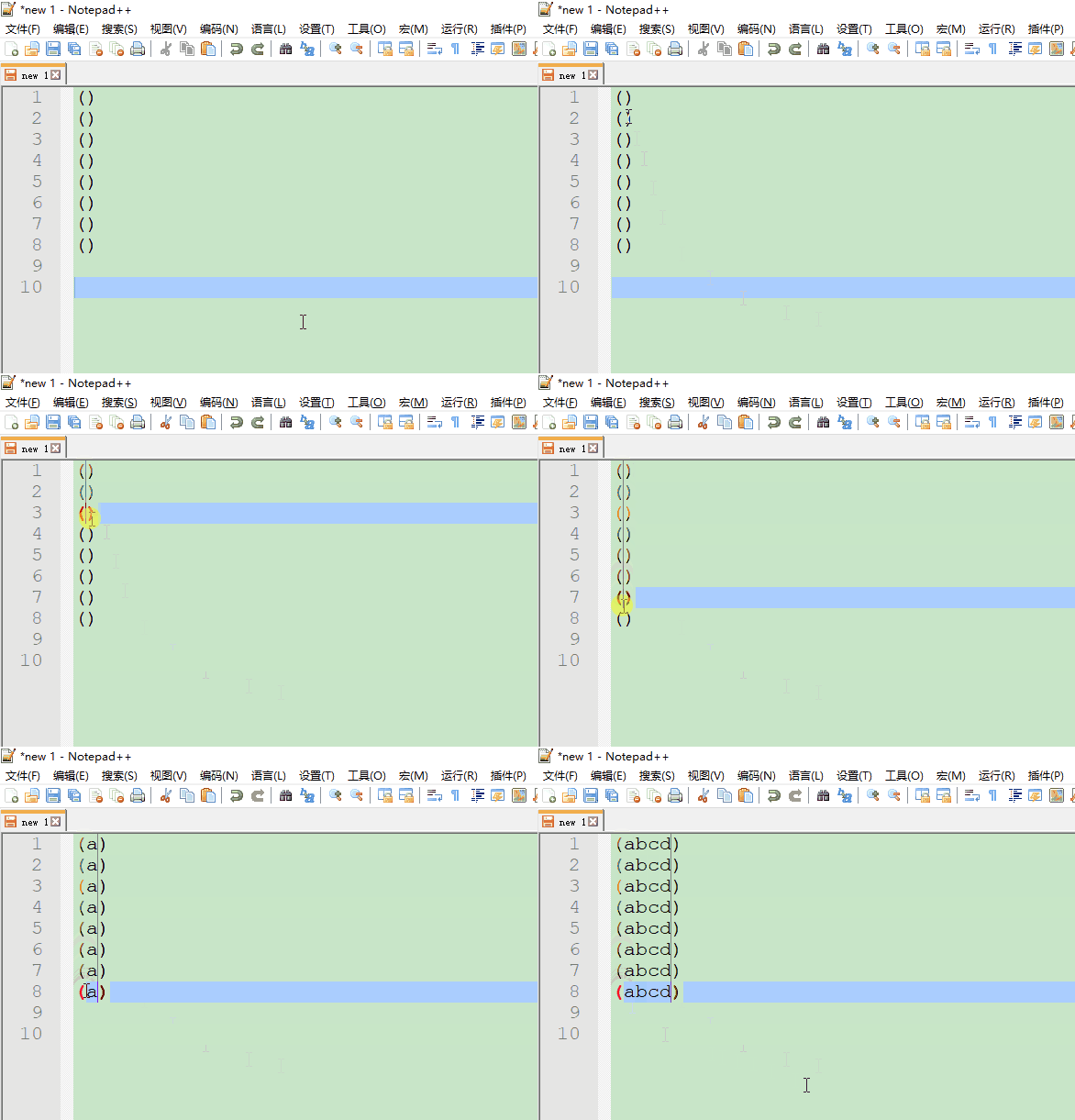
将下边的括号里都填上“abcd”。
()
()
()
()
()
()
()
()
方法
按住ALT=> 用鼠标从上到下选中括号内的空白列=> 输入“abcd” 。
如下图所示:
列的删除
需求描述
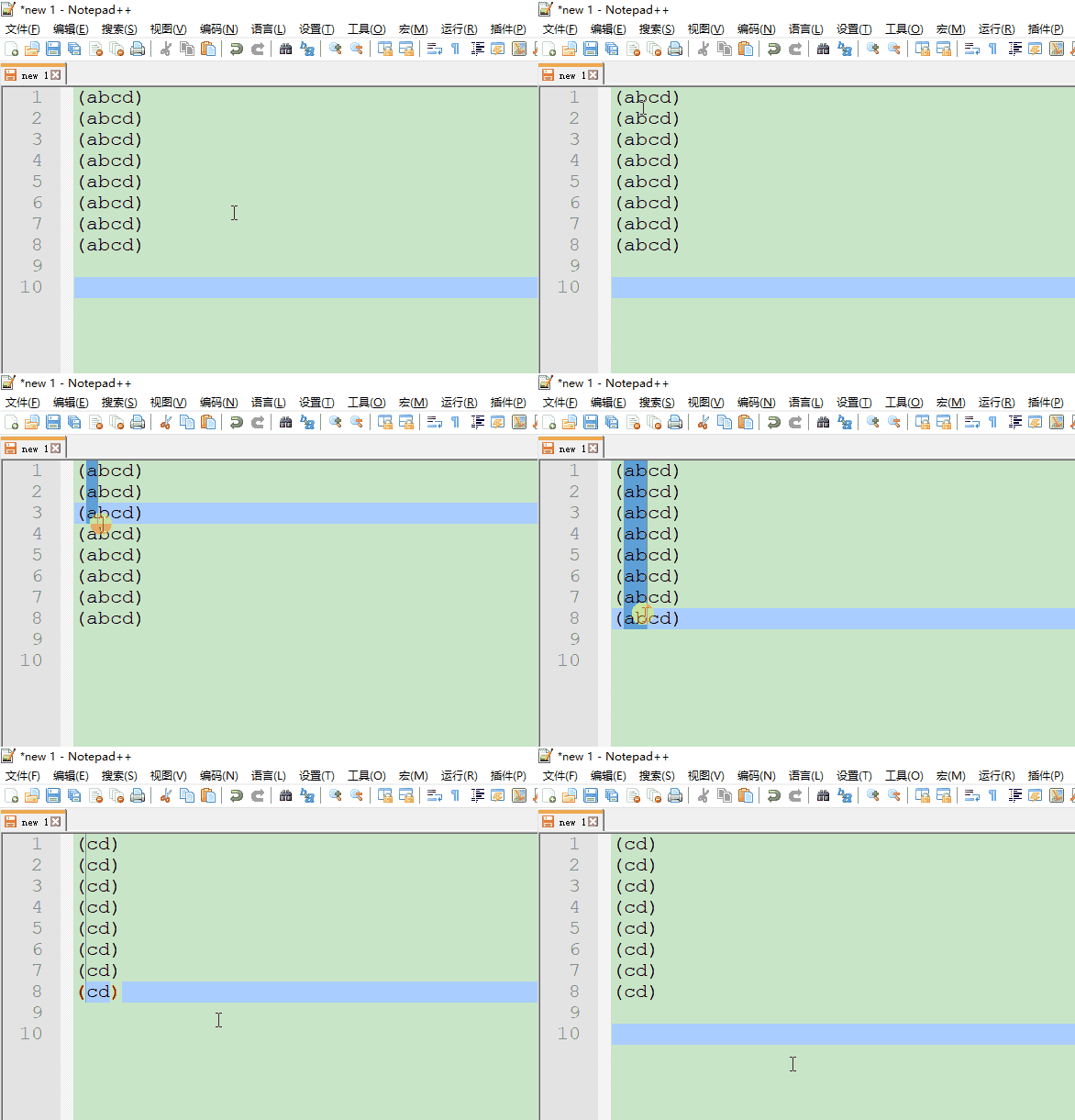
将下边的括号里的“ab”列删掉。
(abcd)
(abcd)
(abcd)
(abcd)
(abcd)
(abcd)
(abcd)
(abcd)
方法
按住ALT=> 用鼠标从上到下选中“ab”这两列=> 按下删除(BackSpace或者Delete) 。
如下图所示
选中整个列
需求
选中“ab”整个列。(省略号表示下边还有很多行)
(abcd)
(abcd)
(abcd)
(abcd)
(abcd)
(abcd)
(abcd)
(abcd)
(abcd)
(abcd)
(abcd)
(abcd)
(abcd)
(abcd)
......
方法
用鼠标点击起始位置=> 按住ALT和SHIFT=> => 用鼠标点击结束位置。如下图所示:

列的复制与粘贴
需求
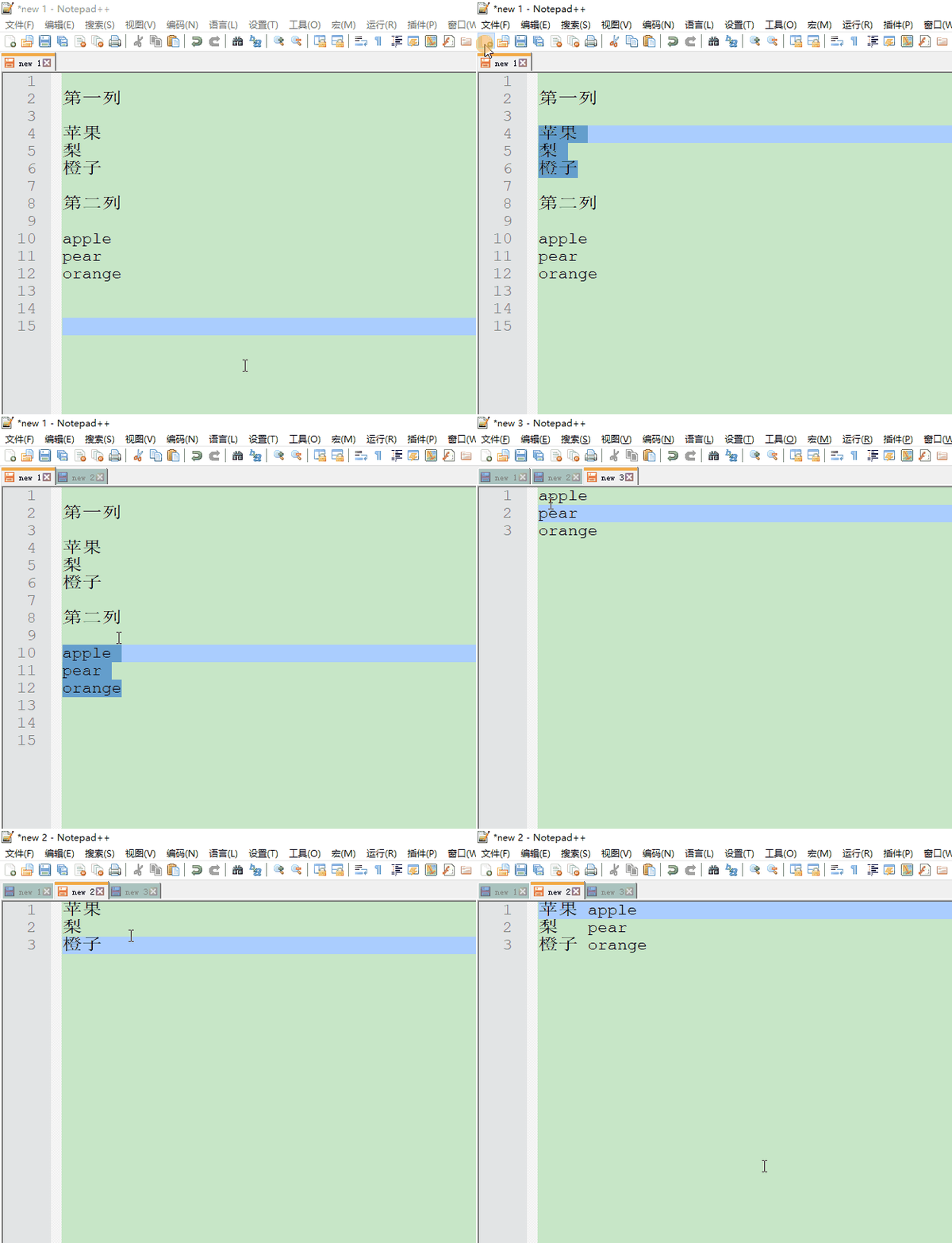
将下边的两列一一对应起来(中文后边跟着英文)。
第一列
苹果
梨
橙子
第二列
apple
pear
orange
想要的结果
苹果  apple
梨    pear
橙子  orange
正确操作
- 将第1个列拷贝到一个页面
- 将第2个列拷贝到一个页面
- 以列模式选择第2个列,CTRL+C复制
- 以列模式选择第1个列的最后位置,CTRL+V粘贴
如下图所示:
错误操作
- 将第1个列拷贝到一个页面
- 将第2个列拷贝到一个页面
- 普通模式选择第2个列,CTRL+C复制
- 以列模式选择第1个列的最后位置,CTRL+V粘贴
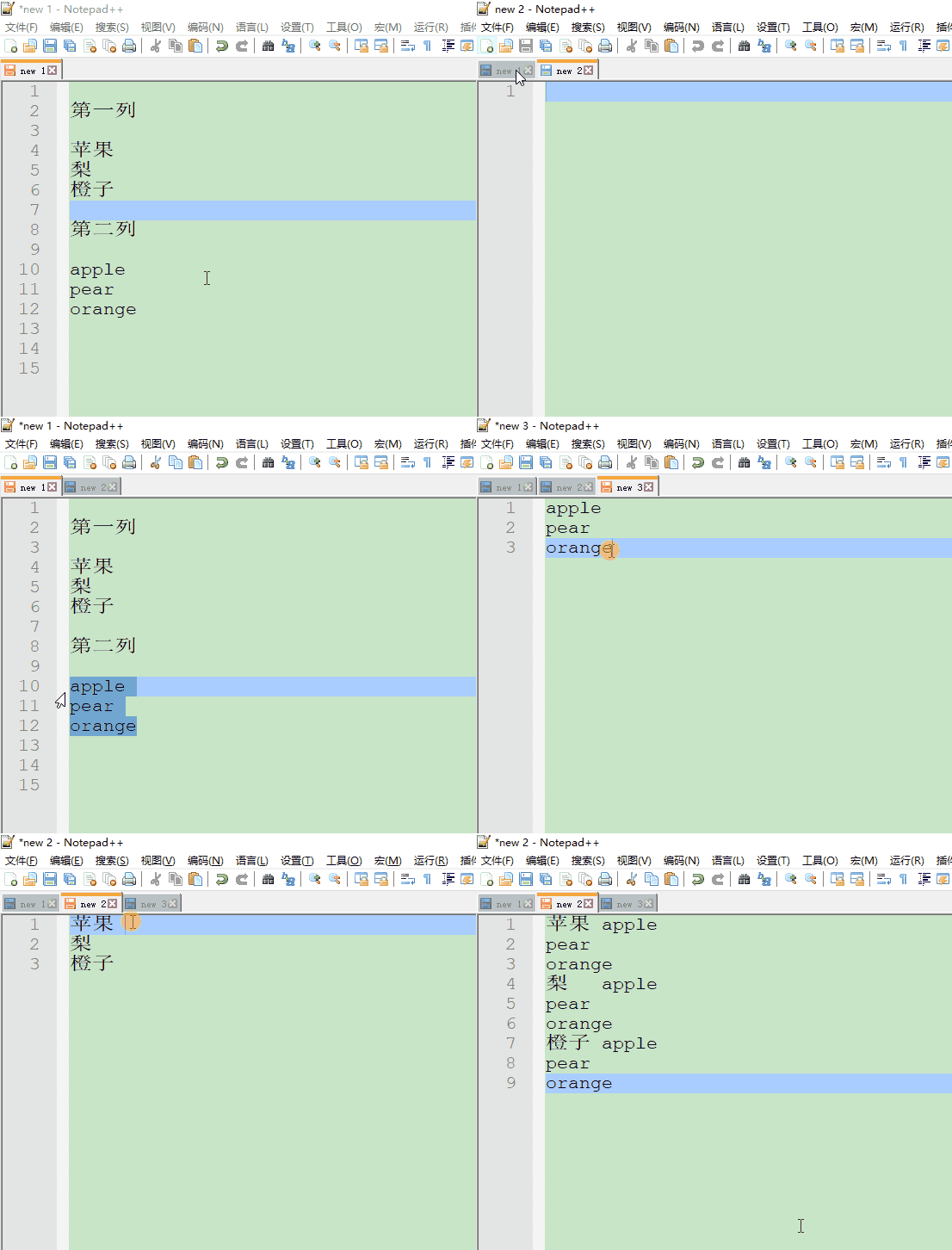
可见:这样操作之后,并不是一一对应的。
其他网址
Notepad++的列编辑功能,多列粘贴:在列模式中选中才能在粘贴到列模式中;notpad 中文乱码_ZhangJiQun.的博客-CSDN博客_notepad粘贴一列
边栏推荐
- Why are so many people keen on big factories because of the great pressure and competition?
- Online JSON to plaintext tool
- 音视频技术开发周刊 | 251
- Domain Name System
- 3年功能测试拿8K,被刚来的测试员反超,其实你在假装努力
- The first in the industry! MOS sub evaluation model for subjective video quality experience that can run on mobile devices!
- 简单ELK配置实现生产级别的日志采集和查询实践
- Yes, it's about water
- 为什么大厂压力大,竞争大,还有这么多人热衷于大厂呢?
- RichView TRVStyle TextStyles
猜你喜欢
StaticLayout的使用详解

3年功能测试拿8K,被刚来的测试员反超,其实你在假装努力

Online JSON to plaintext tool
![[today in history] June 3: Microsoft launched Bing search engine; Larry Roberts starts ARPANET; The father of Visual Basic was born](/img/9e/408ae022d9d5d8106e94e71b319d43.png)
[today in history] June 3: Microsoft launched Bing search engine; Larry Roberts starts ARPANET; The father of Visual Basic was born
> Could not create task ‘:app:MyTest. main()‘. > SourceSet with name ‘main‘ not found. Problem repair
![[today in history] June 8: the father of the world wide web was born; PHP public release; IPhone 4 comes out](/img/1b/31b5adbec5182207c371a23e41baa3.png)
[today in history] June 8: the father of the world wide web was born; PHP public release; IPhone 4 comes out

微信小程序中生成二维码
> Could not create task ‘:app:MyTest.main()‘. > SourceSet with name ‘main‘ not found.问题修复

Opencv -- geometric space transformation (affine transformation and projection transformation)

Writing based on stm32
随机推荐
【活动早知道】LiveVideoStack近期活动一览
Publicity of the third batch of shortlisted enterprises! Annual Top100 smart network supplier selection
腾讯游戏发布40多款产品与项目 其中12款为新游戏
[kotlin] basic introduction and understanding of its syntax in Android official documents
无心剑汉英双语诗004.《剑》
[today in history] May 31: the father of Amiga was born; The co developer of basic language was born; BlackBerry BBM shutdown
adb双击POWER键指令
Built in functions for MySQL database operations
apache、iis6、ii7独立ip主机屏蔽限制ip访问
RichView TRVStyle
分布式事务—基于消息补偿的最终一致性方案(本地消息表、消息队列)
买股票通过券商经理的开户链接开户资金是否安全?想开户炒股
isEmpty 和 isBlank 的用法區別
What if win11 cannot use dynamic wallpaper? Solution of win11 without dynamic wallpaper
[today in history] June 8: the father of the world wide web was born; PHP public release; IPhone 4 comes out
导致系统性能失败的十个原因
为什么大厂压力大,竞争大,还有这么多人热衷于大厂呢?
Summary of software testing tools in 2021 - fuzzy testing tools
ADB double click the power key command
Interview: how do lists duplicate objects according to their attributes?