当前位置:网站首页>微信小程序中生成二维码
微信小程序中生成二维码
2022-06-28 01:10:00 【低代码布道师】
一般在微信小程序中,生成二维码是一个很常见的场景,但是查阅官方文档,却没有一个现成的可以使用的组件。
经过搜索,生成二维码组件一般是需要借助第三方库来实现。实现的步骤分为:
- 下载第三方库
- 安装第三方库
- wxml中生成二维码
- js中引入
下载第三方库
目前有一个现成的库,可以生成二维码。我一般习惯用gitee下载。在浏览器里输入下载地址
https://gitee.com/WeiDoctor/weapp-qrcode-canvas-2d
下载方法是点击克隆按钮
下载完了之后解压缩,dist目录里的文件就是我们需要的
安装第三方库
库安装的方法也比较简单,我们可以现在小程序目录下新建一个utils文件夹
将dist目录下的js全部拷贝到utils目录下
这样就完成了库的安装
wxml中生成二维码
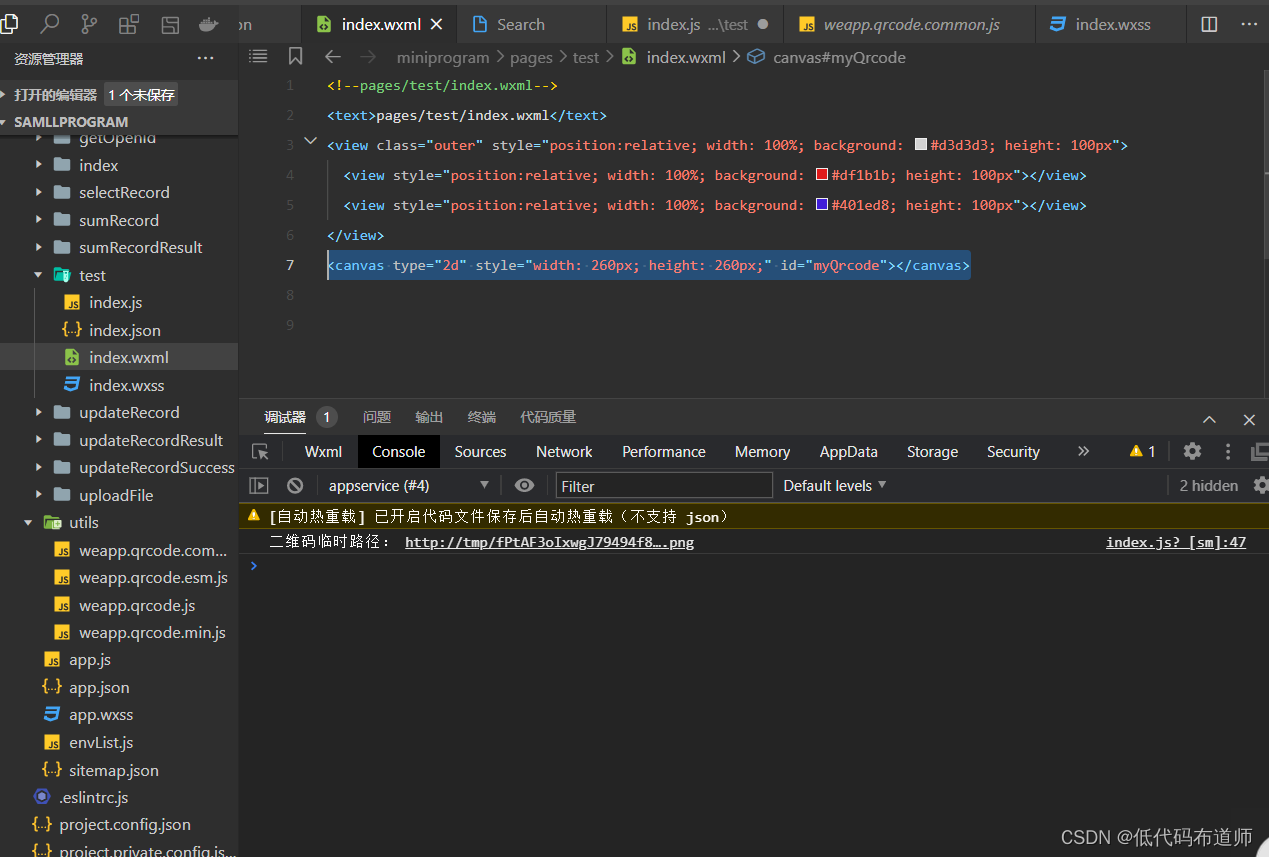
二维码使用canvas组件生成,所以需要在wxml文件中添加canvas组件
<canvas type="2d" style="width: 260px; height: 260px;" id="myQrcode"></canvas>
js中引入第三方库
第三方库如果希望使用需要使用import语句引入,具体代码如下
// pages/test/index.js
import drawQrcode from '../../utils/weapp.qrcode.esm.js'
Page({


  /** * 页面的初始数据 */
  data: {


  },

  /** * 生命周期函数--监听页面加载 */
  onLoad(options) {

    const query = wx.createSelectorQuery()
    query.select('#myQrcode')
        .fields({

            node: true,
            size: true
        })
        .exec((res) => {

            var canvas = res[0].node

            // 调用方法drawQrcode生成二维码
            drawQrcode({

                canvas: canvas,
                canvasId: 'myQrcode',
                width: 260,
                padding: 30,
                background: '#ffffff',
                foreground: '#000000',
                text: '个人二维码信息',
            })

            // 获取临时路径(得到之后,想干嘛就干嘛了)
            wx.canvasToTempFilePath({

                canvasId: 'myQrcode',
                canvas: canvas,
                x: 0,
                y: 0,
                width: 260,
                height: 260,
                destWidth: 260,
                destHeight: 260,
                success(res) {

                    console.log('二维码临时路径:', res.tempFilePath)
                },
                fail(res) {

                    console.error(res)
                }
            })
        })
  },

  /** * 生命周期函数--监听页面初次渲染完成 */
  onReady() {


  },

  /** * 生命周期函数--监听页面显示 */
  onShow() {


  },

  /** * 生命周期函数--监听页面隐藏 */
  onHide() {


  },

  /** * 生命周期函数--监听页面卸载 */
  onUnload() {


  },

  /** * 页面相关事件处理函数--监听用户下拉动作 */
  onPullDownRefresh() {


  },

  /** * 页面上拉触底事件的处理函数 */
  onReachBottom() {


  },

  /** * 用户点击右上角分享 */
  onShareAppMessage() {


  }
})
我们只需要修改text属性中的值就可以
总结
我们本篇介绍了小程序二维码生成的方法,借助第三方库无疑可以大大的提高开发速度。
边栏推荐
- 树莓派-环境设置和交叉编译
- PSM总结
- MFC common current path
- Stm32f1 and stm32subeide programming example - metal touch sensor driver
- Digital intelligence learning Lake Warehouse Integration Practice and exploration
- [today in history] June 25: the father of notebook was born; Windows 98 release; First commercial use of generic product code
- [today in history] June 8: the father of the world wide web was born; PHP public release; IPhone 4 comes out
- What if win11 can't drag an image to the taskbar software to open it quickly
- [fuzzy neural network] simulation of fuzzy neural network based on MATLAB
- Packet capturing and sorting out external Fiddler -- understanding the toolbar [1]
猜你喜欢
![[today in history] June 17: the creator of the term](/img/00/30ccc2f54415a6aca000c42e277dc3.png)
[today in history] June 17: the creator of the term "hypertext" was born; The birth of Novell's chief scientist; Discovery channel on
isEmpty 和 isBlank 的用法区别

【历史上的今天】6 月 5 日:洛夫莱斯和巴贝奇相遇;公钥密码学先驱诞生;函数语言设计先驱出生

【历史上的今天】6 月 25 日:笔记本之父诞生;Windows 98 发布;通用产品代码首次商用

How to systematically learn LabVIEW?

【 amélioration de la correction d'image de Code bidimensionnel】 simulation du traitement d'amélioration de la correction d'image de Code bidimensionnel basée sur MATLAB

【历史上的今天】6 月 20 日:MP3 之父出生;富士通成立;谷歌收购 Dropcam

【历史上的今天】6 月 6 日:世界 IPv6 启动纪念日;《俄罗斯方块》发布;小红书成立

【倒立摆控制】基于UKF无迹卡尔曼滤波的倒立摆控制simulink仿真
【云原生】-Docker安装部署分布式数据库 OceanBase
随机推荐
英特尔锐炫A380显卡即将在中国面市
Stm32f1 and stm32subeide programming example - metal touch sensor driver
【方块编码】基于matlab的图像方块编码仿真
[today in history] June 1: Napster was founded; MS-DOS original author was born; Google sells Google SketchUp
简单ELK配置实现生产级别的日志采集和查询实践
How to run unity webgl after packaging (Firefox configuration)
What if win11 cannot use dynamic wallpaper? Solution of win11 without dynamic wallpaper
How does win11 close recently opened projects? Win11 method to close recently opened projects
喜新厌旧?IT公司为什么宁愿花20k招人,也不愿涨薪留住老员工
[today in history] June 5: Lovelace and Babbage met; The pioneer of public key cryptography was born; Functional language design pioneer born
Win11不能拖拽圖片到任務欄軟件上快速打開怎麼辦
The graduation season is coming, and the number of college graduates in 2022 has exceeded 10 million for the first time
在线JSON转PlainText工具
Shuttle uses custompaint to paint basic shapes
Unity WebGL打包后怎么运行(火狐配置)
【历史上的今天】5 月 31 日:Amiga 之父诞生;BASIC 语言的共同开发者出生;黑莓 BBM 停运
Digital intelligence learning Lake Warehouse Integration Practice and exploration
Writing C program with GCC and makefile for the first time
抓包整理外篇fiddler————了解工具栏[一]
【历史上的今天】6 月 23 日:图灵诞生日;互联网奠基人出生;Reddit 上线