当前位置:网站首页>【微信小程序】协同工作和发布 数据绑定
【微信小程序】协同工作和发布 数据绑定
2022-06-21 18:28:00 【热爱编程的小白白】
目录
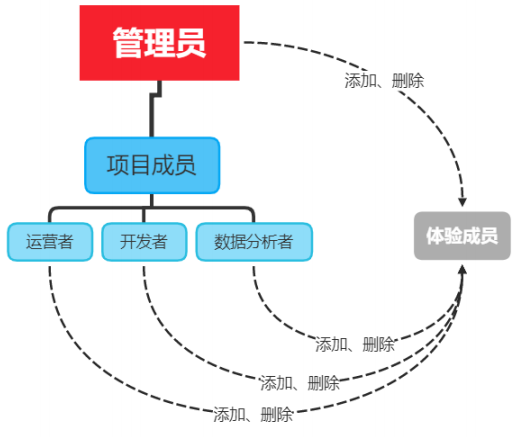
协同工作和发布 - 小程序成员管理
1. 成员管理的两个方面
2. 不同项目成员对应的权限
| 权限 | 运营者 | 开发者 | 数据分析者 |
开发者权限 | √ | ||
体验者权限 | √ | √ | √ |
登录 | √ | √ | √ |
数据分析 | √ | ||
微信支付 | √ | ||
推广 | √ | ||
开发管理 | √ | ||
开发设置 | √ | ||
暂停服务 | √ | ||
解除关联公众号 | √ | ||
腾讯云管理 | √ | ||
小程序插件 | √ | ||
游戏运营管理 | √ |
3. 开发者的权限说明
4. 添加项目成员和体验成员


协同工作和发布 - 小程序的版本
1. 软件开发过程中的不同版本
2. 小程序的版本
版本阶段 | 说明 |
开发版本 | 使用开发者工具,可将代码上传到开发版本中。 开发版本只保留每人最新的一份上传的代码。 点击提交审核,可将代码提交审核。开发版本可删除,不影响线上版本和审核中版本的代码。 |
体验版本 | 可以选择某个开发版本作为体验版,并且选取一份体验版。 |
审核中的版本 | 只能有一份代码处于审核中。有审核结果后可以发布到线上,也可直接重新提交审核,覆盖原审核版本。 |
线上版本 | 线上所有用户使用的代码版本,该版本代码在新版本代码发布后被覆盖更新。 |
协同工作和发布 - 发布上线
1. 小程序发布上线的整体步骤
2. 上传代码
① 点击开发者工具顶部工具栏中的“上传” 按钮


3. 在后台查看上传之后的版本

4. 提交审核
5. 发布

6. 基于小程序码进行推广
协同工作和发布 - 运营数据
1. 查看小程序运营数据的两种方式
WXML 模板语法 - 数据绑定
1. 数据绑定的基本原则
2. 在 data 中定义页面的数据
这是默认的index页面:

// index.js
// 获取应用实例
const app = getApp()

Page({
  data: {
    motto: 'Hello World',
    userInfo: {},
    hasUserInfo: false,
    canIUse: wx.canIUse('button.open-type.getUserInfo'),
    canIUseGetUserProfile: false,
    canIUseOpenData: wx.canIUse('open-data.type.userAvatarUrl') && wx.canIUse('open-data.type.userNickName') // 如需尝试获取用户信息可改为false
  },
  // 事件处理函数
  bindViewTap() {
    wx.navigateTo({
      url: '../logs/logs'
    })
  },
  onLoad() {
    if (wx.getUserProfile) {
      this.setData({
        canIUseGetUserProfile: true
      })
    }
  },
  getUserProfile(e) {
    // 推荐使用wx.getUserProfile获取用户信息,开发者每次通过该接口获取用户个人信息均需用户确认,开发者妥善保管用户快速填写的头像昵称,避免重复弹窗
    wx.getUserProfile({
      desc: '展示用户信息', // 声明获取用户个人信息后的用途,后续会展示在弹窗中,请谨慎填写
      success: (res) => {
        console.log(res)
        this.setData({
          userInfo: res.userInfo,
          hasUserInfo: true
        })
      }
    })
  },
  getUserInfo(e) {
    // 不推荐使用getUserInfo获取用户信息,预计自2021年4月13日起,getUserInfo将不再弹出弹窗,并直接返回匿名的用户个人信息
    console.log(e)
    this.setData({
      userInfo: e.detail.userInfo,
      hasUserInfo: true
    })
  }
})

新建一个页面,打开js文件


Page({

  data: {
    word:"内容"
  }

})
3. Mustache 语法的格式
4. Mustache 语法的应用场景
WXML:
<view>{
            {word}}</view>
WXSS:
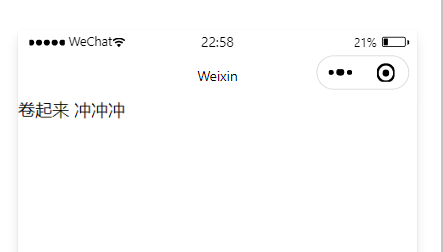
Page({

  data: {
    word:"卷起来 冲冲冲"
  }

})
效果:
<image src="{
            {image}}" mode="widthFix"></image>
WXSS:
Page({

  data: {

    image:"/image/a.jpg"
  }

})
效果:

Page({

  data: {

   randomNum:Math.random()*100
  }

})<view>{
{randomNum>=50 ? '大于等于50':'小于50'}}</view>
生成的随机数为:97.50952738069331>50

算术运算
页面的数据如下:
Page({

  data: {

   randomNum:Math.random().toFixed(2)
  }
})
页面的结构如下:
<view>{
             {randomNum*100}}</view>
边栏推荐
- 1157 Anniversary
- inno setup 更改安装路径学习
- Leetcode personal question solution (Sword finger offer 21-25) 21 Adjust the array order so that odd numbers precede even numbers, 22 The penultimate node in the linked list, 24 Reverse linked list, 2
- How to use devaxpress WPF to create the first MVVM application in winui?
- mysql中有没有关键字
- Cloudcompare & PCL point cloud point matching (based on European distance)
- Whether MySQL has triggers
- 函子(Functor)
- 理财产品如果过了开放日期怎么赎回?
- Introduction to machine learning
猜你喜欢

Gradle下载与安装配置

粗读Targeted Supervised Contrastive Learning for Long-Tailed Recognition

【微信小程序更改appid失败】微信小程序修改appid一直失败报错tourist appid解决办法

What are the knowledge points of SQL statements
Gradle download and installation configuration

【CVPR2022】CMU《多模态机器学习》教程,200+页阐述表示、对齐、推理、迁移、生成与量化六大挑战的多模态学习系统知识
RestTemplate多个认证信息Authorization问题
![[icml2022] ctrlformer: learn the transferable state representation of visual control through the transformer](/img/d7/483ba497a72bd73b7ebc004bc922cb.png)
[icml2022] ctrlformer: learn the transferable state representation of visual control through the transformer

API de table & SQL et module d'échantillon pour le système Flink

mysql增加的语句是什么
随机推荐
机器学习之线性模型与决策树
【CVPR2022】CMU《多模态机器学习》教程,200+页阐述表示、对齐、推理、迁移、生成与量化六大挑战的多模态学习系统知识
机器学习之模型评估与选择
Patch package cannot be used to patch pnpm
Forwarding to remind metamask how to deal with the potential private key disclosure of the expansion program
Sword finger offer II 029 Sorted circular linked list
机器学习之绪论
NetCore3.1 ping网络是否畅通及获取服务器Cpu、内存使用率
How to query all tables in MySQL
【干货知识】Redis:从应用到底层,一文帮你搞定
How to temporarily modify samesite=none and secure in Chrome browser
Simple use of JS
Recycleview drag effect
Introduction to setting program icon in QT
金鱼哥RHCA回忆录:DO447Ansible Tower导航
[cvpr2022] CMU tutorial on multimodal machine learning, 200+ pages to explain the knowledge of multimodal learning system with six challenges of representation, alignment, reasoning, migration, genera
Kubernetes migration of persistent volumes across storageclasses Complete Guide
Manjaro installs the downloaded TTF font file
Linux MySQL command
RPA财务流程自动化 | 浦发集团携手云扩科技加速财务数字化运营