当前位置:网站首页>Gradle download and installation configuration
Gradle download and installation configuration
2022-06-21 19:56:00 【Shandong steamed bun】
One 、Gradle download
1. Download address
https://services.gradle.org/distributions/
- For example, I downloaded gradle-6.7.1-bin.zip
- Sure Ctrl+F Search version number directly
2. decompression
- Unzip the package into a folder , For example, I unzipped it to D Discoid :D:\Gradle
Two 、Gradle Installation configuration
- Press down Windows+R, The run window will open , Then input sysdm.cpl The environment variable setting page opens
1. To configure GRADLE_HOME

2. To configure Path
- stay Path add to %GRADLE_HOME%\bin
3. Test the installation for success
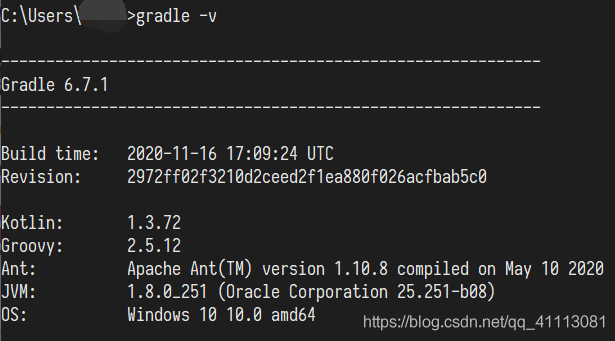
- open cmd, Input gradle -v
- As shown in the figure below, the installation is successful
4.( Choose to do ) To configure Gradle、Maven Use the same local warehouse
- If..., is also installed locally Gradle and Maven, So you can configure Gradle Of Jar Package download directory and Maven Agreement , This avoids repeated downloads Jar package , Cause a waste of space and time .
- Configure environment variables :GRADLE_USER_HOME
- The value is Maven Warehouse Path for , Let's say mine is :D:\apache-maven-3.6.3\LocalRepository
- As shown in the figure :

边栏推荐
- 网管型全国产加固交换机如何创建网络冗余
- Nepal graph has settled in Alibaba cloud computing nest to help enterprises build a super large-scale map database on the cloud
- 医疗费用清单秒速录入,OCR识别助力效率倍增
- nacos-配置中心-源码
- 2022年6月25日PMP考试通关宝典-4
- 2022年6月25日PMP考试通关宝典-3
- Double pointer 1day8 of daily practice of Li Kou
- Using fastjson to deserialize simplegrantedauthority in the security framework
- QT creator 7.0 frequently asked questions and common usage
- 如何使用DevExpress WPF在WinUI中创建第一个MVVM应用?
猜你喜欢

nacos-配置中心-源码

论文解读(USIB)《Towards Explanation for Unsupervised Graph-Level Representation Learning》

Sword finger offer II 029 Sorted circular linked list

An accident caused by a MySQL misoperation, and the "high availability" cannot withstand it!

Jupyter Notebook启动方式及相关问题

转发提醒 MetaMask小狐狸钱包安全公告 如何应对拓展程序潜在的私钥泄露

W10 add system environment variable path

Shang Silicon Valley Shang Silicon Valley | what is Clickhouse table engine memory and merge

Kubernetes 跨 StorageClass 迁移 Persistent Volumes 完全指南
SQL operation: with expression and its application
随机推荐
机器学习之线性模型与决策树
R语言使用plyr包的rbind.fill函数纵向合并两个数据列不同的dataframe数据
R语言glm函数构建二分类logistic回归模型(family参数为binomial)、使用coef函数获取模型系数并解析系数意义
SQL operation: with expression and its application
Kubernetes 跨 StorageClass 迁移 Persistent Volumes 完全指南
Yolov5 trains its own data set to report error records
2022年6月25日PMP考试通关宝典-3
[high frequency interview questions] difficulty 1/5, popular enumeration simulation questions
C. Helping the Nature(cf)差分
新手使用APICloud可视化开发搭建商城主页
After the 80 version of Google browser, how to deal with the problem samesite cross domain problem
Linux MySQL command
RecycleView懒加载失效问题(二)
Using fastjson to deserialize simplegrantedauthority in the security framework
[force deduction 10 days SQL introduction] Day1
Nepal graph has settled in Alibaba cloud computing nest to help enterprises build a super large-scale map database on the cloud
ArrayList源码解析
Double pointer 1day8 of daily practice of Li Kou
gorm数据库是否需要设置外键
记一些PAT题目(一)