当前位置:网站首页>After the 80 version of Google browser, how to deal with the problem samesite cross domain problem
After the 80 version of Google browser, how to deal with the problem samesite cross domain problem
2022-06-21 19:34:00 【pocher】
Google browser 80 After the version , What happened :
Situation 1 :
If the domain name in the address bar is aaa.com, And the corresponding Ajax So is the request aaa.com, Then you can put aaa.com Under the cookie To any aaa.com Domain name request , such as : Sign in aaa.com When the cookie( hypothesis cookie by token=123), stay Ajax call aaa.com/api/queryUser Interface can be used to cookie Pass on the past , Regardless of the corresponding cookie Is there any setting Secure And SameSite=None.
Situation two :
If the domain name in the address bar is aaa.com, And the corresponding Ajax The request is bbb.com, Then you can put bbb.com Under the cookie To any bbb.com Domain name request , such as : Sign in bbb.com When the cookie( hypothesis cookie by token=123), stay Ajax call bbb.com/api/queryUser Interface can be used to cookie Pass on the past , But the premise is token=123 This cookie You have to set Secure And SameSite=None attribute , Otherwise, even if it is the same domain name cookie It is also undeliverable . Be careful : Here is the address bar aaa.com, What I visited was bbb.com/api/queryUser, Cross domain words , Even with Secure And SameSite=None, You can't do it .

complete Nginx To configure :
upstream tomcat_server {
                server 127.0.0.1:8001  weight=10 max_fails=2 fail_timeout=30s;
}


log_format newmain '$remote_addr - "$http_x_forwarded_for" - "$http_j_forwarded_for" - $remote_user [$time_local]'
'"$request" $status $bytes_sent '
'"$http_referer" "$http_user_agent" '
'"$gzip_ratio"';
# Current limiting module
limit_req_zone $binary_remote_addr zone=ip_limit_index:20m rate=500000r/s;

server
{
      listen 80;

      server_name              www.xxx.com ;
     access_log               /export/xxx/nginx/logs/www.xxx.com/www.xxx.com_access.log main;
      error_log                /export/xxx/nginx/logs/www.xxx.com/www.xxx.com_error.log warn;
      error_page 411 = @error_page;

      root /export/App/www.xxx.com/;

      location / {

        set $flag "flag";
         # If it is a request to specify a domain name , Set up cross domain
        if ($http_origin ~* "(xxx.com|xxx.cn)") {
            add_header 'Access-Control-Allow-Origin' "$http_origin";
          add_header 'Access-Control-Allow-Credentials' 'true';
          add_header 'Access-Control-Allow-Methods' 'GET, POST, OPTIONS';
          add_header 'Access-Control-Allow-Headers' 'Origin,X-Requested-With,Content-Type,Accept,Cache-Control,frLo';
          add_header 'Access-Control-Max-Age' 1728000;
        }

        # If it's a pre inspection request , After setting the cross domain, return directly to
        if ($request_method = 'OPTIONS') {
            add_header 'Access-Control-Allow-Origin' "$http_origin";
          add_header 'Access-Control-Allow-Credentials' 'true';
          add_header 'Access-Control-Allow-Methods' 'GET, POST, OPTIONS';
          add_header 'Access-Control-Allow-Headers' 'Origin,X-Requested-With,Content-Type,Accept,Cache-Control,frLo';
          add_header 'Access-Control-Max-Age' 1728000;
          # Pre inspection request returned directly
          return 200;
        }


        proxy_next_upstream     http_500 http_502 http_503 http_504 error timeout invalid_header;
        proxy_set_header        Host  $host;
        proxy_set_header        X-Forwarded-For $proxy_add_x_forwarded_for;
        # Set up cookie, Of course, it can also be used for future cookie Additional SameSite=None; Secure To configure
        add_header Set-Cookie 'mycookie=xxxx;Path=/;SameSite=None; Secure';
        proxy_pass              http://tomcat_server;
        expires                 0;
        fastcgi_buffer_size 128k;
		fastcgi_buffers 32 32k;
	}


    # Processing of static resources
    location ~ .*\.(css|js|ico)$ {
		gzip on;
		gzip_min_length 1k;
		gzip_buffers 4 16k;
		gzip_comp_level 3;
		gzip_types text/plain application/x-javascript text/css application/xml text/javascript image/jpeg image/gif image/png image/x-icon;
		gzip_vary on;
		gzip_disable "MSIE [1-6]\.";
    }

    location /logs/ {
        autoindex       off;
        deny all;
    }

}
How to be in Chrome Simulate or modify the domain name of the request in the browser
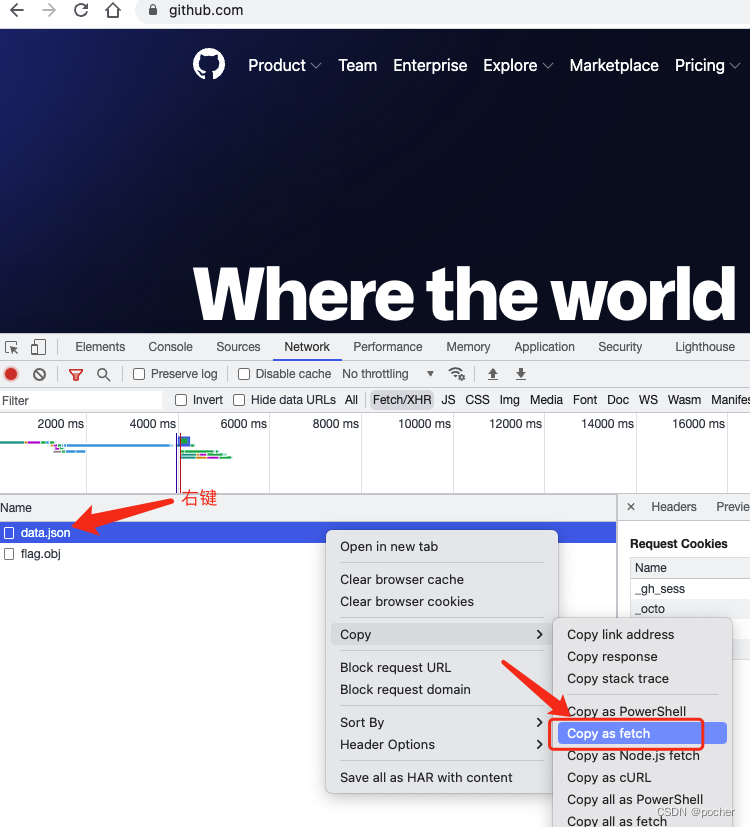
F12 Turn on debug mode , Right click on the request path , then Copy as fetch, open Console TAB , Paste and return , Go back to just now Network On the tab, you can see just now console Request sent in , Of course console You can modify the domain name and the requested parameters .

How to be in Chrome Temporary modification in the browser SameSite=None and Secure

Then tick it

Right click editing SameSite by None,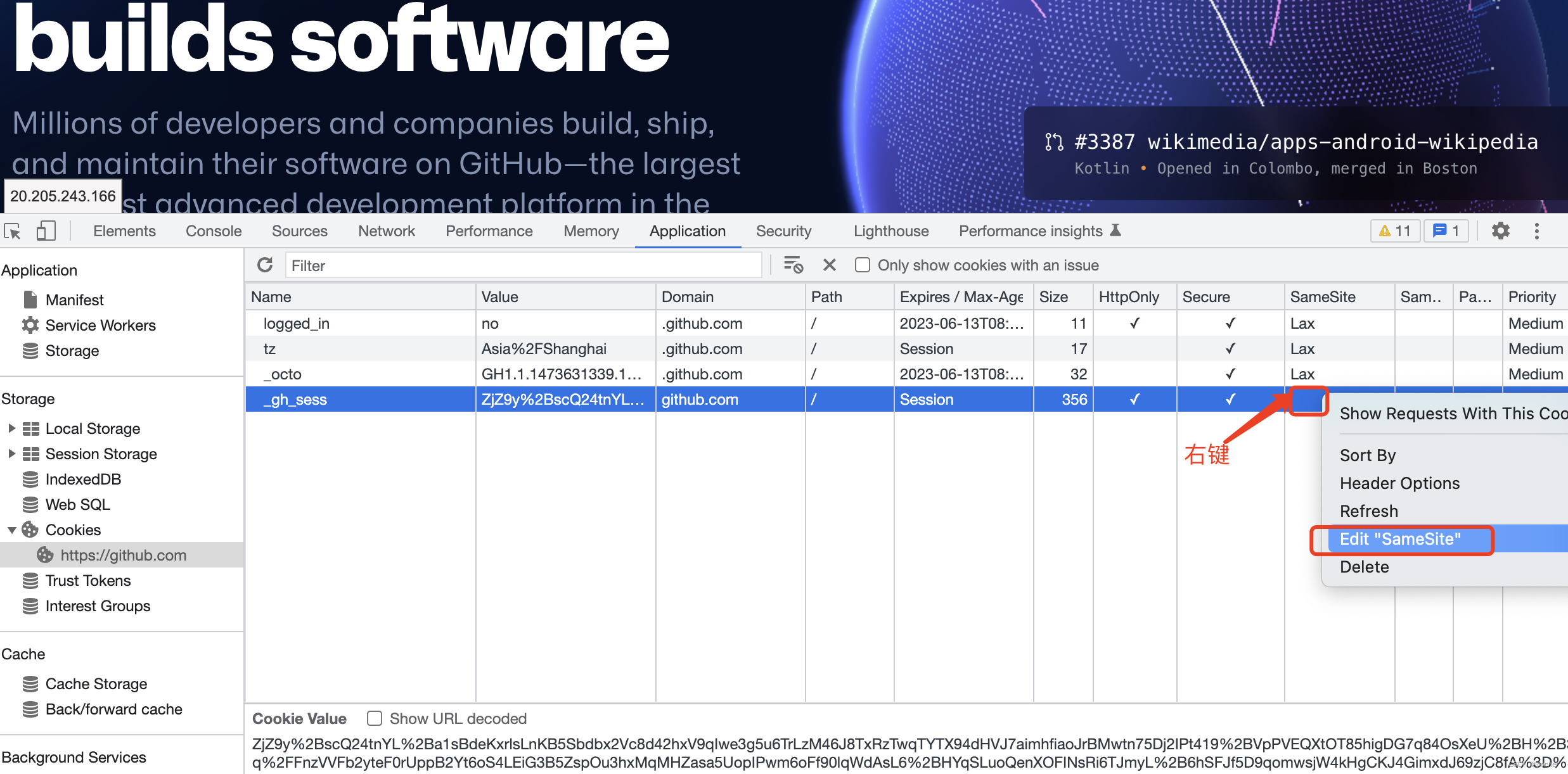

At this point, even if the page is refreshed, the edited value will not change , Unless the cache is clear or the current session expires . Of course, this is different from Expires/Max-Age The properties of this column are related to , If it is Session The type is restore after the session expires . But this is only a temporary plan .
Nginx newly added cookie:
add_header Set-Cookie 'mycookie=xxxx;Path=/;SameSite=None; Secure';
边栏推荐
- 2022年6月25日PMP考试通关宝典-3
- R语言dist函数计算dataframe数据中两两样本之间的距离并返回样本间距离矩阵,将距离矩阵输入给hclust函数进行层次聚类分析,method参数指定两个组合数据点间的距离计算方式
- 近年区域赛(20-22)
- Nebula Graph入驻阿里云计算巢,助力企业打造云上超大规模图数据库
- After Hongmeng, Huawei announced that it would donate to Euler again. What impact is expected to be brought to the industry by the donations of Hongmeng and Euler?
- 6月25日PMP考前指南,你需要做好这些
- 【综合笔试题】难度 2.5/5 :「树状数组」与「双树状数组优化」
- R语言使用neuralnet包构建神经网络回归模型(前馈神经网络回归模型),可视化测试集中实际目标值与预测值之间的散点图并分析模型预测的可靠性
- Second cloud's original fully compatible solution for Xinchuang is upgraded to help accelerate the implementation of Xinchuang industry
- CPDA|数据分析师需要具备哪些基本功?
猜你喜欢

Notes on writing questions in C language -- find s=a+aa+aaa+aaaa+aa Value of a

Nepal graph has settled in Alibaba cloud computing nest to help enterprises build a super large-scale map database on the cloud

Second cloud's original fully compatible solution for Xinchuang is upgraded to help accelerate the implementation of Xinchuang industry

Insert class collation
如何在Chrome浏览器中临时修改SameSite=None和Secure

Niuke: merging two ordered arrays

论文解读(USIB)《Towards Explanation for Unsupervised Graph-Level Representation Learning》

【一起上水硕系列】Day One

GOF mode-03-behavioral mode (bottom)

6月22日直播 | 华南理工詹志辉: 面向昂贵优化的进化计算
随机推荐
Nepal graph has settled in Alibaba cloud computing nest to help enterprises build a super large-scale map database on the cloud
C语言刷题随记 —— 求 s=a+aa+aaa+aaaa+aa...a 的值
空中操作仅通过距离映射对遮挡目标进行鲁棒定位(RAL2022)
SQL操作:WITH表达式及其应用
文献分析 Citespace 6.1.2 下载及安装教程
linux-mysql-命令
R language uses GLM function to build Poisson regression model, and coef function to obtain the coefficients of Poisson regression model and analyze the effects of various variables
删除指定的screen
Guys, please ask me a question about flynk SQL. I have an FQL statement, insert into C sale
阿里云yum源配置
Summary of the 13th week
Niuke: merging two ordered arrays
Gartner 网络研讨会 “九问数字化转型” 会后感
從“村辦企業”到“百億集團”,紅星實業何以完成“蝶變”?
GOF mode-03-behavioral mode (bottom)
Ogg-21.3 error reporting ogg-00768 failed to map database character to ulibcharaset
恒泰证券VIP低佣金开户链接安全的吗?
如何在Chrome浏览器中临时修改SameSite=None和Secure
The GLM function of R language is used to build a binary logistic regression model (the family parameter is binomial), and the coef function is used to obtain the model coefficients and analyze the me
三叶的小伙伴们の经历分享 : 千秋澪(千秋总)