当前位置:网站首页>TF learning notes in ROS
TF learning notes in ROS
2022-06-12 15:01:00 【From spring to winter】
List of articles
One 、turtle_tf_broadcaster.cpp
#include <tf/transform_broadcaster.h>
// Use  TransformBroadcaster, We need to include header files :tf/transform_broadcaster.h
#include <turtlesim/Pose.h>

std::string turtle_name;

void poseCallback(const turtlesim::PoseConstPtr& msg)
//ConstPtr&  Is a reference to a constant pointer
{

    static tf::TransformBroadcaster br;
    // Create a  TransformBroadcaster , We need it to broadcast conversions
    tf::Transform transform;
    transform.setOrigin(tf::Vector3(msg->x, msg->y, 0.0));
    // Create a transform object , We will turtle Of 2D The location information is transformed into 3D Of transform in
    tf::Quaternion q;
    q.setRPY(0, 0, msg->theta);
    // Create a quaternion , hold turtle The Euler angle data in is converted to quaternions q
    transform.setRotation(q);
    // Here we set the rotation
    br.sendTransform(tf::StampedTransform(transform, ros::Time::now( ), "world", turtle_name));
    // This is the executive part ,TransformBroadcaster  Publishing transformation requires four parameters
    //1. Publish the transformation itself
    //2. Give the published transformation a timestamp , You need to mark it in the present time , Use ros::Time::now() Get the present time
    //3. Publish parent coordinate system , In the case of “world”
    //4. Publish sub coordinate systems , In the case of “turtle_name”
}

int main(int argc, char** argv)  //argc Indicates the number of commands received ,argv Indicates the contents of the incoming command
// for example : The compiled program is my.exe, In command execution my.exe, be : here argc Namely 1, Parameters received are 1 individual , The parameter argv[0] yes “my.exe”
// Executing orders my.exe 1 2 3  be : here argc Namely 4 individual , The parameter argv[0] yes “my.exe”, Parameters argv[1] yes “1”, Parameters argv[2] yes “2”, Parameters argv[3] yes “3”
{

    ros::init(argc, argv, "my_tf_broadcaster");
    if (argc != 2){
    ROS_ERROR("need turtle name as argument"); return -1;};
    //return  If you don't answer anything , In fact, that is void Return of type function , Generally no longer execute return Subsequent statements ;
    // If the function is executed successfully, it returns 0, Unsuccessful returns non-zero , Generally, non-zero values are used -1 Express ;
    //return 0; Generally used at the end of the main function , Indicates that the program terminates normally , That is, tell the system that the program is normal .
    //return 1 perhaps -1; Indicates that a surrogate value is returned , Usually used at the end of a subfunction , Indicates that the program terminated abnormally
    turtle_name = argv[1];
    // The parameter passed in names the previously defined turtle_name
    ros::NodeHandle node;
    ros::Subscriber sub = node.subscribe(turtle_name+"/pose", 10, &poseCallback);

    ros::spin();
    return 0;
};
Two 、turtle_tf_listener.cpp
#include <tf/transform_listener.h>
#include <geometry_msgs/Twist.h>
#include <turtlesim/Spawn.h>

int main(int argc, char** argv)
{

    ros::init(argc, argv, "my_tf_listener");

    ros::NodeHandle node;

    ros::service::waitForService("spawn");
    ros::ServiceClient add_turtle =
    node.serviceClient<turtlesim::Spawn>("spawn");
    turtlesim::Spawn srv;
    add_turtle.call(srv);
    // Create a serviceClient That is, the client requesting the service
    //add_turtle.call(srv), Client request spawn service , Generate another turtlebot

    ros::Publisher turtle_vel =
    node.advertise<geometry_msgs::Twist>("turtle2/cmd_vel", 10);

    tf::TransformListener listener;
    // Create a TransformListener  object

    ros::Rate rate(10.0);
    while (node.ok())
    {

        tf::StampedTransform transform;
        try
        {

            listener.lookupTransform("/turtle2", "/turtle1",
                                                                   ros::Time(0), transform);
            // We use listener Receive specific transformations , It contains four parameters :
            // 1. /turtle1 To /turtle2 Coordinate system transformation
            // 2.  Use ros::Time(0) Get the latest available transform
            // 3. transform Used to store transformation results
        }
        catch(tf::TransformException ex)
        {

            ROS_ERROR("%s", ex.what());
            ros::Duration(1.0).sleep();
            continue;
            // Use try catch Statement block to determine whether there is an exception ;
            //try Judge , If there is an abnormal entry catch sentence ,ex.what() return char Array
            //continue: End this cycle , This cycle continue The latter part is no longer executed , Start the next cycle
            // Pay attention to the distinction here break,break Is to permanently terminate the loop ,break The following is no longer executed ,while The loop is no longer executed
        }

        geometry_msgs::Twist vel_msg;
        vel_msg.angular.z = 4.0 * atan2(transform.getOrigin().y(), transform.getOrigin().x());
        vel_msg.linear.x = 0.5 * sqrt(pow(transform.getOrigin().x(), 2)+
                                                                  pow(transform.getOrigin().y(), 2));
        //transform.getOrigin().x() obtain transform Transform values in , Or get turtle2 stay turtle1 In a coordinate system x value ;
        //transform.getOrigin().y() obtain turtle2 stay turtle1 In a coordinate system y value ;
        // This is mainly through turtle1 The distance and angle of turtle2 Linear velocity and angular velocity of
        turtle_vel.publish(vel_msg);
        // The new speed passes turtle2/cmd_cel Topic to post , to update turtle2 The position of
        rate.sleep();
    }
    return 0;
};
3、 ... and 、 compile
1.CMakeList.txt
There are three places that need to be modified :
1.
2.
3.
2.package.xml
There is one place that needs to be modified :
3. To write launch file start_demo.launch

Four 、 perform
1. start-up launch
// perform
roscore
roslaunch learning_tf start_demo.launch

Launch After the file runs , You can see turtle1_tf_broadcaster、turtle2_tf_broadcaster Start broadcasting , meanwhile turtlesim The simulation node starts .
2. start-up listener
rosrun learning_tf turtle_tf_listener


start-up listener node ,listener Call in program spawn Service generation turtle2, At the same time turtle1、turtle2 Between tf Transformation , Caught once during operation error, That is, it was not carried out correctly at the beginning turtle1 And turtle2 Of tf Transformation , Before entering the next while The cycle can be carried out correctly tf Transformation .
according to tf Transformation , to turtle2 Issue speed command , Generate a chase process as shown in the figure above .
3. Start keyboard control node
rosrun turtlesim turtle_teleop_key

The cursor stays under the terminal running keyboard control , Use the up, down, left and right keys to control turtle1 motion ,turtle2 Changes will follow , As shown in the figure below :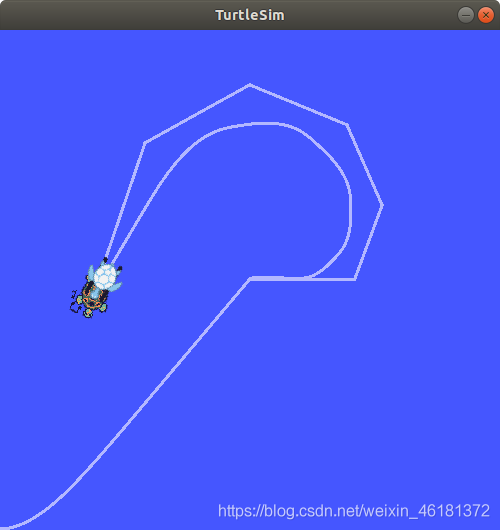
Summary
Yesterday, Beijing welcomed 2020 The first snow in winter , The campus is beautiful ;
I think winter is more suitable for reading alone , Come on, everybody ~
边栏推荐
猜你喜欢
![[writeup]buu SQL course1[entry level]](/img/eb/1b2541b04ca231cb07f1f3706f51c7.png)


![[wechat applet] 5 Applet structure directory](/img/d6/4796c8b8fe482b261c5a1fbf79ba2b.jpg)


随机推荐
左对齐,右对齐,随机数,goto,比较输出bool
函数递归示例
Junit多线程的写法
TC menu split
odom坐标系的理解
Selenium advanced
ROS初学者编写小乌龟以一定速度旋转一定角度的server
Left aligned, right aligned, random number, goto, compare output bool
C 操作符
程序构造和解释之过程抽象
如何写年终总结
关于互联网大厂裁员
宝塔面板新建数据库提示数据库名不能大于16位的解决方法
xshell 7 官网免费下载
Apprendre est une chose contre la nature humaine
Autofac Beginner (1)
【LocalDate LocalTime LocalDateTime】1. Using immutability to achieve thread safety 2 Current date, current time, current date time 3 Since the time zone is not considered, you need to add 8 hours to th
Jenkins' RPC test project
JUnit test suite method sorting (method 2 is not easy to use)
学习是一件逆人性的事情(成为高手的内功心法)